

Review and approve PRs
Use this page to review troubleshooting guide pull requests (PRs), move them through the review board, and complete the reviews required before they can merge.
New guides use the FSE handoff workflow; existing-guide edits use the review path for the author’s role. For the required review order, labels, and statuses, see PR workflow. For the author-facing workflow, see Guide ownership and workflow. For click-by-click GitHub review steps, see How to review a PR.
Note: SE1 and SE2 refer to Service Engineer levels 1 and 2.
Access the review board
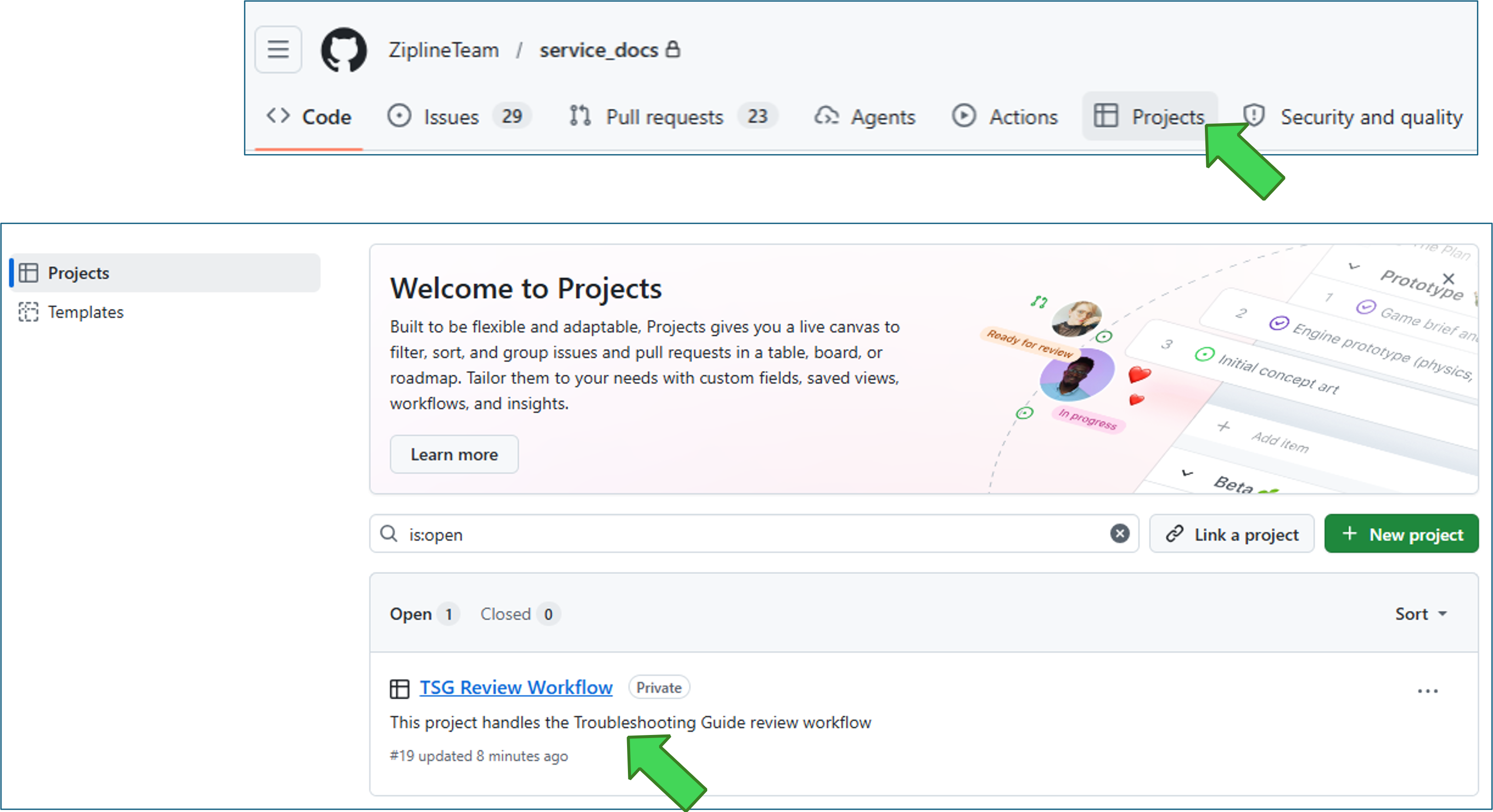
Section titled “Access the review board”Use the TSG Review Workflow project board to track open troubleshooting guide PRs.
To open the board from the repo:
- Open the
service_docsrepo. - Click Projects.
- Click TSG Review Workflow.
Board access example
Reviewer responsibilities
Section titled “Reviewer responsibilities”Before reviewing, confirm that the PR is open for review, required checks pass, and automated-review comments are resolved or answered. For the complete readiness criteria, see the PR readiness checklist.
The assigned FSE completes new guides and coordinates updates on the same PR branch; the FSE is not an authorized SE2 reviewer and the assignment adds no separate approval requirement.
The authorized SE2 reviews technical accuracy, troubleshooting logic, safety wording, escalation targets, repair actions, and return-to-service decisions.
The TW reviews structure, clarity, formatting, links, rendered flow, and whether a reader can follow the guide without guessing.
Choose the option that matches the review task.
Review a new guide PR
The initiator opens a PR with the initial guide draft and assigns the relevant FSE from Technical Contacts by System. The FSE completes the guide on the same branch before human review.
- The FSE moves the PR to Waiting for TW Review.
- The TW reviews writing and usability, adds
TW-reviewed, and moves the PR to Waiting for SE2 Review. - An authorized SE2 reviews technical content, adds
SE2-reviewed, and returns the PR to Waiting for TW Review for final approval. - If changes are requested, move the PR to Waiting for Author Updates. The assigned FSE coordinates the updates and returns it to TW review.
- The TW completes final approval. When checks and reviews are complete, the FSE merges at Ready to Merge or enables auto-merge for the PR.
The FSE is not an authorized SE2 reviewer. Assignment adds no separate approval requirement; the required reviews remain TW/SE2.
Review an SE1-authored PR
- The SE1 changes the PR status to Waiting for SE2 Review.
-
The SE2 reviews the technical content.
- If changes are required, change the PR status to Waiting for Author Updates. The author returns the PR to Waiting for SE2 Review when the changes are ready.
- When the technical content is ready, the SE2 adds the
SE2-reviewedlabel and changes the status to Waiting for TW Review. -
The TW reviews the PR.
- If changes are required, change the PR status to Waiting for Author Updates. The author returns the PR to Waiting for TW Review when the changes are ready.
- When the PR is ready, the TW adds the
TW-reviewedlabel and approves the PR. If auto-merge is enabled, GitHub merges the PR when all requirements are met. Otherwise, change the status to Ready to Merge for the author to merge.
Review an SE2-authored PR
- The SE2 author adds the
SE2-reviewedlabel and changes the PR status to Waiting for TW Review. -
The TW reviews the PR.
- If changes are required, change the PR status to Waiting for Author Updates. The author returns the PR to Waiting for TW Review when the changes are ready.
- When the PR is ready, the TW adds the
TW-reviewedlabel and approves the PR. If auto-merge is enabled, GitHub merges the PR when all requirements are met. Otherwise, change the status to Ready to Merge for the author to merge.
Review an Engineer / FSE / Other author PR
- The author changes the PR status to Waiting for TW Review.
-
The TW reviews the PR.
- If changes are required, change the PR status to Waiting for Author Updates. The author returns the PR to Waiting for TW Review when the changes are ready.
- When the writing and usability review is complete, the TW adds the
TW-reviewedlabel and changes the status to Waiting for SE2 Review. -
The SE2 reviews the technical content.
- If changes are required, change the PR status to Waiting for Author Updates. The author returns the PR to Waiting for TW Review when the changes are ready.
- When the technical content is ready, the SE2 adds the
SE2-reviewedlabel and changes the status to Waiting for TW Review. - The TW approves the PR. If auto-merge is enabled, GitHub merges the PR when all requirements are met. Otherwise, change the status to Ready to Merge for the author to merge.
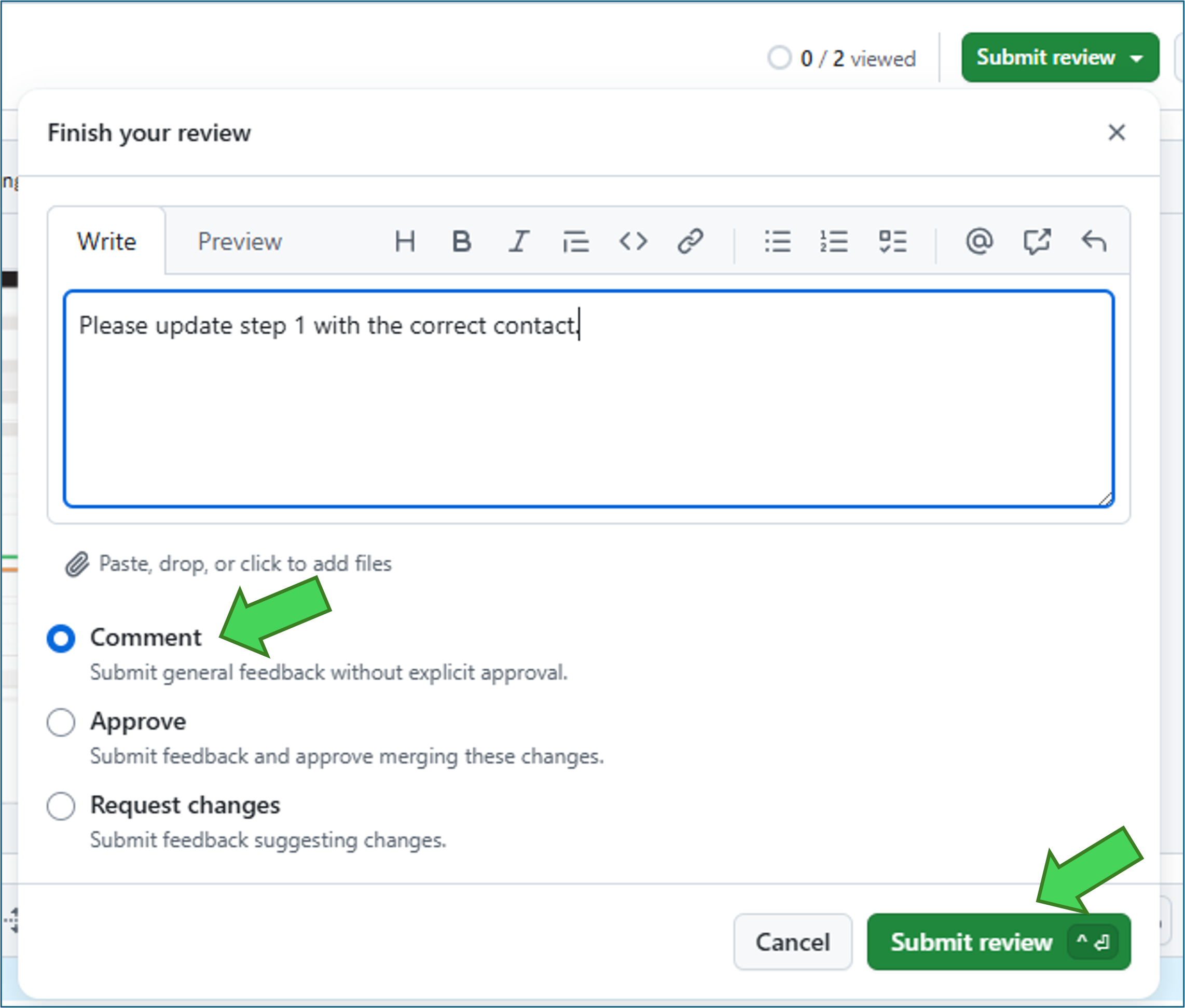
Request author updates
When changes are required:
- Add review comments that clearly tell the author what to fix.
- Submit the review.
- Change the PR status to Waiting for Author Updates.
- After the author resolves the comments and pushes the changes, review the update.
- The author changes the status to Waiting for TW Review or Waiting for SE2 Review.
Submit comments example
Complete the final review
Confirm that:
- required GitHub checks pass
- all review comments are resolved
- the
SE2-reviewedandTW-reviewedlabels are present
If the person completing the PR enabled auto-merge, GitHub merges it when all requirements are met. Otherwise, change the status to Ready to Merge. The assigned FSE completes the merge for a new guide; the author completes it for an existing-guide edit. The TW does not merge the PR.