

Smart Cart Tests Overview and Index - START HERE
Related Topics
- Smart Cart - EV2 Aircraft and Droid Health Maintenance Check Failure Troubleshooting
- Basic Smart Cart Commands for Zip/Droid Troubleshooting
Background
Section titled “Background”Smart Carts are used as the official troubleshooting tool when a Zip or Droid is down in MX or doing ground tests. The smart carts provide power and ethernet access to the vehicles, allowing technicians and engineers to:
- kick off OTA
- provision and configure a vehicle
- troubleshoot the vehicle
- initiate ad-hoc triaging with engineers.
The test software is managed by the Hardware Test Team. Please use @manufacturing-test-software-on-call for any escalations.
Access
Section titled “Access”Smart cart tests are accessed by going to the 5000 port of the smart cart you are on.
i.e. http://p2-smart-cart-42:5000
Compatibility
Section titled “Compatibility”Smart Cart software will only be compatible with the released software as part of these troubleshooting guides. If you require support from the team, your test must be run on an officially released software manifest.
To update your zip’s software, use OTA, before running the selected tests.
Updates
Section titled “Updates”Smart carts currently get updates when powered and online.
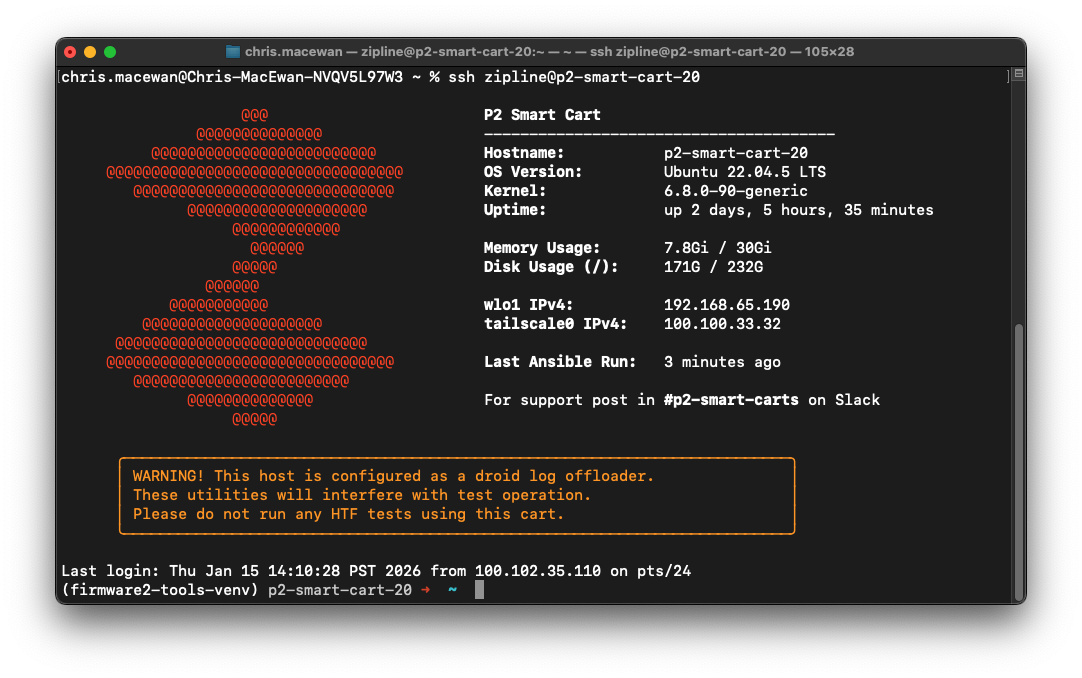
When ssh-ed in, you will see:
- System health information (uptime, memory usage, disk utilization)
- Time since last Ansible update - if the host remains online and can receive all updates, this will typically be < 8 hours
- If a system is configured as a log offloader, you will see a warning advising you not to use it for normal testing
Troubleshooting
Section titled “Troubleshooting”Use the following overview and index to understand what tests are available to use in a smart cart.
Provisioning and Configuration Setting
Section titled “Provisioning and Configuration Setting”A smart carts primary function is generally called “provisioning.” Provisioning refers to asset configuration setting that downstream operations depend on. UMM and troubleshooting guides will reference a number of tests depending on the problem. Provisioning and Configuration settings encompass a suite of tests.
| Test Name | What it is | EV2 | EV3 |
|---|---|---|---|
| Zip Provisioning / Zip Unprovisioning | Set up / delete the asset id, init and config directories with needed scripts and files. | zip_provisioningzip_unprovisioning | p2_ev3_zip_provisioningzip_unprovisioning |
| Set Paraland Type | Set paraland type, single or dual stage, on the distro after a distro or paraland swap. | set_paraland_type to select single vs dual stage paraland. | n/a - there is only single stage paraland in EV3 |
| Recalibrate Hover Motors | With a physical fixture, set the zero hover calibration so that the propellers park properly for fixed wing flight. | recalibrate_hover_motors | n/a - all motors we have seen have had proper provisioning. |
| Zip AOA Calibration | With a physical fixture, recalibrate the AOA offset against the base of the zip. | zip_aoa_calibration | n/a |
| Droid Provisioning / Droid Unprovisioning | Set up / delete the asset id, init and config directories with needed scripts and files. | droid_provisioningdroid_unprovisioning | n/a |
| Droid Camera Calibration | With physical setup and steps, calibrate the droid cameras to produce a file for camera ingest. | droid_camera_calibrationTBD: Q1 2026 aims to remove this test. | n/a |
Health Checks
Section titled “Health Checks”A smart carts secondary function is generally called “health checks” (formally zip eol or droid eol). Health checks refers to a suite of tests that checks the functionality of the zip or droid before returning the asset to the fleet
| Test Name | What it is | EV2 | EV3 |
|---|---|---|---|
| Zip Maintenance Test | Distro, compute, and nodes are all reporting nominally. | Use Fleetwrangler “Run Diagnostic Test without Motors”. If you did run Smart Cart - EV2 Aircraft and Droid Health Maintenance Check Failure Troubleshooting | TBD |
| Zip Servo Checks | Forces the roll/tilt, ruddervators, and control surfaces through their full range to make sure they are within thresholds. | Use Fleetwrangler to operate roll/tilt and ruddervators with “Run Diagnostic Test without Motors”. Use Fleetwrangler to operate the wing control surfaces with “Run Wing Diagnostic Test”. | Use Fleetwrangler to operate roll/tilt and ruddervators with “Run Diagnostic Test without Motors”. Use Fleetwrangler to operate the wing control surfaces with “Run Wing Diagnostic Test”. |
| Zip Droid Lower / Raise / Fit | Forces the droid in and out of the winch to confirm fitment. | winch_gnc_commander | winch_gnc_commander |
| Droid Maintenance Test | Compute, AMN, and FMN are all reporting nominally. | droid_maintenance_testUse: Smart Cart - EV2 Aircraft and Droid Health Maintenance Check Failure Troubleshooting | n/a |
Did this guide help you get unblocked?
Open suggestions
There are no open suggestions.
Open pull requests
There are no open pull requests.