

Power Cycle Droid
Viewing this guide for
Applicable to all hardware versions.
Troubleshooting Steps
Section titled “Troubleshooting Steps”graph TD
is-droid-in-aircraft{"<small><b>Step 1</b></small><br/>Question: Is the Droid in the Aircraft?"}
power-cycle-droid-not-in-aircraft["<small><b>Step 2</b></small><br/>Action: **Power Cycle Droid Not in Aircraft**..."]
is-droid-stowed-in-aircraft{"<small><b>Step 3</b></small><br/>Question: Is the Droid stowed in the Aircraft?"}
connect-droid-to-smart-cart["<small><b>Step 4</b></small><br/>Action: Connect the Droid to the smart cart. ..."]
ssh-into-droid-using-smart-cart["<small><b>Step 5</b></small><br/>Action: SSH into the Droid using the smart ca..."]
disable-droid-power["<small><b>Step 6</b></small><br/>Action: Turn off Droid power: sh fw-zip-po..."]
power-off-droid-battery["<small><b>Step 7</b></small><br/>Action: Turn off Droid battery power: sh d..."]
enable-droid-power["<small><b>Step 8</b></small><br/>Action: Turn on Droid power: sh fw-zip-pow..."]
wait-one-minute["<small><b>Step 9</b></small><br/>Action: Wait one minute."]
end-manual-session["<small><b>Step 10</b></small><br/>Action: End the manual session: sh fw-zip-..."]
request-lease-on-zip["<small><b>Step 11</b></small><br/>Action: **Request a Lease on the Zip** a. Sel..."]
power-cycle-droid-in-aircraft["<small><b>Step 12</b></small><br/>Action: **Power Cycle Droid in Aircraft** In ..."]
is-aircraft-in-diagnostic-mode{"<small><b>Step 13</b></small><br/>Question: Is the Aircraft in Diagnostic Mode v..."}
switch-aircraft-to-standard["<small><b>Step 14</b></small><br/>Action: Switch to Standard mode: click **Oper..."]
is-aircraft-still-in-diagnostic-mode{"<small><b>Step 15</b></small><br/>Question: Is the Aircraft still in Diagnostic M..."}
escalate-diagnostic-mode{{"<small><b>Step 16</b></small><br/>Escalation: If the Aircraft is still in Diagnosti..."}}
open-troubleshooting-commands["<small><b>Step 17</b></small><br/>Action: Click **Troubleshooting commands**. !..."]
select-droid-power-off["<small><b>Step 18</b></small><br/>Action: Select **Droid Power Off** and click ..."]
wait-for-droid-power-off-result{"<small><b>Step 19</b></small><br/>Question: In the Recent Commands section, wait ..."}
continue-after-power-off-failure["<small><b>Step 20</b></small><br/>Action: If DROID_POWER_OFF fails, read this..."]
open-troubleshooting-commands-for-on["<small><b>Step 21</b></small><br/>Action: Click **Troubleshooting commands**. !..."]
select-droid-power-on["<small><b>Step 22</b></small><br/>Action: Select **Droid Power On** and click *..."]
wait-for-droid-power-on-success["<small><b>Step 23</b></small><br/>Action: In **Recent Commands**, wait for DRO..."]
is-droid-in-aircraft -->|Yes| request-lease-on-zip
is-droid-in-aircraft -->|No| power-cycle-droid-not-in-aircraft
power-cycle-droid-not-in-aircraft --> is-droid-stowed-in-aircraft
is-droid-stowed-in-aircraft -->|Yes| request-lease-on-zip
is-droid-stowed-in-aircraft -->|No| connect-droid-to-smart-cart
connect-droid-to-smart-cart --> ssh-into-droid-using-smart-cart
ssh-into-droid-using-smart-cart --> disable-droid-power
disable-droid-power --> power-off-droid-battery
power-off-droid-battery --> enable-droid-power
enable-droid-power --> wait-one-minute
wait-one-minute --> end-manual-session
request-lease-on-zip --> power-cycle-droid-in-aircraft
power-cycle-droid-in-aircraft --> is-aircraft-in-diagnostic-mode
is-aircraft-in-diagnostic-mode -->|Yes| switch-aircraft-to-standard
is-aircraft-in-diagnostic-mode -->|No| open-troubleshooting-commands
switch-aircraft-to-standard --> is-aircraft-still-in-diagnostic-mode
is-aircraft-still-in-diagnostic-mode -->|Yes| escalate-diagnostic-mode
is-aircraft-still-in-diagnostic-mode -->|No| open-troubleshooting-commands
open-troubleshooting-commands --> select-droid-power-off
select-droid-power-off --> wait-for-droid-power-off-result
wait-for-droid-power-off-result -->|Yes| continue-after-power-off-failure
wait-for-droid-power-off-result -->|No| open-troubleshooting-commands-for-on
continue-after-power-off-failure --> open-troubleshooting-commands-for-on
open-troubleshooting-commands-for-on --> select-droid-power-on
select-droid-power-on --> wait-for-droid-power-on-success
style is-droid-in-aircraft fill:#dbeafe,stroke:#3b82f6,color:#1e3a5f
style power-cycle-droid-not-in-aircraft fill:#dcfce7,stroke:#22c55e,color:#14532d
style is-droid-stowed-in-aircraft fill:#dbeafe,stroke:#3b82f6,color:#1e3a5f
style connect-droid-to-smart-cart fill:#dcfce7,stroke:#22c55e,color:#14532d
style ssh-into-droid-using-smart-cart fill:#dcfce7,stroke:#22c55e,color:#14532d
style disable-droid-power fill:#dcfce7,stroke:#22c55e,color:#14532d
style power-off-droid-battery fill:#dcfce7,stroke:#22c55e,color:#14532d
style enable-droid-power fill:#dcfce7,stroke:#22c55e,color:#14532d
style wait-one-minute fill:#dcfce7,stroke:#22c55e,color:#14532d
style end-manual-session fill:#dcfce7,stroke:#22c55e,color:#14532d
style request-lease-on-zip fill:#dcfce7,stroke:#22c55e,color:#14532d
style power-cycle-droid-in-aircraft fill:#dcfce7,stroke:#22c55e,color:#14532d
style is-aircraft-in-diagnostic-mode fill:#dbeafe,stroke:#3b82f6,color:#1e3a5f
style switch-aircraft-to-standard fill:#dcfce7,stroke:#22c55e,color:#14532d
style is-aircraft-still-in-diagnostic-mode fill:#dbeafe,stroke:#3b82f6,color:#1e3a5f
style escalate-diagnostic-mode fill:#fef3c7,stroke:#f59e0b,color:#78350f
style open-troubleshooting-commands fill:#dcfce7,stroke:#22c55e,color:#14532d
style select-droid-power-off fill:#dcfce7,stroke:#22c55e,color:#14532d
style wait-for-droid-power-off-result fill:#dbeafe,stroke:#3b82f6,color:#1e3a5f
style continue-after-power-off-failure fill:#dcfce7,stroke:#22c55e,color:#14532d
style open-troubleshooting-commands-for-on fill:#dcfce7,stroke:#22c55e,color:#14532d
style select-droid-power-on fill:#dcfce7,stroke:#22c55e,color:#14532d
style wait-for-droid-power-on-success fill:#dcfce7,stroke:#22c55e,color:#14532d Hover or focus a block to preview it. Select the block to keep the preview open.
1 question
Is the Droid in the Aircraft?
2 action
Power Cycle Droid Not in Aircraft
Perform a maintenance raise. For steps, see Droid Maintenance Raise / Lower.
Perform a maintenance raise. For steps, see Droid Maintenance Raise / Lower.
3 question
Is the Droid stowed in the Aircraft?
4 action
Connect the Droid to the smart cart. For steps, see Droid CMM 10.2.4 Connect the Droid to the Smart Cart.
5 action
SSH into the Droid using the smart cart. For steps, see SSH Into Droid.
6 action
Turn off Droid power:
fw-zip-power -i enp3s0 disable-droid-power 7 action
Turn off Droid battery power:
droid-battery-cli -i fe80::62%enp3s0 power-off 8 action
Turn on Droid power:
fw-zip-power -i enp3s0 enable-droid-power 9 action
Wait one minute.
10 action
End the manual session:
fw-zip-power -i enp3s0 end-manual-session 11 action
Request a Lease on the Zip
a. Select Lease Action Type → Request Lease.
b. Submit the request.
a. Select Lease Action Type → Request Lease.
b. Submit the request.
12 action
Power Cycle Droid in Aircraft
In FleetWrangler, navigate to the Aircraft's page.
In FleetWrangler, navigate to the Aircraft's page.
13 question
Is the Aircraft in Diagnostic Mode (visible in the top left corner)?
14 action
Switch to Standard mode: click Operations Mode, select Standard, and click Submit. Wait for about one minute for the operations mode to change.
15 question
Is the Aircraft still in Diagnostic Mode?
16 escalation
If the Aircraft is still in Diagnostic Mode after waiting at least one (1) minute, escalate to P2 Exec On Call.
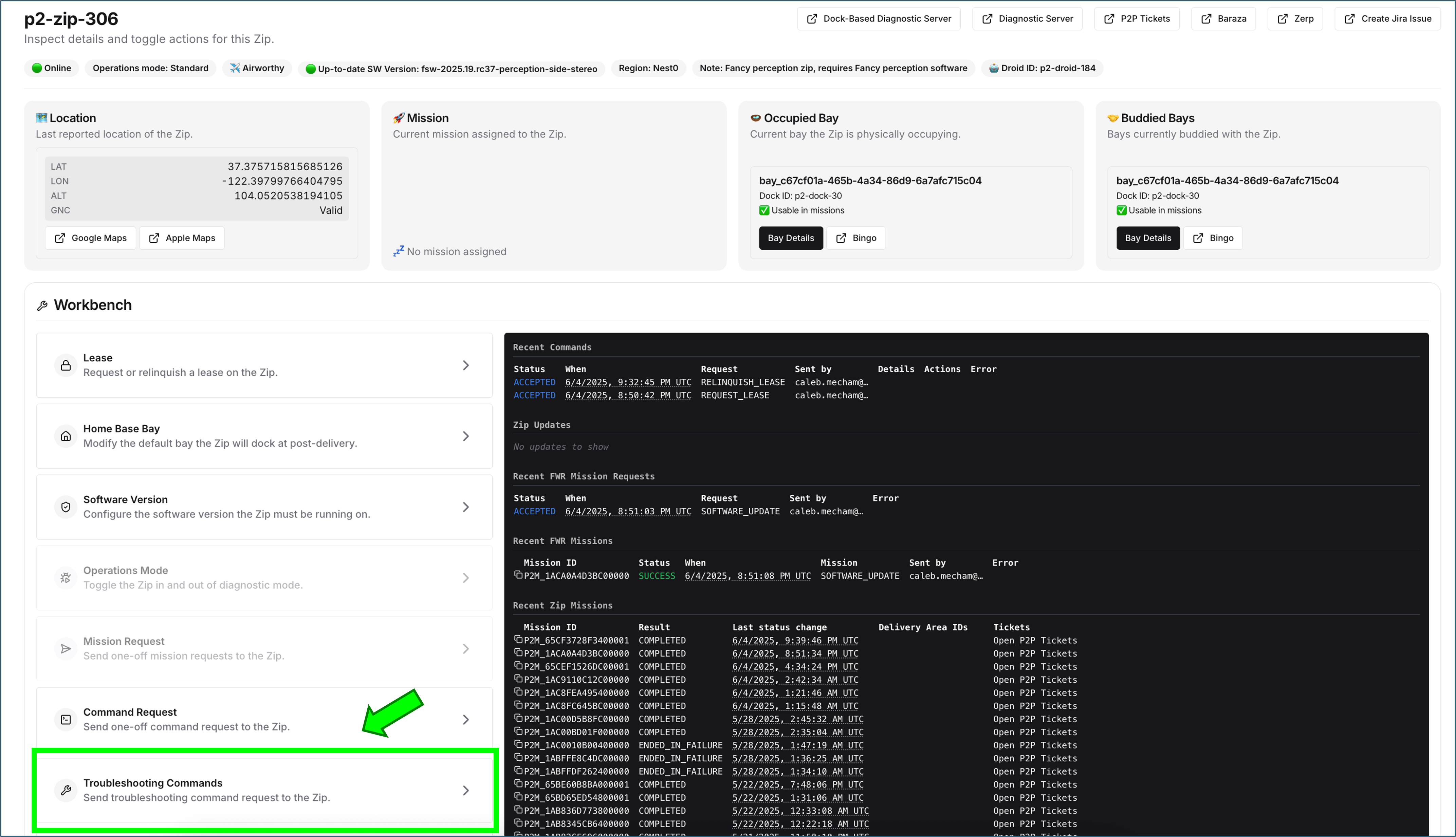
17 action
Click Troubleshooting commands.
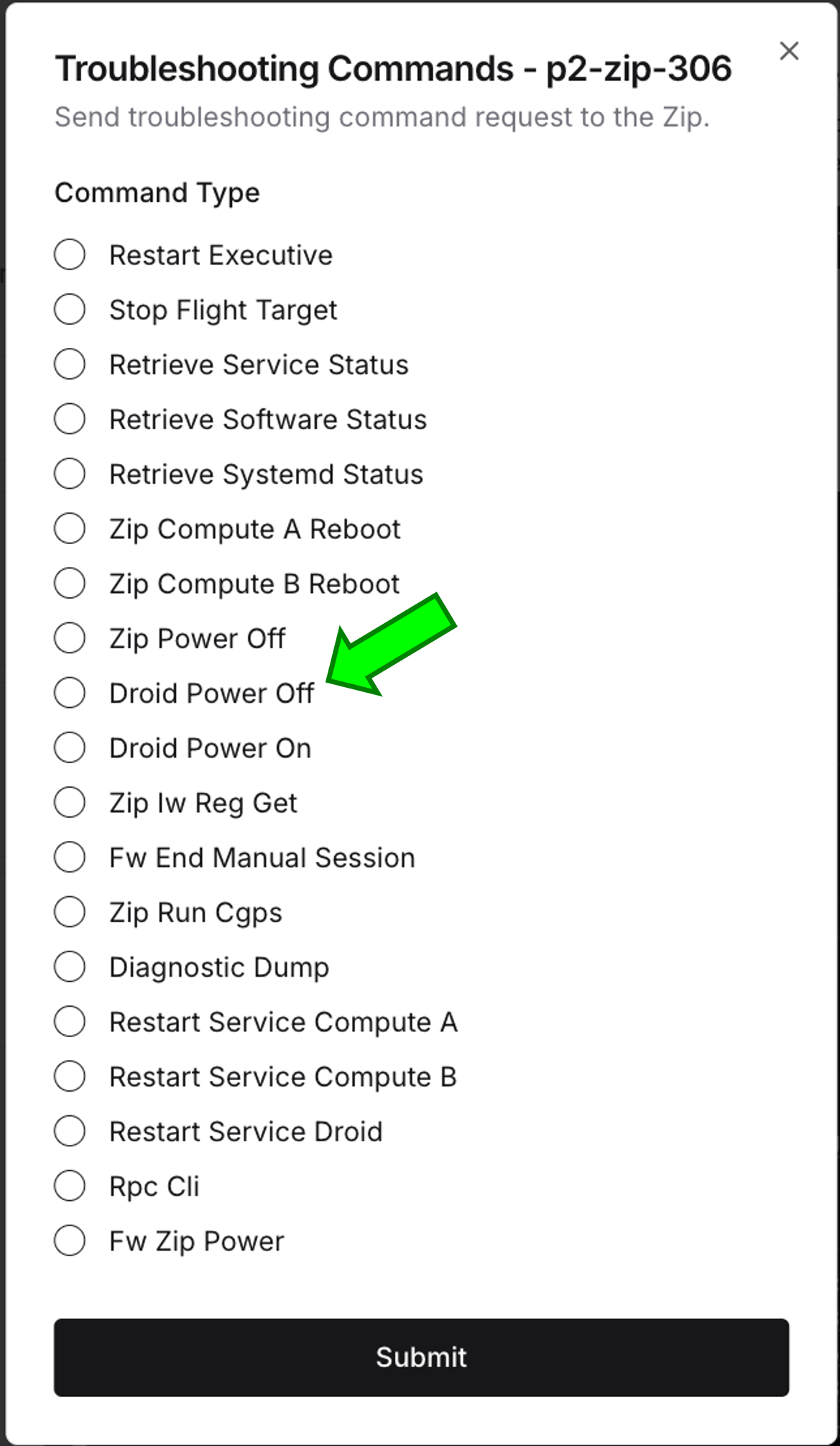
18 action
Select Droid Power Off and click Submit.
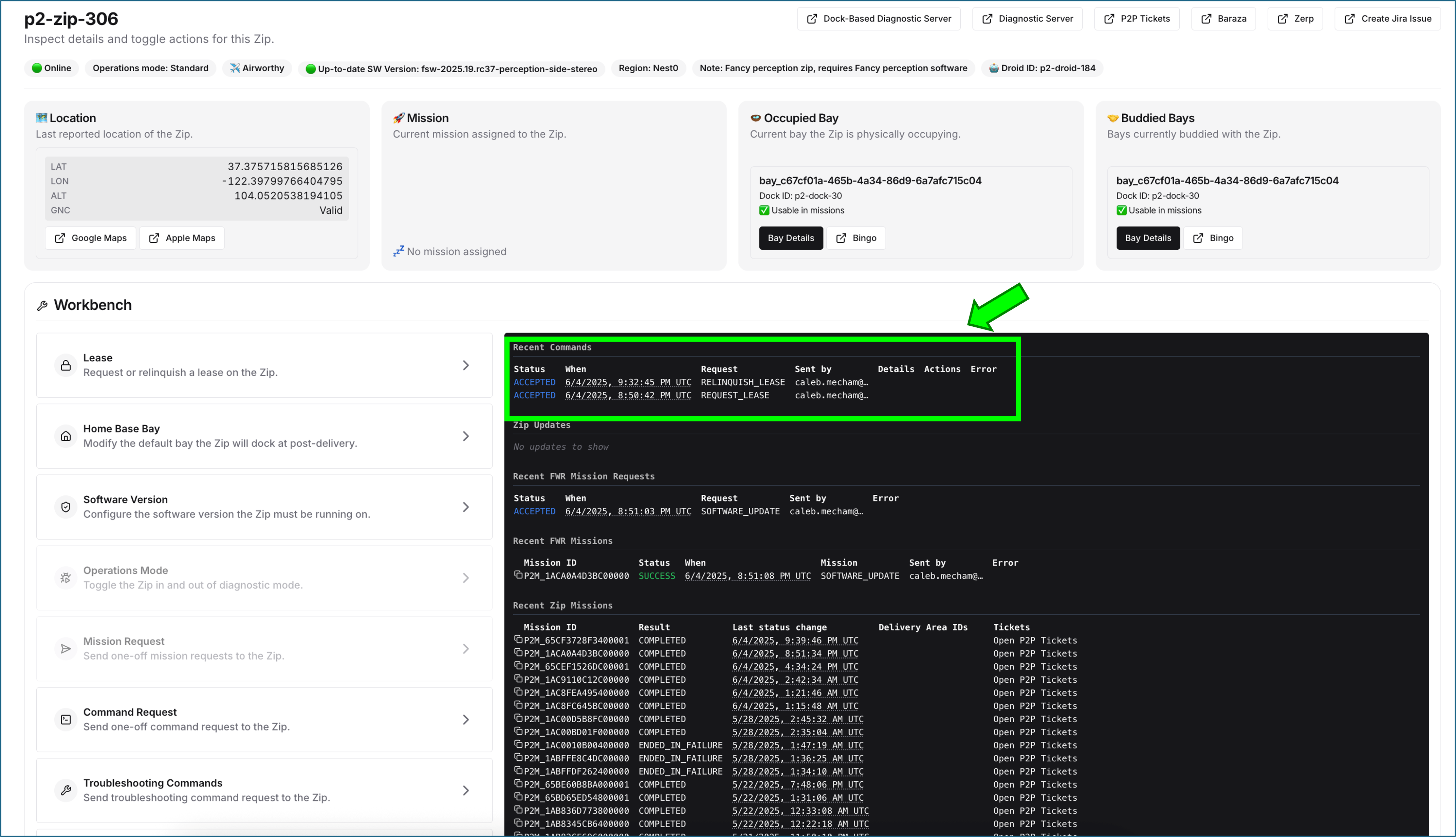
19 question
In the Recent Commands section, wait for the command to indicate success.
Did
Did
DROID_POWER_OFF report fail? 20 action
If

There are two parts to the Droid Power Off command:
1. Turn off the Aircraft to Droid power.
2. Request is sent for the Droid to turn off battery power.
In some instances, after the Aircraft to Droid power is turned off, if the Droid failed to boot and turn on battery power in the first place, when the request is sent for the Droid to turn off battery power, the command may report failed.
Even though the command failed, the Droid is off and you can continue to the next step.
DROID_POWER_OFF fails, read this noteThere are two parts to the Droid Power Off command:
1. Turn off the Aircraft to Droid power.
2. Request is sent for the Droid to turn off battery power.
In some instances, after the Aircraft to Droid power is turned off, if the Droid failed to boot and turn on battery power in the first place, when the request is sent for the Droid to turn off battery power, the command may report failed.
Even though the command failed, the Droid is off and you can continue to the next step.
21 action
Click Troubleshooting commands.
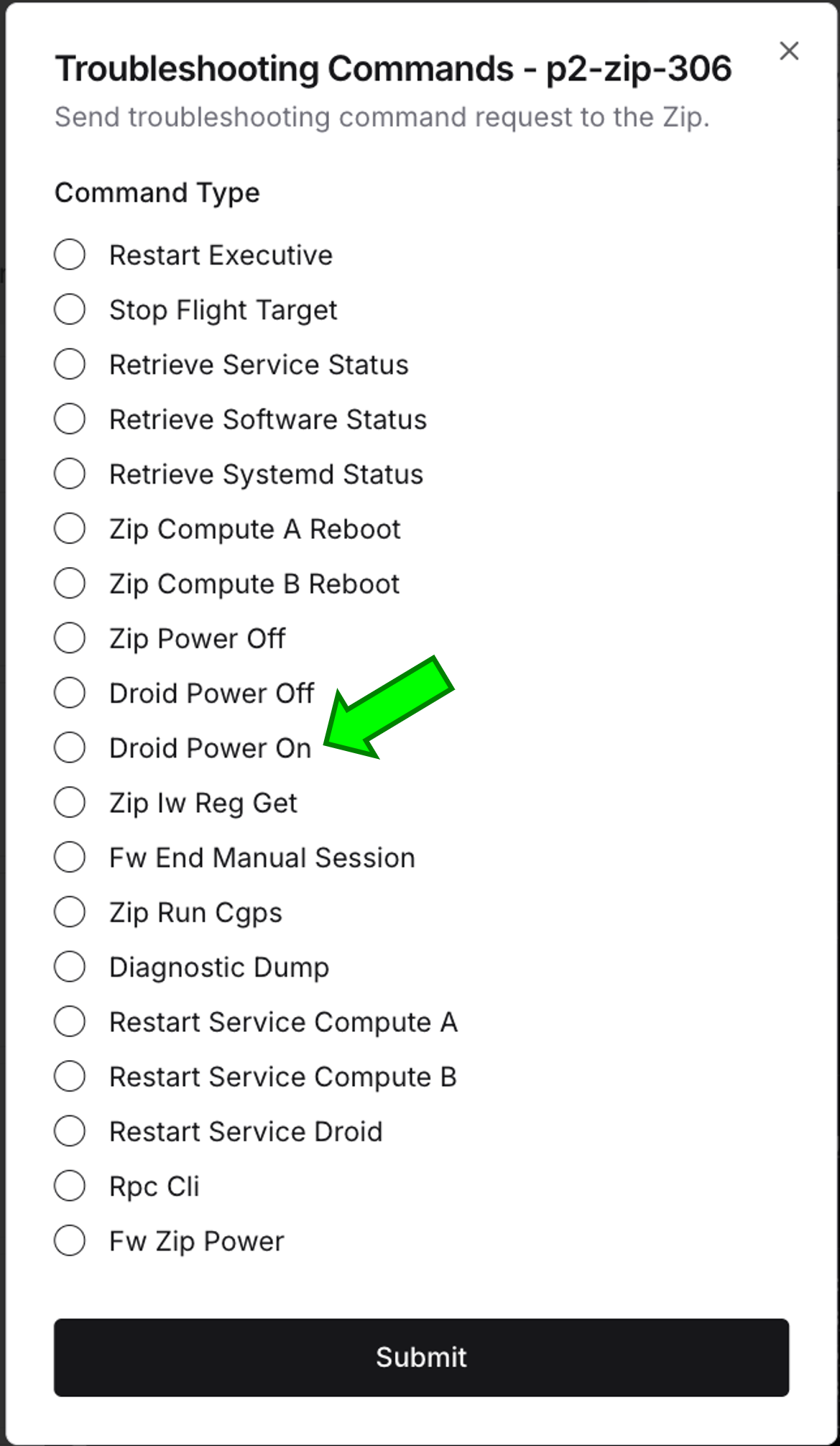
22 action
Select Droid Power On and click Submit.
23 action
In Recent Commands, wait for
DROID_POWER_ON to indicate success.Resolution note
This plaintext block is ready to paste into the Resolution Note field on the ZERP issue you're working. The permalink below gives engineering review access to the full step-by-step timeline including any back-navigation; share it if the case needs a deeper look.
Permalink:
Session is too large to fit in a URL. Use Download session JSON to share the timeline out-of-band.
Did this guide help you get unblocked?
Open suggestions
There are no open suggestions.
Open pull requests
There are no open pull requests.