

DROID_ERROR_AUTO_KIOSK_DOOR_CLOSE_FAILED
Applicable alarms (1)
Likely outcomes — click to expand
Based on 0 missions where this alarm fired in the last 90 days as of 2026-10-13
Aggregated from fleet operations and refreshed daily. Individual outcomes may vary by site and configuration.
Background
Section titled “Background”This error may occur anytime doors are commanded closed in a zipping point loading. There are two behaviors that require the doors to close:
- Nominal state progression: Doors are commanded closed when the Droid is sitting on the platform in order to pick up the package.
- Off nominal state progression: Doors are commanded closed after the Droid is clear of the platform on ascent after a package put back. Doors must be closed in order to pass through the lid.
This error code usually occurs because the operator loaded a package that was too heavy or oddly-shaped for the droid, or because the innermech in the zipping point drawer is unable to fully collapse, obstructing the doors from closing.
Troubleshooting Steps
Section titled “Troubleshooting Steps”graph TD
did-the-alarm-occur-during-a-dlb{"<small><b>Step 1</b></small><br/>Question: Did the alarm occur during a Droid Le..."}
complete-the-dlb-work-orders["<small><b>Step 2</b></small><br/>Action: Complete the work orders listed below..."]
complete-zp-v4-triage("<small><b>Step 3</b></small><br/>Reference: Complete the Zipping Point V4 Triage...")
ask-for-role{"<small><b>Step 4</b></small><br/>Question: What is your job role?"}
open-iss-ticket["<small><b>Step 5</b></small><br/>Action: Open the Jira ISS ticket related to t..."]
load-autokiosk-debug-logs["<small><b>Step 6</b></small><br/>Telemetry: Load log plots for the failed mission..."]
zoom-autokiosk-debug-time-window["<small><b>Step 7</b></small><br/>Action: This is the initial view that should ..."]
capture-package-screenshots-for-iss["<small><b>Step 8</b></small><br/>Action: Go to the earliest timestamp in which..."]
capture-door-closing-screenshot-for-iss["<small><b>Step 9</b></small><br/>Action: Go to the timestamp that is right bef..."]
check-droid-fully-lowered-before-door-close{"<small><b>Step 10</b></small><br/>Question: Does the Droid appear to be fully low..."}
capture-door-stall-screenshot-for-iss{"<small><b>Step 11</b></small><br/>Question: Add a note to the Jira ISS ticket say..."}
droid-autonomy-droid-not-fully-lowered["<small><b>Step 12</b></small><br/>Action: Add a note to the Jira ISS ticket say..."]
check-door-percent-open-stall-threshold{"<small><b>Step 13</b></small><br/>Question: At what door percent does the flat se..."}
unclear-door-closing-plot["<small><b>Step 14</b></small><br/>Action: Add a note to the Jira ISS ticket say..."]
get-immediate-carpet-view["<small><b>Step 15</b></small><br/>Action: Add a note to the Jira ISS ticket say..."]
door-stall-below-threshold-placeholder["<small><b>Step 16</b></small><br/>Action: Add a note to the Jira ISS Ticket say..."]
assign-inner-mech-inspection{"<small><b>Step 17</b></small><br/>Question: Find the existing inspection work ord..."}
ask-about-innermech-inspection-results{"<small><b>Step 18</b></small><br/>Question: What were the results from the Inner ..."}
no-work-order-exists["<small><b>Step 19</b></small><br/>Action: Add a note to the Jira ISS ticket say..."]
zp-oncall-no-carpet-issues-found["<small><b>Step 20</b></small><br/>Action: Add a note to the Jira ISS ticket say..."]
remove-package-obstruction["<small><b>Step 21</b></small><br/>Action: Add a photo of the package obstructio..."]
remove-platform-obstruction["<small><b>Step 22</b></small><br/>Action: Add a photo of the platform obstructi..."]
plug-in-servo["<small><b>Step 23</b></small><br/>Action: Add a photo of the unplugged servo to..."]
escalate-replace-drawer["<small><b>Step 24</b></small><br/>Action: Add a note to the Jira ISS ticket say..."]
alternate-assign-inner-mech-inspection["<small><b>Step 25</b></small><br/>Action: Create an Incident channel. Assign th..."]
alternate-ask-about-innermech-inspection-results{"<small><b>Step 26</b></small><br/>Question: What were the results from the Inner ..."}
alternate-zp-oncall-no-carpet-issues-found["<small><b>Step 27</b></small><br/>Action: Since there are no obvious operationa..."]
alternate-remove-package-obstruction["<small><b>Step 28</b></small><br/>Action: Make sure the Zipping Point Ranger ha..."]
alternate-remove-platform-obstruction["<small><b>Step 29</b></small><br/>Action: Make sure the Zipping Point Ranger ha..."]
alternate-plug-in-servo["<small><b>Step 30</b></small><br/>Action: Make sure the Zipping Point Ranger ha..."]
alternate-escalate-replace-drawer["<small><b>Step 31</b></small><br/>Action: Assign the V4 Zipping Point: Replace..."]
did-the-alarm-occur-during-a-dlb -->|Yes| complete-the-dlb-work-orders
did-the-alarm-occur-during-a-dlb -->|No| complete-zp-v4-triage
complete-zp-v4-triage --> ask-for-role
ask-for-role -->|Autonomy Triage Engineer| open-iss-ticket
ask-for-role -->|Service Engineer| alternate-assign-inner-mech-inspection
open-iss-ticket --> load-autokiosk-debug-logs
load-autokiosk-debug-logs --> zoom-autokiosk-debug-time-window
zoom-autokiosk-debug-time-window --> capture-package-screenshots-for-iss
capture-package-screenshots-for-iss --> capture-door-closing-screenshot-for-iss
capture-door-closing-screenshot-for-iss --> check-droid-fully-lowered-before-door-close
check-droid-fully-lowered-before-door-close -->|Droid is fully lowered| capture-door-stall-screenshot-for-iss
check-droid-fully-lowered-before-door-close -->|Droid is not fully lowered| droid-autonomy-droid-not-fully-lowered
capture-door-stall-screenshot-for-iss -->|Yes, and the screenshot is ...| check-door-percent-open-stall-threshold
capture-door-stall-screenshot-for-iss -->|No, there is no clear point...| unclear-door-closing-plot
check-door-percent-open-stall-threshold -->|Above 25%| get-immediate-carpet-view
check-door-percent-open-stall-threshold -->|Under 25%| door-stall-below-threshold-placeholder
get-immediate-carpet-view --> assign-inner-mech-inspection
assign-inner-mech-inspection -->|Continue| ask-about-innermech-inspection-results
assign-inner-mech-inspection -->|No work order exists| no-work-order-exists
ask-about-innermech-inspection-results -->|Nothing out of the ordinary...| zp-oncall-no-carpet-issues-found
ask-about-innermech-inspection-results -->|Package Obstruction| remove-package-obstruction
ask-about-innermech-inspection-results -->|Platform Obstruction| remove-platform-obstruction
ask-about-innermech-inspection-results -->|Unplugged Cable| plug-in-servo
ask-about-innermech-inspection-results -->|Other / Broken servo| escalate-replace-drawer
alternate-assign-inner-mech-inspection --> alternate-ask-about-innermech-inspection-results
alternate-ask-about-innermech-inspection-results -->|Nothing out of the ordinary...| alternate-zp-oncall-no-carpet-issues-found
alternate-ask-about-innermech-inspection-results -->|Package Obstruction| alternate-remove-package-obstruction
alternate-ask-about-innermech-inspection-results -->|Platform Obstruction| alternate-remove-platform-obstruction
alternate-ask-about-innermech-inspection-results -->|Unplugged Cable| alternate-plug-in-servo
alternate-ask-about-innermech-inspection-results -->|Other / Broken servo| alternate-escalate-replace-drawer
style did-the-alarm-occur-during-a-dlb fill:#dbeafe,stroke:#3b82f6,color:#1e3a5f
style complete-the-dlb-work-orders fill:#dcfce7,stroke:#22c55e,color:#14532d
style complete-zp-v4-triage fill:#f3e8ff,stroke:#a855f7,color:#581c87
style ask-for-role fill:#dbeafe,stroke:#3b82f6,color:#1e3a5f
style open-iss-ticket fill:#dcfce7,stroke:#22c55e,color:#14532d
style zoom-autokiosk-debug-time-window fill:#dcfce7,stroke:#22c55e,color:#14532d
style capture-package-screenshots-for-iss fill:#dcfce7,stroke:#22c55e,color:#14532d
style capture-door-closing-screenshot-for-iss fill:#dcfce7,stroke:#22c55e,color:#14532d
style check-droid-fully-lowered-before-door-close fill:#dbeafe,stroke:#3b82f6,color:#1e3a5f
style capture-door-stall-screenshot-for-iss fill:#dbeafe,stroke:#3b82f6,color:#1e3a5f
style droid-autonomy-droid-not-fully-lowered fill:#dcfce7,stroke:#22c55e,color:#14532d
style check-door-percent-open-stall-threshold fill:#dbeafe,stroke:#3b82f6,color:#1e3a5f
style unclear-door-closing-plot fill:#dcfce7,stroke:#22c55e,color:#14532d
style get-immediate-carpet-view fill:#dcfce7,stroke:#22c55e,color:#14532d
style door-stall-below-threshold-placeholder fill:#dcfce7,stroke:#22c55e,color:#14532d
style assign-inner-mech-inspection fill:#dbeafe,stroke:#3b82f6,color:#1e3a5f
style ask-about-innermech-inspection-results fill:#dbeafe,stroke:#3b82f6,color:#1e3a5f
style no-work-order-exists fill:#dcfce7,stroke:#22c55e,color:#14532d
style zp-oncall-no-carpet-issues-found fill:#dcfce7,stroke:#22c55e,color:#14532d
style remove-package-obstruction fill:#dcfce7,stroke:#22c55e,color:#14532d
style remove-platform-obstruction fill:#dcfce7,stroke:#22c55e,color:#14532d
style plug-in-servo fill:#dcfce7,stroke:#22c55e,color:#14532d
style escalate-replace-drawer fill:#dcfce7,stroke:#22c55e,color:#14532d
style alternate-assign-inner-mech-inspection fill:#dcfce7,stroke:#22c55e,color:#14532d
style alternate-ask-about-innermech-inspection-results fill:#dbeafe,stroke:#3b82f6,color:#1e3a5f
style alternate-zp-oncall-no-carpet-issues-found fill:#dcfce7,stroke:#22c55e,color:#14532d
style alternate-remove-package-obstruction fill:#dcfce7,stroke:#22c55e,color:#14532d
style alternate-remove-platform-obstruction fill:#dcfce7,stroke:#22c55e,color:#14532d
style alternate-plug-in-servo fill:#dcfce7,stroke:#22c55e,color:#14532d
style alternate-escalate-replace-drawer fill:#dcfce7,stroke:#22c55e,color:#14532d Hover or focus a block to preview it. Select the block to keep the preview open.
- Aircraft: Complete the work order for the relevant aircraft version:
- EV2: #195: Inspect Aircraft after Droid Left Behind (DLB)
- EV3: #662: Inspect Aircraft after Droid Left Behind (DLB)
- Droid: Complete the following work orders in order:
1. #1169: Reset Droid after DLB
2. #1196: Offload Droid Logs after DLB
3. #1417: Perform Droid Door Check Test after DLB
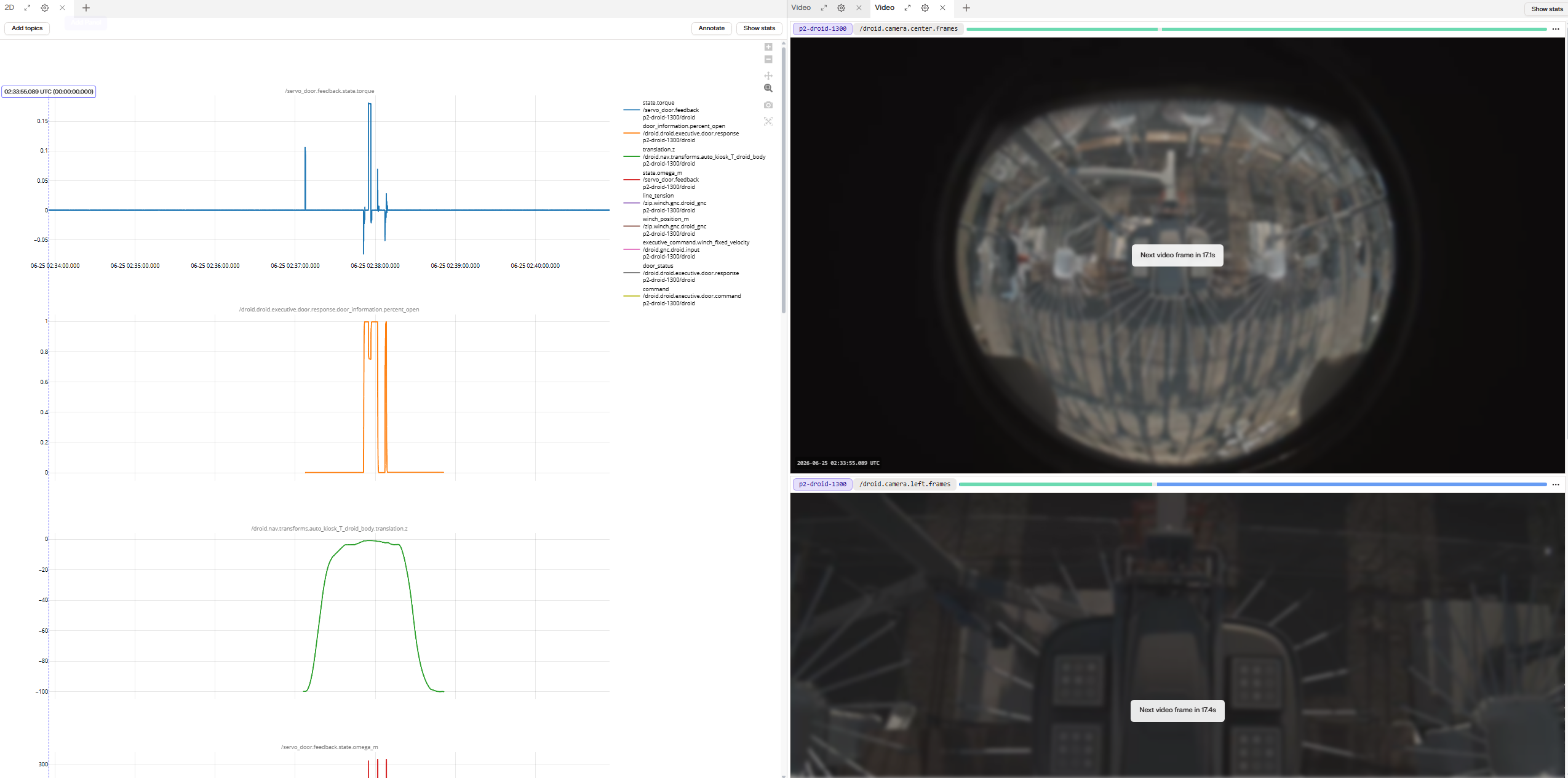
Zoom in on the mission timeframe as shown below:
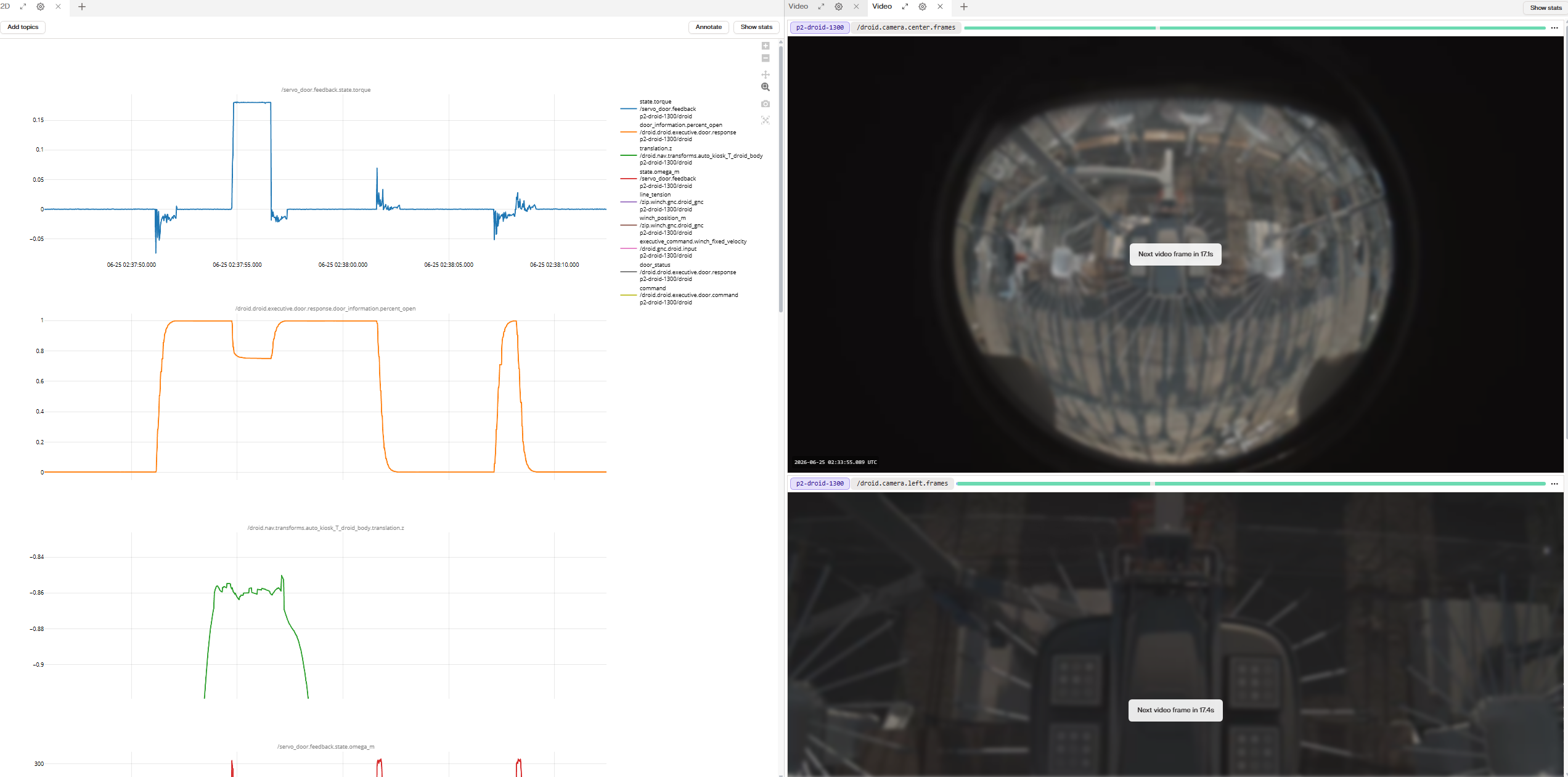
A few notes:
Using
door open percent plot as a guide, the view should start before the doors open and end after the doors are closed again.The
translation.z plot is zoomed into more detail, with the y-axis ranging from approx -0.9 thru -0.75A) gone through the lid and
B) the package is visible from the droid center camera.
Take a screenshot of the entire screen as shown below:
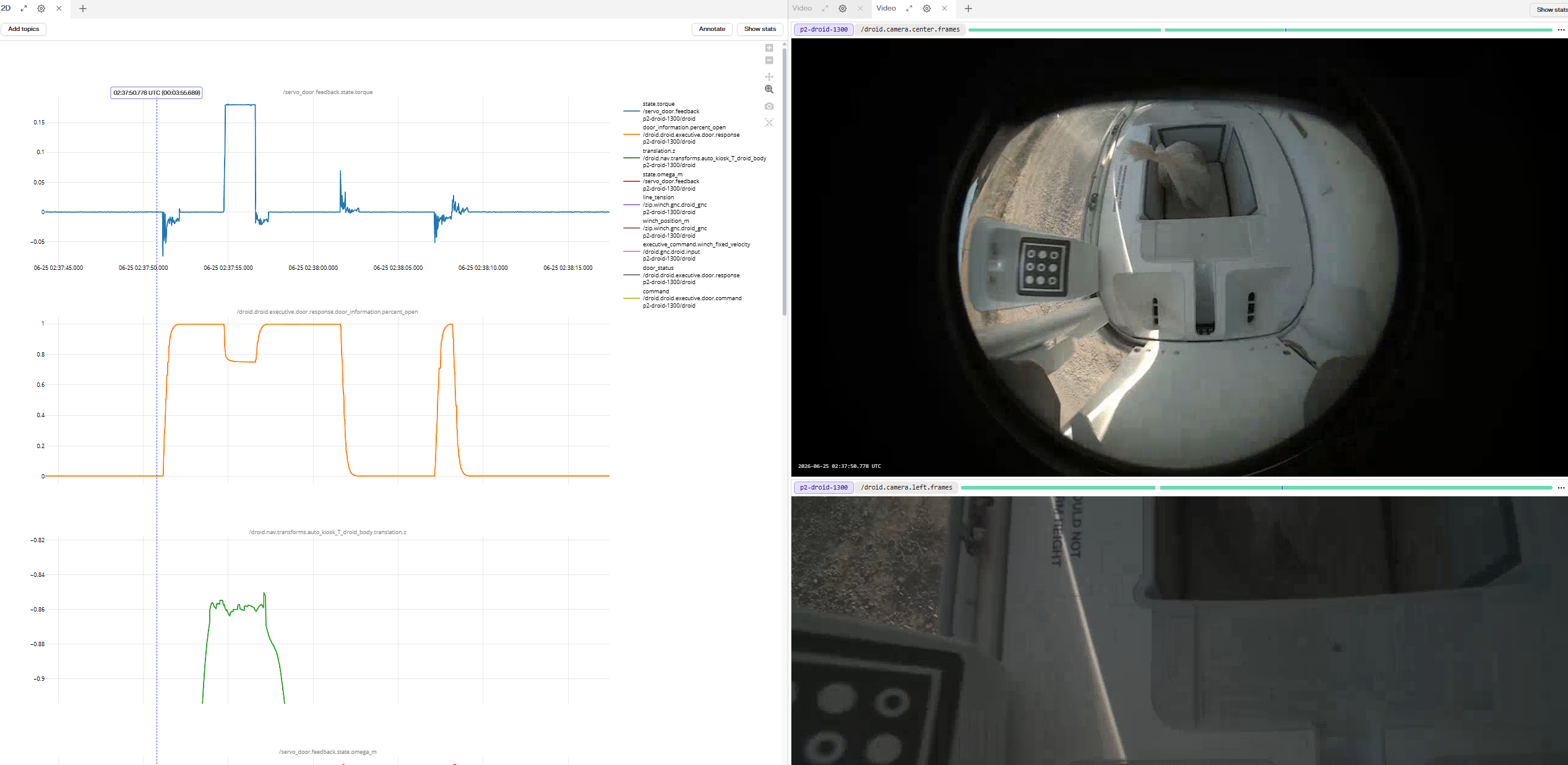
This screenshot should show both the
door percent open log plot and the center camera view of the package.Add this image to the Jira ISS ticket, titled
View of package as droid enters Dropbox.Take a closeup screenshot of just the package:
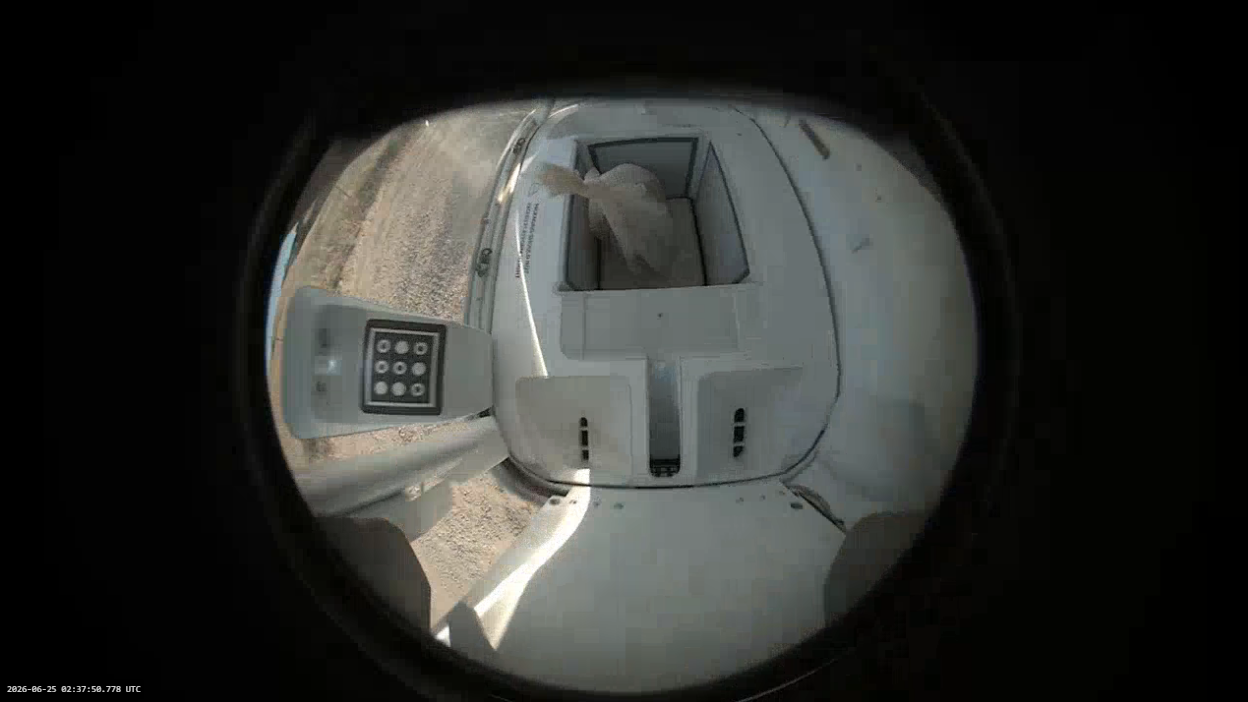
This should be just the
center camera view of the package, along with the timestamp in the bottom left-corner.Add this image to the Jira ISS ticket, titled
Close up view of package only.door percent open log plot. Take a screenshot of the entire screen as shown below:
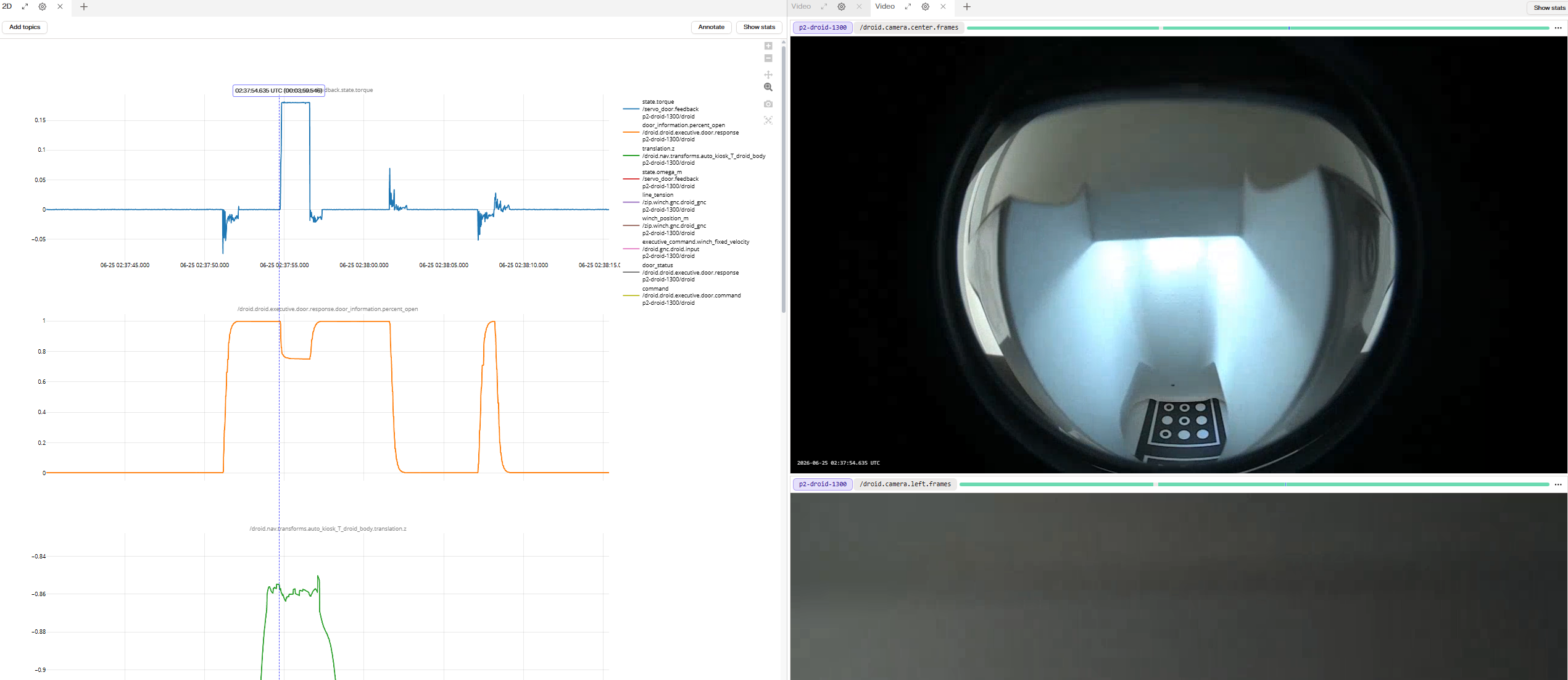
The view should include the plots of
door servo torque, door percent open, and translation.z, in addition to the view from the center camera.Add this image to the Jira ISS ticket, titled
Start of door closing(Note, the timestamp can also be found by seeing when
door status switches from open to closing)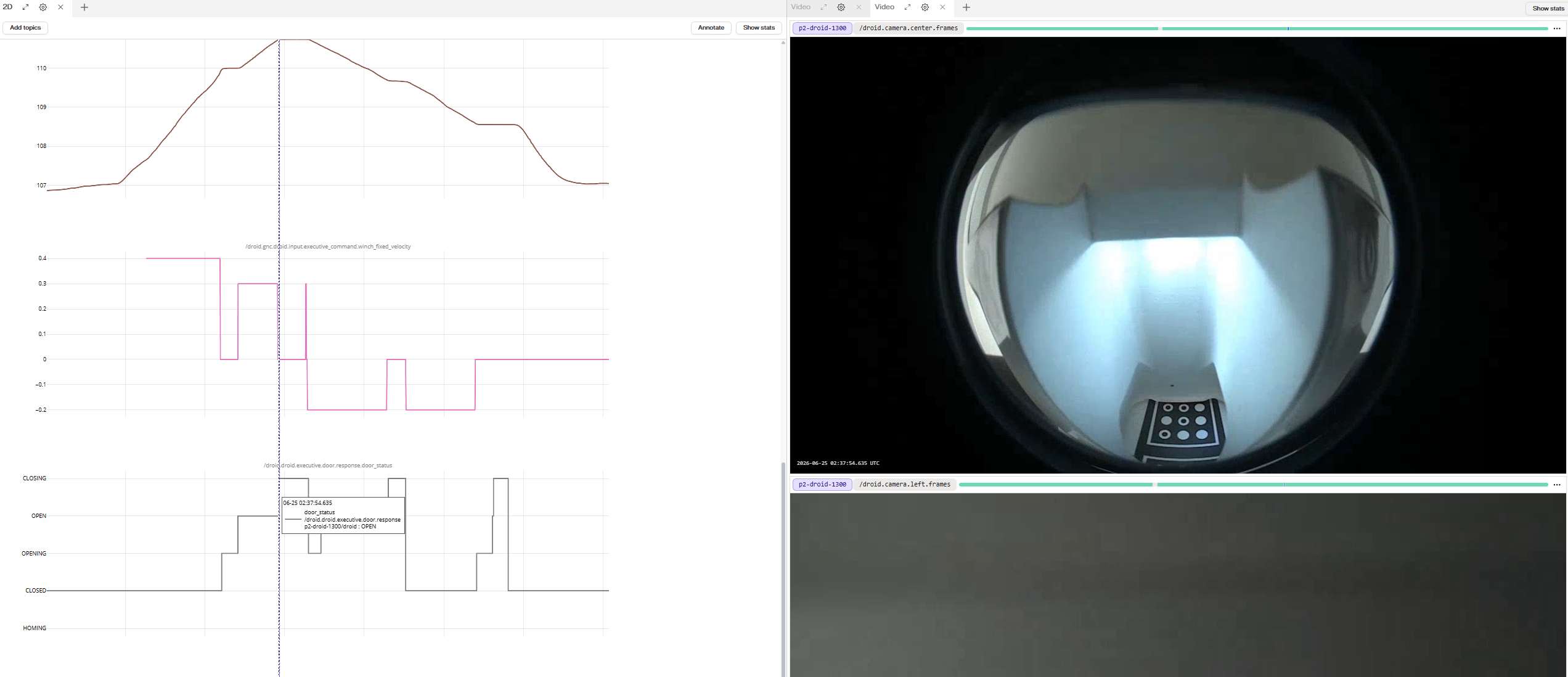
Droid fully lowered
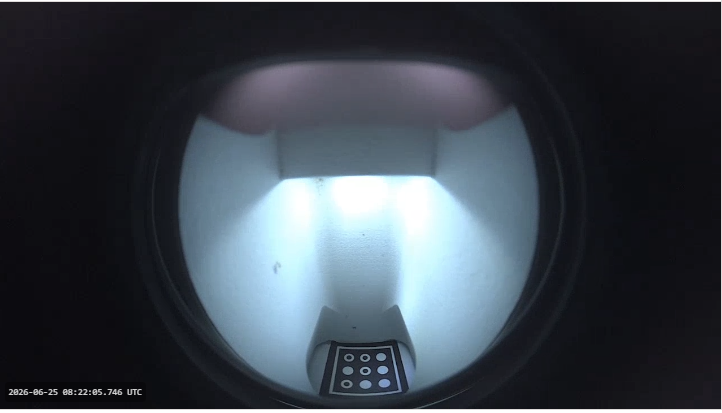
Note here the bottom platform fiducial is fully visible, and the droid appears to be fully seated in the platform, and the droid does not appear to be rotated.
Droid not fully lowered - Example 1
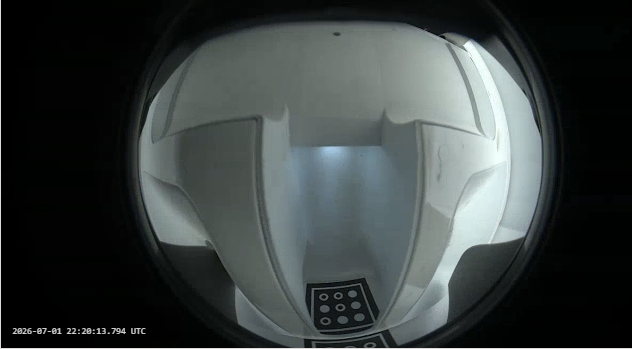
Even though the bottom fiducial is visible, the droid seems far away from the platform, or the droid seems tilted.
Droid not fully lowered - Example 2
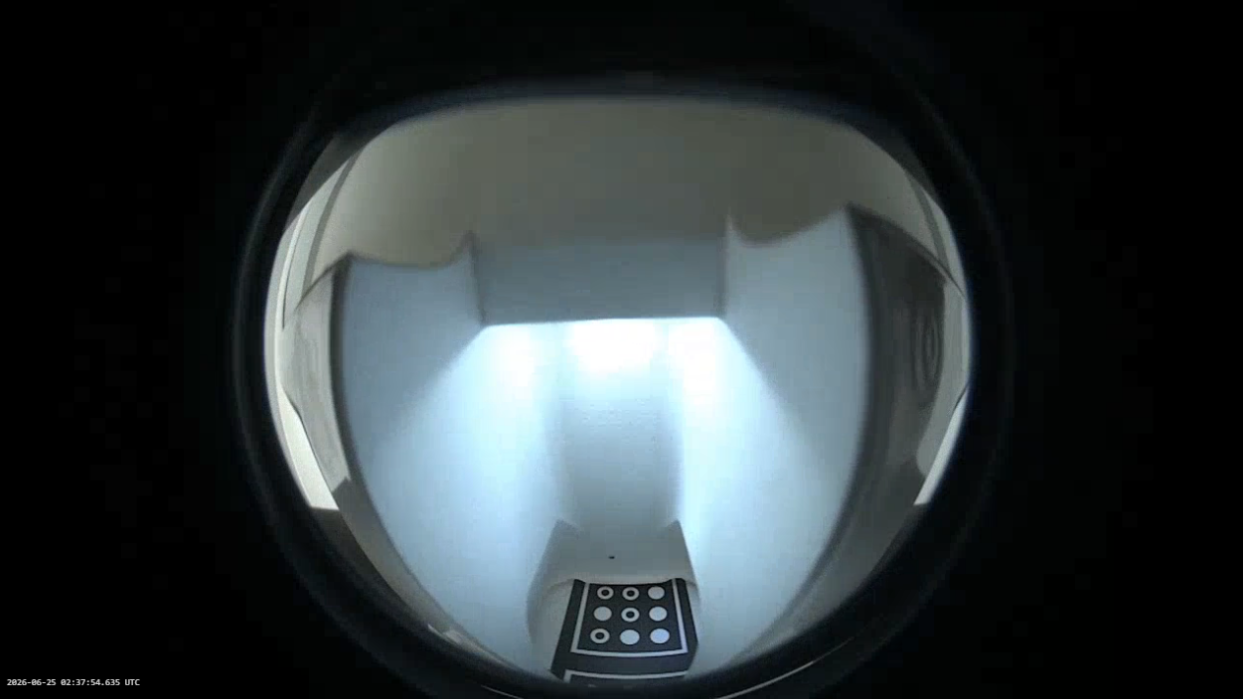
This one looks closer to being fully lowered. But note that the bottom-most white line of the fiducial is hidden by the platform.
Next, go to the timestamp that is just after the doors start closing and right as the doors start to stall (just as
percent open starts to level out).Is there a clear point at which the percent open graph levels out? If so, take a screenshot of the entire screen as shown below and add the image to the Jira ISS ticket, titled
This is when the Droid doors stall.: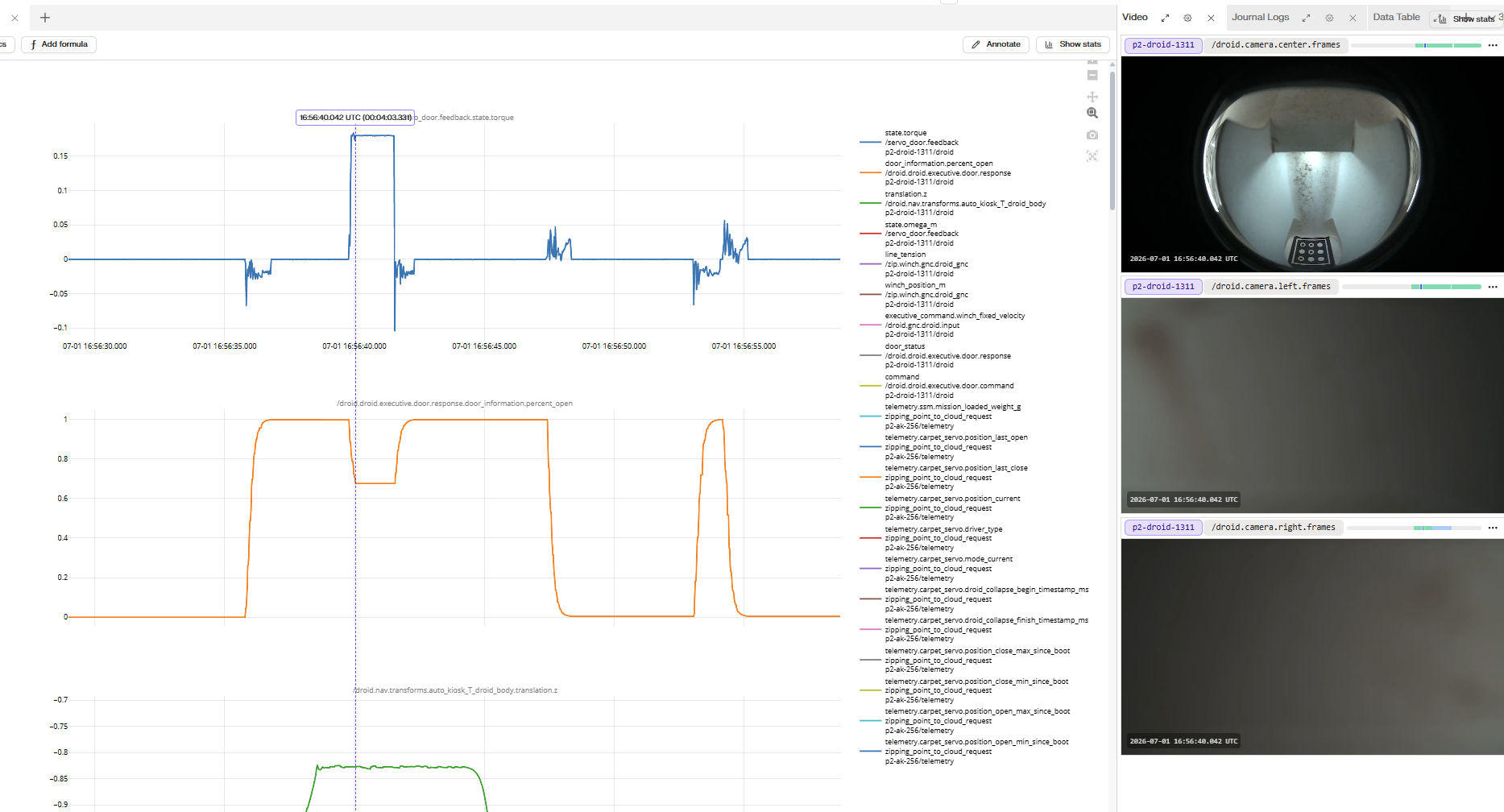
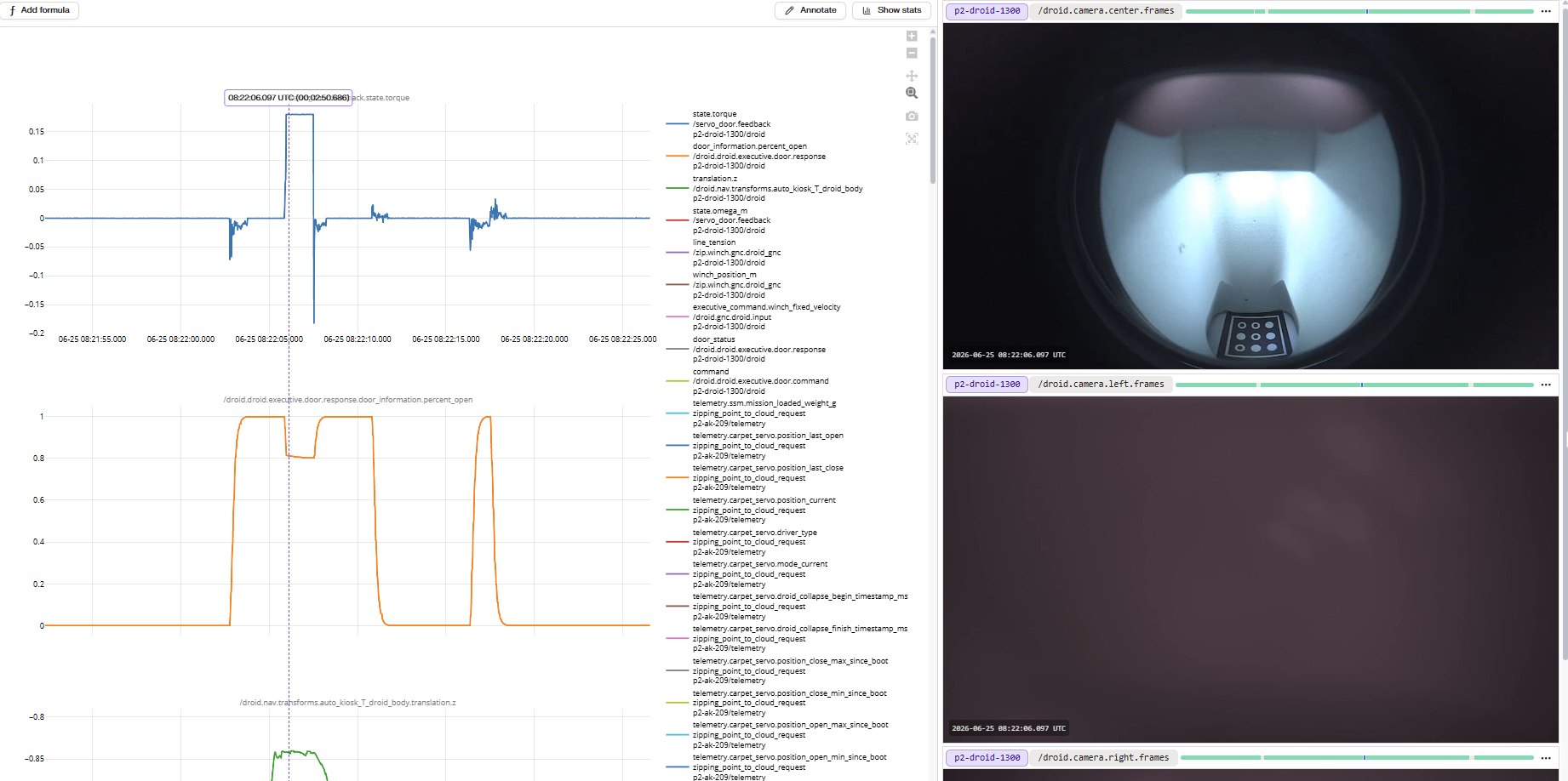
Inflection point above 25%
Inflection point below 25%
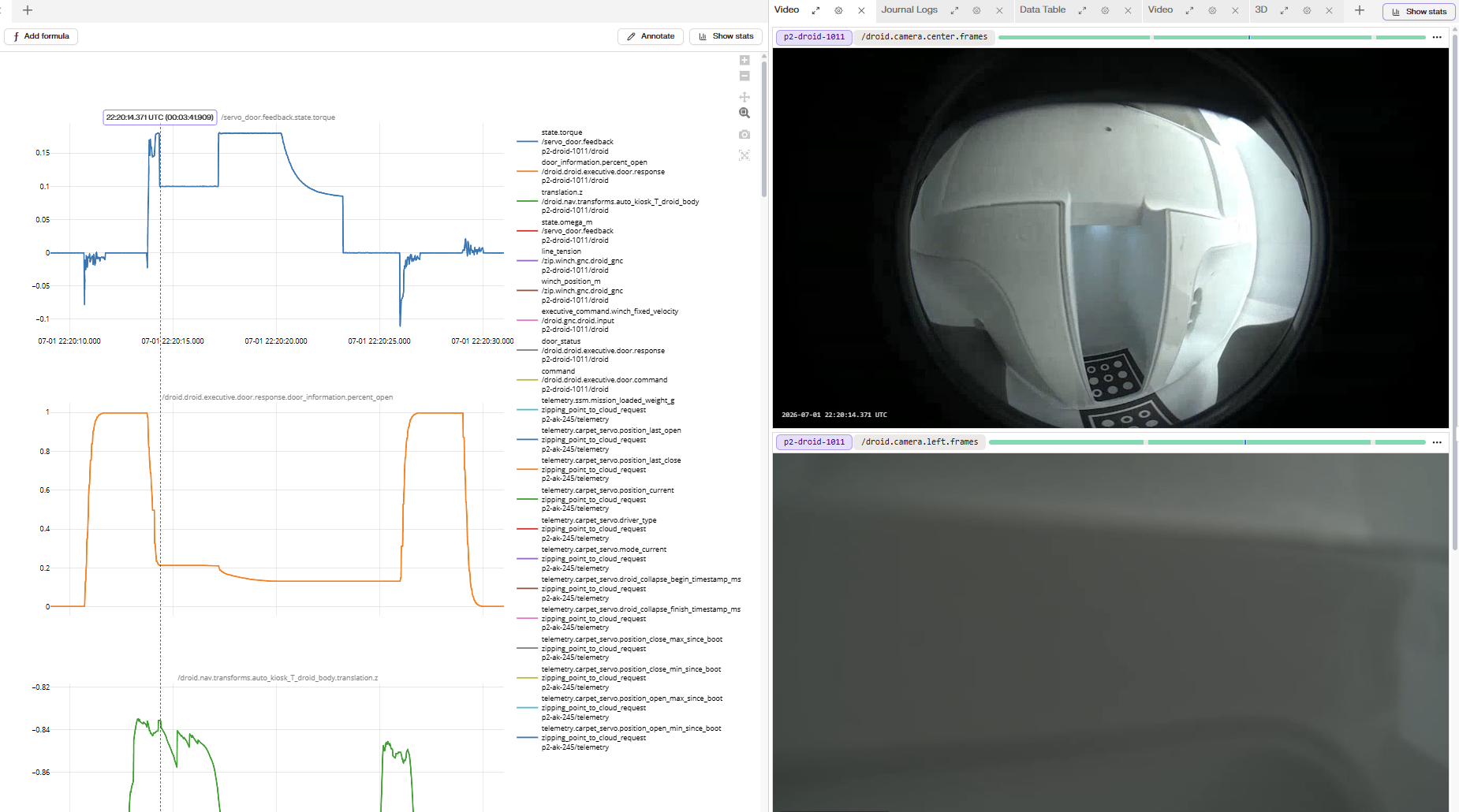
Tag
@XanderWells and @RustinBergren on Slack so the issue can be investigated further.Next, go to the next earliest possible timestamp in which the droid has raised enough so that you can see the package and/or magic carpet through both the
center camera and the left/right camera view.NOTE: It is important to step through the logs bit by bit, because it is easy to miss this.
Take a screenshot of the entire screen as shown below:
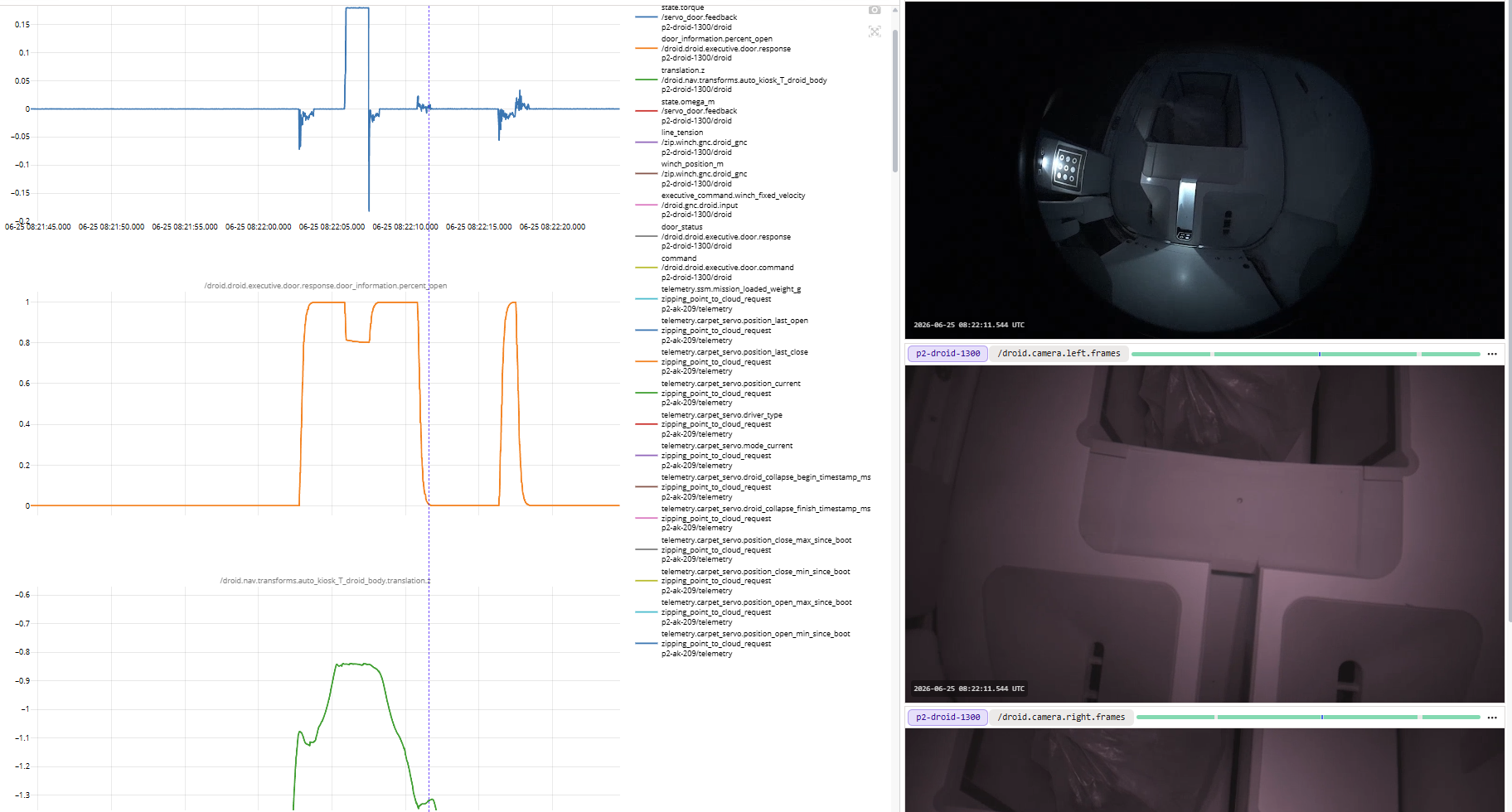
Add this image to the Jira ISS ticket, titled
Earliest view of package from droid center and side cameras, after pickup attempt.Tag
@XanderWells and @RustinBergren on Slack so the issue can be investigated further.Tag
@XanderWells and @RustinBergren on Slack so the issue can be investigated further.Tag
@XanderWells and @RustinBergren on Slack so the issue can be investigated further.Ping
@XanderWells and @RustinBergren on Slack so the issue can be investigated further.@zrangers or @dfw-zp-rangers (depending on location), and ask them to complete the work order and to notify you when it has been completed.After confirming the package has been removed, return to service.
After confirming the platform obstruction has been solved, return to service.
After confirming the servo has been plugged back in, return to service.
Resolution note
This plaintext block is ready to paste into the Resolution Note field on the ZERP issue you're working. The permalink below gives engineering review access to the full step-by-step timeline including any back-navigation; share it if the case needs a deeper look.
Permalink:
Session is too large to fit in a URL. Use Download session JSON to share the timeline out-of-band.
Did this guide help you get unblocked?
Open suggestions
There are no open suggestions.
Open pull requests
There are no open pull requests.