

Place Dock into Diagnostic Mode (Grounding Dock)
Viewing this guide for
Applicable to all hardware versions
For more information about the Diagnostic operations mode, see Operations Mode = DIAGNOSTIC.
graph TD
    check-if-there-is-a-zip-in-the-dock{"<small><b>Step 1</b></small><br/>Question: Is there a Zip in the Dock?"}
    zip-is-in-dock["<small><b>Step 2</b></small><br/>Action: Ensure that the Zip is not on a missi..."]
    no-zip-in-dock["<small><b>Step 3</b></small><br/>Action: Ensure that there is no Zip on a miss..."]
    in-fleet-wrangler-click-bay["<small><b>Step 4</b></small><br/>Action: In Fleet Wrangler, click **Bay**."]
    select-the-dock-id["<small><b>Step 5</b></small><br/>Action: Select the Dock ID."]
    click-operations-mode["<small><b>Step 6</b></small><br/>Action: Click **Operations Mode**. !Dock Ope..."]
    click-diagnostic["<small><b>Step 7</b></small><br/>Action: Click **Diagnostic**."]
    click-submit["<small><b>Step 8</b></small><br/>Action: Click **Submit**."]
    check-if-there-is-a-zip-in-the-dock -->|Yes| zip-is-in-dock
    check-if-there-is-a-zip-in-the-dock -->|No| no-zip-in-dock
    zip-is-in-dock --> in-fleet-wrangler-click-bay
    no-zip-in-dock --> in-fleet-wrangler-click-bay
    in-fleet-wrangler-click-bay --> select-the-dock-id
    select-the-dock-id --> click-operations-mode
    click-operations-mode --> click-diagnostic
    click-diagnostic --> click-submit
    style check-if-there-is-a-zip-in-the-dock fill:#dbeafe,stroke:#3b82f6,color:#1e3a5f
    style zip-is-in-dock fill:#dcfce7,stroke:#22c55e,color:#14532d
    style no-zip-in-dock fill:#dcfce7,stroke:#22c55e,color:#14532d
    style in-fleet-wrangler-click-bay fill:#dcfce7,stroke:#22c55e,color:#14532d
    style select-the-dock-id fill:#dcfce7,stroke:#22c55e,color:#14532d
    style click-operations-mode fill:#dcfce7,stroke:#22c55e,color:#14532d
    style click-diagnostic fill:#dcfce7,stroke:#22c55e,color:#14532d
    style click-submit fill:#dcfce7,stroke:#22c55e,color:#14532d
Hover or focus a block to preview it. Select the block to keep the preview open.
1 question
Is there a Zip in the Dock?
2 action
Ensure that the Zip is not on a mission.
If the Zip has most recently failed a mission, restart the Zip flight target. For steps, see Restart Flight Target.
CAUTION: Ensure that the flight target is restarted on the correct Zip.
If the Zip has most recently failed a mission, restart the Zip flight target. For steps, see Restart Flight Target.
CAUTION: Ensure that the flight target is restarted on the correct Zip.
3 action
Ensure that there is no Zip on a mission to that Dock. If there is a Zip on a mission to that Dock, a "Cannot change operations mode while buddied to zip id" message may display.
If the Zip is not actually on a mission, restart the Zip to clear the mission.
If the Zip is not actually on a mission, restart the Zip to clear the mission.
4 action
In Fleet Wrangler, click Bay.
5 action
Select the Dock ID.
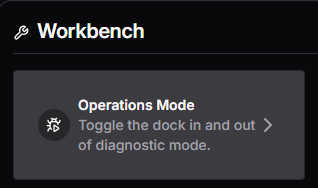
6 action
Click Operations Mode.
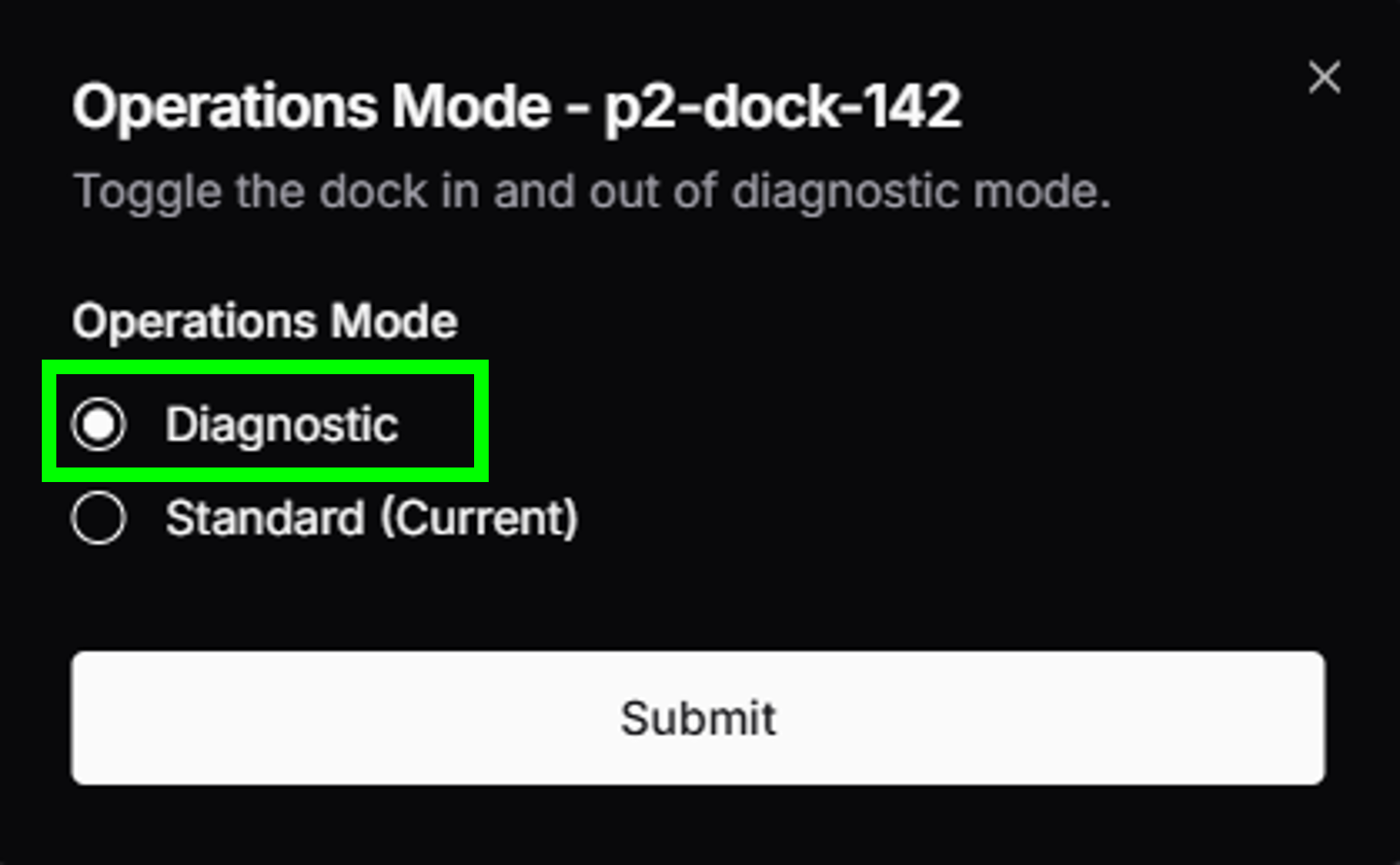
7 action
Click Diagnostic.
8 action
Click Submit.
Resolution note
This plaintext block is ready to paste into the Resolution Note field on the ZERP issue you're working. The permalink below gives engineering review access to the full step-by-step timeline including any back-navigation; share it if the case needs a deeper look.
Permalink:
Session is too large to fit in a URL. Use Download session JSON to share the timeline out-of-band.
Did this guide help you get unblocked?
Open suggestions
There are no open suggestions.
Open pull requests
There are no open pull requests.