

OTA Error Code: deploy_firmware_fw_update2_node_failure
What This Means
Section titled “What This Means”One or more node updates did not complete successfully. This can be caused by:
- Independent node failure(s)
- A faulty gateway node or power condition
- Load switch failure
- Missing or unreachable gateway node
A gateway or power failure can prevent downstream nodes from being attempted. The result JSON may record failures for those downstream nodes, but Slack may not list that detail in the Failures table. Find the first suspect before deciding what to fix.
What To Check
Section titled “What To Check”Start with the deploy Slack thread.
In a successful firmware deploy, status is 0 and all nodes pass:

Presentation 1: Slack Lists Specific Node Failures
Section titled “Presentation 1: Slack Lists Specific Node Failures”When Slack lists failed nodes, use those nodes as the first suspects. In this example, tail.Ping and mixed.Ping failed:
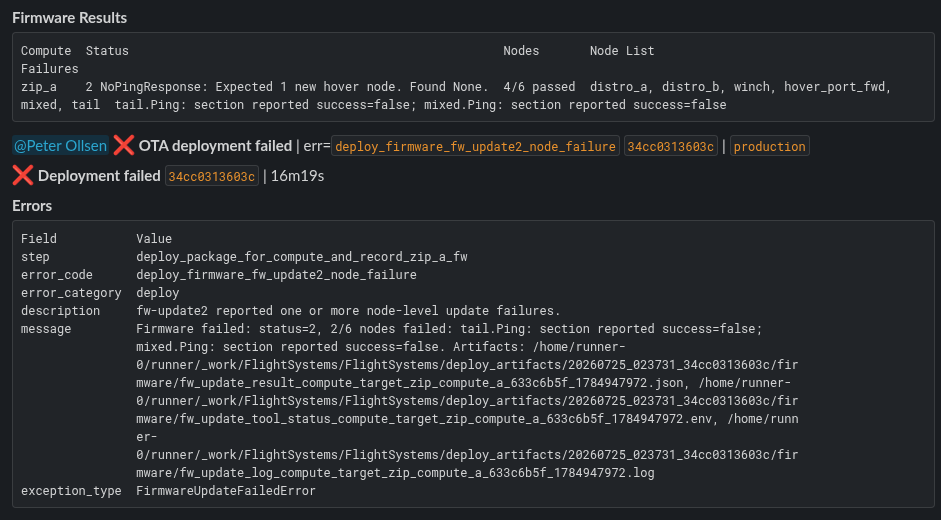
Presentation 2: Slack Does Not List A Failed Node
Section titled “Presentation 2: Slack Does Not List A Failed Node”When Slack does not list a failed node, check the Slack message field. In this example, the message says Expected 1 new hover node. Found None.
The Slack message shows that a hover node was missing, but does not clearly identify which hover or gateway node caused the failure. It also does not list downstream nodes that were skipped because the gateway was missing.
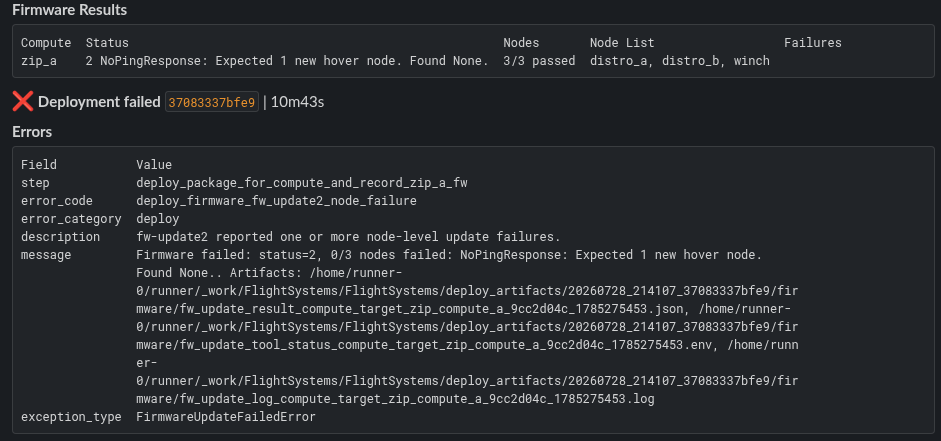
Inspect the result JSON file for further information. The result file can be found at result_artifact_path from Slack when present; otherwise look in the deploy output directory under firmware/fw_update_result_*.json.
In the result JSON, find the first node section with success: false. Use that node, section, error_code, and reason. Examples of sections are Ping, App, Bootloader, Boot_Updater, and Config.
Power Issues
Section titled “Power Issues”Power issues may appear in Slack or in the result JSON. Examples:
error_code: 12Failed to set load switchServo power is offFailed to read servo power
These mean the updater could not put the target hardware into the power state needed for update. If you’re a maintenance technician, escalate to service engineering using an RFI. If you’re a service engineer, escalate to OTA Support On Call.
Result JSON Error Code Reference
Section titled “Result JSON Error Code Reference”Use these status codes when reading result details and update logs:
| Status Code | Name | Meaning |
|---|---|---|
12 |
PowerSequencing |
Vehicle power sequencing, setup, or restore failed. |
30 |
NodeUnresponsive |
A target node did not respond. |
31 |
TargetDiscovery |
Target discovery failed. |
32 |
RevisionDetection |
Firmware revision detection failed. |
33 |
TargetMismatch |
The discovered target did not match the expected target. |
34 |
ContentCheck |
Firmware content validation failed. |
35 |
FlashOperation |
Flashing firmware failed. |
36 |
ConfigProvisioning |
Firmware configuration provisioning failed. |
Troubleshooting Steps
Section titled “Troubleshooting Steps”graph TD
check-firmware-results-table["<small><b>Step 1</b></small><br/>Action: In the deploy Slack thread, check the..."]
choose-slack-scenario{"<small><b>Step 2</b></small><br/>Question: Can Slack identify the first suspect?"}
record-slack-details["<small><b>Step 3</b></small><br/>Action: Use the listed node and stage as the ..."]
identify-upstream-node["<small><b>Step 4</b></small><br/>Action: Use the named gateway, missing node, ..."]
access-github-action-logs["<small><b>Step 5</b></small><br/>Action: The following steps will require acce..."]
open-firmware-result["<small><b>Step 6</b></small><br/>Action: Open the firmware result JSON. Use r..."]
find-failed-node-in-result["<small><b>Step 7</b></small><br/>Action: Find the first node section with suc..."]
is-power-sequencing{"<small><b>Step 8</b></small><br/>Question: Does the Slack message or result JSON..."}
was-node-and-reason-found{"<small><b>Step 9</b></small><br/>Question: Were you able to identify the failed ..."}
record-result-details["<small><b>Step 10</b></small><br/>Action: Record the first suspect node, stage,..."]
reattempt-after-action["<small><b>Step 11</b></small><br/>Action: After the node-specific or upstream i..."]
did-retry-succeed{"<small><b>Step 12</b></small><br/>Question: Did the retried OTA succeed?"}
ota-succeeded["<small><b>Step 13</b></small><br/>Action: No further OTA troubleshooting is nee..."]
escalate-to-ota-support{{"<small><b>Step 14</b></small><br/>Escalation: If you're a maintenance technician, e..."}}
check-firmware-results-table --> choose-slack-scenario
choose-slack-scenario -->|Node/stage listed| record-slack-details
choose-slack-scenario -->|Gateway/power issue| identify-upstream-node
choose-slack-scenario -->|No or unclear| access-github-action-logs
record-slack-details --> is-power-sequencing
identify-upstream-node --> access-github-action-logs
access-github-action-logs --> open-firmware-result
open-firmware-result --> find-failed-node-in-result
find-failed-node-in-result --> is-power-sequencing
is-power-sequencing -->|Yes| escalate-to-ota-support
is-power-sequencing -->|No| was-node-and-reason-found
was-node-and-reason-found -->|Yes| record-result-details
was-node-and-reason-found -->|No| escalate-to-ota-support
record-result-details --> reattempt-after-action
reattempt-after-action --> did-retry-succeed
did-retry-succeed -->|Yes| ota-succeeded
did-retry-succeed -->|No| escalate-to-ota-support
style check-firmware-results-table fill:#dcfce7,stroke:#22c55e,color:#14532d
style choose-slack-scenario fill:#dbeafe,stroke:#3b82f6,color:#1e3a5f
style record-slack-details fill:#dcfce7,stroke:#22c55e,color:#14532d
style identify-upstream-node fill:#dcfce7,stroke:#22c55e,color:#14532d
style access-github-action-logs fill:#dcfce7,stroke:#22c55e,color:#14532d
style open-firmware-result fill:#dcfce7,stroke:#22c55e,color:#14532d
style find-failed-node-in-result fill:#dcfce7,stroke:#22c55e,color:#14532d
style is-power-sequencing fill:#dbeafe,stroke:#3b82f6,color:#1e3a5f
style was-node-and-reason-found fill:#dbeafe,stroke:#3b82f6,color:#1e3a5f
style record-result-details fill:#dcfce7,stroke:#22c55e,color:#14532d
style reattempt-after-action fill:#dcfce7,stroke:#22c55e,color:#14532d
style did-retry-succeed fill:#dbeafe,stroke:#3b82f6,color:#1e3a5f
style ota-succeeded fill:#dcfce7,stroke:#22c55e,color:#14532d
style escalate-to-ota-support fill:#fef3c7,stroke:#f59e0b,color:#78350f Hover or focus a block to preview it. Select the block to keep the preview open.
Firmware Results table. Look at Failures first, then the Slack message field.tail.Ping, mixed.Ping.If you are a maintenance technician following the guide, please escalate to service engineering using an RFI. If you are a service engineer, please proceed.
result_artifact_path from Slack when present; otherwise look in the deploy output directory under firmware/fw_update_result_*.json.success: false. Use its node, section, error_code, and reason as the next clue.error_code: 12, servo power off, failed servo power read, failed load switch control.Resolution note
This plaintext block is ready to paste into the Resolution Note field on the ZERP issue you're working. The permalink below gives engineering review access to the full step-by-step timeline including any back-navigation; share it if the case needs a deeper look.
Permalink:
Session is too large to fit in a URL. Use Download session JSON to share the timeline out-of-band.
Did this guide help you get unblocked?
Open suggestions
There are no open suggestions.
Open pull requests
There are no open pull requests.