

Droid to Aircraft Electrical Contacts Debugging
Applicable alarms (1)
Likely outcomes — click to expand
Based on 0 missions where this alarm fired in the last 90 days as of 2026-10-13
Aggregated from fleet operations and refreshed daily. Individual outcomes may vary by site and configuration.
Background
Section titled “Background”- The Droid to Aircraft Electrical Contacts serve 3 purposes:
- wired comms
- charging
- chassis ground connection between vehicles
- Faults in the system happen if the Droid or Aircraft electrical contacts are damaged, there’s a break in the electrical harness (solder, wire, or connector), or the spring contacts have inadequate compression to maintain contact.
- This system has been redesigned for EV3 to address common faults. We are considering a retrofit of the EV3 hardware onto EV2 vehicles, depending on the frequency and severity of these faults to operations.
- Common Errors Caused by Bad Electrical Contacts:
Troubleshooting Steps
Section titled “Troubleshooting Steps”graph TD
follow-applicable-ev2-or-ev3-steps{"<small><b>Step 1</b></small><br/>Question: Follow the applicable EV2 or EV3 step..."}
ev2-confirm-dropouts["<small><b>Step 2</b></small><br/>Action: 1. **Confirm Dropouts:** Check the Ba..."]
ev2-check-aircraft-hardware-damage{"<small><b>Step 3</b></small><br/>Question: **Check Aircraft Hardware Damage:** A..."}
ev2-aircraft-contacts-replace["<small><b>Step 4</b></small><br/>Action: Replace the Aircraft Electrical Conta..."]
ev2-increase-spring-compression["<small><b>Step 5</b></small><br/>Action: **Increase Spring Contact Compression..."]
ev2-shim-issue-resolved{"<small><b>Step 6</b></small><br/>Question: Is the issue resolved?"}
ev2-shim-resolved-return-service["<small><b>Step 7</b></small><br/>Action: The Aircraft and Droid may return to ..."]
ev2-check-droid-hardware-damage{"<small><b>Step 8</b></small><br/>Question: **Check Droid Hardware Damage:** Are ..."}
ev2-droid-pitted-replace-contacts["<small><b>Step 9</b></small><br/>Action: 1. Replace the Droid Electrical Conta..."]
ev2-droid-not-pitted-replace-ring["<small><b>Step 10</b></small><br/>Action: 1. Replace the electrical contacts pe..."]
ev3-confirm-dropouts["<small><b>Step 11</b></small><br/>Action: 1. **Confirm Dropouts:** Check the Ba..."]
ev3-check-droid-hardware-damage{"<small><b>Step 12</b></small><br/>Question: **Check Droid Hardware Damage:** Are ..."}
ev3-droid-pitted-replace-contacts["<small><b>Step 13</b></small><br/>Action: 1. Replace the Droid Electrical Conta..."]
ev3-droid-not-pitted-replace-ring["<small><b>Step 14</b></small><br/>Action: 1. Replace the electrical contacts pe..."]
ev3-check-aircraft-hardware-damage{"<small><b>Step 15</b></small><br/>Question: **Check Aircraft Hardware Damage:** A..."}
ev3-aircraft-contacts-replace["<small><b>Step 16</b></small><br/>Action: Replace the Aircraft Electrical Conta..."]
ev3-aircraft-contacts-no["<small><b>Step 17</b></small><br/>Action: Continue to the next step."]
follow-applicable-ev2-or-ev3-steps -->|EV2 Troubleshooting Steps| ev2-confirm-dropouts
follow-applicable-ev2-or-ev3-steps -->|EV3 Troubleshooting Steps| ev3-confirm-dropouts
ev2-confirm-dropouts --> ev2-check-aircraft-hardware-damage
ev2-check-aircraft-hardware-damage -->|Yes| ev2-aircraft-contacts-replace
ev2-check-aircraft-hardware-damage -->|No| ev2-increase-spring-compression
ev2-increase-spring-compression --> ev2-shim-issue-resolved
ev2-shim-issue-resolved -->|Yes| ev2-shim-resolved-return-service
ev2-shim-issue-resolved -->|No| ev2-check-droid-hardware-damage
ev2-check-droid-hardware-damage -->|Yes| ev2-droid-pitted-replace-contacts
ev2-check-droid-hardware-damage -->|No| ev2-droid-not-pitted-replace-ring
ev3-confirm-dropouts --> ev3-check-droid-hardware-damage
ev3-check-droid-hardware-damage -->|Yes| ev3-droid-pitted-replace-contacts
ev3-check-droid-hardware-damage -->|No| ev3-droid-not-pitted-replace-ring
ev3-droid-not-pitted-replace-ring --> ev3-check-aircraft-hardware-damage
ev3-check-aircraft-hardware-damage -->|Yes| ev3-aircraft-contacts-replace
ev3-check-aircraft-hardware-damage -->|No| ev3-aircraft-contacts-no
style follow-applicable-ev2-or-ev3-steps fill:#dbeafe,stroke:#3b82f6,color:#1e3a5f
style ev2-confirm-dropouts fill:#dcfce7,stroke:#22c55e,color:#14532d
style ev2-check-aircraft-hardware-damage fill:#dbeafe,stroke:#3b82f6,color:#1e3a5f
style ev2-aircraft-contacts-replace fill:#dcfce7,stroke:#22c55e,color:#14532d
style ev2-increase-spring-compression fill:#dcfce7,stroke:#22c55e,color:#14532d
style ev2-shim-issue-resolved fill:#dbeafe,stroke:#3b82f6,color:#1e3a5f
style ev2-shim-resolved-return-service fill:#dcfce7,stroke:#22c55e,color:#14532d
style ev2-check-droid-hardware-damage fill:#dbeafe,stroke:#3b82f6,color:#1e3a5f
style ev2-droid-pitted-replace-contacts fill:#dcfce7,stroke:#22c55e,color:#14532d
style ev2-droid-not-pitted-replace-ring fill:#dcfce7,stroke:#22c55e,color:#14532d
style ev3-confirm-dropouts fill:#dcfce7,stroke:#22c55e,color:#14532d
style ev3-check-droid-hardware-damage fill:#dbeafe,stroke:#3b82f6,color:#1e3a5f
style ev3-droid-pitted-replace-contacts fill:#dcfce7,stroke:#22c55e,color:#14532d
style ev3-droid-not-pitted-replace-ring fill:#dcfce7,stroke:#22c55e,color:#14532d
style ev3-check-aircraft-hardware-damage fill:#dbeafe,stroke:#3b82f6,color:#1e3a5f
style ev3-aircraft-contacts-replace fill:#dcfce7,stroke:#22c55e,color:#14532d
style ev3-aircraft-contacts-no fill:#dcfce7,stroke:#22c55e,color:#14532d Hover or focus a block to preview it. Select the block to keep the preview open.
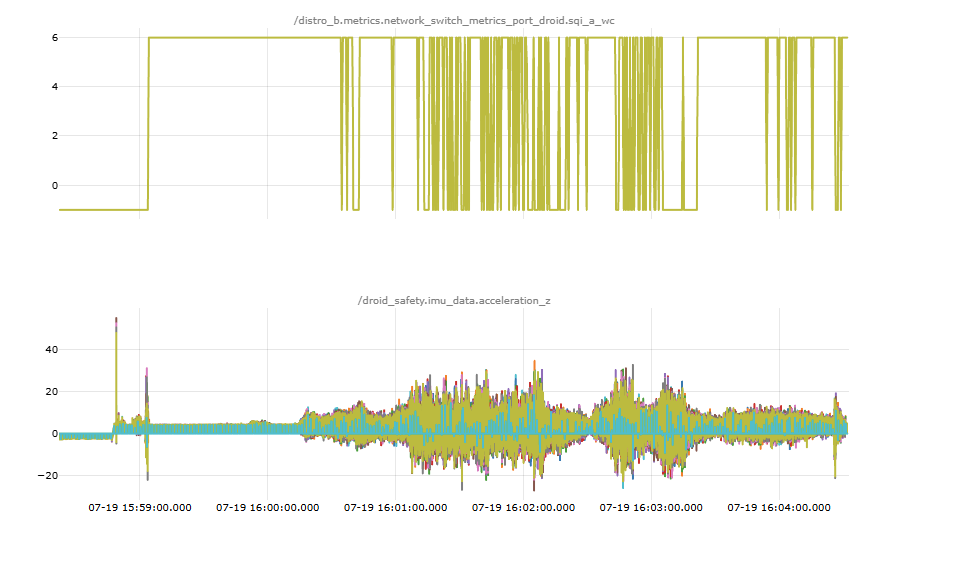
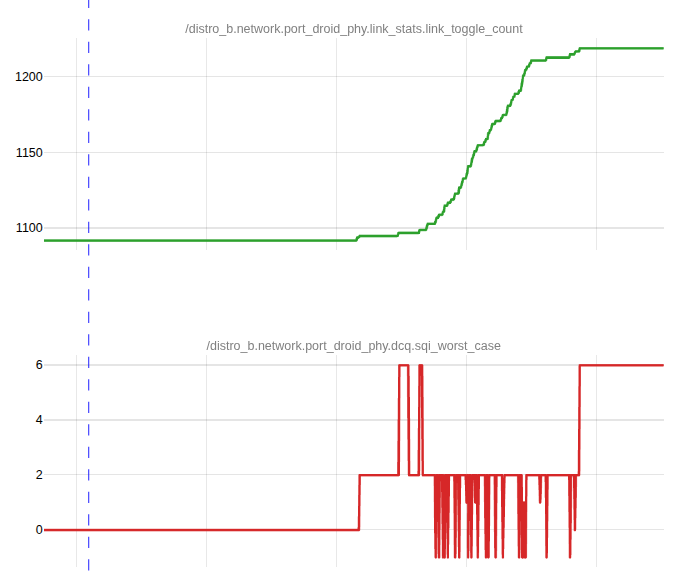
- Example of bad wired comms:
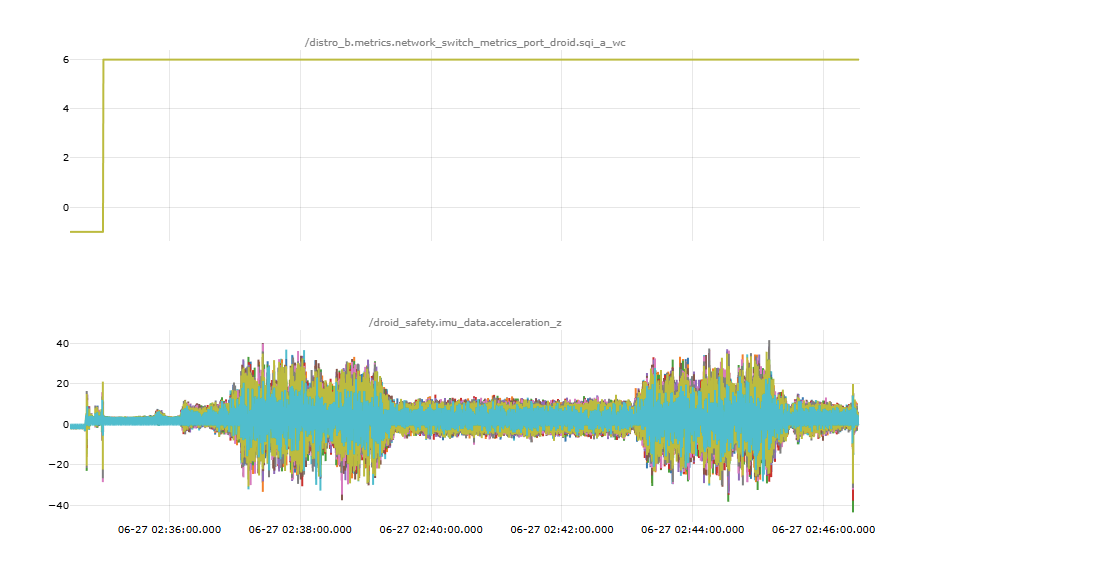
- Example of good wired comms:
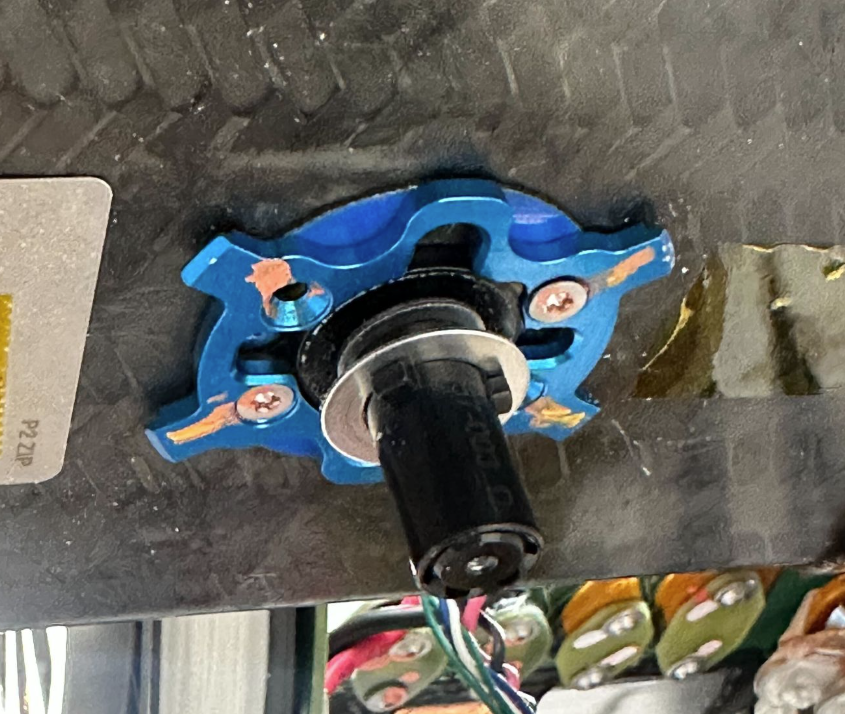
.JPG)
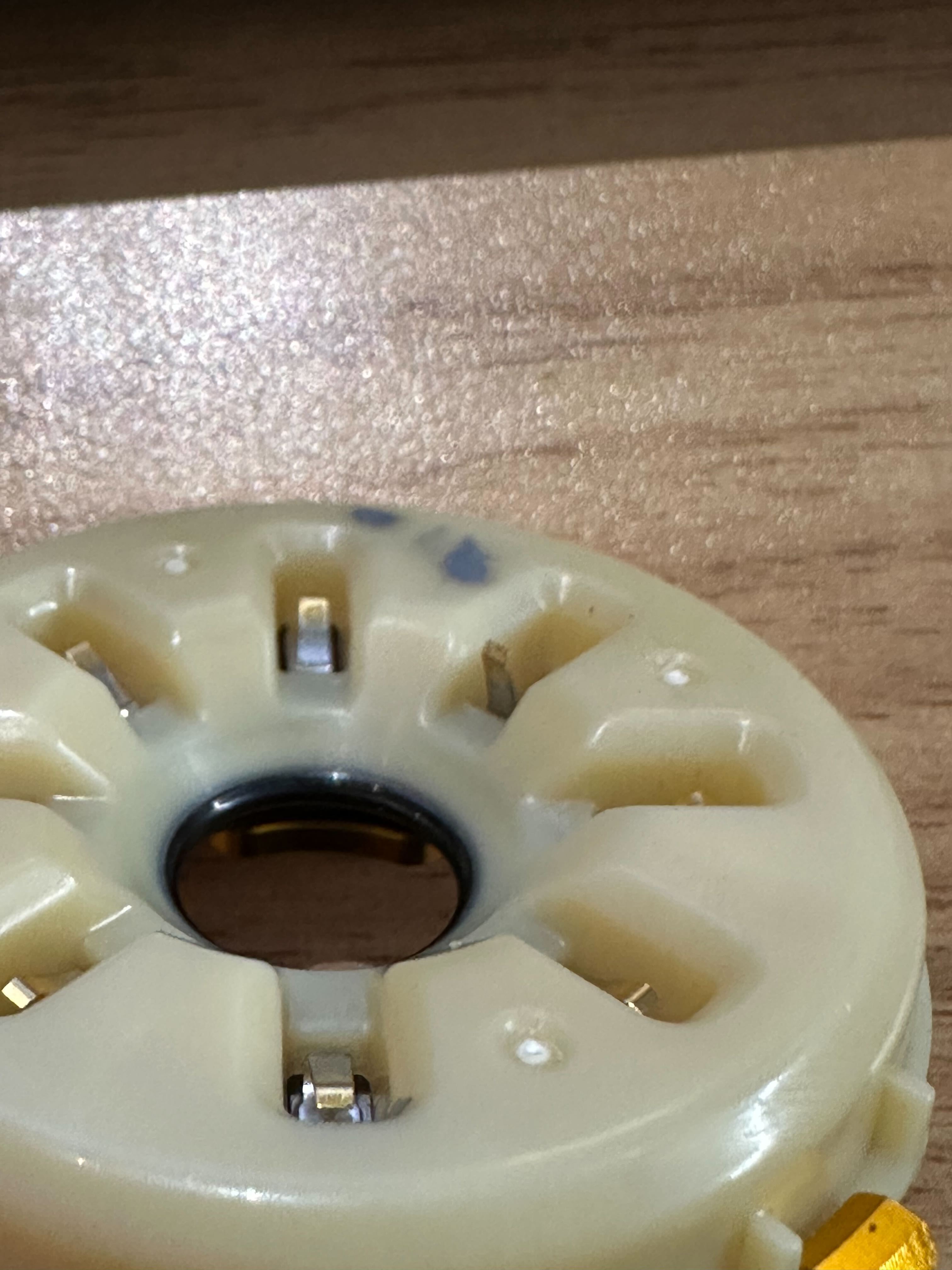
- Example of heavy pitting (REPLACE). 3x deep marks on all contact pads that have fully eroded through the gold plating.
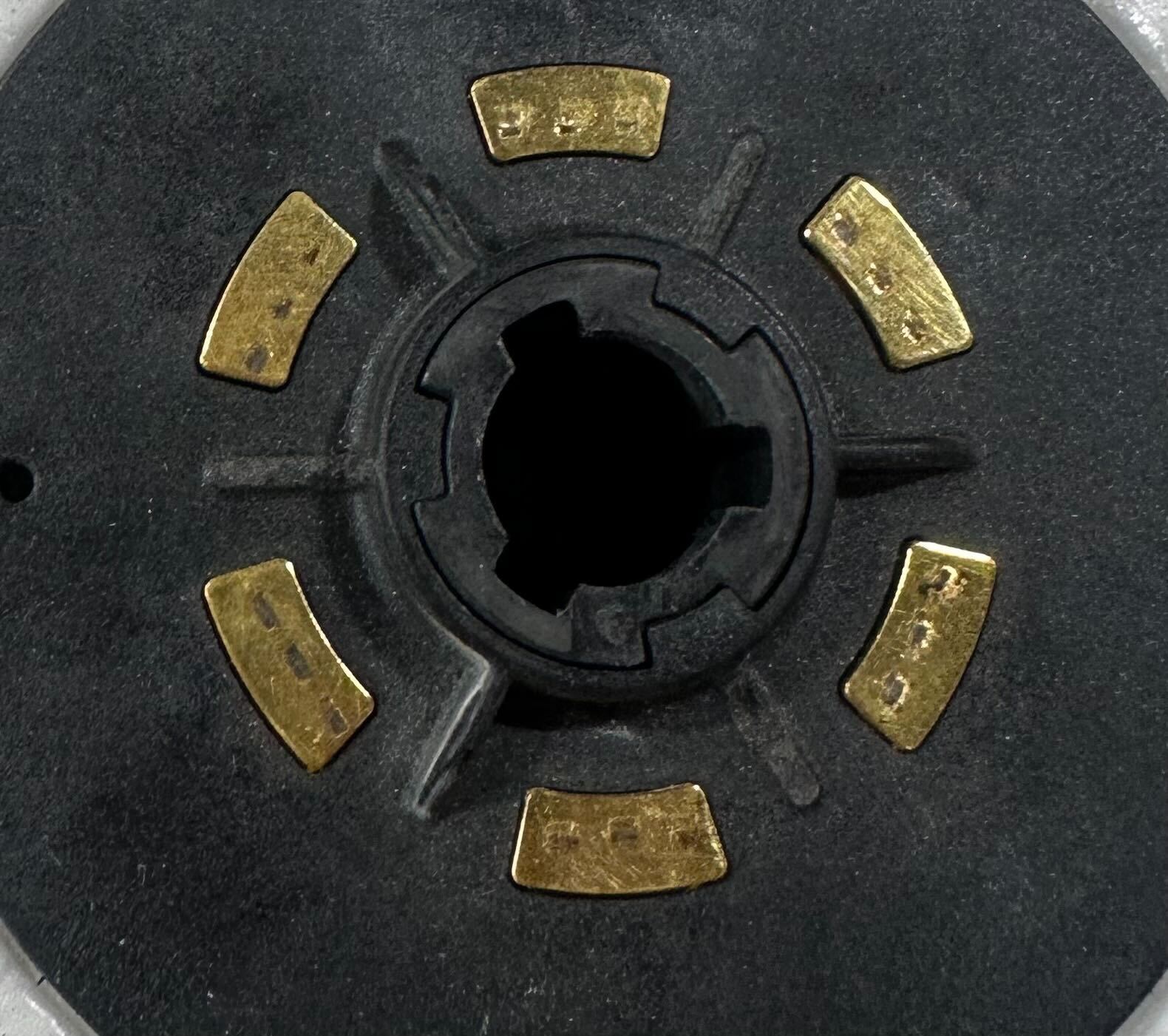
- Example of light pitting (DON’T Replace). Some marks on the contact pads, but not all marks have fully eroded through the gold plating.
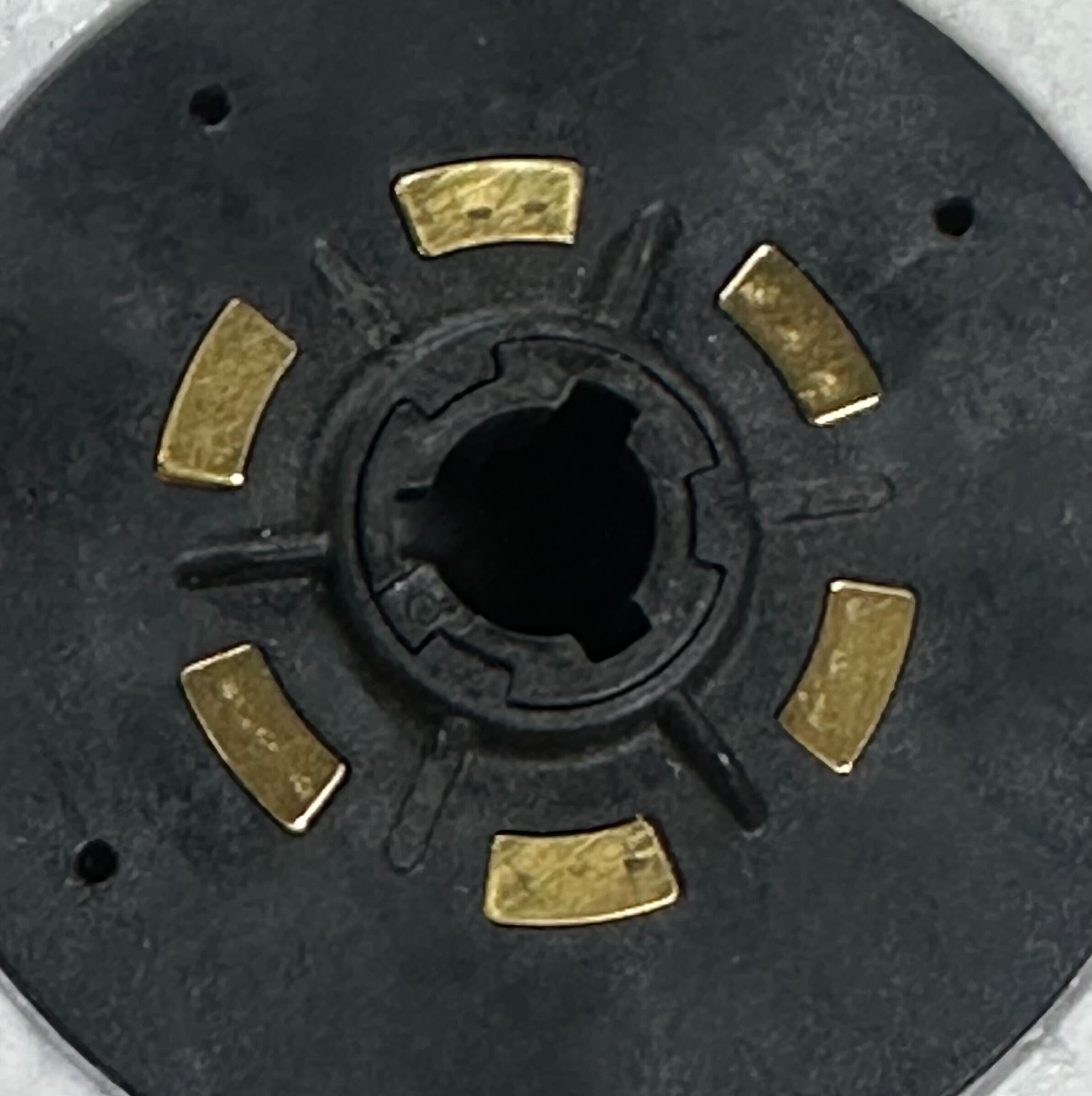
1. Remove the lid. See Droid CMM Remove Lid Assembly steps 1-8.
CAUTION: DO NOT REMOVE THE CARBON LID STRUCTURE.
2. Reinstall the lid. See Droid CMM: Install Lid Assembly steps 6-11.
1. UMM 32.5.2.b: Remove Droid Receiver Ring
2. UMM 32.5.2.c: Install Droid Receiver Ring.
2. Is the issue resolved?
- YES: The Droid may return to service.
- NO: Escalate to P2 Droid On Call.
If the
link_toggle_count is seen increasing or SQI drops below 5, then it points to a loose connection (electrical or mechanical).- Example of bad wired comms:
- Example of good wired comms:
NOTE: It is expected for the toggle counts to increase or SQI to drop to 0 or -1 when the Droid is lowered, like in this case during
LoadFromAutoKiosk.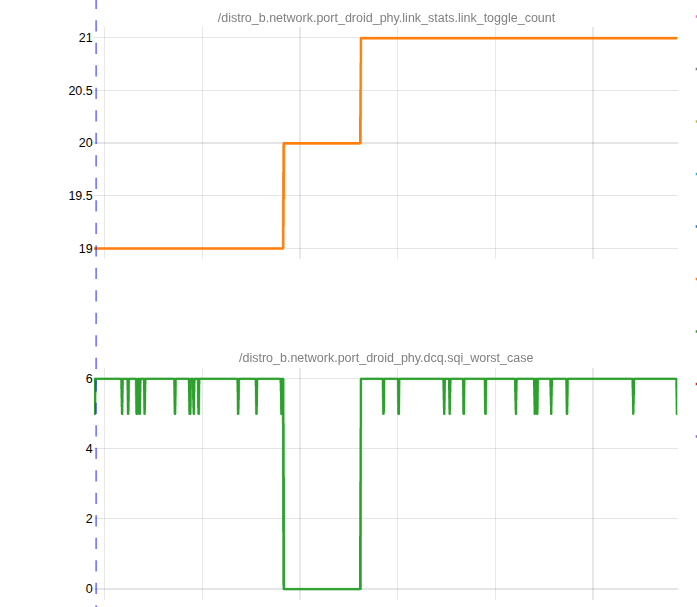
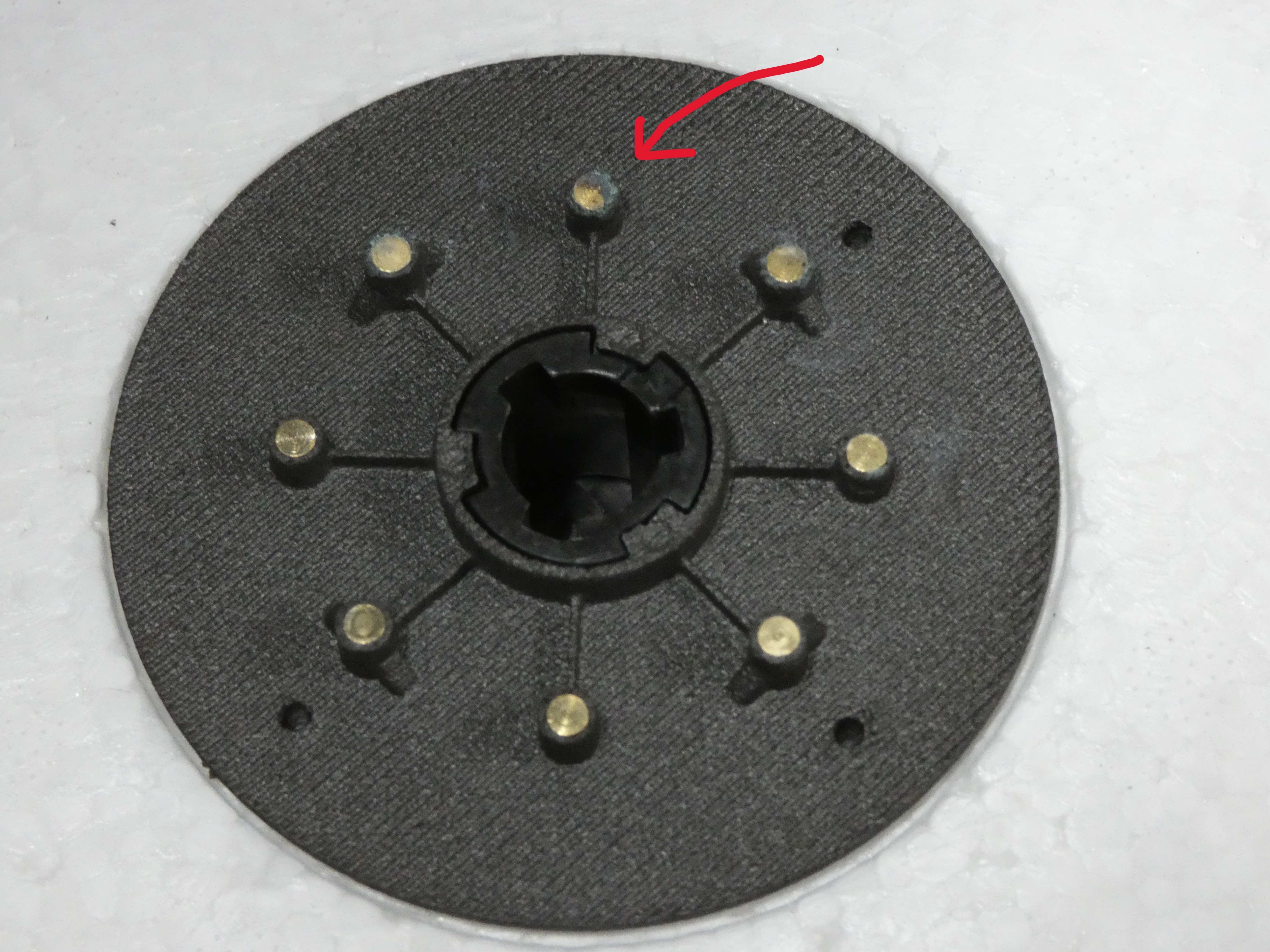
1. Remove the lid. See Droid CMM Remove Lid Assembly steps 1-8.
CAUTION: DO NOT REMOVE THE CARBON LID STRUCTURE.
2. Reinstall the lid. See Droid CMM: Install Lid Assembly steps 6-11.
1. UMM 32.5.2.b: Remove Droid Receiver Ring
2. UMM 32.5.2.c: Install Droid Receiver Ring.
2. Is the issue resolved?
- YES: The Droid may return to service.
- NO: Escalate to P2 Droid On Call.
Resolution note
This plaintext block is ready to paste into the Resolution Note field on the ZERP issue you're working. The permalink below gives engineering review access to the full step-by-step timeline including any back-navigation; share it if the case needs a deeper look.
Permalink:
Session is too large to fit in a URL. Use Download session JSON to share the timeline out-of-band.
Did this guide help you get unblocked?
Open suggestions
There are no open suggestions.
Open pull requests
There are no open pull requests.