

CORRECTIONS_REDUNDANCY_FAILURE
Applicable alarms (1)
Likely outcomes — click to expand
Based on 606,577 missions where this alarm fired in the last 90 days as of 2026-10-13
Grounding vs discrepancy (of 3,533 ZERP issues filed on these missions)
Top work orders
- EV2: Inspect Aircraft after Droid Left Behind (DLB) · MAINTENANCE_ACTION 270
- Inspect Droid after Droid Left Behind (DLB) · MAINTENANCE_ACTION 186
- ZCO-2026-06-11 M5 Connector Bracket Retrofit (FRCO-252 / SB-2026-020 / HIT-171) · UPGRADE_RETROFIT 87
- EV2: Replace Aft Motor Assembly on Aircraft · MAINTENANCE_ACTION 77
- EV2: Displace and Reinstall Hover Motor on Aircraft · MAINTENANCE_ACTION 74
Frequently replaced parts
| Part | P/N | Removals |
|---|---|---|
| SERVO, ASSY, UNIVERSAL, P2 | 20398 | 1,248 |
| CCW HOVER MOTOR ASSY, ZIP, P2 | 19607 | 956 |
| PRE PREG WING ASSY PORT(LH), ZIP, P2 | 24762 | 723 |
| WING STBD, ZIP, P2 | 25266 | 723 |
| TAIL ASSY STBD(RH), PRE-EV2, ZIP, P2 | 21840 | 648 |
Aggregated from fleet operations and refreshed daily. Individual outcomes may vary by site and configuration.
Background
Section titled “Background”This alarm is set if we have lost redundancy of RTK corrections providers.
There are at least three streams of corrections available per compute; two streams must be lost to lose redundancy and set this alarm. If redundancy is lost and the remaining RTK corrections stream is lost, the Aircraft may paraland.
Corrections streams arrive via cellular connection to both computes from two separate providers:
- Cloud: A stream from Zipline’s cloud (corrections come from Zipline RTK Base Station)
- Polaris: A stream from a 3rd party vendor (corrections come from Point One Nav RTK Base Station)
- Polaris bridged: A copy of the other compute’s Polaris corrections stream (compute A bridges to compute B, and vice versa)
This alarm also occurs when we lack provider redundancy. That is, if Zipline’s cloud stream is unavailable and the Aircraft is relying entirely on Polaris, it will not take off.
Troubleshooting Steps
Section titled “Troubleshooting Steps”graph TD
check-if-the-alarm-is-set-on-compute-a-o["<small><b>Step 1</b></small><br/>Action: Check if the alarm is set on compute ..."]
there-may-be-a-transient-issue-with-the{"<small><b>Step 2</b></small><br/>Question: There may be a transient issue with t..."}
return-the-aircraft-to-service("<small><b>Step 3</b></small><br/>Reference: Return the Aircraft to service.")
is-the-alarm-affecting-the-fleet{"<small><b>Step 4</b></small><br/>Question: Is the alarm affecting the fleet, or ..."}
escalate-to-embedded-linux-oncall{{"<small><b>Step 5</b></small><br/>Escalation: Escalate to Embedded-linux-oncall."}}
escalate-to-embedded-linux-on-call-2603{{"<small><b>Step 6</b></small><br/>Escalation: Escalate to P2 Embedded Linux On Call."}}
determine-which-correction-sources-are-n["<small><b>Step 7</b></small><br/>Action: Determine which correction sources ar..."]
find-the-alarm-report-is-alarm-report-av{"<small><b>Step 8</b></small><br/>Question: Find the alarm report: Aircraft/Droi..."}
alarm-report-available-check-streams["<small><b>Step 9</b></small><br/>Action: The alarm report contains a list of t..."]
use-baraza-to-view-log["<small><b>Step 10</b></small><br/>Action: Use Baraza to view a log from the aff..."]
follow-the-steps-below-for-the-sources{"<small><b>Step 11</b></small><br/>Question: Follow the steps below for the source..."}
all-sources-unhealthy-wait-10-minutes["<small><b>Step 12</b></small><br/>Action: There may be a transient issue with t..."]
all-sources-is-issue-resolved{"<small><b>Step 13</b></small><br/>Question: Is the issue resolved?"}
the-aircraft-may-return-to-service("<small><b>Step 14</b></small><br/>Reference: The Aircraft may return to service.")
escalate-to-embedded-linux-oncall-all{{"<small><b>Step 15</b></small><br/>Escalation: Escalate to P2 Embedded Linux On Call."}}
cloud-unhealthy-check-dashboards["<small><b>Step 16</b></small><br/>Action: Check the following Zipline RTK Base ..."]
cloud-check-rtcm3-messages{"<small><b>Step 17</b></small><br/>Question: Check the 'Rtcm3 Messages per second'..."}
cloud-resolve-site-wide-outage["<small><b>Step 18</b></small><br/>Action: Resolve the site wide network issue a..."]
cloud-follow-rtk-station-offline["<small><b>Step 19</b></small><br/>Action: Follow next steps in RTK Station Off..."]
polaris-unhealthy-follow-rtk-offline["<small><b>Step 20</b></small><br/>Action: Follow next steps in RTK Station Off..."]
check-if-the-alarm-is-set-on-compute-a-o --> there-may-be-a-transient-issue-with-the
there-may-be-a-transient-issue-with-the -->|Yes| return-the-aircraft-to-service
there-may-be-a-transient-issue-with-the -->|No| is-the-alarm-affecting-the-fleet
is-the-alarm-affecting-the-fleet -->|Yes| determine-which-correction-sources-are-n
is-the-alarm-affecting-the-fleet -->|No| escalate-to-embedded-linux-oncall
determine-which-correction-sources-are-n --> find-the-alarm-report-is-alarm-report-av
find-the-alarm-report-is-alarm-report-av -->|Yes| alarm-report-available-check-streams
find-the-alarm-report-is-alarm-report-av -->|No| use-baraza-to-view-log
alarm-report-available-check-streams --> follow-the-steps-below-for-the-sources
use-baraza-to-view-log --> follow-the-steps-below-for-the-sources
follow-the-steps-below-for-the-sources -->|All sources are unhealthy| all-sources-unhealthy-wait-10-minutes
follow-the-steps-below-for-the-sources -->|CLOUD is unhealthy| cloud-unhealthy-check-dashboards
follow-the-steps-below-for-the-sources -->|POLARIS or POLARIS_BRIDGED ...| polaris-unhealthy-follow-rtk-offline
all-sources-unhealthy-wait-10-minutes --> all-sources-is-issue-resolved
all-sources-is-issue-resolved -->|Yes| the-aircraft-may-return-to-service
all-sources-is-issue-resolved -->|No| escalate-to-embedded-linux-oncall-all
cloud-unhealthy-check-dashboards --> cloud-check-rtcm3-messages
cloud-check-rtcm3-messages -->|Yes| cloud-resolve-site-wide-outage
cloud-check-rtcm3-messages -->|No| cloud-follow-rtk-station-offline
cloud-resolve-site-wide-outage --> cloud-follow-rtk-station-offline
style check-if-the-alarm-is-set-on-compute-a-o fill:#dcfce7,stroke:#22c55e,color:#14532d
style there-may-be-a-transient-issue-with-the fill:#dbeafe,stroke:#3b82f6,color:#1e3a5f
style return-the-aircraft-to-service fill:#f3e8ff,stroke:#a855f7,color:#581c87
style is-the-alarm-affecting-the-fleet fill:#dbeafe,stroke:#3b82f6,color:#1e3a5f
style escalate-to-embedded-linux-oncall fill:#fef3c7,stroke:#f59e0b,color:#78350f
style escalate-to-embedded-linux-on-call-2603 fill:#fef3c7,stroke:#f59e0b,color:#78350f
style determine-which-correction-sources-are-n fill:#dcfce7,stroke:#22c55e,color:#14532d
style find-the-alarm-report-is-alarm-report-av fill:#dbeafe,stroke:#3b82f6,color:#1e3a5f
style alarm-report-available-check-streams fill:#dcfce7,stroke:#22c55e,color:#14532d
style use-baraza-to-view-log fill:#dcfce7,stroke:#22c55e,color:#14532d
style follow-the-steps-below-for-the-sources fill:#dbeafe,stroke:#3b82f6,color:#1e3a5f
style all-sources-unhealthy-wait-10-minutes fill:#dcfce7,stroke:#22c55e,color:#14532d
style all-sources-is-issue-resolved fill:#dbeafe,stroke:#3b82f6,color:#1e3a5f
style the-aircraft-may-return-to-service fill:#f3e8ff,stroke:#a855f7,color:#581c87
style escalate-to-embedded-linux-oncall-all fill:#fef3c7,stroke:#f59e0b,color:#78350f
style cloud-unhealthy-check-dashboards fill:#dcfce7,stroke:#22c55e,color:#14532d
style cloud-check-rtcm3-messages fill:#dbeafe,stroke:#3b82f6,color:#1e3a5f
style cloud-resolve-site-wide-outage fill:#dcfce7,stroke:#22c55e,color:#14532d
style cloud-follow-rtk-station-offline fill:#dcfce7,stroke:#22c55e,color:#14532d
style polaris-unhealthy-follow-rtk-offline fill:#dcfce7,stroke:#22c55e,color:#14532d Hover or focus a block to preview it. Select the block to keep the preview open.
CLOUD, POLARIS, or POLARIS_BRIDGED. Each report will have an is_healthy field to indicate if the stream is healthy.Plot the RTK health using the RTK Stream Health template (Log Plots >> Templates >> RTK Stream Health).
Look at the
is_healthy plot to determine which sources are healthy/unhealthy.Example plot: In this example,
CLOUD and POLARIS_BRIDGED on Compute A are healthy, while POLARIS is cycling between healthy and unhealthy.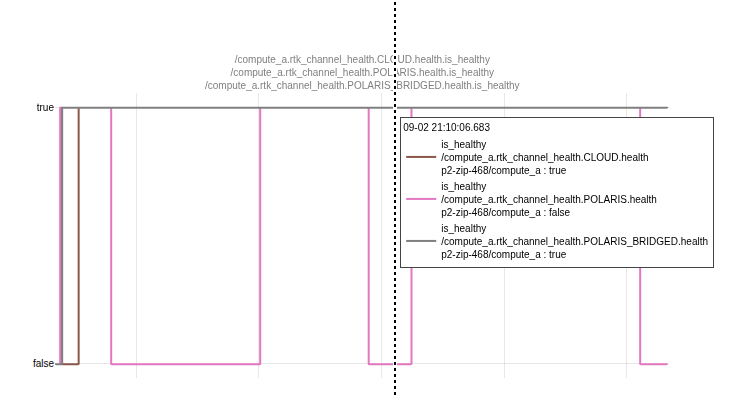
1. Wait 10 minutes and then resend the mission.
NOTE: If you cannot access the pages, you likely do not have AWS permissions. Contact UTM On Call.
- Test Sites: Integration Corrections Dashboard
- Commercial Operations Sites: Production Corrections Dashboard
Is there a site wide network/power outage?
- To check if site network is down, follow: Site Network Outage.
- To check if there is a power outage, follow: Site Power Outage.
Review the corrections dashboard: Are the Zipline RTK corrections stable for at least 30 mins?
- YES: The site may return to service.
- NO: Continue to the next step.
Resolution note
This plaintext block is ready to paste into the Resolution Note field on the ZERP issue you're working. The permalink below gives engineering review access to the full step-by-step timeline including any back-navigation; share it if the case needs a deeper look.
Permalink:
Session is too large to fit in a URL. Use Download session JSON to share the timeline out-of-band.
Did this guide help you get unblocked?
Open suggestions
There are no open suggestions.
Open pull requests
There are no open pull requests.