

Zipping Point Autodiscrepancy GENERAL GUIDE
Applicable alarms (12)
Likely outcomes — click to expand
Based on 0 missions where this alarm fired in the last
90 days
(for DROID_ERROR_AUTO_KIOSK) as of 2026-10-13
Aggregated from fleet operations and refreshed daily. Individual outcomes may vary by site and configuration.
Background
Section titled “Background”The process for troubleshooting discrepancies with zipping points differs from that for other assets. The zipping point does not have its own logs, and error codes are often generated by the droid, which means they often do not contain enough information to successfully root cause an issue without video logs. The following process is intended to reduce zipping point downtime and avoid unnecessary review of logs.
Using/Setting Up Baraza for Triaging Zipping Point
Section titled “Using/Setting Up Baraza for Triaging Zipping Point”- Go to https://baraza2.platform.flyzipline.com/ and click on “Missions and Flights”.
- Click on “Columns” on the left side of the screen, and make sure you have selected “Mission ID”, “Mission Start”, “Duration”, “Assets”, “Status”, and “Mission Root Errors”. Pin them all to the left side of the screen so that it looks like this:
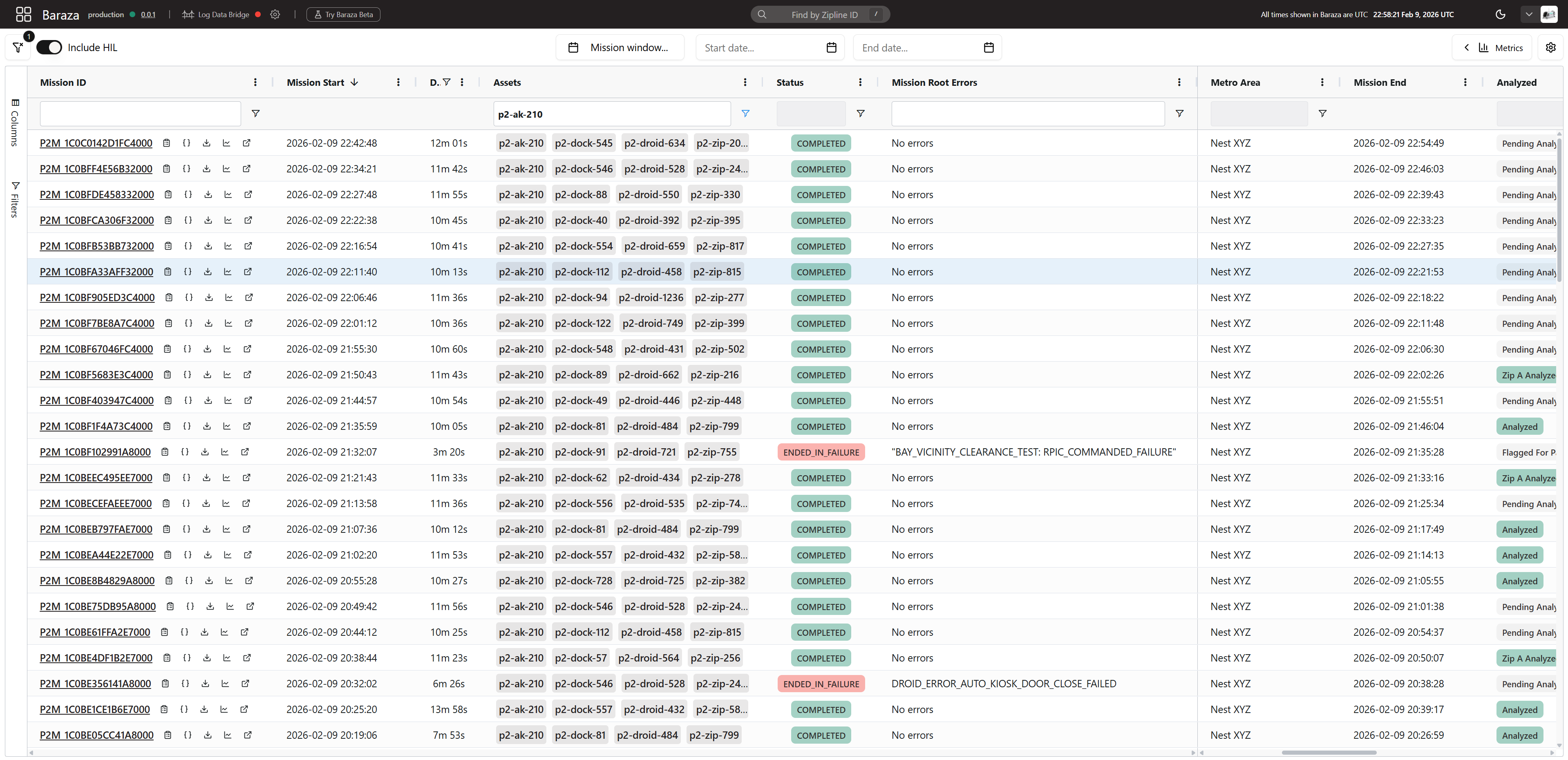
- Throughout the troubleshooting process, you will be using this menu to search for the past missions of the zipping point AND droid. Here are some things you may want to consider as you triage.
- Did the zipping point fail multiple missions in a row? Do they have the same error code/cause?
- Did the droid fail multiple missions in a row? Do they have the same error code/cause?
- Is the mission duration long enough that the droid ever reached the zipping point? (Ex. If a mission is 30s long, the zipping point cannot be at fault and should be cleared)
- Are the mission start times recent, or are there some failures from yesterday/several hours ago that are possibly unrelated to the issue being investigated.
NOTE: Sometimes, baraza will filter by a category that is not being displayed. Ensure you are only applying intentional filters by clicking the filter icon in the top left of the page.
Troubleshooting Steps
Section titled “Troubleshooting Steps”graph TD
open-discrepancy-and-note-error-codes{"<small><b>Step 1</b></small><br/>Question: Open the discrepancy and note the ass..."}
follow-v4-dlb-guide["<small><b>Step 2</b></small><br/>Action: Follow the winch_cutter_deployed_in_..."]
note-error-codes-non-auto-kiosk{"<small><b>Step 3</b></small><br/>Question: Note the error codes listed in Bara..."}
check-troubleshooting-guide-droid-failur["<small><b>Step 4</b></small><br/>Action: Check if the troubleshooting guide fo..."]
search-droid-in-baraza-pattern{"<small><b>Step 5</b></small><br/>Question: Open Barazahttps://baraza2.platfor..."}
create-discrepancy-against-droid-pattern["<small><b>Step 6</b></small><br/>Action: Create a discrepancy against the droi..."]
has-droid-failed-multiple-zp-missions{"<small><b>Step 7</b></small><br/>Question: ***Has the droid failed multiple ZIPP..."}
create-discrepancy-against-droid-zp-miss["<small><b>Step 8</b></small><br/>Action: Create a discrepancy against the droi..."]
are-droid-video-logs-available{"<small><b>Step 9</b></small><br/>Question: Are Droid video logs available?"}
watch-droid-center-camera-log{"<small><b>Step 10</b></small><br/>Question: Open the mission in baraza and watch ..."}
droid-stuck-assign-inspection["<small><b>Step 11</b></small><br/>Action: Assign the V4 Zipping Point: Perform..."]
was-any-obstruction-found-during-inspection{"<small><b>Step 12</b></small><br/>Question: Was any obstruction found during the ..."}
obstruction-found-remove-and-document["<small><b>Step 13</b></small><br/>Action: Remove the obstruction and document i..."]
obstruction-not-found-return-asset-to-service["<small><b>Step 14</b></small><br/>Action: Return the asset to service."]
droid-never-reached-zp-camera-dirty{"<small><b>Step 15</b></small><br/>Question: :::note **NOTE:** Weather conditions ..."}
return-service-clean-droid-brain-camera["<small><b>Step 16</b></small><br/>Action: Return the zipping point to service. ..."]
approach-fiducials-clearly-visible{"<small><b>Step 17</b></small><br/>Question: Are the approach fiducials clearly vi..."}
escalate-visible-fiducials-to-p2-nav{{"<small><b>Step 18</b></small><br/>Escalation: Escalate to P2 Nav On Call."}}
assign-retrofit-zp-matte-fiducial-stickers["<small><b>Step 19</b></small><br/>Action: Assign the 'Retrofit Zipping Point Ma..."]
lights-not-on-power-cycle["<small><b>Step 20</b></small><br/>Action: Assign the V4 Zipping Point: Perform..."]
did-all-lights-turn-on-during-console-field-test{"<small><b>Step 21</b></small><br/>Question: Did all lights turn on during the Con..."}
lights-console-test-yes-return-asset-to-service["<small><b>Step 22</b></small><br/>Action: Return the asset to service."]
lights-console-test-no-escalate-zipping-point{{"<small><b>Step 23</b></small><br/>Escalation: Escalate to Zipping Point On Call."}}
lid-did-not-open-check-shift{"<small><b>Step 24</b></small><br/>Question: Did the lid shift/move downward at al..."}
does-zp-have-lid-latch{"<small><b>Step 25</b></small><br/>Question: Does the zipping point have a lid lat..."}
assign-ad-hoc-lid-inspection["<small><b>Step 26</b></small><br/>Action: Assign an Ad-hoc lid inspection to de..."]
assign-retrofit-remove-lid-latch["<small><b>Step 27</b></small><br/>Action: Assign the work order 'Retrofit Zippi..."]
platform-did-not-lower-camera-dirty{"<small><b>Step 28</b></small><br/>Question: Is the camera dirty?"}
return-service-clean-droid-brain-camera-platform["<small><b>Step 29</b></small><br/>Action: Return the zipping point to service. ..."]
add-zp-platform-inspection["<small><b>Step 30</b></small><br/>Action: Assign the Perform Go/NoGo Testhtt..."]
did-platform-pass-inspection{"<small><b>Step 31</b></small><br/>Question: Did the platform pass inspection?"}
platform-inspection-yes-return-asset-to-service["<small><b>Step 32</b></small><br/>Action: Return the asset to service."]
platform-inspection-no-adjust-platform-forces["<small><b>Step 33</b></small><br/>Action: Assign the V4 Zipping Point: Adjust ..."]
something-else-escalate-zp-on-call{{"<small><b>Step 34</b></small><br/>Escalation: Communicate with Zipping Point On Cal..."}}
assign-standard-field-inspection-no-vide["<small><b>Step 35</b></small><br/>Action: Assign the V4 Zipping Point: Perform..."]
open-discrepancy-and-note-error-codes -->|Yes| follow-v4-dlb-guide
open-discrepancy-and-note-error-codes -->|No| note-error-codes-non-auto-kiosk
note-error-codes-non-auto-kiosk -->|Yes| check-troubleshooting-guide-droid-failur
note-error-codes-non-auto-kiosk -->|No| search-droid-in-baraza-pattern
check-troubleshooting-guide-droid-failur --> are-droid-video-logs-available
search-droid-in-baraza-pattern -->|Yes| create-discrepancy-against-droid-pattern
search-droid-in-baraza-pattern -->|No| has-droid-failed-multiple-zp-missions
has-droid-failed-multiple-zp-missions -->|Yes| create-discrepancy-against-droid-zp-miss
has-droid-failed-multiple-zp-missions -->|No| are-droid-video-logs-available
are-droid-video-logs-available -->|Yes| watch-droid-center-camera-log
are-droid-video-logs-available -->|No| assign-standard-field-inspection-no-vide
watch-droid-center-camera-log -->|Droid got stuck on the way ...| droid-stuck-assign-inspection
watch-droid-center-camera-log -->|Droid never reached zipping...| droid-never-reached-zp-camera-dirty
watch-droid-center-camera-log -->|Lights were not on| lights-not-on-power-cycle
watch-droid-center-camera-log -->|Lid did not open| lid-did-not-open-check-shift
watch-droid-center-camera-log -->|Platform did not lower| platform-did-not-lower-camera-dirty
watch-droid-center-camera-log -->|Something Else| something-else-escalate-zp-on-call
droid-stuck-assign-inspection --> was-any-obstruction-found-during-inspection
was-any-obstruction-found-during-inspection -->|Yes| obstruction-found-remove-and-document
was-any-obstruction-found-during-inspection -->|No| obstruction-not-found-return-asset-to-service
droid-never-reached-zp-camera-dirty -->|Yes| return-service-clean-droid-brain-camera
droid-never-reached-zp-camera-dirty -->|No| approach-fiducials-clearly-visible
approach-fiducials-clearly-visible -->|Yes| escalate-visible-fiducials-to-p2-nav
approach-fiducials-clearly-visible -->|No| assign-retrofit-zp-matte-fiducial-stickers
lights-not-on-power-cycle --> did-all-lights-turn-on-during-console-field-test
did-all-lights-turn-on-during-console-field-test -->|Yes| lights-console-test-yes-return-asset-to-service
did-all-lights-turn-on-during-console-field-test -->|No| lights-console-test-no-escalate-zipping-point
lid-did-not-open-check-shift -->|Yes| assign-ad-hoc-lid-inspection
lid-did-not-open-check-shift -->|No| does-zp-have-lid-latch
does-zp-have-lid-latch -->|Yes| assign-retrofit-remove-lid-latch
does-zp-have-lid-latch -->|No| assign-ad-hoc-lid-inspection
platform-did-not-lower-camera-dirty -->|Yes| return-service-clean-droid-brain-camera-platform
platform-did-not-lower-camera-dirty -->|No| add-zp-platform-inspection
add-zp-platform-inspection --> did-platform-pass-inspection
did-platform-pass-inspection -->|Yes| platform-inspection-yes-return-asset-to-service
did-platform-pass-inspection -->|No| platform-inspection-no-adjust-platform-forces
style open-discrepancy-and-note-error-codes fill:#dbeafe,stroke:#3b82f6,color:#1e3a5f
style follow-v4-dlb-guide fill:#dcfce7,stroke:#22c55e,color:#14532d
style note-error-codes-non-auto-kiosk fill:#dbeafe,stroke:#3b82f6,color:#1e3a5f
style check-troubleshooting-guide-droid-failur fill:#dcfce7,stroke:#22c55e,color:#14532d
style search-droid-in-baraza-pattern fill:#dbeafe,stroke:#3b82f6,color:#1e3a5f
style create-discrepancy-against-droid-pattern fill:#dcfce7,stroke:#22c55e,color:#14532d
style has-droid-failed-multiple-zp-missions fill:#dbeafe,stroke:#3b82f6,color:#1e3a5f
style create-discrepancy-against-droid-zp-miss fill:#dcfce7,stroke:#22c55e,color:#14532d
style are-droid-video-logs-available fill:#dbeafe,stroke:#3b82f6,color:#1e3a5f
style watch-droid-center-camera-log fill:#dbeafe,stroke:#3b82f6,color:#1e3a5f
style droid-stuck-assign-inspection fill:#dcfce7,stroke:#22c55e,color:#14532d
style was-any-obstruction-found-during-inspection fill:#dbeafe,stroke:#3b82f6,color:#1e3a5f
style obstruction-found-remove-and-document fill:#dcfce7,stroke:#22c55e,color:#14532d
style obstruction-not-found-return-asset-to-service fill:#dcfce7,stroke:#22c55e,color:#14532d
style droid-never-reached-zp-camera-dirty fill:#dbeafe,stroke:#3b82f6,color:#1e3a5f
style return-service-clean-droid-brain-camera fill:#dcfce7,stroke:#22c55e,color:#14532d
style approach-fiducials-clearly-visible fill:#dbeafe,stroke:#3b82f6,color:#1e3a5f
style escalate-visible-fiducials-to-p2-nav fill:#fef3c7,stroke:#f59e0b,color:#78350f
style assign-retrofit-zp-matte-fiducial-stickers fill:#dcfce7,stroke:#22c55e,color:#14532d
style lights-not-on-power-cycle fill:#dcfce7,stroke:#22c55e,color:#14532d
style did-all-lights-turn-on-during-console-field-test fill:#dbeafe,stroke:#3b82f6,color:#1e3a5f
style lights-console-test-yes-return-asset-to-service fill:#dcfce7,stroke:#22c55e,color:#14532d
style lights-console-test-no-escalate-zipping-point fill:#fef3c7,stroke:#f59e0b,color:#78350f
style lid-did-not-open-check-shift fill:#dbeafe,stroke:#3b82f6,color:#1e3a5f
style does-zp-have-lid-latch fill:#dbeafe,stroke:#3b82f6,color:#1e3a5f
style assign-ad-hoc-lid-inspection fill:#dcfce7,stroke:#22c55e,color:#14532d
style assign-retrofit-remove-lid-latch fill:#dcfce7,stroke:#22c55e,color:#14532d
style platform-did-not-lower-camera-dirty fill:#dbeafe,stroke:#3b82f6,color:#1e3a5f
style return-service-clean-droid-brain-camera-platform fill:#dcfce7,stroke:#22c55e,color:#14532d
style add-zp-platform-inspection fill:#dcfce7,stroke:#22c55e,color:#14532d
style did-platform-pass-inspection fill:#dbeafe,stroke:#3b82f6,color:#1e3a5f
style platform-inspection-yes-return-asset-to-service fill:#dcfce7,stroke:#22c55e,color:#14532d
style platform-inspection-no-adjust-platform-forces fill:#dcfce7,stroke:#22c55e,color:#14532d
style something-else-escalate-zp-on-call fill:#fef3c7,stroke:#f59e0b,color:#78350f
style assign-standard-field-inspection-no-vide fill:#dcfce7,stroke:#22c55e,color:#14532d Hover or focus a block to preview it. Select the block to keep the preview open.
If it is clear that the droid was causing the zipping point to fail, you may return the zipping point to service at your discretion.
(Compare the "Assets", "Status", and "Mission Root Errors" columns in Baraza)
Example of a droid that hasn't failed all missions, but keeps failing specifically zipping point missions:
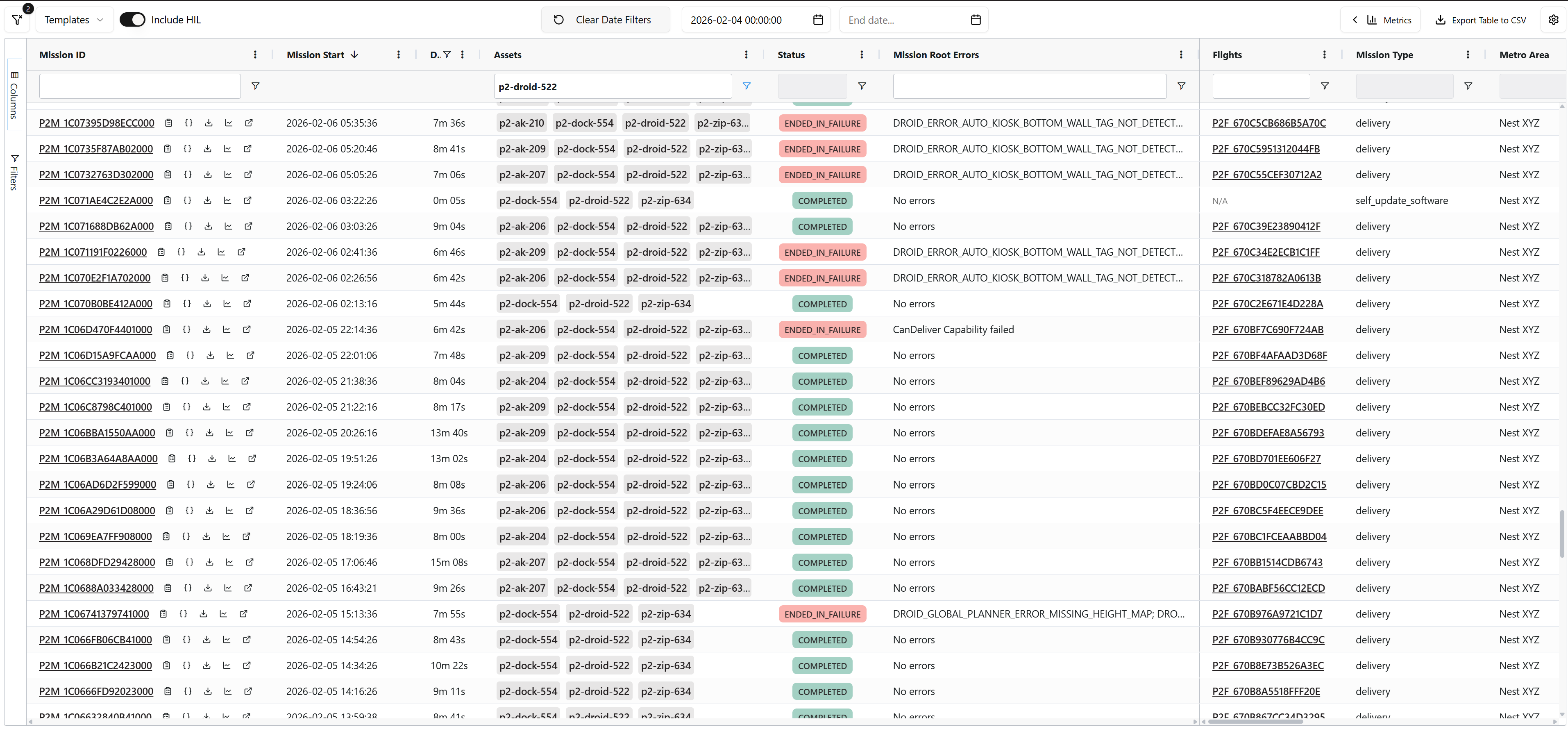
If it is clear that the droid was causing the zipping point to fail, you may return the zipping point to service at your discretion.
Is the camera dirty?
@Mark Avila to document the issue and solution.1. Ask the onsite rangers to perform an inspection and return the zipping point to service if it passes.
NOTE: Onsite rangers at NestZ can be contacted using the
@zrangers tag, while onsite rangers in Dallas can be contacted using the @dfw-zp-rangers tag.2. You are essentially in a race with the rangers to get the asset back up and running. Continually monitor the incident channel for a notification indicating video logs have been offloaded. If you are able to resolve it with guides/logs before they reach it, let them know so that they don't waste their time.
Resolution note
This plaintext block is ready to paste into the Resolution Note field on the ZERP issue you're working. The permalink below gives engineering review access to the full step-by-step timeline including any back-navigation; share it if the case needs a deeper look.
Permalink:
Session is too large to fit in a URL. Use Download session JSON to share the timeline out-of-band.
Did this guide help you get unblocked?
Open suggestions
There are no open suggestions.
Open pull requests
There are no open pull requests.