

Portal Showing "No Docked Zip"
Background
Section titled “Background”On FleetWrangler’s Dock page, an Aircraft will appear buddied with the Dock but the portal will show “No Docked Zip” even though the Aircraft is currently occupying by a Dock and no other issue is found on Dock, Aircraft, and Droid.
| Example detailed status with no failures | Example detailed status with failures |
|---|---|
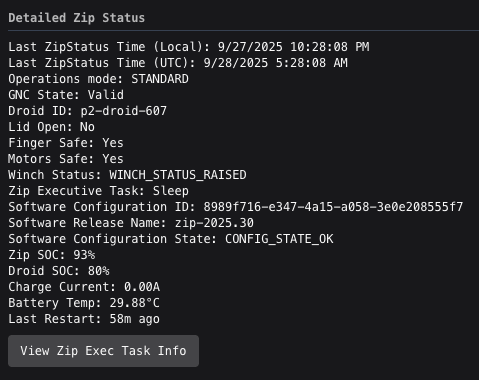 |
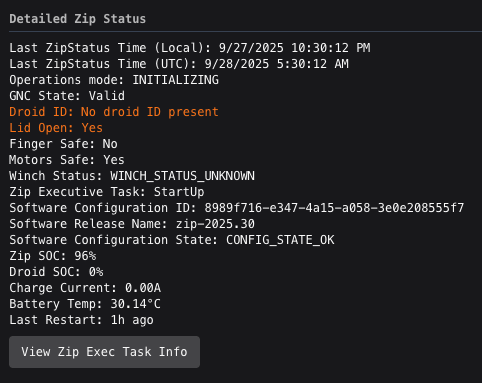 |
Troubleshooting Steps
Section titled “Troubleshooting Steps”graph TD
is-the-aircraft-online-in-fleetwrangler{"<small><b>Step 1</b></small><br/>Question: Is the Aircraft online in FleetWrangler?"}
ssh-into-compute-a-via-the-dock-ssh-int{"<small><b>Step 2</b></small><br/>Question: SSH into compute_a via the Dock SSH..."}
this-indicates-that-the-aircraft-is-off["<small><b>Step 3</b></small><br/>Action: This indicates that the Aircraft is o..."]
this-indicate-that-compute-a-has-crashe["<small><b>Step 4</b></small><br/>Action: This indicate that compute_a has cras..."]
does-the-aircraft-detailed-status-show{"<small><b>Step 5</b></small><br/>Question: Does the Aircraft detailed status sho..."}
check-the-zip-exec-under-view-zip-exec{"<small><b>Step 6</b></small><br/>Question: Check the Zip exec under 'View Zip Ex..."}
check-if-the-droid-is-in-the-aircraft-i{"<small><b>Step 7</b></small><br/>Question: If related to the Droid, check if the..."}
power-cycle-the-droid-power-cycle-droid["<small><b>Step 8</b></small><br/>Action: Power cycle the Droid Power Cycle D..."]
is-the-issue-resolved{"<small><b>Step 9</b></small><br/>Question: Is the issue resolved?"}
escalate-to-p2-droid-autonomy-on-call{{"<small><b>Step 10</b></small><br/>Escalation: Escalate to P2 Droid Autonomy On Call."}}
perform-a-maintenance-raise-droid-maint["<small><b>Step 11</b></small><br/>Action: Perform a maintenance raise Droid M..."]
is-the-aircraft-reporting-any-other-fai{"<small><b>Step 12</b></small><br/>Question: Is the Aircraft reporting any other f..."}
follow-the-troubleshooting-guide-for-th("<small><b>Step 13</b></small><br/>Reference: Follow the troubleshooting guide for ...")
check-the-dock-status-is-there-an-alarm{"<small><b>Step 14</b></small><br/>Question: Check the Dock status. Is there an al..."}
follow-the-troubleshooting-guide-for-do("<small><b>Step 15</b></small><br/>Reference: Follow the troubleshooting guide for ...")
power-cycle-the-aircraft-power-cycle-ai["<small><b>Step 16</b></small><br/>Action: Power cycle the Aircraft Power Cycl..."]
does-the-aircraft-now-appear-docked-in{"<small><b>Step 17</b></small><br/>Question: Does the Aircraft now appear docked i..."}
the-discrepancy-may-be-closed["<small><b>Step 18</b></small><br/>Action: The Discrepancy may be closed."]
escalate-to-p2-application-software-tri{{"<small><b>Step 19</b></small><br/>Escalation: Escalate to P2 Application Software T..."}}
is-the-aircraft-online-in-fleetwrangler -->|Yes| does-the-aircraft-detailed-status-show
is-the-aircraft-online-in-fleetwrangler -->|No| ssh-into-compute-a-via-the-dock-ssh-int
ssh-into-compute-a-via-the-dock-ssh-int -->|Yes| this-indicates-that-the-aircraft-is-off
ssh-into-compute-a-via-the-dock-ssh-int -->|No| this-indicate-that-compute-a-has-crashe
does-the-aircraft-detailed-status-show -->|Yes| check-the-zip-exec-under-view-zip-exec
does-the-aircraft-detailed-status-show -->|No| is-the-aircraft-reporting-any-other-fai
check-the-zip-exec-under-view-zip-exec -->|If related to the Aircraft| is-the-aircraft-reporting-any-other-fai
check-the-zip-exec-under-view-zip-exec -->|If related to the Droid| check-if-the-droid-is-in-the-aircraft-i
check-if-the-droid-is-in-the-aircraft-i -->|Droid is raised Winch Stat...| power-cycle-the-droid-power-cycle-droid
check-if-the-droid-is-in-the-aircraft-i -->|Droid is lowered or unknown...| perform-a-maintenance-raise-droid-maint
power-cycle-the-droid-power-cycle-droid --> is-the-issue-resolved
is-the-issue-resolved -->|YES| is-the-aircraft-reporting-any-other-fai
is-the-issue-resolved -->|NO| escalate-to-p2-droid-autonomy-on-call
perform-a-maintenance-raise-droid-maint --> is-the-aircraft-reporting-any-other-fai
is-the-aircraft-reporting-any-other-fai -->|Yes| follow-the-troubleshooting-guide-for-th
is-the-aircraft-reporting-any-other-fai -->|No| check-the-dock-status-is-there-an-alarm
check-the-dock-status-is-there-an-alarm -->|Yes| follow-the-troubleshooting-guide-for-do
check-the-dock-status-is-there-an-alarm -->|No| power-cycle-the-aircraft-power-cycle-ai
power-cycle-the-aircraft-power-cycle-ai --> does-the-aircraft-now-appear-docked-in
does-the-aircraft-now-appear-docked-in -->|Yes| the-discrepancy-may-be-closed
does-the-aircraft-now-appear-docked-in -->|No| escalate-to-p2-application-software-tri
style is-the-aircraft-online-in-fleetwrangler fill:#dbeafe,stroke:#3b82f6,color:#1e3a5f
style ssh-into-compute-a-via-the-dock-ssh-int fill:#dbeafe,stroke:#3b82f6,color:#1e3a5f
style this-indicates-that-the-aircraft-is-off fill:#dcfce7,stroke:#22c55e,color:#14532d
style this-indicate-that-compute-a-has-crashe fill:#dcfce7,stroke:#22c55e,color:#14532d
style does-the-aircraft-detailed-status-show fill:#dbeafe,stroke:#3b82f6,color:#1e3a5f
style check-the-zip-exec-under-view-zip-exec fill:#dbeafe,stroke:#3b82f6,color:#1e3a5f
style check-if-the-droid-is-in-the-aircraft-i fill:#dbeafe,stroke:#3b82f6,color:#1e3a5f
style power-cycle-the-droid-power-cycle-droid fill:#dcfce7,stroke:#22c55e,color:#14532d
style is-the-issue-resolved fill:#dbeafe,stroke:#3b82f6,color:#1e3a5f
style escalate-to-p2-droid-autonomy-on-call fill:#fef3c7,stroke:#f59e0b,color:#78350f
style perform-a-maintenance-raise-droid-maint fill:#dcfce7,stroke:#22c55e,color:#14532d
style is-the-aircraft-reporting-any-other-fai fill:#dbeafe,stroke:#3b82f6,color:#1e3a5f
style follow-the-troubleshooting-guide-for-th fill:#f3e8ff,stroke:#a855f7,color:#581c87
style check-the-dock-status-is-there-an-alarm fill:#dbeafe,stroke:#3b82f6,color:#1e3a5f
style follow-the-troubleshooting-guide-for-do fill:#f3e8ff,stroke:#a855f7,color:#581c87
style power-cycle-the-aircraft-power-cycle-ai fill:#dcfce7,stroke:#22c55e,color:#14532d
style does-the-aircraft-now-appear-docked-in fill:#dbeafe,stroke:#3b82f6,color:#1e3a5f
style the-discrepancy-may-be-closed fill:#dcfce7,stroke:#22c55e,color:#14532d
style escalate-to-p2-application-software-tri fill:#fef3c7,stroke:#f59e0b,color:#78350f Hover or focus a block to preview it. Select the block to keep the preview open.
Follow this guide to bring it back online Asset Offline Due To Comms/Provisioning Agent Error.
1. SSH into compute_b via the Dock (SSH into Compute A/B).
2. Power OFF the Aircraft. For steps, see UMM: Power Off Zip Using the Dock
3. Power ON the Aircraft. For steps, see Power ON Aircraft.
Select the matching condition:
Winch Status: WINCH_STATUS_RAISED?Resolution note
This plaintext block is ready to paste into the Resolution Note field on the ZERP issue you're working. The permalink below gives engineering review access to the full step-by-step timeline including any back-navigation; share it if the case needs a deeper look.
Permalink:
Session is too large to fit in a URL. Use Download session JSON to share the timeline out-of-band.
Did this guide help you get unblocked?
Open suggestions
There are no open suggestions.
Open pull requests
There are no open pull requests.