

Mixed Motor Temperature Unavailable
Applicable alarms (1)
Likely outcomes — click to expand
Based on 851,825 missions where this alarm fired in the last 90 days as of 2026-10-13
Grounding vs discrepancy (of 4,498 ZERP issues filed on these missions)
Top work orders
- EV2: Inspect Aircraft after Droid Left Behind (DLB) · MAINTENANCE_ACTION 233
- EV3: Inspect Aircraft after Droid Left Behind (DLB) · MAINTENANCE_ACTION 214
- Inspect Droid after Droid Left Behind (DLB) · MAINTENANCE_ACTION 185
- Reset Droid after DLB · REPAIR 117
- EV2: Replace Aft Motor Assembly on Aircraft · MAINTENANCE_ACTION 90
Frequently replaced parts
| Part | P/N | Removals |
|---|---|---|
| SERVO, ASSY, UNIVERSAL, P2 | 20398 | 983 |
| CCW HOVER MOTOR ASSY, EV3 ZIP, P2 | 19607 | 811 |
| ASSY, SPOOL AND LINE, DOCKING FIN, AIRCRAFT, P2 | 48477 | 779 |
| AFT MOTOR ASSY, ZIP, P2 | 23548 | 714 |
| PRE-PREG TAIL ASSY STBD(RH), ZIP, P2 | 21840 | 624 |
Aggregated from fleet operations and refreshed daily. Individual outcomes may vary by site and configuration.
Background
Section titled “Background”This alarm occurs when Zip Exec has not received a temperature status message reported by the mixed motor within the watchdog timeout. This usually occurs if a motor service is crashing, running at too slow of a rate, or publishing too infrequently.
This alarm could indicate a hardware issue. This alarm can also be caused by compute performance issues and IPC issues (these cases often see multiple watchdog alarms). If the alarm occurs during preflight once we attempt motor checks, or in flight, follow the troubleshooting steps below.
Exec watchdog alarm
Section titled “Exec watchdog alarm”- MOTOR_TEMP_MIXED_UNAVAILABLE
Troubleshooting Steps
Section titled “Troubleshooting Steps”graph TD
check-mixed-motor-not-in-main-boot-role-alarm{"<small><b>Step 1</b></small><br/>Question: Check in Baraza and confirm if error ..."}
follow-mixed-motor-not-in-main-boot-role-guide["<small><b>Step 2</b></small><br/>Action: Follow **ZIP_EXECUTIVE_V4_MIXED_MOTO..."]
load-failed-mission-into-mixed-motor-boot-failure["<small><b>Step 3</b></small><br/>Telemetry: Load the failed mission into the **Mi..."]
review-mixed-motor-boot-failure-plot{"<small><b>Step 4</b></small><br/>Question: Review /mixed.feedback.received_comm..."}
mixed-motor-failed-to-boot["<small><b>Step 5</b></small><br/>Action: **Mixed motor failed to boot into MA..."]
power-cycle-and-run-health-check{"<small><b>Step 6</b></small><br/>Question: Power cycle the Aircrafthttps://do..."}
return-aircraft-to-service["<small><b>Step 7</b></small><br/>Action: Return the Aircraft to service."]
escalate-firmware-motors-after-health-check{{"<small><b>Step 8</b></small><br/>Escalation: Escalate to P2 Firmware Motors On Call."}}
check-active-alarms-first-occurrence{"<small><b>Step 9</b></small><br/>Question: Is there any other **Active Alarms** ..."}
follow-first-active-alarm-guide["<small><b>Step 10</b></small><br/>Action: Follow the guide for that alarm to re..."]
escalate-firmware-motors-no-first-alarm{{"<small><b>Step 11</b></small><br/>Escalation: Escalate to P2 Firmware Motors On Call."}}
check-mixed-motor-not-in-main-boot-role-alarm -->|Yes| follow-mixed-motor-not-in-main-boot-role-guide
check-mixed-motor-not-in-main-boot-role-alarm -->|No| load-failed-mission-into-mixed-motor-boot-failure
load-failed-mission-into-mixed-motor-boot-failure --> review-mixed-motor-boot-failure-plot
review-mixed-motor-boot-failure-plot -->|Yes| mixed-motor-failed-to-boot
review-mixed-motor-boot-failure-plot -->|No| check-active-alarms-first-occurrence
mixed-motor-failed-to-boot --> power-cycle-and-run-health-check
power-cycle-and-run-health-check -->|Yes| return-aircraft-to-service
power-cycle-and-run-health-check -->|No| escalate-firmware-motors-after-health-check
check-active-alarms-first-occurrence -->|Yes| follow-first-active-alarm-guide
check-active-alarms-first-occurrence -->|No| escalate-firmware-motors-no-first-alarm
style check-mixed-motor-not-in-main-boot-role-alarm fill:#dbeafe,stroke:#3b82f6,color:#1e3a5f
style follow-mixed-motor-not-in-main-boot-role-guide fill:#dcfce7,stroke:#22c55e,color:#14532d
style review-mixed-motor-boot-failure-plot fill:#dbeafe,stroke:#3b82f6,color:#1e3a5f
style mixed-motor-failed-to-boot fill:#dcfce7,stroke:#22c55e,color:#14532d
style power-cycle-and-run-health-check fill:#dbeafe,stroke:#3b82f6,color:#1e3a5f
style return-aircraft-to-service fill:#dcfce7,stroke:#22c55e,color:#14532d
style escalate-firmware-motors-after-health-check fill:#fef3c7,stroke:#f59e0b,color:#78350f
style check-active-alarms-first-occurrence fill:#dbeafe,stroke:#3b82f6,color:#1e3a5f
style follow-first-active-alarm-guide fill:#dcfce7,stroke:#22c55e,color:#14532d
style escalate-firmware-motors-no-first-alarm fill:#fef3c7,stroke:#f59e0b,color:#78350f Hover or focus a block to preview it. Select the block to keep the preview open.
ZIP_EXECUTIVE_V4_MIXED_MOTOR_NOT_IN_MAIN_BOOT_ROLE is in the error graph./mixed.feedback.received_command_sequence_number, and check whether the plot is empty and /mixed_motor.identity.boot_role is set to BOOT.Refer to the image below.
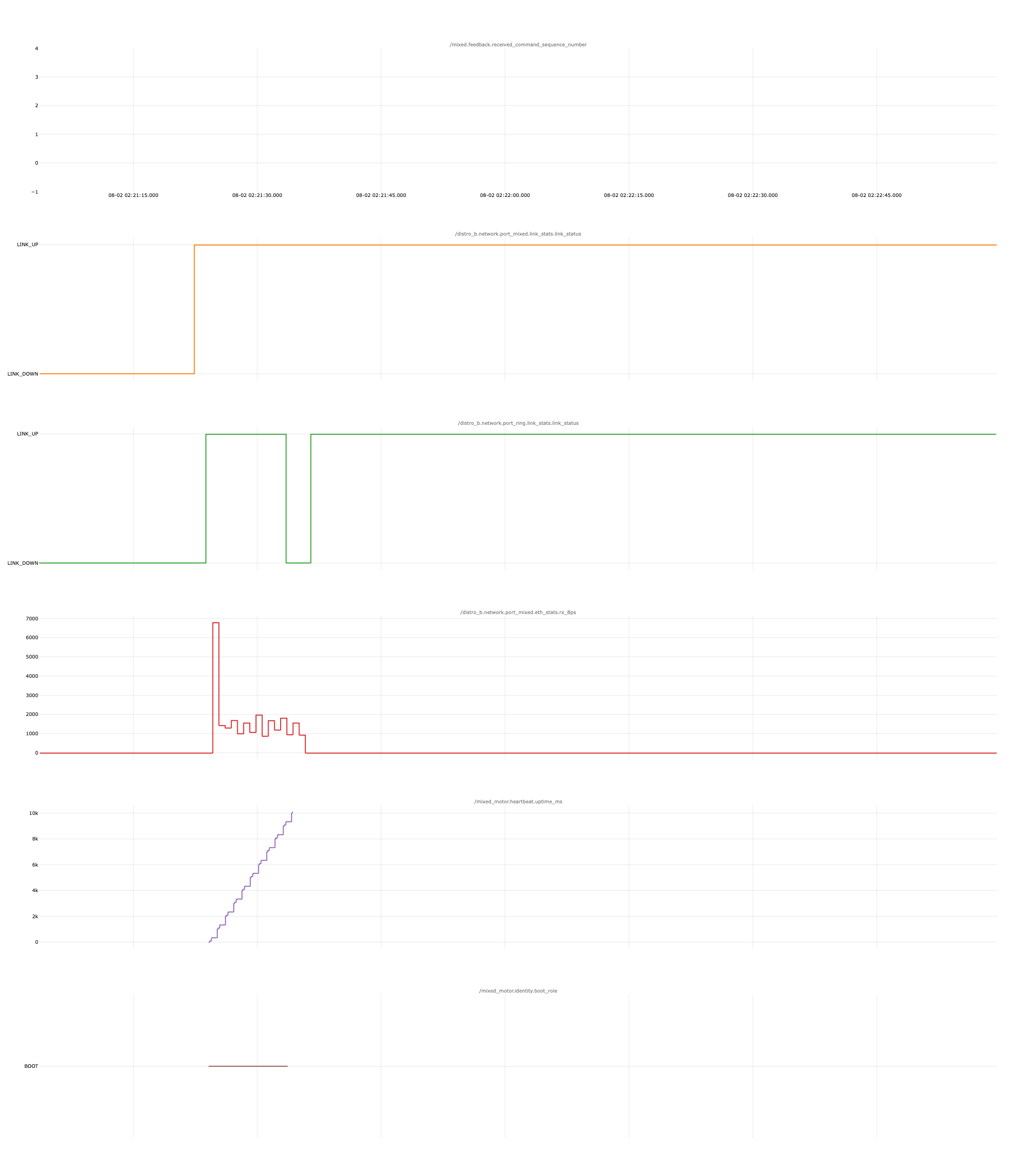
Is the plot empty and is
/mixed_motor.identity.boot_role set to BOOT?MAIN from BOOT.Resolution note
This plaintext block is ready to paste into the Resolution Note field on the ZERP issue you're working. The permalink below gives engineering review access to the full step-by-step timeline including any back-navigation; share it if the case needs a deeper look.
Permalink:
Session is too large to fit in a URL. Use Download session JSON to share the timeline out-of-band.
Did this guide help you get unblocked?
Open suggestions
There are no open suggestions.
Open pull requests
There are no open pull requests.