

Bay Vicinity Image not Visible in Fleet Apps
Background
Section titled “Background”Preflight bay vicinity check images do not populate in Fleet Control/Assist applications leading to mission failure during preflight.
Images are uploaded from the aircraft to S3 by the Blob Agent service via the aircraft cellular network. If the cellular network bandwidth is insufficient, the image upload may fail. When a Fleet Assist or Aircraft Operator cannot see the Bay Vicinity image during preflight, they cannot determine if the bay vicinity is clear of hazards, and fail the preflight check.
The Bay Vicinity Clearance preflight check (IBIT) has an overall timeout duration of 180 seconds. When the operator fails the preflight check the aircraft will retry the check by taking a new image of the Bay Vicinity with the Droid center (mono) camera and uploading the new image to the cloud for the operator.
Troubleshooting Steps
Section titled “Troubleshooting Steps”graph TD
did-the-bay-vicinity-check-image-upload{"<small><b>Step 1</b></small><br/>Question: Did the bay vicinity check image uplo..."}
was-the-image-uploaded-to-s3["<small><b>Step 2</b></small><br/>Action: Was the image uploaded to S3? 1. Use ..."]
if-this-issue-has-occurred-previously-o["<small><b>Step 3</b></small><br/>Action: If this issue has occurred previously..."]
was-the-issue-issue-resolved-with-a-res{"<small><b>Step 4</b></small><br/>Question: Was the issue issue resolved with a r..."}
the-aircraft-may-return-to-service-cont["<small><b>Step 5</b></small><br/>Action: The Aircraft may return to service. C..."]
escalate-to-asw-fleet-and-delivery-onca{{"<small><b>Step 6</b></small><br/>Escalation: Escalate to ASW Fleet & Delivery On C..."}}
did-the-bay-vicinity-check-image-upload -->|Yes| if-this-issue-has-occurred-previously-o
did-the-bay-vicinity-check-image-upload -->|No| was-the-image-uploaded-to-s3
was-the-image-uploaded-to-s3 --> if-this-issue-has-occurred-previously-o
if-this-issue-has-occurred-previously-o --> was-the-issue-issue-resolved-with-a-res
was-the-issue-issue-resolved-with-a-res -->|Yes| the-aircraft-may-return-to-service-cont
was-the-issue-issue-resolved-with-a-res -->|No| escalate-to-asw-fleet-and-delivery-onca
style did-the-bay-vicinity-check-image-upload fill:#dbeafe,stroke:#3b82f6,color:#1e3a5f
style was-the-image-uploaded-to-s3 fill:#dcfce7,stroke:#22c55e,color:#14532d
style if-this-issue-has-occurred-previously-o fill:#dcfce7,stroke:#22c55e,color:#14532d
style was-the-issue-issue-resolved-with-a-res fill:#dbeafe,stroke:#3b82f6,color:#1e3a5f
style the-aircraft-may-return-to-service-cont fill:#dcfce7,stroke:#22c55e,color:#14532d
style escalate-to-asw-fleet-and-delivery-onca fill:#fef3c7,stroke:#f59e0b,color:#78350f Hover or focus a block to preview it. Select the block to keep the preview open.
Wait for the Compute A ZML logs to upload for the mission. Use the bay vicinity ZipVis template to determine if the Blob agent failed to upload the request. This will be indicated by an error message in the Compute A, Blob agent service journal logs. You will see an error like
2026-01-18T03:00:32.403812Z ERROR blob_agent::handlers::upload_handler: Failed priority upload for operation_id: 41b7aea3-81ae-4fe4-bfa3-bb0c7e469a4c error: error sending request for url (https://zipline-p2-images-production.s3.amazonaws.com/image/p2-zip-675/41b7aea3-81ae-4fe4-bfa3-bb0c7e469a4c?AWSAccessKeyId=access_key)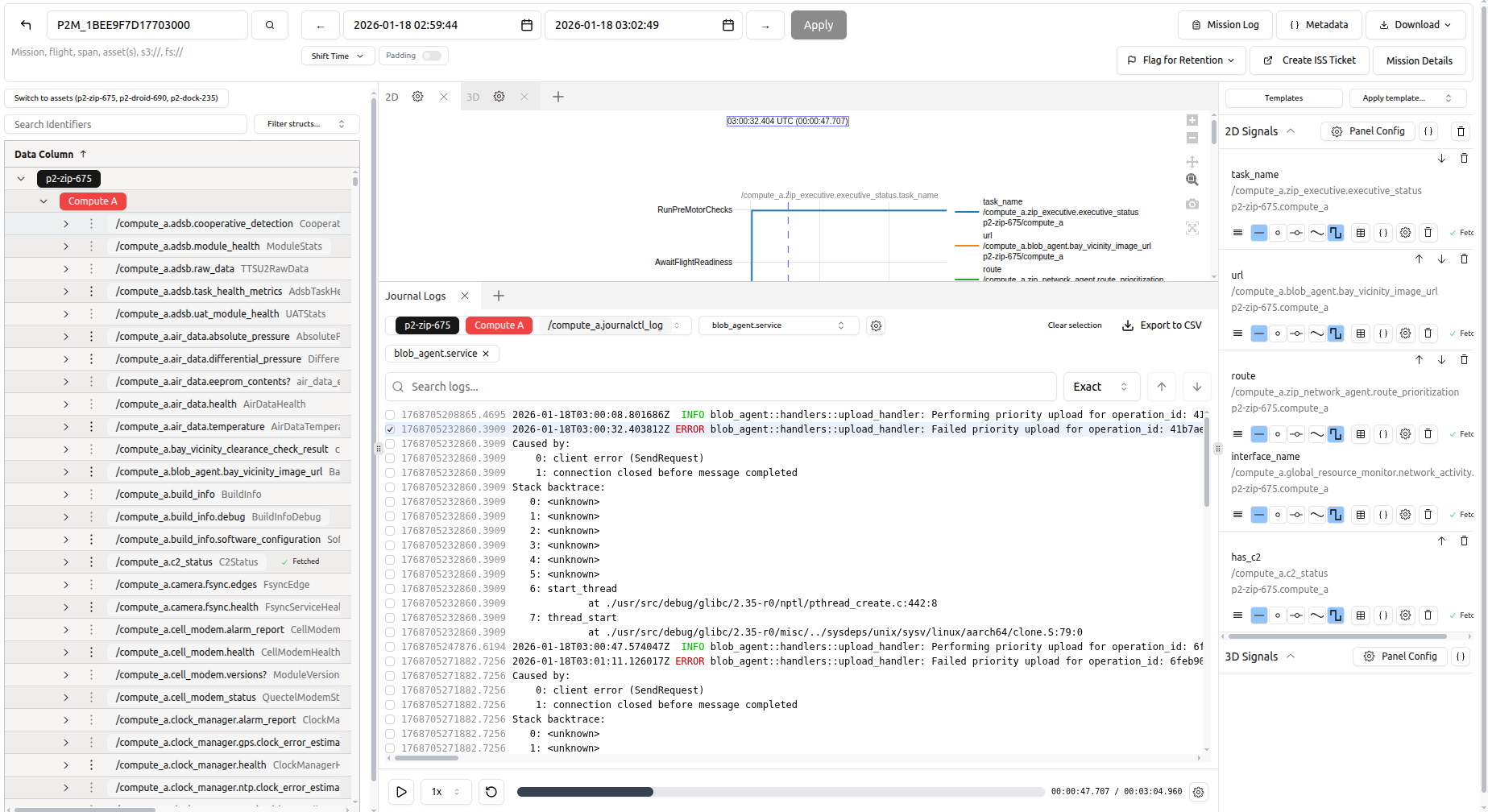
1. Use the bay vicinity ZipVis template to find the S3 URI for the image file via this template
2. Grab the image file S3 URI from the
/compute_a.blob_agent.bay_vicinity_image_url.url, for example s3://zipline-p2-images-production/image/p2-zip-622/0d88de04-aeb4-49f3-9602-55308dba2d403. use the filter to find the relevant identifier.

4. Click on
view entries.
5. Use the subfields pop up to copy the url.

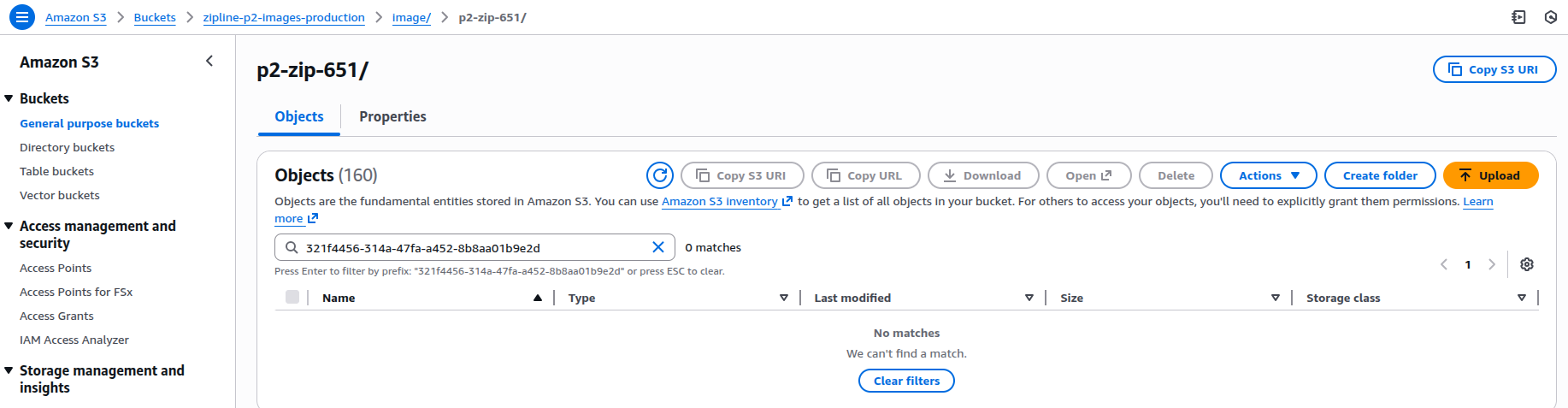
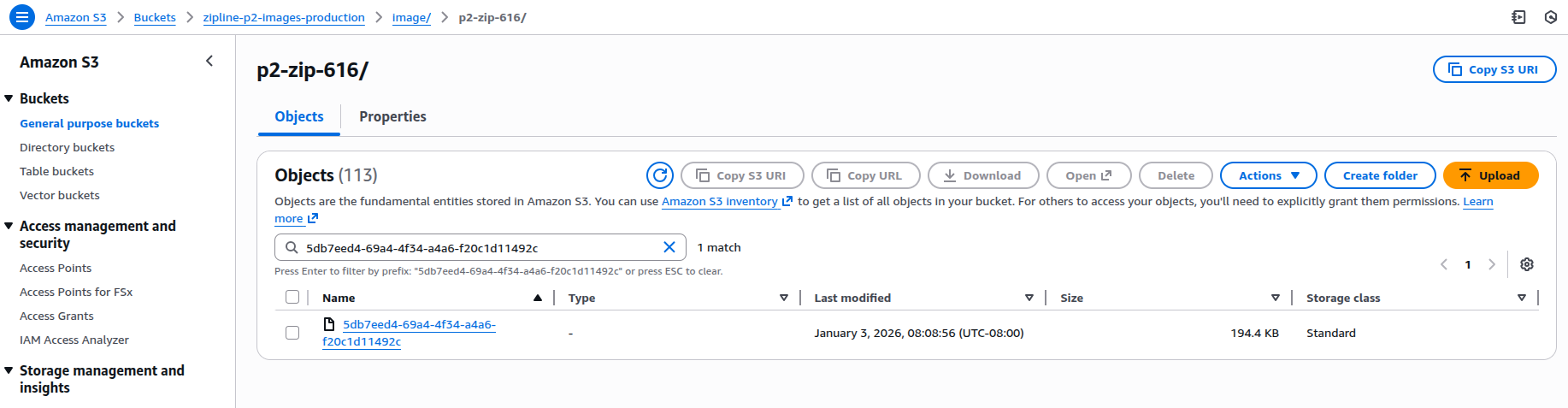
6. Navigate to the appropriate S3 prefix and check if the file exists.
- Example where the image does not exist, note the message "No matches We can't find a match"
- Example where the image does exist.
Resolution note
This plaintext block is ready to paste into the Resolution Note field on the ZERP issue you're working. The permalink below gives engineering review access to the full step-by-step timeline including any back-navigation; share it if the case needs a deeper look.
Permalink:
Session is too large to fit in a URL. Use Download session JSON to share the timeline out-of-band.
Did this guide help you get unblocked?
Open suggestions
There are no open suggestions.
Open pull requests
There are no open pull requests.