

Cell Modem Connection Troubleshooting
Applicable alarms (1)
Likely outcomes — click to expand
Based on 11,499 missions where this alarm fired in the last 90 days as of 2026-10-13
Grounding vs discrepancy (of 121 ZERP issues filed on these missions)
Top work orders
- EV3: Inspect Aircraft after Droid Left Behind (DLB) · MAINTENANCE_ACTION 19
Frequently replaced parts
| Part | P/N | Removals |
|---|---|---|
| ASSY, SPOOL AND LINE, DOCKING FIN, AIRCRAFT, P2 | 48477 | 61 |
| PREPPED HOVER HARNESSING, STBD, ZIP, P2 | 0117583 | 32 |
| SERVO, ASSY, UNIVERSAL, P2 | 20398 | 23 |
| T800 CW HOVER PROPELLER, ZIP, P2 | 31101 | 20 |
| CCW HOVER PROPELLER BLADE, ZIP, P2 | 29857 | 20 |
Frequently co-occurring alarms (% of the 11,499 missions above)
Aggregated from fleet operations and refreshed daily. Individual outcomes may vary by site and configuration.
Primer
Section titled “Primer”Each Aircraft has two cell modems (one on Compute A, one on Compute B). The Compute A modem is connected to AT&T, and Compute B is connected to T-Mobile.
Each Dock has a single cell modem, nominally connected to AT&T.
Confirming which carrier is in use
The carrier is logged in the cell_modem_status message.

Troubleshooting Steps
Section titled “Troubleshooting Steps”graph TD
is-cell-sim-unplugged-asserted{"<small><b>Step 1</b></small><br/>Question: For an Aircraft cell modem, is CELL_..."}
follow-cell-sim-unplugged-guide["<small><b>Step 2</b></small><br/>Action: Resolve CELL_SIM_UNPLUGGED using C..."]
confirm-cell-modem-status-data["<small><b>Step 3</b></small><br/>Action: **Why isn't a Cell Modem Connected?**..."]
check-cell-modem-connection-state{"<small><b>Step 4</b></small><br/>Question: **Connection state**: Was the cell mo..."}
modem-stuck-in-searching-state["<small><b>Step 5</b></small><br/>Action: If the modem is stuck in this state, ..."]
modem-stuck-in-connected-not-registered["<small><b>Step 6</b></small><br/>Action: The modem may enter this state briefl..."]
connected-cell-network-continue["<small><b>Step 7</b></small><br/>Action: The modem is connected to the cell ne..."]
review-cell-modem-connection-quality["<small><b>Step 8</b></small><br/>Action: **Connection Quality**: Now that it i..."]
is-cell-sim-unplugged-asserted -->|Yes| follow-cell-sim-unplugged-guide
is-cell-sim-unplugged-asserted -->|No / troubleshooting a Dock| confirm-cell-modem-status-data
follow-cell-sim-unplugged-guide --> confirm-cell-modem-status-data
confirm-cell-modem-status-data --> check-cell-modem-connection-state
check-cell-modem-connection-state -->|SEARCHING| modem-stuck-in-searching-state
check-cell-modem-connection-state -->|CONNECTED_NOT_REGISTERED| modem-stuck-in-connected-not-registered
check-cell-modem-connection-state -->|CONNECTED| connected-cell-network-continue
connected-cell-network-continue --> review-cell-modem-connection-quality
style is-cell-sim-unplugged-asserted fill:#dbeafe,stroke:#3b82f6,color:#1e3a5f
style follow-cell-sim-unplugged-guide fill:#dcfce7,stroke:#22c55e,color:#14532d
style confirm-cell-modem-status-data fill:#dcfce7,stroke:#22c55e,color:#14532d
style check-cell-modem-connection-state fill:#dbeafe,stroke:#3b82f6,color:#1e3a5f
style modem-stuck-in-searching-state fill:#dcfce7,stroke:#22c55e,color:#14532d
style modem-stuck-in-connected-not-registered fill:#dcfce7,stroke:#22c55e,color:#14532d
style connected-cell-network-continue fill:#dcfce7,stroke:#22c55e,color:#14532d
style review-cell-modem-connection-quality fill:#dcfce7,stroke:#22c55e,color:#14532d Hover or focus a block to preview it. Select the block to keep the preview open.
CELL_SIM_UNPLUGGED asserted on the affected compute? Check this alarm before troubleshooting the cellular connection.CELL_SIM_UNPLUGGED using CELL_SIM_UNPLUGGED (Zip) first. If the cellular connection issue persists after the SIM alarm is resolved, continue this guide.Is the right data that is necessary for diagnosis present?
Confirm that you have the right data to figure out what went wrong. You specifically need the
cell_modem_status message. If looking at Aircraft computes, you need the message from Compute A and B.To check, search for
cell_modem_status in ZipViz: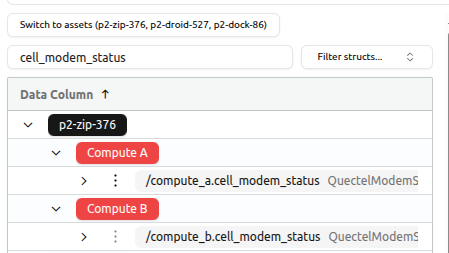
This is the
state in the cell_modem_status message.If other vehicles in the same area are experiencing the same issue, there is likely a cell network outage, or no coverage in the area in general.
Continue troubleshooting by following: Cell Modem Connection Troubleshooting - Suspected Poor/No Network Coverage.
If the modem is stuck in this state, there may be an issue with the modem's SIM card. It may not be properly registered.
Continue troubleshooting by following: Cell Modem Connection Troubleshooting - Suspected SIM Card Issues.
- RSRP: Reference signals received power
- RSRQ: Reference signal received quality
Below are thresholds for these signals that generally communicate how solid of an internet connection to expect.
Sources
General RSRP/RSRQ signal guidance is from here.
Reference Signals Received Power (RSRP)
| RSRP Value (dBm) | Signal Strength | Remarks |
|---|---|---|
| >= -80 | Excellent | |
| -80 to -90 | Good | |
| -90 to -100 | Fair to Poor | Expect occasional drop-outs |
| <= -100 | No Signal | Expect no internet connection |
Reference Signal Received Quality (RSRQ)
| RSRQ Value (dB) | Signal Quality | Remarks |
|---|---|---|
| >= -10 | Excellent | |
| -10 to -15 | Good | |
| -15 to -20 | Fair to Poor | Expect occasional drop-outs |
| <= -20 | No Signal | Expect no internet connection |
These signals can be correlated with indications of internet connection quality:
- Cloud Comms Agent's channel connection status: The Cloud Comms Agent publishes
commsn_agent_statuson Compute A, withchannel_a_connection_state(Compute A) andchannel_b_connection_state(Compute B) fields. - NTRIP client health: This client connects to an external source to receive a stream of data. It publishes
ntrip_client.statuson Compute A and B. Thebytes_receivedfield should always be increasing linearly, unless it loses connection.
Resolution note
This plaintext block is ready to paste into the Resolution Note field on the ZERP issue you're working. The permalink below gives engineering review access to the full step-by-step timeline including any back-navigation; share it if the case needs a deeper look.
Permalink:
Session is too large to fit in a URL. Use Download session JSON to share the timeline out-of-band.
Next Steps
Section titled “Next Steps”Determining if connection dropouts are due to cell network coverage is more of an art than a science, but you can use correlation of the above information (signal strength, Cloud Comms Agent connection status, NTRIP client health) to make an educated guess. The steps below will guide you through this process.
Things to keep in mind:
- It is expected to lose comms on individual modems and sometimes on both modems from time to time. We move in and out of areas of cell coverage in normal operations.
- Outages that only affect a single modem should not cause loss of connection. C2 and other flight-critical resources (NTRIP) utilize both cell modems. We are only interested in dual modem outages.
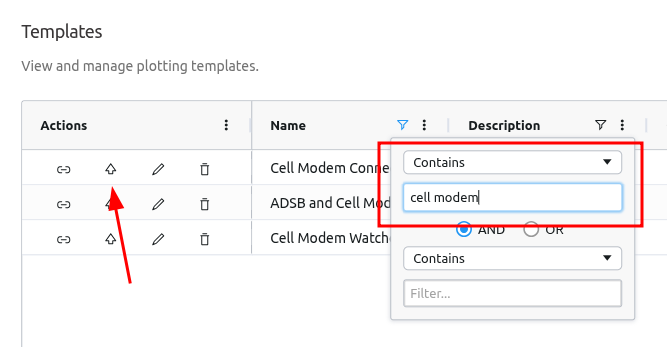
Alternatively, start by clicking this link to load the template, then search for the relevant mission/flight ID.
FAILED / FAILED_WITH_INTERNET states.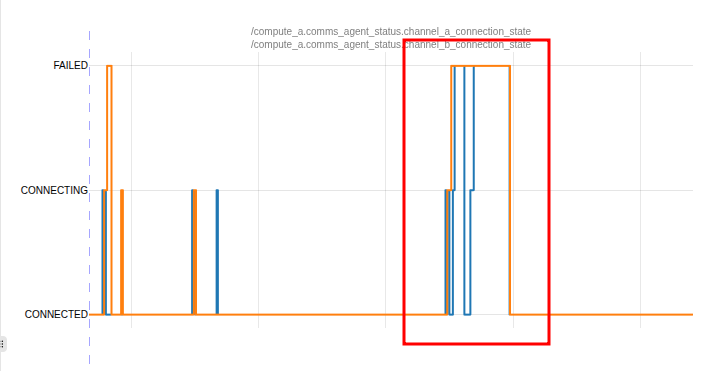
bytes_received field on both Compute A and B. If the failure is due to internet connection loss, you would expect to see the bytes_received field flatline when the channel connection states fail.Example
From the same log as above, there is a clear flatline in both bytes_received graphs from the NTRIP client.
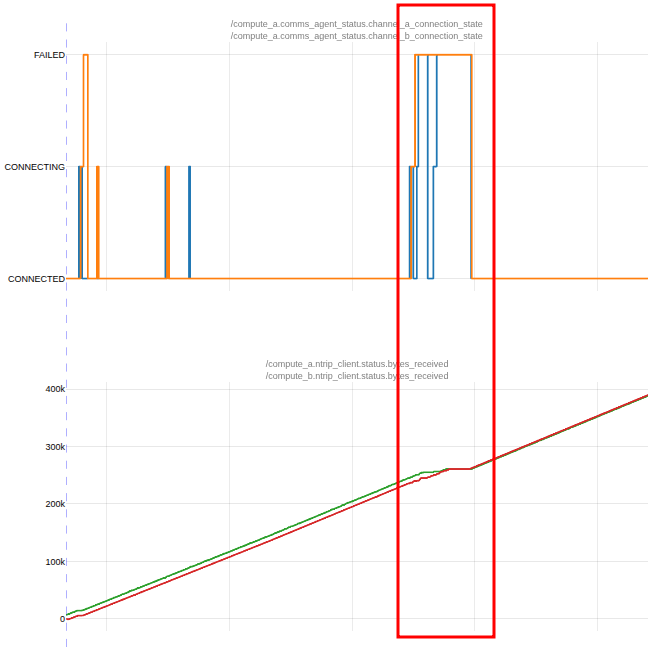
Does the channel connection state correlate well with flat areas in the
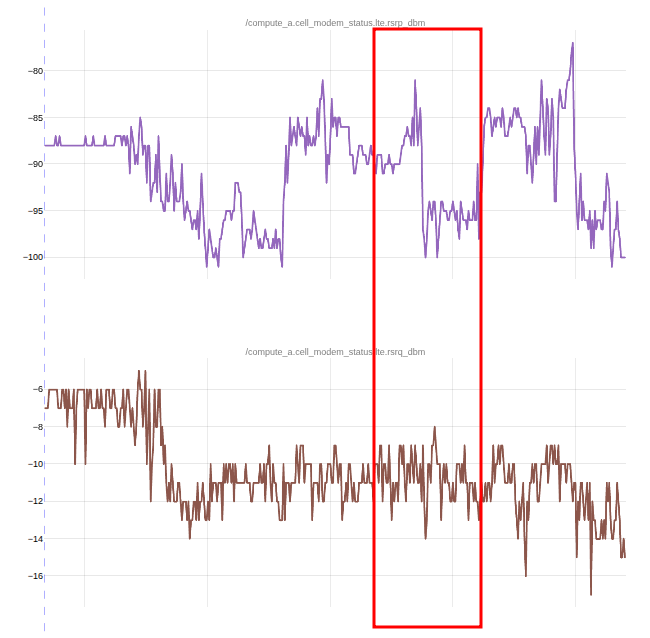
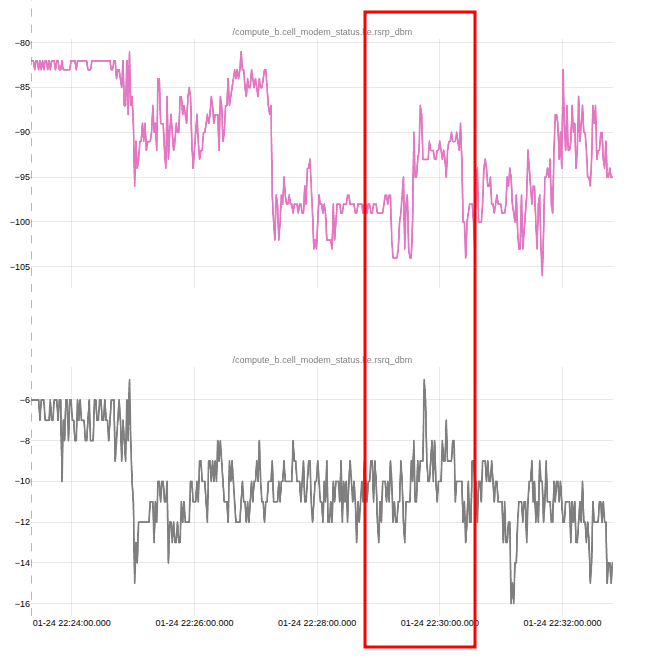
bytes_received graph?Look over the signal quality metrics of each modem (RSRP and RSRQ). Do the connection loss events correlate to these values entering the "Fair to Poor" or "No Signal" quality thresholds?
Example
From the same log as above, there is nothing too conclusive other than signal levels not being ideal.
- Compute A:
- RSRP drops into the "Fair to Poor" range, but it does not align well with when connection is lost and regained.
- RSRQ is in the "Good" range.
- Compute B:
- RSRP is not great, in the "Fair to Poor" and "No Signal" range. There is no clear correlation with connection loss.
- RSRQ is in the "Good" range.
For this log, analysis is inconclusive. Cell signal is not great, so it is not unexpected to see connection issues. However, it is surprising to see such a long loss of connection across both cell modems.
Compute A Cell
Compute B Cell
Continue troubleshooting using: C2_EXTENDED_LOSS.
Continue troubleshooting using: Cell Modem Connection Troubleshooting - Suspected Poor/No Network Coverage.
Continue troubleshooting using: Cell Modem Connection Troubleshooting - Other.
Did this guide help you get unblocked?
Open suggestions
There are no open suggestions.
Open pull requests
There are no open pull requests.