

Power ON Smart Cart
Viewing this guide for
Use this procedure when the Smart Cart needs to be powered on or when you need to confirm that the NEO is online.
Troubleshooting Steps
Section titled “Troubleshooting Steps”graph TD
plug-in-smart-cart-power["<small><b>Step 1</b></small><br/>Action: Plug in the Smart Cart's main power p..."]
press-neo-power-button["<small><b>Step 2</b></small><br/>Action: Press the white button on the NEO to ..."]
confirm-neo-lights{"<small><b>Step 3</b></small><br/>Question: Wait up to 5 minutes. Do you see the ..."}
can-ssh-into-smart-cart{"<small><b>Step 4</b></small><br/>Question: Can you SSH into the smart cart SSH..."}
smart-cart-is-on["<small><b>Step 5</b></small><br/>Action: The smart cart is on."]
confirm-tailscale["<small><b>Step 6</b></small><br/>Action: Confirm that you are logged into Tail..."]
confirm-main-power-plug["<small><b>Step 7</b></small><br/>Action: Confirm that the Smart Cart's main po..."]
press-neo-power-button-after-ssh-failure["<small><b>Step 8</b></small><br/>Action: If needed, press the white button on ..."]
wait-after-ssh-failure["<small><b>Step 9</b></small><br/>Action: Wait 5 minutes."]
confirm-neo-power-connector["<small><b>Step 10</b></small><br/>Action: Confirm that the connector is plugged..."]
press-neo-power-button-after-no-lights["<small><b>Step 11</b></small><br/>Action: If needed, press the white button on ..."]
wait-after-no-lights["<small><b>Step 12</b></small><br/>Action: Wait 5 minutes."]
escalate-to-p2-smart-carts{{"<small><b>Step 13</b></small><br/>Escalation: If you still cannot SSH into the smar..."}}
plug-in-smart-cart-power --> press-neo-power-button
press-neo-power-button --> confirm-neo-lights
confirm-neo-lights -->|Yes| can-ssh-into-smart-cart
confirm-neo-lights -->|No| confirm-neo-power-connector
can-ssh-into-smart-cart -->|Yes| smart-cart-is-on
can-ssh-into-smart-cart -->|No| confirm-tailscale
confirm-tailscale --> confirm-main-power-plug
confirm-main-power-plug --> press-neo-power-button-after-ssh-failure
press-neo-power-button-after-ssh-failure --> wait-after-ssh-failure
wait-after-ssh-failure --> escalate-to-p2-smart-carts
confirm-neo-power-connector --> press-neo-power-button-after-no-lights
press-neo-power-button-after-no-lights --> wait-after-no-lights
wait-after-no-lights --> escalate-to-p2-smart-carts
style plug-in-smart-cart-power fill:#dcfce7,stroke:#22c55e,color:#14532d
style press-neo-power-button fill:#dcfce7,stroke:#22c55e,color:#14532d
style confirm-neo-lights fill:#dbeafe,stroke:#3b82f6,color:#1e3a5f
style can-ssh-into-smart-cart fill:#dbeafe,stroke:#3b82f6,color:#1e3a5f
style smart-cart-is-on fill:#dcfce7,stroke:#22c55e,color:#14532d
style confirm-tailscale fill:#dcfce7,stroke:#22c55e,color:#14532d
style confirm-main-power-plug fill:#dcfce7,stroke:#22c55e,color:#14532d
style press-neo-power-button-after-ssh-failure fill:#dcfce7,stroke:#22c55e,color:#14532d
style wait-after-ssh-failure fill:#dcfce7,stroke:#22c55e,color:#14532d
style confirm-neo-power-connector fill:#dcfce7,stroke:#22c55e,color:#14532d
style press-neo-power-button-after-no-lights fill:#dcfce7,stroke:#22c55e,color:#14532d
style wait-after-no-lights fill:#dcfce7,stroke:#22c55e,color:#14532d
style escalate-to-p2-smart-carts fill:#fef3c7,stroke:#f59e0b,color:#78350f Hover or focus a block to preview it. Select the block to keep the preview open.
1 action
Plug in the Smart Cart's main power plug.
3 question
Wait up to 5 minutes. Do you see the NEO indicator lights shown below?
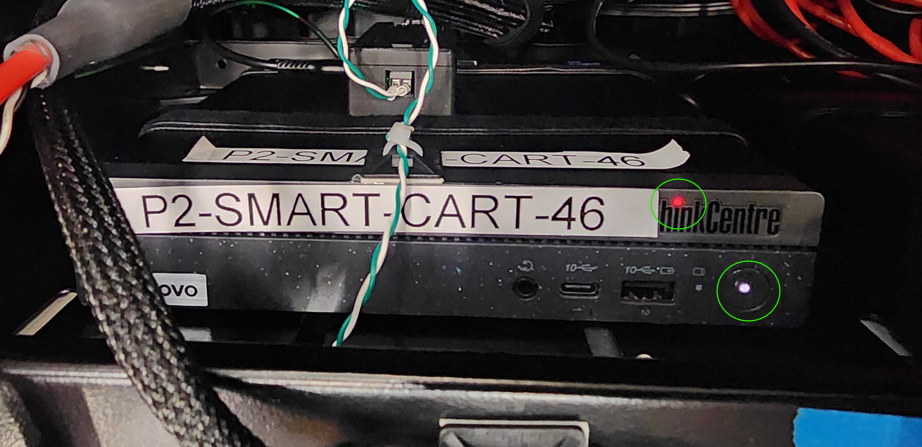
4 question
Can you SSH into the smart cart (SSH into Smart Cart)?
5 action
The smart cart is on.
6 action
Confirm that you are logged into Tailscale.
7 action
Confirm that the Smart Cart's main power plug is plugged in.
9 action
Wait 5 minutes.
10 action
Confirm that the connector is plugged in.
12 action
Wait 5 minutes.
13 escalation
If you still cannot SSH into the smart cart, escalate to P2 Smart Carts.
Resolution note
This plaintext block is ready to paste into the Resolution Note field on the ZERP issue you're working. The permalink below gives engineering review access to the full step-by-step timeline including any back-navigation; share it if the case needs a deeper look.
Permalink:
Session is too large to fit in a URL. Use Download session JSON to share the timeline out-of-band.
Did this guide help you get unblocked?
Open suggestions
There are no open suggestions.
Open pull requests
There are no open pull requests.