

Wing Servos Failing Firmware Deploy or Manifest Does Not Match after Full SW Update
You may have found this page because:
- Fleetwrangler Assigned Software Version reports “Software invalid” or “Software does not match manifest: ….”
- Software Updates in #p2-deploy-status-updates reports FW and FW Deploy Failed.
Background
Section titled “Background”In preparation for the fixed-wing / cruise mode feature of the Aircraft, we need to make use of the control surfaces in the wing. Depending on the hardware configuration of the Aircraft, there may be zero (0) , one (1) or two (2) servo’s per wing and tail.
Specifically:
- Top-Level-Assembly Zip Part Numbers 20000-003 or earlier (depop) both expect to have
0 servos per wing AND 1 servo per tail – only the fwd servos on each
- servo_tail_port_fwd
- servo_tail_starboard_fwd
- Top-Level-Assembly Zip Part Numbers 20000-004, -005 (full) and greater both expect to have
2 servos per wing AND 2 servos per tail
- servo_wing_port_fwd
- servo_wing_starboard_fwd
- servo_wing_port_aft (IGNORED)
- servo_wing_starboard_aft (IGNORED)
- servo_tail_port_fwd
- servo_tail_starboard_fwd
- servo_tail_port_aft (IGNORED)
- servo_tail_starboard_aft (IGNORED)
- 9/30/2025 NEW Top-Level-Assembly Zip Part Numbers 20000-004, -005 (full) and greater both expect to have 1 servo per wing AND 1 servo per tail
- servo_wing_port_fwd
- servo_wing_starboard_fwd
- servo_tail_port_fwd
- servo_tail_starboard_fwd
During a sw-update, when zip-fw is selected to be updated, the software updater looks at the Aircraft’s hardware_config file to check the top-level assembly number (i.e. 20000-004) to determine if it should try to flash these servos. The sw updater utilizes fw-update under the hood, which has two options – depopulated or full – which respectively map to these two Aircraft hardware configurations.
Aircraft Response
Section titled “Aircraft Response”If the servo fails to update, as shown in the example below, it indicates that the particular piece of hardware did not respond and needs to be physically examined. When this happens, complete the Troubleshooting Steps below.
Node Ping App Bootloader Boot Updater Configdistro_a OK OK OKdistro_b OK OK OKwinch OK OK OKhover_port_fwd OK OK OKtail OK OK OKmixed OK OK OKhover_port_aft OK OK OKhover_stbd_aft OK OK OKhover_stbd_fwd OK OK OKservo_roll OK OK OKservo_tilt OK OK OKservo_wing_port_fwd OK OK OKservo_wing_stbd_fwd FAIL X X X Xservo_tail_port_fwd OK OK OKservo_tail_stbd_fwd OK OK OKTroubleshooting Steps
Section titled “Troubleshooting Steps”graph TD
is-the-aircraft-listed-in-the-exception{"<small><b>Step 1</b></small><br/>Question: Is the Aircraft listed in the Except..."}
follow-the-steps-for-the-aircraft-in-th["<small><b>Step 2</b></small><br/>Action: Follow the steps for the Aircraft in ..."]
follow-the-steps-in-the-section-below-t{"<small><b>Step 3</b></small><br/>Question: Follow the steps in the section below..."}
do-you-see-more-servos-than-are-shown-b{"<small><b>Step 4</b></small><br/>Question: Do you see **more** servos than are s..."}
the-hardware-config-file-is-not-correct["<small><b>Step 5</b></small><br/>Action: The hardware_config file is not corre..."]
ask-maintenance-to-physically-check-the["<small><b>Step 6</b></small><br/>Action: Ask maintenance to physically check t..."]
do-you-see-less-servos-than-are-shown-b{"<small><b>Step 7</b></small><br/>Question: Do you see **less** servos than are s..."}
the-hardware-config-file-is-not-corre-2["<small><b>Step 8</b></small><br/>Action: The hardware_config file is not corre..."]
ask-maintenance-to-physically-check-t-2["<small><b>Step 9</b></small><br/>Action: Ask maintenance to physically check t..."]
have-any-of-the-servos-shown-as-ok-in-t{"<small><b>Step 10</b></small><br/>Question: Have any of the servos shown as OK in..."}
ask-maintenance-to-physically-check-t-3["<small><b>Step 11</b></small><br/>Action: Ask maintenance to physically check t..."]
the-servos-have-updated-correctly-the-a["<small><b>Step 12</b></small><br/>Action: The servos have updated correctly. Th..."]
is-the-aircraft-listed-in-the-exception -->|Yes| follow-the-steps-for-the-aircraft-in-th
is-the-aircraft-listed-in-the-exception -->|No| follow-the-steps-in-the-section-below-t
follow-the-steps-in-the-section-below-t -->|20000-003 or lower| do-you-see-more-servos-than-are-shown-b
follow-the-steps-in-the-section-below-t -->|20000-004 or higher| do-you-see-less-servos-than-are-shown-b
do-you-see-more-servos-than-are-shown-b -->|Yes, there are more servos ...| the-hardware-config-file-is-not-correct
do-you-see-more-servos-than-are-shown-b -->|No, I see the same servos a...| ask-maintenance-to-physically-check-the
do-you-see-less-servos-than-are-shown-b -->|Yes, there are less servos ...| the-hardware-config-file-is-not-corre-2
do-you-see-less-servos-than-are-shown-b -->|No, I see the same servos a...| ask-maintenance-to-physically-check-t-2
have-any-of-the-servos-shown-as-ok-in-t -->|Yes, one or more servos sho...| ask-maintenance-to-physically-check-t-3
have-any-of-the-servos-shown-as-ok-in-t -->|No, all of the servos shown...| the-servos-have-updated-correctly-the-a
style is-the-aircraft-listed-in-the-exception fill:#dbeafe,stroke:#3b82f6,color:#1e3a5f
style follow-the-steps-for-the-aircraft-in-th fill:#dcfce7,stroke:#22c55e,color:#14532d
style follow-the-steps-in-the-section-below-t fill:#dbeafe,stroke:#3b82f6,color:#1e3a5f
style do-you-see-more-servos-than-are-shown-b fill:#dbeafe,stroke:#3b82f6,color:#1e3a5f
style the-hardware-config-file-is-not-correct fill:#dcfce7,stroke:#22c55e,color:#14532d
style ask-maintenance-to-physically-check-the fill:#dcfce7,stroke:#22c55e,color:#14532d
style do-you-see-less-servos-than-are-shown-b fill:#dbeafe,stroke:#3b82f6,color:#1e3a5f
style the-hardware-config-file-is-not-corre-2 fill:#dcfce7,stroke:#22c55e,color:#14532d
style ask-maintenance-to-physically-check-t-2 fill:#dcfce7,stroke:#22c55e,color:#14532d
style have-any-of-the-servos-shown-as-ok-in-t fill:#dbeafe,stroke:#3b82f6,color:#1e3a5f
style ask-maintenance-to-physically-check-t-3 fill:#dcfce7,stroke:#22c55e,color:#14532d
style the-servos-have-updated-correctly-the-a fill:#dcfce7,stroke:#22c55e,color:#14532d Hover or focus a block to preview it. Select the block to keep the preview open.
Ask maintenance to run provision_hw_config to get the latest hardware_config file.
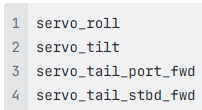
NOTE: You will no longer see aft servos on this list
servo_roll
servo_tilt
servo_wing_port_fwd
servo_wing_stbd_fwd
servo_tail_stbd_fwd
servo_tail_port_fwdAsk maintenance to run provision_hw_config to get the latest hardware_config file.
NOTE: The servos in the example below that show FAIL are expected to fail because they do not exist on the Aircraft.
servo_roll           OK
servo_tilt           OK
servo_wing_port_fwd  FAIL
servo_wing_stbd_fwd  FAIL
servo_tail_port_fwd  OK
servo_tail_stbd_fwd OKResolution note
This plaintext block is ready to paste into the Resolution Note field on the ZERP issue you're working. The permalink below gives engineering review access to the full step-by-step timeline including any back-navigation; share it if the case needs a deeper look.
Permalink:
Session is too large to fit in a URL. Use Download session JSON to share the timeline out-of-band.
Exceptions for p2-zip-300, 307, 338
Section titled “Exceptions for p2-zip-300, 307, 338”p2-zip-300, p2-zip-307, p2-zip-338 do NOT have servos in their wings; therefore, all fw updates will fail with servo_wing_port_fwd, servo_wing_port_aft, servo_wing_starboard_fwd, servo_wing_starboard_aft.
NOTE: The servos in the example below that show FAIL are expected to fail because they do not exist on the Aircraft.
servo_roll           OK
servo_tilt           OK
servo_wing_port_fwd  FAIL
servo_wing_stbd_fwd  FAIL
servo_tail_port_fwd  OK
servo_tail_stbd_fwd OKDid this guide help you get unblocked?
Open suggestions
There are no open suggestions.
Open pull requests
There are no open pull requests.