

"No Troubleshooting Guide" Standard Operating Procedures
Viewing this guide for
When there is an issue that is NOT COVERED in the Troubleshooting Guide, follow the applicable procedure below.
1 question
What issue are you troubleshooting?
2 action
1. Power cycle the Aircraft. See Power Cycle Aircraft.
2. Check the Aircraft detailed status.
2. Check the Aircraft detailed status.
3 question
What is the Droid status?
4 action
Power cycle the Droid. See Power Cycle Droid
5 question
Is the issue resolved?
6 action
1. Perform a maintenance raise (Droid Maintenance Raise / Lower).
2. Power cycle the Droid. See Power Cycle Droid.
2. Power cycle the Droid. See Power Cycle Droid.
7 question
Is the issue resolved?
8 action
The Aircraft may return to service.
9 action
Escalate to P2 Exec On Call.
10 question
Has the aircraft paralanded?
Refer to How to Check if Aircraft Paralanded (Fleet View).
Refer to How to Check if Aircraft Paralanded (Fleet View).
11 action
Inspect the primary structure. Is the vehicle salvageable?
12 action
Replace the paraland tube. See UMM: Remove Paraland Tube and UMM: Install Paraland Tube.
13 action
Update the location to the applicable location to be removed from active service.
14 action
Replace the paraland tube. See UMM: Remove/Install Paraland Tube.
15 question
Has the Droid been left behind?
See How to Check if Droid is Left Behind.
See How to Check if Droid is Left Behind.
16 action
1. Raise a discrepancy against the Droid that was left behind.
2. On the Aircraft, perform a Droid left behind inspection (UMM: Droid Left Behind Post-Event Inspection).
3. On the Droid, perform the Droid left behind inspection (Droid CMM: Post Droid Left Behind Inspection).
2. On the Aircraft, perform a Droid left behind inspection (UMM: Droid Left Behind Post-Event Inspection).
3. On the Droid, perform the Droid left behind inspection (Droid CMM: Post Droid Left Behind Inspection).
17 question
Did the inspection pass?
18 action
Return the Droid to service.
19 action
If there is a clear root cause, perform applicable maintenance. Otherwise, escalate to P2 Droid Autonomy On Call.
20 action
Escalate to P2 Exec On Call.
21 action
Use these steps when the Dock is in a degraded operations mode and there is no troubleshooting guide for an associated alarm/service state.
22 question
Is the Aircraft occupied in a Dock?
Look at Occupied Bay or Buddied Bays in FleetWrangler.
Example:
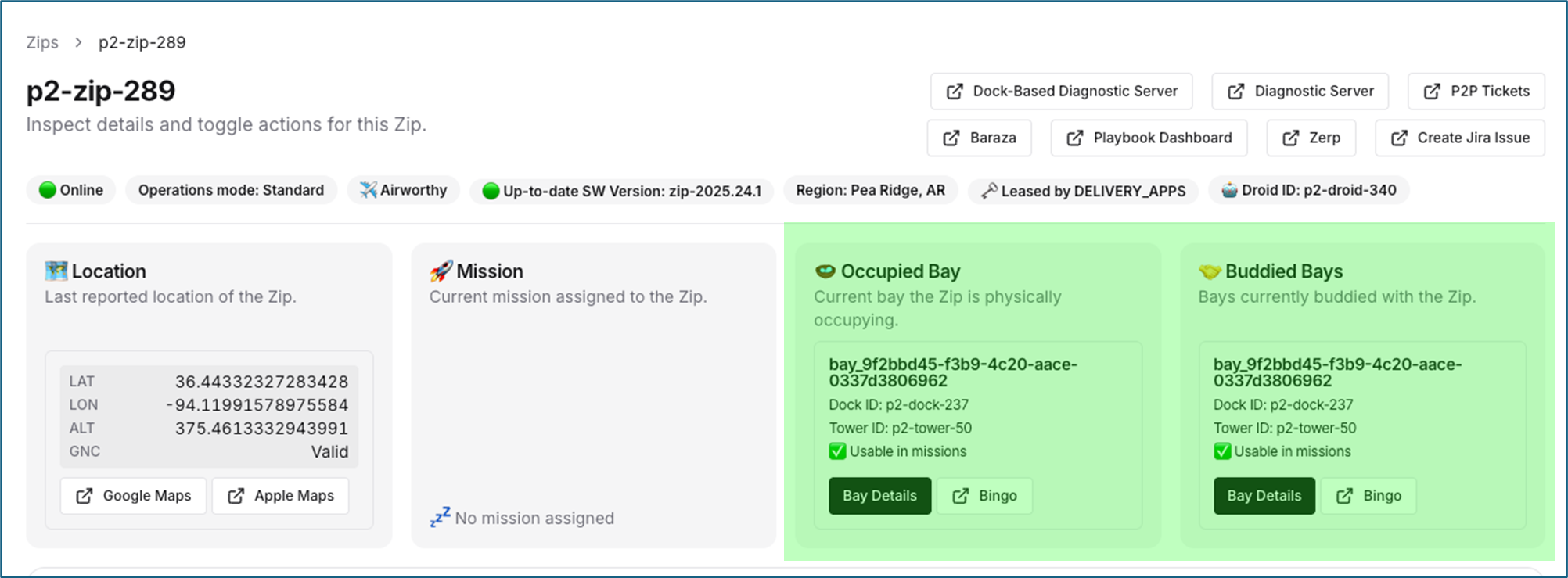
Look at Occupied Bay or Buddied Bays in FleetWrangler.
Example:
23 action
Contact the operator and get more information before continuing.
24 question
Are there any active Dock alarms?
In FleetWrangler, check the Dock operations mode and check for active alarms.
In FleetWrangler, check the Dock operations mode and check for active alarms.
25 action
Follow the applicable troubleshooting guide. If there is no guide, continue below.
26 action
Restart the Dock target. See Restart Dock Target.
27 question
Is the issue resolved?
28 action
Dock may return to operations.
29 action
Escalate to P2 Dock Embedded On Call.
30 question
What system or symptom is the issue related to?
No matching issue categories.
31 action
Issue category: Embedded Linux, Sensor Peripherals, Compute Performance
Escalation group: P2 Embedded Linux On Call
Team lead: @Brian Dunlay
Escalation group: P2 Embedded Linux On Call
Team lead: @Brian Dunlay
32 action
33 action
34 action
35 action
Issue category: Controls issues and alarms
Escalation group: P2 Zip Controls On Call
Team lead: @Christopher Coffman
Escalation group: P2 Zip Controls On Call
Team lead: @Christopher Coffman
36 action
Issue category: Data issues
Escalation group: P2 Onboard Data Platform On Call
Team lead: @Gavin Ananda
Escalation group: P2 Onboard Data Platform On Call
Team lead: @Gavin Ananda
37 action
Issue category: Droid issues not covered by other teams
Escalation group: P2 Droid Autonomy On Call
Team lead: @Ryan Wolcott
Escalation group: P2 Droid Autonomy On Call
Team lead: @Ryan Wolcott
38 action
Issue category: EOL failures
Escalation group: P2 FSE On Call
Escalation group: P2 FSE On Call
39 action
Issue category: Ethernet (Aircraft/Droid)
Escalation group: P2 Firmware Platform On Call
Team lead: @Francesco Macchione
Escalation group: P2 Firmware Platform On Call
Team lead: @Francesco Macchione
40 action
Issue category: Exec specific issues/behaviour (not because exec failed a mission)
Escalation group: P2 Exec On Call
Notes: Include time, mission type, expected behavior config, task at failure
Team lead: @Blake Richards
Escalation group: P2 Exec On Call
Notes: Include time, mission type, expected behavior config, task at failure
Team lead: @Blake Richards
41 action
Issue category: Firmware deployments
Escalation group: P2 Firmware Platform On Call
Team lead: @Francesco Macchione
Escalation group: P2 Firmware Platform On Call
Team lead: @Francesco Macchione
42 action
Issue category: Structures and Mechanisms Hardware failure (Aircraft)
Escalation group: Aircraft Structures And Mechanisms On Call
Notes: Pictures, videos, HW serial numbers
Team lead: @Greg Monahan
Escalation group: Aircraft Structures And Mechanisms On Call
Notes: Pictures, videos, HW serial numbers
Team lead: @Greg Monahan
43 action
Issue category: Hardware failure (Droid)
Escalation group: P2 Droid Hardware On Call
Notes: Pictures, videos, HW serial numbers
Team lead: @Jordan Factor
Escalation group: P2 Droid Hardware On Call
Notes: Pictures, videos, HW serial numbers
Team lead: @Jordan Factor
44 action
Issue category: Hardware failure not covered by other teams
Escalation group: P2 EE On Call
Notes: Pictures, videos, HW serial numbers
Team lead: @Brian Dohler
Escalation group: P2 EE On Call
Notes: Pictures, videos, HW serial numbers
Team lead: @Brian Dohler
45 action
Issue category: Load switch
Escalation group: P2 Firmware Power On Call
Team lead: @Francesco Macchione
Escalation group: P2 Firmware Power On Call
Team lead: @Francesco Macchione
46 action
47 action
Issue category: Maintenance or hardware issues
Escalation group: P2 FSE On Call
Escalation group: P2 FSE On Call
48 action
49 action
Issue category: Motor freewheeling
Escalation group: P2 Firmware Motors On Call
Team lead: @Trevor Nielsen
Escalation group: P2 Firmware Motors On Call
Team lead: @Trevor Nielsen
51 action
Issue category: Vehicle Networking
Escalation group: P2 Embedded Linux On Call
Team lead: @Brian Dunlay
Escalation group: P2 Embedded Linux On Call
Team lead: @Brian Dunlay
52 action
Issue category: Parachute/squib
Escalation group: P2 Firmware Safety On Call
Team lead: @Francesco Macchione
Escalation group: P2 Firmware Safety On Call
Team lead: @Francesco Macchione
53 action
Issue category: Planner
Escalation group: P2 Aircraft Autonomy On Call
Notes: Maps issues go to P2 Maps On Call
Team lead: @Stephen Chaves
Escalation group: P2 Aircraft Autonomy On Call
Notes: Maps issues go to P2 Maps On Call
Team lead: @Stephen Chaves
55 action
56 action
Issue category: RPC and fw-update tooling
Escalation group: P2 Firmware Platform On Call
Team lead: @Francesco Macchione
Escalation group: P2 Firmware Platform On Call
Team lead: @Francesco Macchione
57 action
58 action
Issue category: Safety: Site / operational safety incident / personnel injury / fire / Aircraft flight failure without paraland
Escalation group: P2 Safety On Call
Team lead: @Gene McGuinness
Escalation group: P2 Safety On Call
Team lead: @Gene McGuinness
59 action
60 action
61 action
62 action
Did this guide help you get unblocked?
Open suggestions
There are no open suggestions.
Open pull requests
There are no open pull requests.