

Validator: winch_fatigue
Related Search Phrases
Section titled “Related Search Phrases”This issue may also be described as SUSPECT_CRACKED_WIRE
Background
Section titled “Background”This validator is intended to preemptively detect a cracked phase wire in the winch while the zip is still functional, before it escalates into an in-flight alarm. A failure on this validator indicates hardware damage that requires maintenance, even if the mission was successful.
A cracked wire manifests as an periodic open circuit (high resistance) on that phase, resulting in periodic increases in voltage as the controller attempts to account for this. This noisiness in the voltage setpoints is the signal that the validator is checking to detect this failure mode.
Previously, this guide requested log review checking for imbalanced heating to confirm the cracked wire. However, the imbalanced heating leading to overtemperature is merely a correlated symptom and does not account for all cases of this failure. As we get better at detecting faulted winches before they have degraded as far, only looking at temperature logs becomes increasingly subjective and so is no longer used in the troubleshooting workflow.
The following example plots of the WINCH OVERTEMPERATURE - Check for phase imbalance template are shown as a reference only. A cracked phase wire may still be present even if its logs don’t look exactly like these examples.
Click to show examples
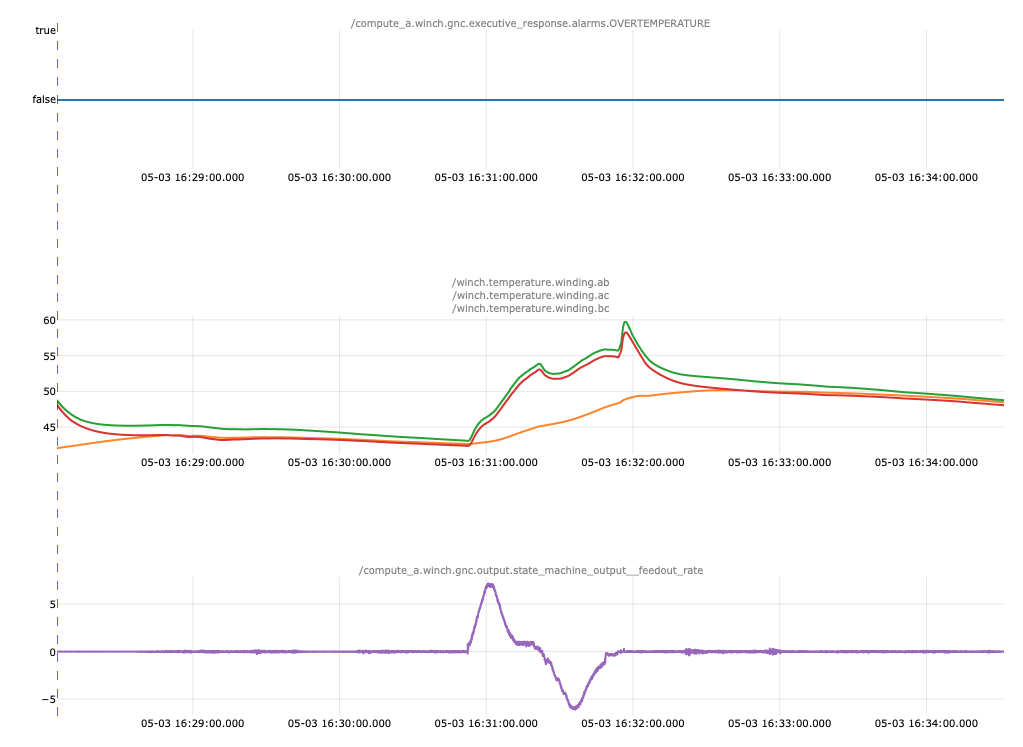
Example 1: Degraded winch motor, cracked wire on the instrumented side
One of the winch winding temperatures (orange on the middle plot) is noticeably lower than the other two and does not show the same shape for its temperature spike(s)
This temperature imbalance occurs while the winch is actively moving (non-zero feedout rate on the lower plot). If the winch is not moving, imbalanced temperatures are not evidence
of or against this failure mode.
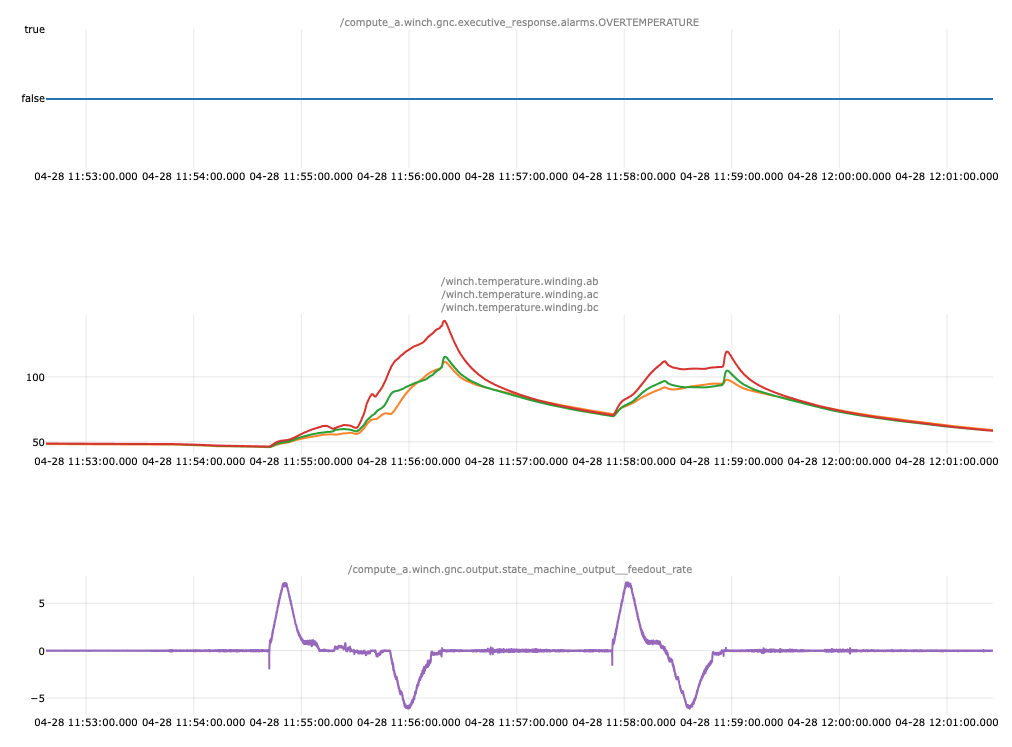
Example 2: Degraded winch motor, cracked wire on the uninstrumented side
One of the winch winding temperatures (red on the middle plot) is noticeably higher than the other two and is at least 10C above the next hottest winding during winch operation.
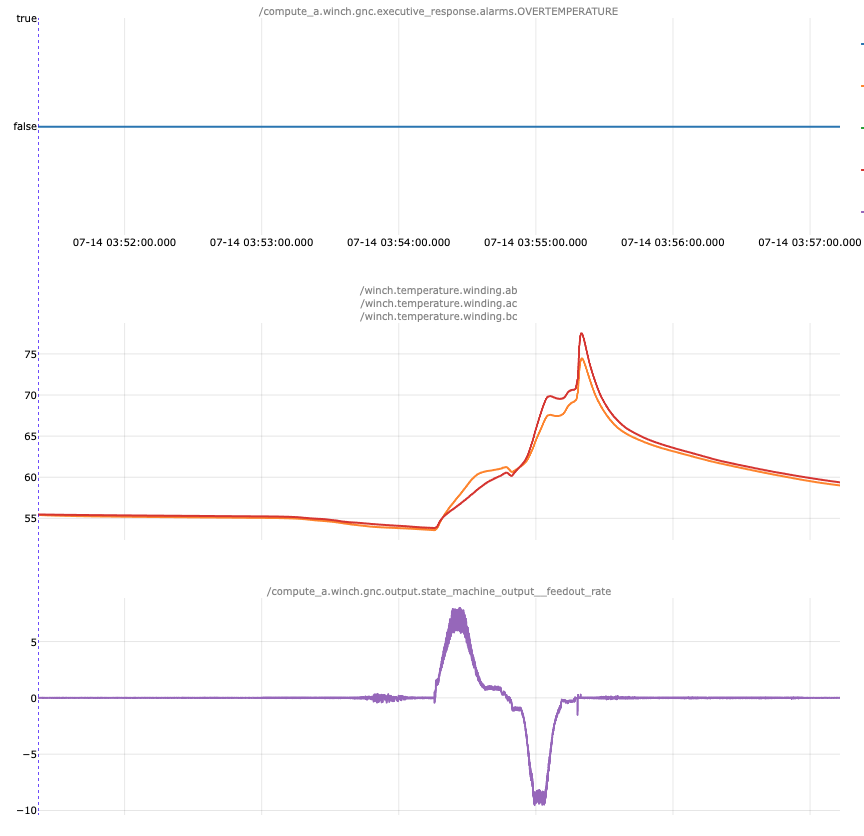
Example 3: Severely degraded winch motor, complete failure of broken phase
This plot does not look imbalanced because the faulted phase is no longer sending temperature data - note how the there are only two temperature signals on the middle plot instead of three.
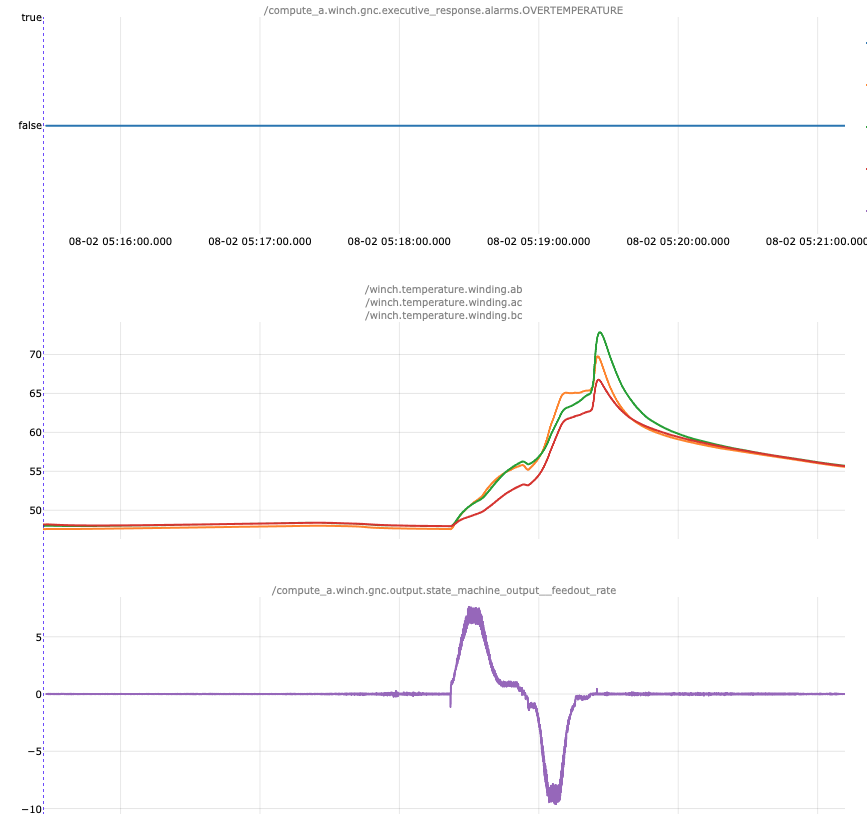
Example 4: Early-stage degradation
This plot does not show the expected temperature imbalance. If it weren’t for the validator failure, it would be easy to conclude that there is nothing wrong with the hardware. However, on this zip’s next mission, the temperature signal matured into one that looked much more like Example 1. Perhaps this specific case could be a candidate for deferred maintenance when it becomes available, but in the meantime this is still a hardware failure that requires a part swap.
Troubleshooting Steps
Section titled “Troubleshooting Steps”graph TD
confirm-failed-maintenance-validators["<small><b>Step 1</b></small><br/>Telemetry: First, confirm that the validator has..."]
confirm-extenuating-circumstances{"<small><b>Step 2</b></small><br/>Question: Did the winch_fatigue validator fail?"}
escalate-to-p2-motors-incidents-1{{"<small><b>Step 3</b></small><br/>Escalation: Escalate to P2 Firmware Motors On Call."}}
replace-the-winch["<small><b>Step 4</b></small><br/>Action: Replace the winch. **WORK ORDER TEMPL..."]
perform-a-wfh-delivery["<small><b>Step 5</b></small><br/>Action: Perform a WFH delivery mission to ver..."]
escalate-to-p2-motors-incidents-2{{"<small><b>Step 6</b></small><br/>Escalation: Escalate to P2 Firmware Motors On Call."}}
the-aircraft-may-return-to-service["<small><b>Step 7</b></small><br/>Action: The Aircraft may return to service."]
confirm-failed-maintenance-validators --> confirm-extenuating-circumstances
confirm-extenuating-circumstances -->|Yes, the validator failed| replace-the-winch
confirm-extenuating-circumstances -->|Yes, the validator is faili...| escalate-to-p2-motors-incidents-1
confirm-extenuating-circumstances -->|No, there is no evidence of...| the-aircraft-may-return-to-service
replace-the-winch --> perform-a-wfh-delivery
perform-a-wfh-delivery -->|Yes, there are no further f...| the-aircraft-may-return-to-service
perform-a-wfh-delivery -->|The winch_fatigue validator...| escalate-to-p2-motors-incidents-2
style confirm-extenuating-circumstances fill:#dbeafe,stroke:#3b82f6,color:#1e3a5f
style escalate-to-p2-motors-incidents-1 fill:#fef3c7,stroke:#f59e0b,color:#78350f
style replace-the-winch fill:#dcfce7,stroke:#22c55e,color:#14532d
style perform-a-wfh-delivery fill:#dcfce7,stroke:#22c55e,color:#14532d
style escalate-to-p2-motors-incidents-2 fill:#fef3c7,stroke:#f59e0b,color:#78350f
style the-aircraft-may-return-to-service fill:#dcfce7,stroke:#22c55e,color:#14532d Hover or focus a block to preview it. Select the block to keep the preview open.
Verify that the Alarm Report for the
CRITICAL_WORKFLOW_ERROR alarm in the Zerp Auto Issue is displaying a check failure for winch_fatigue/SUSPECT_CRACKED_WIRE.Alternatively, load the failed maintenance validator results for the affected mission. Check whether the winch fatigue validator
Firmware_zip_a_maintenance.winch_fatigue/SUSPECT_CRACKED_WIRE failed.winch_fatigue validator fail?WORK ORDER TEMPLATE: Use the work order template that matches the hardware version:
- Work Order Template #70 - EV2: Replace Winch on Aircraft Docking Fin/Winch Assembly
- Work Order Template #1067 - EV3: Replace Winch on Aircraft Docking Fin Winch LRU
Resolution note
This plaintext block is ready to paste into the Resolution Note field on the ZERP issue you're working. The permalink below gives engineering review access to the full step-by-step timeline including any back-navigation; share it if the case needs a deeper look.
Permalink:
Session is too large to fit in a URL. Use Download session JSON to share the timeline out-of-band.
Did this guide help you get unblocked?
Open suggestions
There are no open suggestions.
Open pull requests
There are no open pull requests.