

PR review checklist
Use this checklist when reviewing a troubleshooting guide in the rendered UI and comparing it with the changed code. It is for reviewers; the Guide content checklist helps authors prepare a guide for review.
For step-by-step GitHub review instructions, see How to review a PR.
-
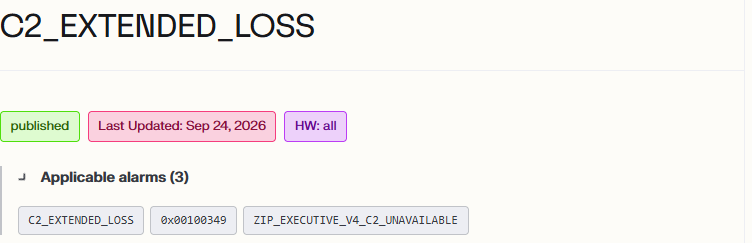
Topic header and ownership. Confirm that Status is
published, the Hardware labels match the guide’s applicability, and Applicable alarms lists the topic alarm and any other relevant alarms. The hardware labelallmeans the guide applies to all hardware versions. If Applicable alarms is missing, check thealarmsfield. Confirm that no individual owner or SME badge is displayed and that the MDX has no ownership fields or body ownership labels.Applicable alarms example
-
Troubleshooting logic. Follow every path and confirm that the instructions and decisions make sense. Check for missing information and unnecessary steps. Combine or split steps when that improves clarity.
-
Questions and answer paths. When the next action depends on what the reader observes, use a clear question rather than a statement. For example, instead of “Confirm that the switch is on.” ask “Is the switch on?” and provide a path for both Yes and No. Each answer must lead to a clear action, another question, or an outcome. Click through every option to confirm that no answer leaves the reader stranded. For more guidance, see Writing the troubleshooting flow and select Question.
-
Layout and navigation. Check readability and button layout. As you click through the topic, the next step should appear below the current step. For example, clicking a button on Step 12 should not send you back up to Step 4. See Guide content checklist: Flow UI readability.
-
Writing. Check grammar, spelling, formatting, and wording. Instructions should be clear and easy to follow.
-
Step types and rendered content. Compare the changed code with the UI. Confirm that the correct step types are used and that every intended step appears on the appropriate path. A step can exist in the code without appearing in the UI if it is not linked correctly in the flow.
-
Outcomes. Every path must end with one clear outcome: return to service, asset requires maintenance, or escalate. Avoid competing endings, such as directing both a work order and an Engineering escalation. See Workflow outcomes.
-
Escalation routing. Confirm that the escalation group uses a verified escalation-path link rather than plain text. Escalations use
[[EscalationPath:<id>]]shortcodes. -
Links and procedures. Open links and confirm that they work and go to the correct location. Procedure actions must link to the applicable procedure in the repository or maintenance manual. Check maintenance-manual links for all applicable hardware versions and work-order templates for hardware applicability and clear steps. If a procedure is mentioned without a link, suggest the correct link. Instructions must point to controlled sources, not uncontrolled documents.
-
Guide scope. Keep the guide focused on resolving the condition. Check for unnecessary follow-up tasks after an outcome, such as tagging Engineering for awareness or collecting unrelated information or photos. Information required for an escalation can remain part of that escalation.