

Unable to Safe a Bay
Background
Section titled “Background”This guide is specifically for troubleshooting and resolving issues when you’re unable to safe a bay. If you are unable to release the safe on a bay, request support in #wg-bay-safe-flow.
More info about the bay safe process can be found here: Bay Safe – How they work and how to use them.
Troubleshooting Steps
Section titled “Troubleshooting Steps”graph TD
are-you-able-to-find-the-bay-safe-qr-co{"<small><b>Step 1</b></small><br/>Question: Have you opened the Fleet Wrangler Ba..."}
test-ops-special-qr-codes-can-be-found["<small><b>Step 2</b></small><br/>Action: Open the relevant site in Fleet Wrang..."]
was-the-tower-found-when-searching-by-t{"<small><b>Step 3</b></small><br/>Question: Can you find the tower in the Bay Saf..."}
in-fleetwrangler-ensure-that-tower-is-p["<small><b>Step 4</b></small><br/>Action: In FleetWrangler, ensure that the tow..."]
was-the-dock-found-after-selected-the-t{"<small><b>Step 5</b></small><br/>Question: Can you find the dock in the selected..."}
in-fleetwrangler-ensure-that-the-bay-is["<small><b>Step 6</b></small><br/>Action: In FleetWrangler, ensure that the bay..."]
are-you-stuck-on-waiting-for-bay-to-be{"<small><b>Step 7</b></small><br/>Question: After requesting Bay Safe, does any r..."}
you-should-see-a-zip-id-at-the-bottom-i{"<small><b>Step 8</b></small><br/>Question: In the Bay Safe Map, inspect the bay ..."}
restart-the-zip-if-you-are-still-stuck["<small><b>Step 9</b></small><br/>Action: Restart the zip. If any required bay ..."]
confirm-that-the-zip-is-not-flying-note["<small><b>Step 10</b></small><br/>Action: Confirm that the zip is not flying *..."]
you-should-now-see-bay-is-safe-to-appro{{"<small><b>Step 11</b></small><br/>Escalation: In the Fleet Wrangler Bay Safe Map, c..."}}
is-the-zips-occupied-bay-id-set{"<small><b>Step 12</b></small><br/>Question: Is the zip’s 'occupied bay ID' set?"}
turn-off-the-zip-occupied-bay-set["<small><b>Step 13</b></small><br/>Action: Turn off the zip.Navigate to FleetWra..."]
send-operator-removed-zip-from-bay-comm["<small><b>Step 14</b></small><br/>Action: Send 'Operator Removed Zip From Bay' ..."]
you-should-now-see-bay-is-safe-to-app-2["<small><b>Step 15</b></small><br/>Action: In the Fleet Wrangler Bay Safe Map, c..."]
if-you-have-confirmed-that-the-zip-is-n["<small><b>Step 16</b></small><br/>Action: If you have confirmed that the zip is..."]
turn-off-the-zip-occupied-bay-unset["<small><b>Step 17</b></small><br/>Action: Turn off the zip.Navigate to FleetWra..."]
note-any-tags-and-notes-on-the-zip-so-t["<small><b>Step 18</b></small><br/>Action: Note any tags and notes on the zip so..."]
delete-the-zip-in-fleetwrangler["<small><b>Step 19</b></small><br/>Action: Delete the zip in FleetWrangler.Navig..."]
you-should-now-see-bay-is-safe-to-app-3["<small><b>Step 20</b></small><br/>Action: In the Fleet Wrangler Bay Safe Map, c..."]
are-you-able-to-find-the-bay-safe-qr-co -->|Yes| was-the-tower-found-when-searching-by-t
are-you-able-to-find-the-bay-safe-qr-co -->|No| test-ops-special-qr-codes-can-be-found
test-ops-special-qr-codes-can-be-found --> was-the-tower-found-when-searching-by-t
was-the-tower-found-when-searching-by-t -->|Yes| was-the-dock-found-after-selected-the-t
was-the-tower-found-when-searching-by-t -->|No| in-fleetwrangler-ensure-that-tower-is-p
in-fleetwrangler-ensure-that-tower-is-p --> was-the-dock-found-after-selected-the-t
was-the-dock-found-after-selected-the-t -->|Yes| are-you-stuck-on-waiting-for-bay-to-be
was-the-dock-found-after-selected-the-t -->|No| in-fleetwrangler-ensure-that-the-bay-is
in-fleetwrangler-ensure-that-the-bay-is --> are-you-stuck-on-waiting-for-bay-to-be
are-you-stuck-on-waiting-for-bay-to-be -->|Yes| you-should-see-a-zip-id-at-the-bottom-i
are-you-stuck-on-waiting-for-bay-to-be -->|No| you-should-now-see-bay-is-safe-to-appro
you-should-see-a-zip-id-at-the-bottom-i -->|Yes| restart-the-zip-if-you-are-still-stuck
you-should-see-a-zip-id-at-the-bottom-i -->|No| confirm-that-the-zip-is-not-flying-note
restart-the-zip-if-you-are-still-stuck --> is-the-zips-occupied-bay-id-set
confirm-that-the-zip-is-not-flying-note --> is-the-zips-occupied-bay-id-set
is-the-zips-occupied-bay-id-set -->|Yes| turn-off-the-zip-occupied-bay-set
is-the-zips-occupied-bay-id-set -->|No| if-you-have-confirmed-that-the-zip-is-n
turn-off-the-zip-occupied-bay-set --> send-operator-removed-zip-from-bay-comm
send-operator-removed-zip-from-bay-comm --> you-should-now-see-bay-is-safe-to-app-2
if-you-have-confirmed-that-the-zip-is-n --> turn-off-the-zip-occupied-bay-unset
turn-off-the-zip-occupied-bay-unset --> note-any-tags-and-notes-on-the-zip-so-t
note-any-tags-and-notes-on-the-zip-so-t --> delete-the-zip-in-fleetwrangler
delete-the-zip-in-fleetwrangler --> you-should-now-see-bay-is-safe-to-app-3
style are-you-able-to-find-the-bay-safe-qr-co fill:#dbeafe,stroke:#3b82f6,color:#1e3a5f
style test-ops-special-qr-codes-can-be-found fill:#dcfce7,stroke:#22c55e,color:#14532d
style was-the-tower-found-when-searching-by-t fill:#dbeafe,stroke:#3b82f6,color:#1e3a5f
style in-fleetwrangler-ensure-that-tower-is-p fill:#dcfce7,stroke:#22c55e,color:#14532d
style was-the-dock-found-after-selected-the-t fill:#dbeafe,stroke:#3b82f6,color:#1e3a5f
style in-fleetwrangler-ensure-that-the-bay-is fill:#dcfce7,stroke:#22c55e,color:#14532d
style are-you-stuck-on-waiting-for-bay-to-be fill:#dbeafe,stroke:#3b82f6,color:#1e3a5f
style you-should-see-a-zip-id-at-the-bottom-i fill:#dbeafe,stroke:#3b82f6,color:#1e3a5f
style restart-the-zip-if-you-are-still-stuck fill:#dcfce7,stroke:#22c55e,color:#14532d
style confirm-that-the-zip-is-not-flying-note fill:#dcfce7,stroke:#22c55e,color:#14532d
style you-should-now-see-bay-is-safe-to-appro fill:#fef3c7,stroke:#f59e0b,color:#78350f
style is-the-zips-occupied-bay-id-set fill:#dbeafe,stroke:#3b82f6,color:#1e3a5f
style turn-off-the-zip-occupied-bay-set fill:#dcfce7,stroke:#22c55e,color:#14532d
style send-operator-removed-zip-from-bay-comm fill:#dcfce7,stroke:#22c55e,color:#14532d
style you-should-now-see-bay-is-safe-to-app-2 fill:#dcfce7,stroke:#22c55e,color:#14532d
style if-you-have-confirmed-that-the-zip-is-n fill:#dcfce7,stroke:#22c55e,color:#14532d
style turn-off-the-zip-occupied-bay-unset fill:#dcfce7,stroke:#22c55e,color:#14532d
style note-any-tags-and-notes-on-the-zip-so-t fill:#dcfce7,stroke:#22c55e,color:#14532d
style delete-the-zip-in-fleetwrangler fill:#dcfce7,stroke:#22c55e,color:#14532d
style you-should-now-see-bay-is-safe-to-app-3 fill:#dcfce7,stroke:#22c55e,color:#14532d Hover or focus a block to preview it. Select the block to keep the preview open.
Confirm that you have selected the correct site and environment.
NOTE: For 12-dock towers, include the stack letter as well. For example, for "p2-tower-202-a," you can input "202a."
NOTE: For NestZ/Esparto, confirm that the tower is at the site selected in FleetWrangler. If you selected Esparto, ensure that the tower is showing at Esparto rather than NestZ.
Do not enter the flight line while any required bay is yellow.
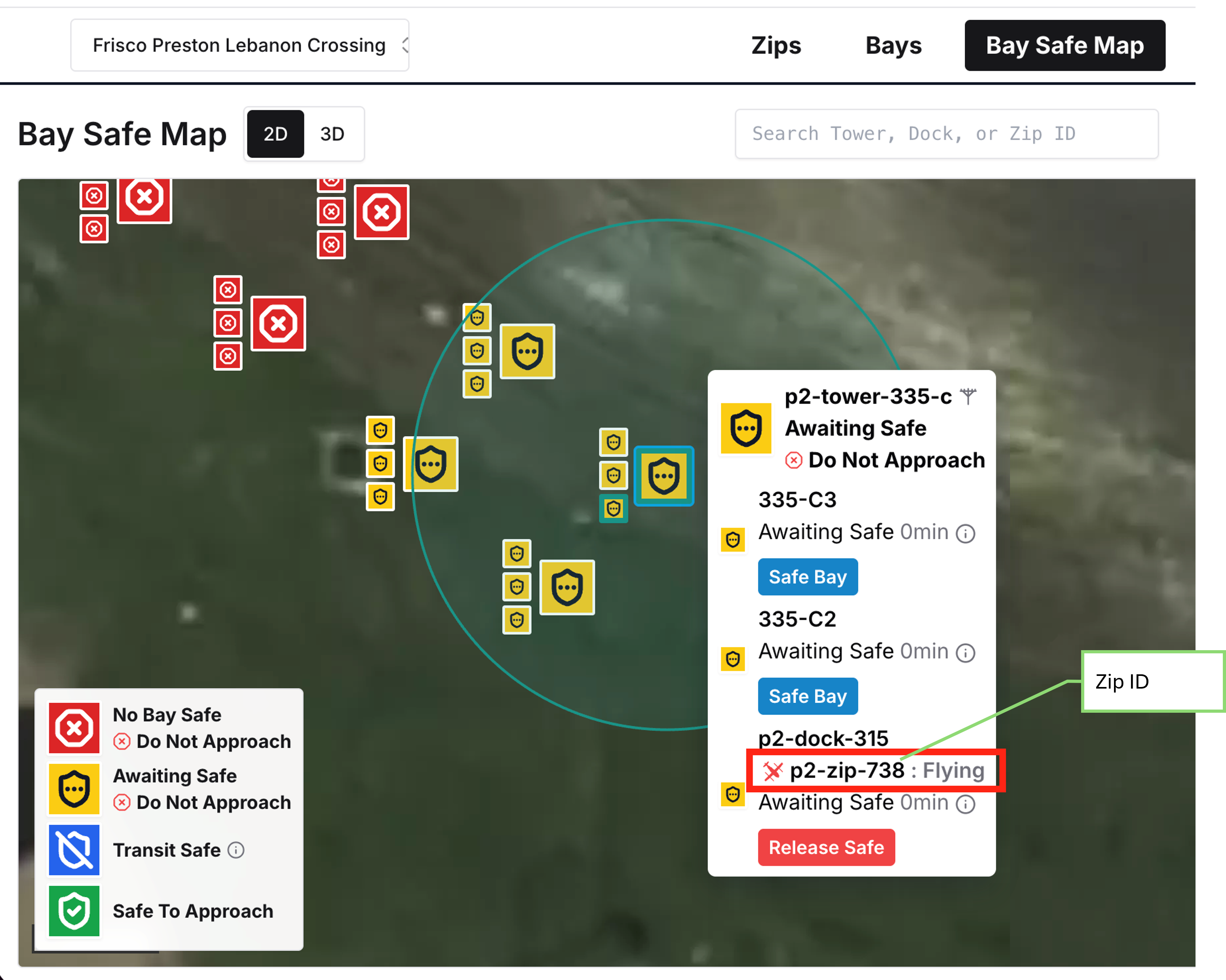
Is the Zip in the dock?
- If it is still flying, wait for it to land.
- If it is not still flying (i.e. it’s in the maintenance area or otherwise not on the flight line), continue.
- If the zip has paralanded, continue.
- Turn off the zip.
- Navigate to FleetWrangler Zip Details page » Troubleshooting Commands » Zip Power Off.
NOTE: You must have the lease to send the command. - If this does not work, contact service engineering to turn off the zip via SSH.
- Navigate to FleetWrangler Zip Details page » Troubleshooting Commands » Zip Power Off.
- Send "Operator Removed Zip From Bay" command.
- Navigate to FleetWrangler Zip Details page » Command Request » Operator Removed Zip From Bay.
- If the tooltip identifies another blocking Zip, repeat the aircraft-location and recovery checks for that Zip, starting with Is the Zip in the dock?
- If the required statuses are still not shown after recovery, escalate to ASW Fleet & Delivery On Call.
- If you closed the map, reopen the correct site and verify the primary bay and required transit-safe bays before entering.
- Turn off the zip.
- Navigate to FleetWrangler Zip Details page » Troubleshooting Commands » Zip Power Off.
NOTE: You must have the lease to send the command. - If this does not work, contact service engineering to turn off the zip via SSH.
- Navigate to FleetWrangler Zip Details page » Troubleshooting Commands » Zip Power Off.
- Delete the zip in FleetWrangler.
- Navigate to FleetWrangler Zip Details page » Delete zip » Enter zip ID » hold spacebar for 5 seconds to delete.
- When the zip turns back on, it will create itself in FleetWrangler. Reapply any notes or tags.
- If the tooltip identifies another blocking Zip, repeat the aircraft-location and recovery checks for that Zip, starting with "Is the Zip in the dock?"
- If the required statuses are still not shown after recovery, escalate to ASW Delivery.
- If you closed the map, reopen the correct site and verify the primary bay and required transit-safe bays before entering.
Resolution note
This plaintext block is ready to paste into the Resolution Note field on the ZERP issue you're working. The permalink below gives engineering review access to the full step-by-step timeline including any back-navigation; share it if the case needs a deeper look.
Permalink:
Session is too large to fit in a URL. Use Download session JSON to share the timeline out-of-band.
Did this guide help you get unblocked?
Open suggestions
There are no open suggestions.
Open pull requests
There are no open pull requests.