

HOVER_SA_TO_HOVER_PA_ETHERNET_LINK
Viewing this guide for
graph TD
    select-aircraft-variant{"<small><b>Step 1</b></small><br/>Question: Which aircraft variant are you troubl..."}
    ev2-background["<small><b>Step 2</b></small><br/>Action: Use this maintenance guide to locate ..."]
    ev3-background["<small><b>Step 3</b></small><br/>Action: Use this maintenance guide to locate ..."]
    inspect-hover-sa-flex{"<small><b>Step 4</b></small><br/>Question: Inspect the hover SA flex, is there a..."}
    swap-hover-sa-flex["<small><b>Step 5</b></small><br/>Action: Swap the hover SA flex and proceed to..."]
    inspect-hover-sa{"<small><b>Step 6</b></small><br/>Question: Inspect the hover SA motor especiall..."}
    swap-hover-sa["<small><b>Step 7</b></small><br/>Action: Swap the Hover Stbd Aft motor, procee..."]
    inspect-hover-pa-flex{"<small><b>Step 8</b></small><br/>Question: Inspect the hover PA flex, is there a..."}
    swap-hover-pa-flex["<small><b>Step 9</b></small><br/>Action: Swap the hover PA flex and proceed to..."]
    inspect-hover-pa{"<small><b>Step 10</b></small><br/>Question: Inspect the hover PA motor especiall..."}
    swap-hover-pa["<small><b>Step 11</b></small><br/>Action: Swap the Hover Port Aft motor, procee..."]
    inspect-distro{"<small><b>Step 12</b></small><br/>Question: Inspect the distro especially the co..."}
    swap-distro["<small><b>Step 13</b></small><br/>Action: Swap the distro board, proceed to nex..."]
    inspection-findings{"<small><b>Step 14</b></small><br/>Question: Was anything swapped due to damage?"}
    swap-flexes-anyway["<small><b>Step 15</b></small><br/>Action: Invisible damage is most likely in on..."]
    is-the-issue-resolved{"<small><b>Step 16</b></small><br/>Question: Is the issue resolved?"}
    the-aircraft-may-return-to-service("<small><b>Step 17</b></small><br/>Reference: The Aircraft may return to service.")
    escalate-to-p2-avionics-hardware-on-call{{"<small><b>Step 18</b></small><br/>Escalation: Escalate to P2 Avionics Hardware On C..."}}
    select-aircraft-variant -->|EV2| ev2-background
    select-aircraft-variant -->|EV3| ev3-background
    ev2-background --> inspect-hover-sa-flex
    ev3-background --> inspect-hover-sa-flex
    inspect-hover-sa-flex -->|YES| swap-hover-sa-flex
    inspect-hover-sa-flex -->|NO| inspect-hover-sa
    swap-hover-sa-flex --> inspect-hover-sa
    inspect-hover-sa -->|YES| swap-hover-sa
    inspect-hover-sa -->|NO| inspect-hover-pa-flex
    swap-hover-sa --> inspect-hover-pa-flex
    inspect-hover-pa-flex -->|YES| swap-hover-pa-flex
    inspect-hover-pa-flex -->|NO| inspect-hover-pa
    swap-hover-pa-flex --> inspect-hover-pa
    inspect-hover-pa -->|YES| swap-hover-pa
    inspect-hover-pa -->|NO| inspect-distro
    swap-hover-pa --> inspect-distro
    inspect-distro -->|YES| swap-distro
    inspect-distro -->|NO| inspection-findings
    swap-distro --> inspection-findings
    inspection-findings -->|YES| is-the-issue-resolved
    inspection-findings -->|NO| swap-flexes-anyway
    swap-flexes-anyway --> is-the-issue-resolved
    is-the-issue-resolved -->|Yes| the-aircraft-may-return-to-service
    is-the-issue-resolved -->|No| escalate-to-p2-avionics-hardware-on-call
    style select-aircraft-variant fill:#dbeafe,stroke:#3b82f6,color:#1e3a5f
    style ev2-background fill:#dcfce7,stroke:#22c55e,color:#14532d
    style ev3-background fill:#dcfce7,stroke:#22c55e,color:#14532d
    style inspect-hover-sa-flex fill:#dbeafe,stroke:#3b82f6,color:#1e3a5f
    style swap-hover-sa-flex fill:#dcfce7,stroke:#22c55e,color:#14532d
    style inspect-hover-sa fill:#dbeafe,stroke:#3b82f6,color:#1e3a5f
    style swap-hover-sa fill:#dcfce7,stroke:#22c55e,color:#14532d
    style inspect-hover-pa-flex fill:#dbeafe,stroke:#3b82f6,color:#1e3a5f
    style swap-hover-pa-flex fill:#dcfce7,stroke:#22c55e,color:#14532d
    style inspect-hover-pa fill:#dbeafe,stroke:#3b82f6,color:#1e3a5f
    style swap-hover-pa fill:#dcfce7,stroke:#22c55e,color:#14532d
    style inspect-distro fill:#dbeafe,stroke:#3b82f6,color:#1e3a5f
    style swap-distro fill:#dcfce7,stroke:#22c55e,color:#14532d
    style inspection-findings fill:#dbeafe,stroke:#3b82f6,color:#1e3a5f
    style swap-flexes-anyway fill:#dcfce7,stroke:#22c55e,color:#14532d
    style is-the-issue-resolved fill:#dbeafe,stroke:#3b82f6,color:#1e3a5f
    style the-aircraft-may-return-to-service fill:#f3e8ff,stroke:#a855f7,color:#581c87
    style escalate-to-p2-avionics-hardware-on-call fill:#fef3c7,stroke:#f59e0b,color:#78350f
Hover or focus a block to preview it. Select the block to keep the preview open.
1 question
Which aircraft variant are you troubleshooting?
2 action
Use this maintenance guide to locate the Ethernet harness and connectors that should be inspected for this link fault.
Please read the checklist carefully, refer to the layout diagram and then proceed with the debugging steps below.
Make sure to check Zerp for any recently replaced HW. If any LRU was recently replaced, proceed with inspection or replacement of remaining LRUs in the list.
LRUs to check:
- Hover-SA to Distro flex harness.
- Hover-SA board and connector.
- Distro to Hover-PA flex harness.
- Hover-PA board and connector.
- Distro board and connector.
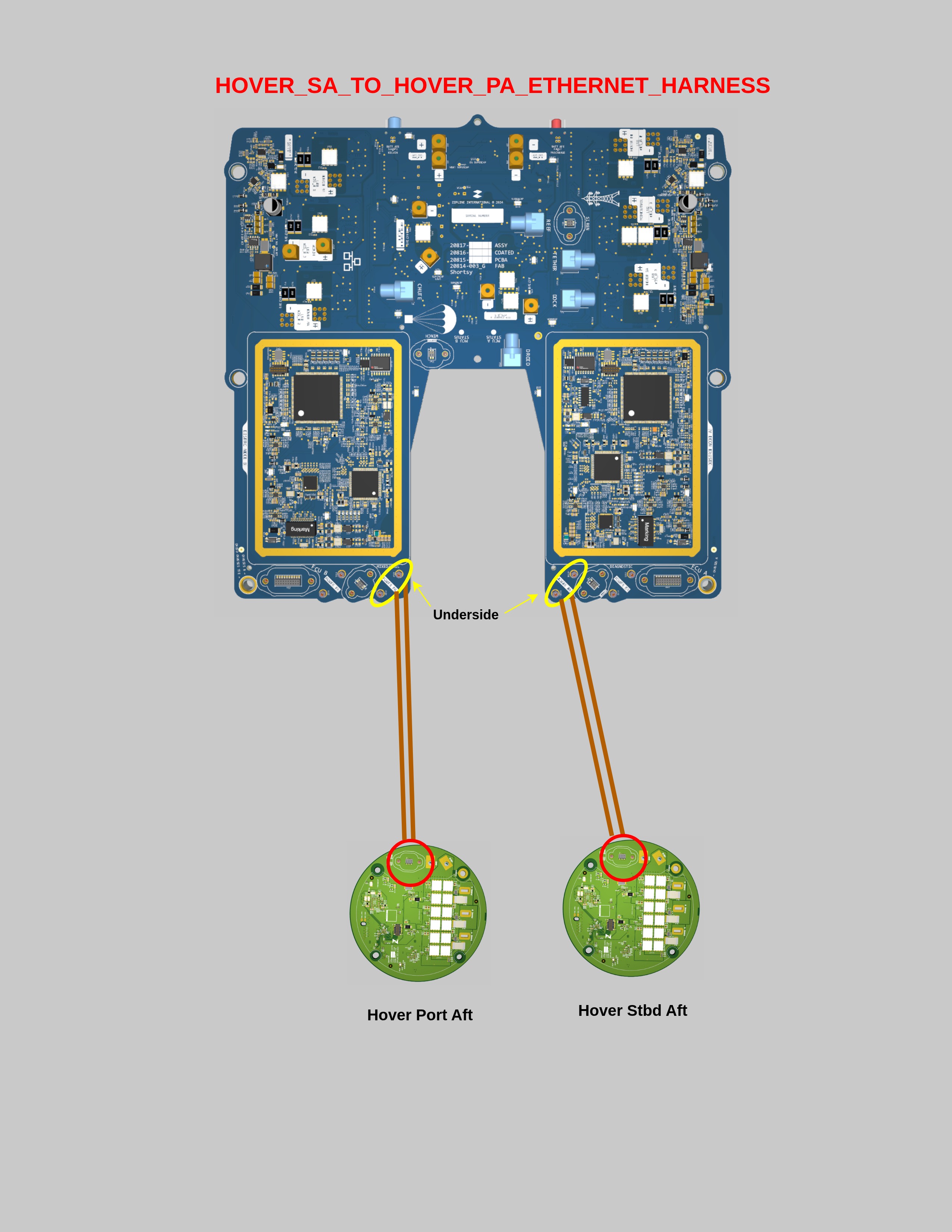
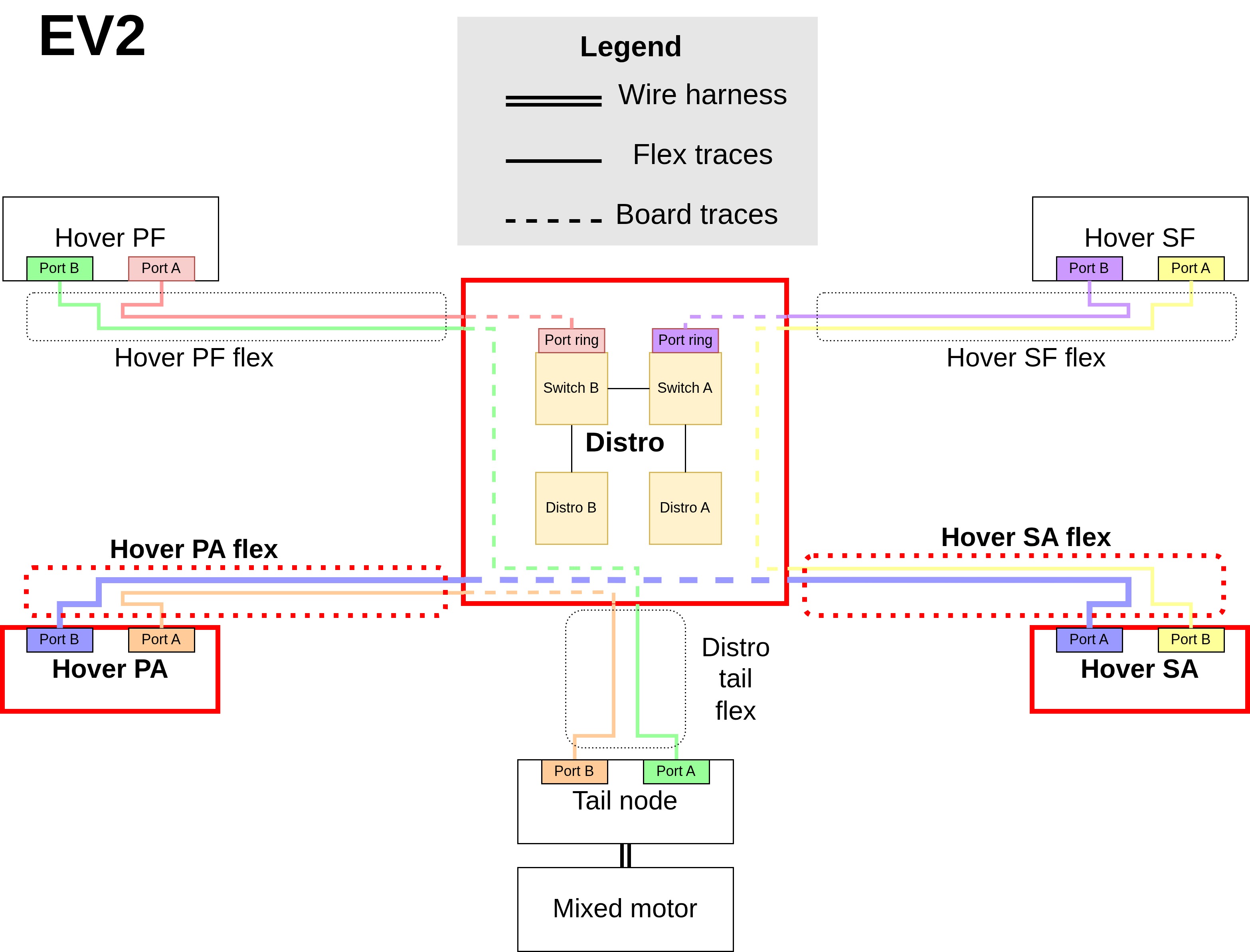
Please read the checklist carefully, refer to the layout diagram and then proceed with the debugging steps below.
Make sure to check Zerp for any recently replaced HW. If any LRU was recently replaced, proceed with inspection or replacement of remaining LRUs in the list.
LRUs to check:
- Hover-SA to Distro flex harness.
- Hover-SA board and connector.
- Distro to Hover-PA flex harness.
- Hover-PA board and connector.
- Distro board and connector.
3 action
Use this maintenance guide to locate the Ethernet harness and connectors that should be inspected for this link fault.
Please read the checklist carefully and then proceed with the debugging steps below.
Make sure to check Zerp for any recently replaced HW. If any LRU was recently replaced, proceed with inspection or replacement of remaining LRUs in the list.
LRUs to check:
- Hover-SA to Distro flex harness.
- Hover-SA motor and connector.
- Distro to Hover-PA flex harness.
- Hover-PA motor and connector.
- Distro board and connector.
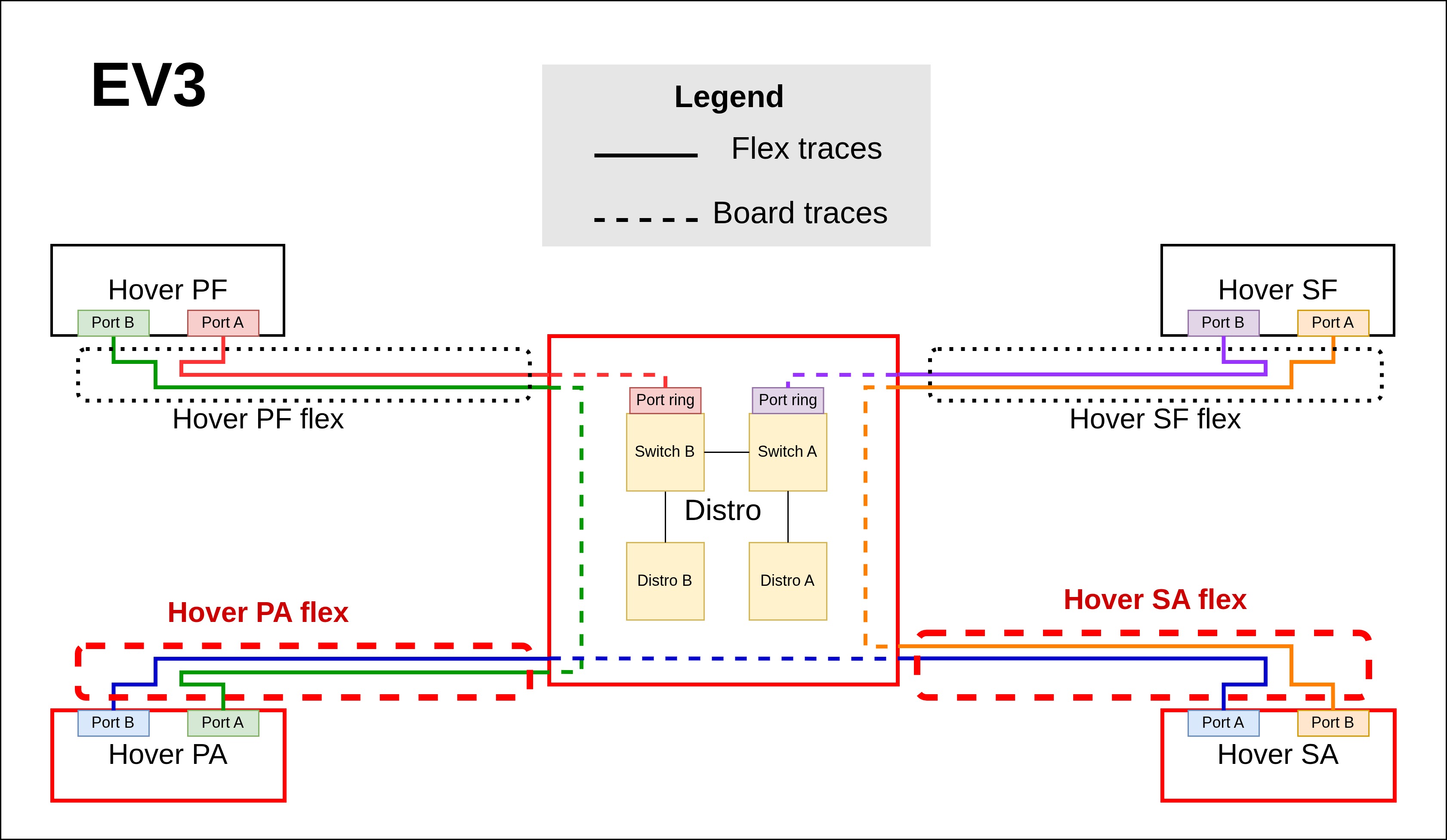
Please read the checklist carefully and then proceed with the debugging steps below.
Make sure to check Zerp for any recently replaced HW. If any LRU was recently replaced, proceed with inspection or replacement of remaining LRUs in the list.
LRUs to check:
- Hover-SA to Distro flex harness.
- Hover-SA motor and connector.
- Distro to Hover-PA flex harness.
- Hover-PA motor and connector.
- Distro board and connector.
4 question
Inspect the hover SA flex, is there any visible damage?
5 action
Swap the hover SA flex and proceed to the next inspection steps.
6 question
Inspect the hover SA motor (especially the connector), is there any visible damage?
7 action
Swap the Hover Stbd Aft motor, proceed to next inspection steps.
8 question
Inspect the hover PA flex, is there any visible damage?
9 action
Swap the hover PA flex and proceed to the next inspection steps.
10 question
Inspect the hover PA motor (especially the connector), is there any visible damage?
11 action
Swap the Hover Port Aft motor, proceed to next inspection steps.
12 question
Inspect the distro (especially the connector), is there any visible damage?
13 action
Swap the distro board, proceed to next inspection steps.
14 question
Was anything swapped due to damage?
15 action
Invisible damage is most likely in one of the flexes. Swap both implicated flexes (make sure the replacements have the foam covering). Notify and ship the removed flexes to Avionics-HW-on-call POC (and include Joseph Katz). Try a redocking flight.
16 question
Is the issue resolved?
17 reference
The Aircraft may return to service.
18 escalation
Escalate to P2 Avionics Hardware On Call.
Resolution note
This plaintext block is ready to paste into the Resolution Note field on the ZERP issue you're working. The permalink below gives engineering review access to the full step-by-step timeline including any back-navigation; share it if the case needs a deeper look.
Permalink:
Session is too large to fit in a URL. Use Download session JSON to share the timeline out-of-band.
Did this guide help you get unblocked?
Open suggestions
Open pull requests
There are no open pull requests.