

Wing Torque Mismatch
Applicable alarms (2)
Likely outcomes — click to expand
Based on 26 missions where this alarm fired in the last
90 days
(for WING_PORT_TORQUE_MISMATCH) as of 2026-10-13
Grounding vs discrepancy (of 17 ZERP issues filed on these missions)
Top work orders
- EV3: Replace Wing on Aircraft · MAINTENANCE_ACTION 16
Frequently replaced parts
| Part | P/N | Removals |
|---|---|---|
| LONG WING ASM, PORT(LH), ZIP, P2 | 0100553 | 96 |
| LONG WING ASM, STRBRD(RH), IM GB, ZIP, P2 | 0108493 | 96 |
| BATTERY ASSY, ZIP, P2 | 27158 | 11 |
| WING GEARBOX ASM, LONG WING, ZIP, P2 | 0111424 | 9 |
| SCREW FASTENED, CAMERA MODULE, EV3 | 0110395 | 6 |
Frequently co-occurring alarms (% of the 26 missions above)
Aggregated from fleet operations and refreshed daily. Individual outcomes may vary by site and configuration.
Background
Section titled “Background”Use this guide only for wing torque mismatch alarms.
Troubleshooting Steps
Section titled “Troubleshooting Steps”graph TD
check-p2f-validator-results["<small><b>Step 1</b></small><br/>Action: **Start with the servo comms validato..."]
try-servo-comms-validator-check{"<small><b>Step 2</b></small><br/>Question: Try the validator check now. 1. Filte..."}
check-matching-wing-failure{"<small><b>Step 3</b></small><br/>Question: Did the matching wing servo-mismatch..."}
follow-servo-rs485("<small><b>Step 4</b></small><br/>Reference: This is indicative of unreliable comm...")
inspect-flight-logs-no-validator["<small><b>Step 5</b></small><br/>Action: Use manual Baraza plot analysis to de..."]
apply-control-surface-high-mismatch-template["<small><b>Step 6</b></small><br/>Action: Apply the **Control Surface Torque M..."]
zoom-first-high-mismatch-transition["<small><b>Step 7</b></small><br/>Action: In the affected wing servo's gnc.veh..."]
check-feedback-dot-gaps{"<small><b>Step 8</b></small><br/>Question: In the second plot, immediately below..."}
follow-servo-rs485-from-feedback-gaps("<small><b>Step 9</b></small><br/>Reference: This is indicative of unreliable comm...")
inspect-flight-logs-validator-passed["<small><b>Step 10</b></small><br/>Action: Use manual Baraza plot analysis to de..."]
apply-control-surface-high-mismatch-template-skip-comms["<small><b>Step 11</b></small><br/>Action: Apply the **Control Surface Torque M..."]
zoom-first-high-mismatch-transition-skip-comms["<small><b>Step 12</b></small><br/>Action: In the affected wing servo's gnc.veh..."]
check-feedback-model-mismatch{"<small><b>Step 13</b></small><br/>Question: In the second plot for this surface, ..."}
check-torque-spikes{"<small><b>Step 14</b></small><br/>Question: Look at the third plot for this surfa..."}
request-wing-control-surface-inspection{"<small><b>Step 15</b></small><br/>Question: Request inspection on the affected wi..."}
replace-wing-control-surface-hardware["<small><b>Step 16</b></small><br/>Action: Create a work order to replace the ba..."]
escalate-structures-mechanisms{{"<small><b>Step 17</b></small><br/>Escalation: Escalate to Aircraft Structures & Mec..."}}
escalate-zip-controls-or-wait{{"<small><b>Step 18</b></small><br/>Escalation: Escalate to P2 Zip Controls On Call w..."}}
check-p2f-validator-results --> try-servo-comms-validator-check
try-servo-comms-validator-check -->|The matching validator chec...| check-matching-wing-failure
try-servo-comms-validator-check -->|The matching validator chec...| inspect-flight-logs-no-validator
check-matching-wing-failure -->|Yes, the matching wing feed...| follow-servo-rs485
check-matching-wing-failure -->|No, there is no matching wi...| inspect-flight-logs-validator-passed
inspect-flight-logs-no-validator --> apply-control-surface-high-mismatch-template
apply-control-surface-high-mismatch-template --> zoom-first-high-mismatch-transition
zoom-first-high-mismatch-transition --> check-feedback-dot-gaps
check-feedback-dot-gaps -->|Yes, there is a noticeable ...| follow-servo-rs485-from-feedback-gaps
check-feedback-dot-gaps -->|No, there is no noticeable ...| check-feedback-model-mismatch
check-feedback-dot-gaps -->|I do not know| escalate-zip-controls-or-wait
inspect-flight-logs-validator-passed --> apply-control-surface-high-mismatch-template-skip-comms
apply-control-surface-high-mismatch-template-skip-comms --> zoom-first-high-mismatch-transition-skip-comms
zoom-first-high-mismatch-transition-skip-comms --> check-feedback-model-mismatch
check-feedback-model-mismatch -->|Yes, the feedback diverges ...| request-wing-control-surface-inspection
check-feedback-model-mismatch -->|No, the feedback does not d...| check-torque-spikes
check-feedback-model-mismatch -->|I do not know| escalate-zip-controls-or-wait
check-torque-spikes -->|Yes, there appears to be an...| request-wing-control-surface-inspection
check-torque-spikes -->|No, the torque plot seems n...| escalate-zip-controls-or-wait
check-torque-spikes -->|I do not know| escalate-zip-controls-or-wait
request-wing-control-surface-inspection -->|Yes, inspection found an issue| replace-wing-control-surface-hardware
request-wing-control-surface-inspection -->|No, inspection found no issue| escalate-structures-mechanisms
style check-p2f-validator-results fill:#dcfce7,stroke:#22c55e,color:#14532d
style try-servo-comms-validator-check fill:#dbeafe,stroke:#3b82f6,color:#1e3a5f
style check-matching-wing-failure fill:#dbeafe,stroke:#3b82f6,color:#1e3a5f
style follow-servo-rs485 fill:#f3e8ff,stroke:#a855f7,color:#581c87
style inspect-flight-logs-no-validator fill:#dcfce7,stroke:#22c55e,color:#14532d
style apply-control-surface-high-mismatch-template fill:#dcfce7,stroke:#22c55e,color:#14532d
style zoom-first-high-mismatch-transition fill:#dcfce7,stroke:#22c55e,color:#14532d
style check-feedback-dot-gaps fill:#dbeafe,stroke:#3b82f6,color:#1e3a5f
style follow-servo-rs485-from-feedback-gaps fill:#f3e8ff,stroke:#a855f7,color:#581c87
style inspect-flight-logs-validator-passed fill:#dcfce7,stroke:#22c55e,color:#14532d
style apply-control-surface-high-mismatch-template-skip-comms fill:#dcfce7,stroke:#22c55e,color:#14532d
style zoom-first-high-mismatch-transition-skip-comms fill:#dcfce7,stroke:#22c55e,color:#14532d
style check-feedback-model-mismatch fill:#dbeafe,stroke:#3b82f6,color:#1e3a5f
style check-torque-spikes fill:#dbeafe,stroke:#3b82f6,color:#1e3a5f
style request-wing-control-surface-inspection fill:#dbeafe,stroke:#3b82f6,color:#1e3a5f
style replace-wing-control-surface-hardware fill:#dcfce7,stroke:#22c55e,color:#14532d
style escalate-structures-mechanisms fill:#fef3c7,stroke:#f59e0b,color:#78350f
style escalate-zip-controls-or-wait fill:#fef3c7,stroke:#f59e0b,color:#78350f Hover or focus a block to preview it. Select the block to keep the preview open.
Check validator results for this flight from the P2F validator results page. Do not use the P2M validator results page.
Open the Validators tab.

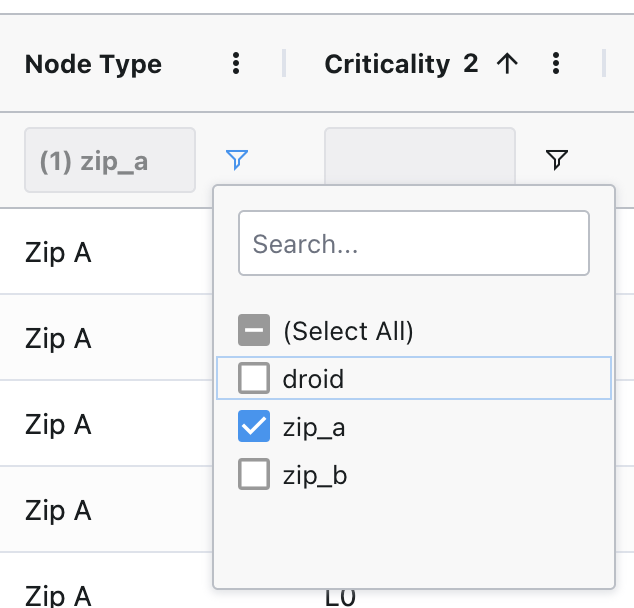
1. Filter validator results to
zip_a only. Do not use Zip B results.2. Search for
servo-mismatch-feedback-gap.3. Look for the check that matches the alarm:
-
WING_PORT_TORQUE_MISMATCH: servo-mismatch-feedback-gap/wing-port-mismatch-feedback-gap-
WING_STBD_TORQUE_MISMATCH: servo-mismatch-feedback-gap/wing-stbd-mismatch-feedback-gapIs the matching check available, or is it unavailable, incomplete, or missing?

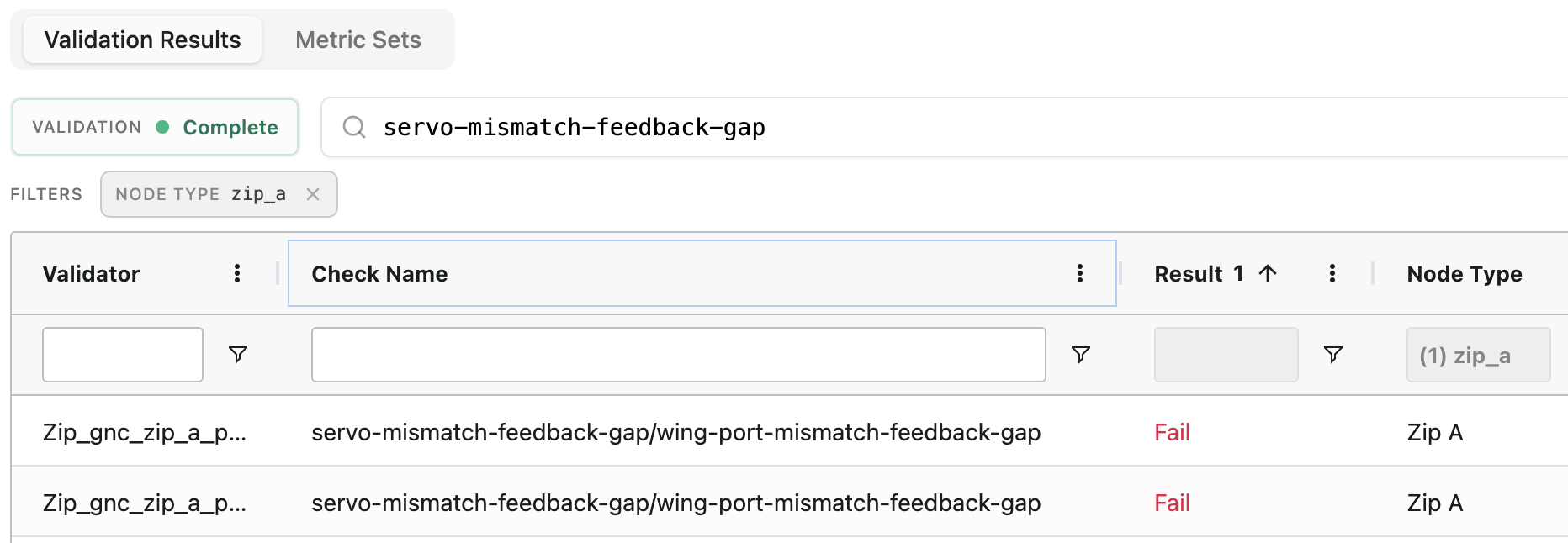
servo-mismatch-feedback-gap check fail?-
WING_PORT_TORQUE_MISMATCH: check servo-mismatch-feedback-gap/wing-port-mismatch-feedback-gap-
WING_STBD_TORQUE_MISMATCH: check servo-mismatch-feedback-gap/wing-stbd-mismatch-feedback-gapExample failing validator result. The screenshot uses a wing-port check, but the failure pattern is the same for the wing checks listed above.
Follow the guide for servo RS-485 connection issues:
Validator: servo_rs485_connection/*.For follow-up actions and questions, escalate to P2 Avionics Hardware On Call.
If no servo-comms validator results were available, first manually inspect for servo comms gaps. This path is more subject to human error than the validator check. If the matching validator check becomes available before you finish, prefer the validator result.
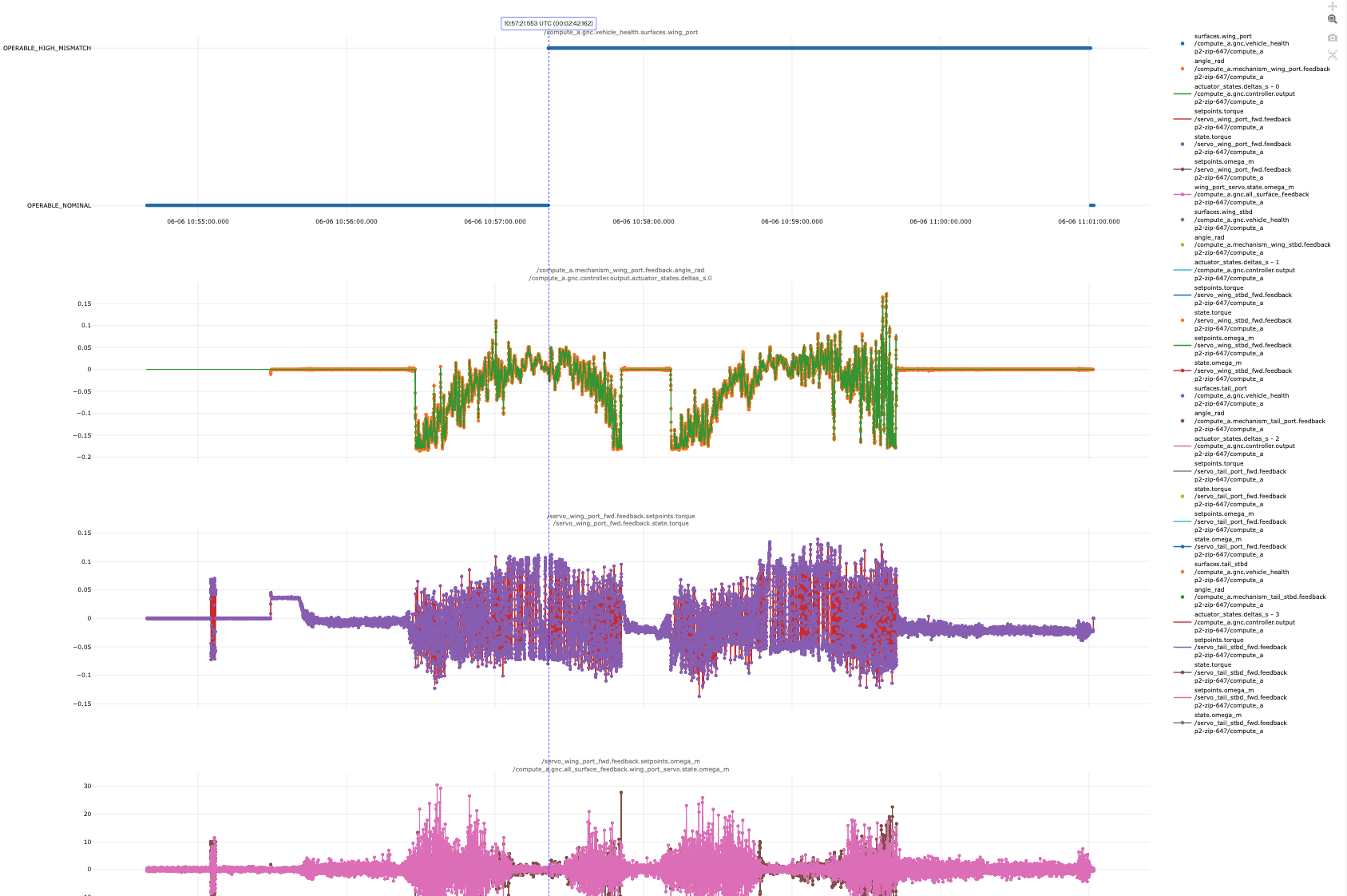
gnc.vehicle_health plot for the wing servo that raised the alarm.-
WING_PORT_TORQUE_MISMATCH: use the wing-port surface plots.-
WING_STBD_TORQUE_MISMATCH: use the wing-starboard surface plots.There are 4 plots in the plot set for each surface:
1.
gnc.vehicle_health state.2. The affected surface's
feedback.angle_rad vs the controller model line from actuator_states.delta_s.3. The servo
feedback.setpoints.torque and feedback.state.torque.4.
feedback.setpoints.omega_m vs state.omega_m (this 4th plot is not used in this guide).The screenshot below uses a wing-port example, but the plot pattern is the same for wing surfaces.
gnc.vehicle_health plot, find the first OPERABLE_NOMINAL -> OPERABLE_HIGH_MISMATCH transition. Zoom in around that transition until you can see the individual value dots.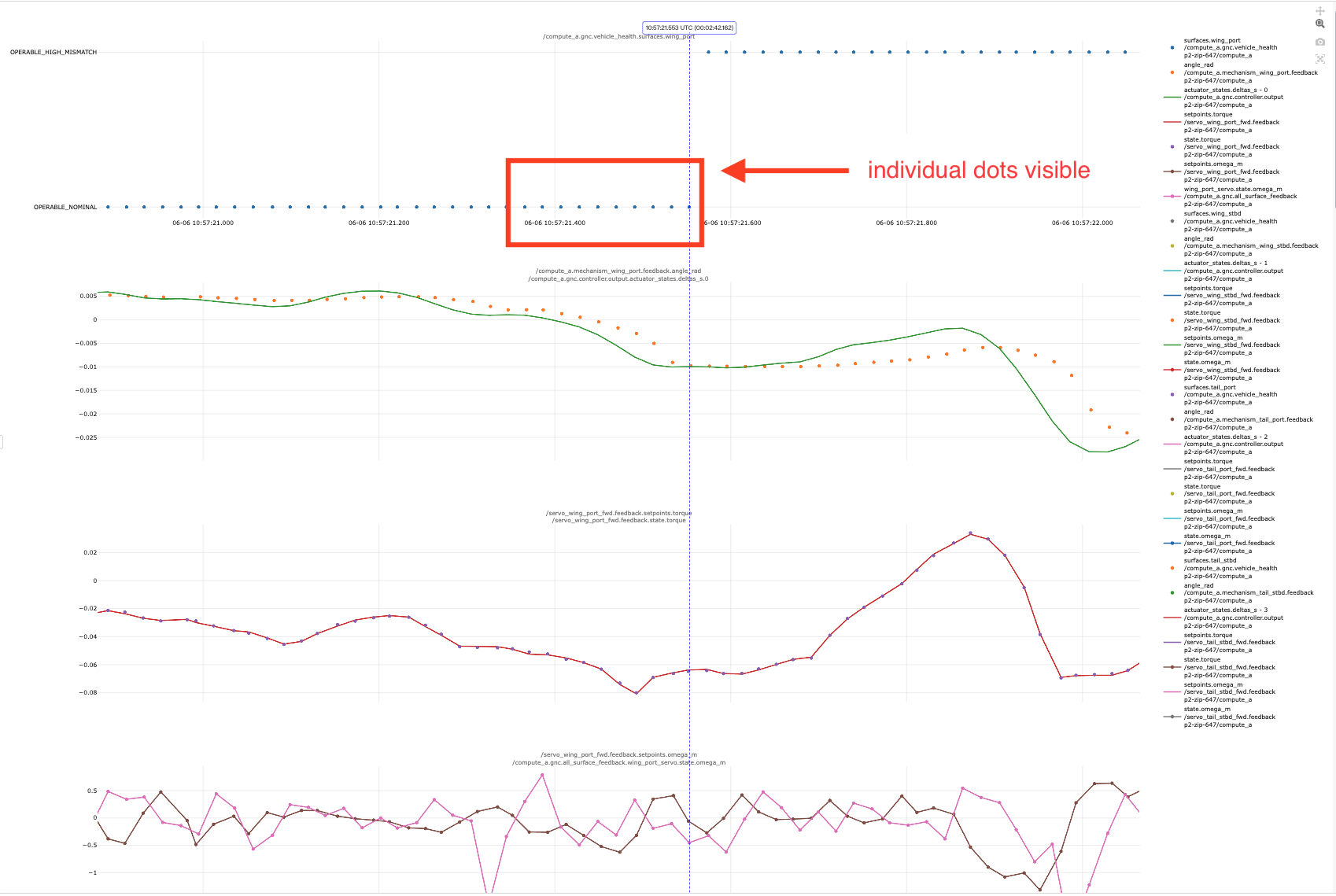
OPERABLE_NOMINAL -> OPERABLE_HIGH_MISMATCH transition, compare the feedback.angle_rad dots against the actuator_states.delta_s model line.Do you see any noticeable gaps in the feedback dots?
Each feedback sample should arrive every 20 ms. Any gap larger than 60 ms, or about 3 missing dots, is problematic. Use the plot cursor to measure the gap if needed.
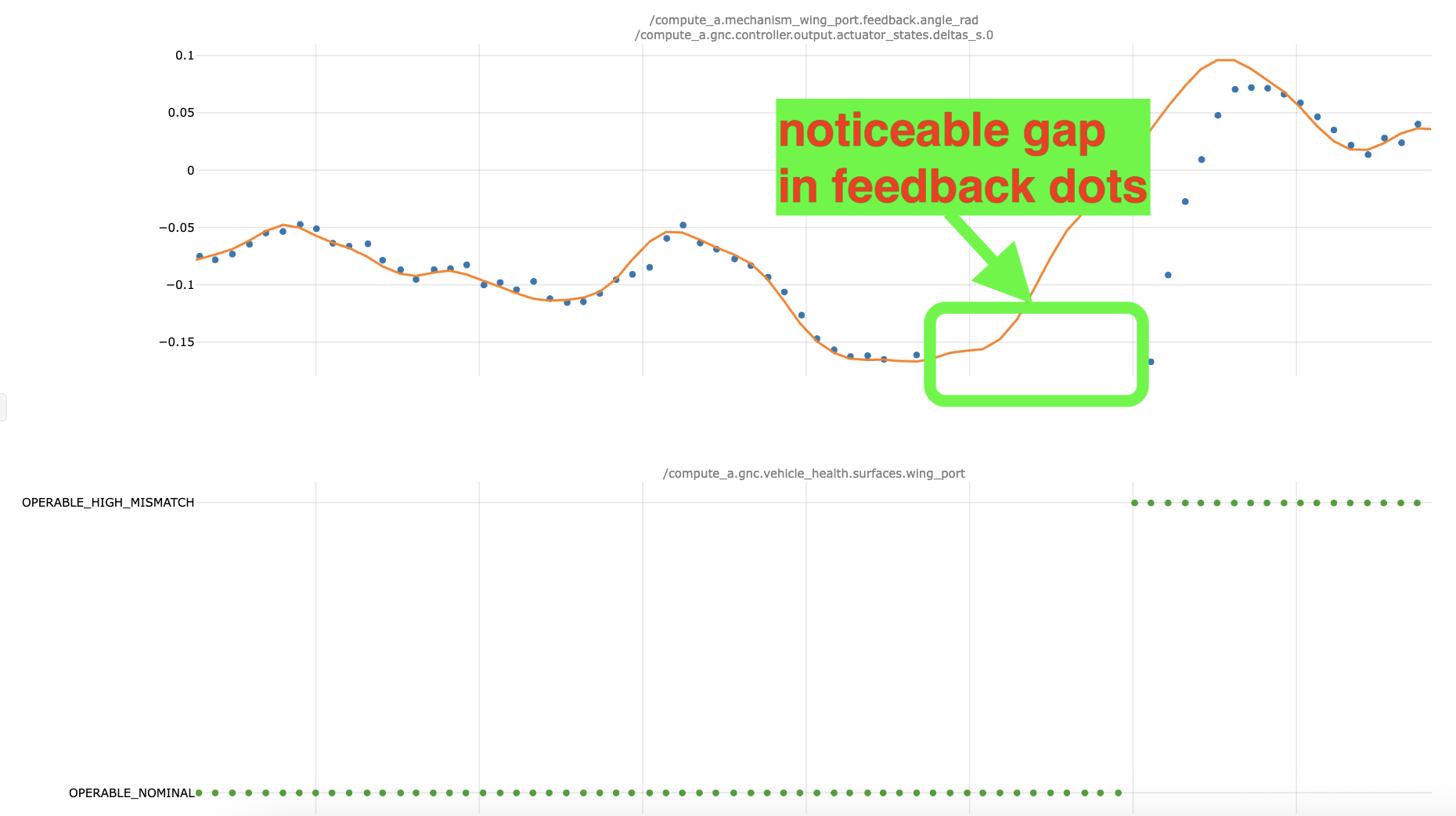
Follow the guide for servo RS-485 connection issues:
Validator: servo_rs485_connection/*.For follow-up actions and questions, escalate to P2 Avionics Hardware On Call.
Here we will inspect for surface model mismatch or unusual servo torque feedback.
gnc.vehicle_health plot for the wing servo that raised the alarm.-
WING_PORT_TORQUE_MISMATCH: use the wing-port surface plots.-
WING_STBD_TORQUE_MISMATCH: use the wing-starboard surface plots.There are 4 plots in the plot set for each surface:
1.
gnc.vehicle_health state;2. the affected surface's
feedback.angle_rad vs the controller model line from actuator_states.delta_s;3. the servo
feedback.setpoints.torque and feedback.state.torque;and 4.
feedback.setpoints.omega_m vs state.omega_m (this 4th plot not used in this guide).The screenshot below uses a wing-port example, but the plot pattern is the same for wing surfaces.
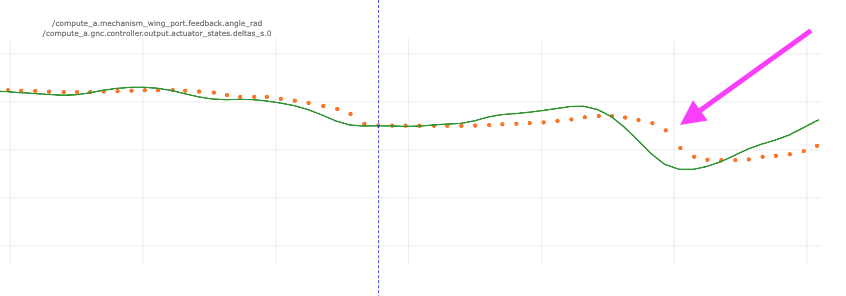
gnc.vehicle_health plot, find the first OPERABLE_NOMINAL -> OPERABLE_HIGH_MISMATCH transition. Zoom in around that transition until you can see the individual value dots.feedback.angle_rad dots against the actuator_states.delta_s model line.Do the feedback dots diverge significantly from the controller model line?
A significant divergence means the blue feedback dots remain visibly separated from the orange model line during the high-mismatch region.
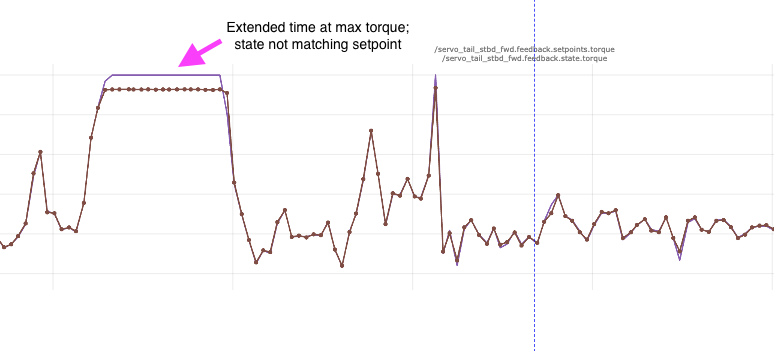
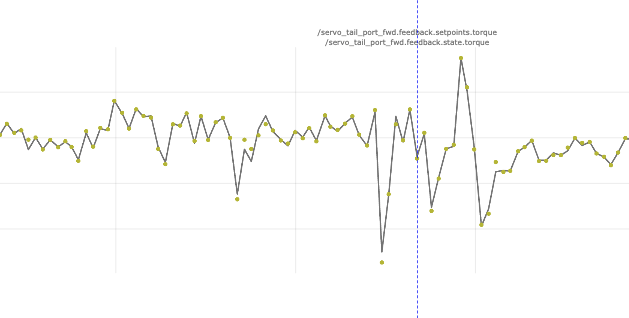
feedback.setpoints.torque and feedback.state.torque.Are there any noticeable torque spikes during the time immediately before we trigger 'OPERABLE_HIGH_MISMATCH'? These spikes might look larger, sharper or longer compared to the torque plots for the other non-faulted surfaces?
-
WING_PORT_TORQUE_MISMATCH: inspect the port aileron.-
WING_STBD_TORQUE_MISMATCH: inspect the starboard aileron.Prompt maintenance to follow UMM
57.2.1.c Inspect Control Surface (Aileron).Did the inspection find an issue with the affected control surface hardware?
Resolution note
This plaintext block is ready to paste into the Resolution Note field on the ZERP issue you're working. The permalink below gives engineering review access to the full step-by-step timeline including any back-navigation; share it if the case needs a deeper look.
Permalink:
Session is too large to fit in a URL. Use Download session JSON to share the timeline out-of-band.
Did this guide help you get unblocked?
Open suggestions
There are no open suggestions.
Open pull requests
There are no open pull requests.