

Ping_devices not Seeing Aircraft or Droid
Applicable alarms (1)
Likely outcomes — click to expand
Based on 0 missions where this alarm fired in the last 90 days as of 2026-10-13
Aggregated from fleet operations and refreshed daily. Individual outcomes may vary by site and configuration.
Background
Section titled “Background”The smart carts use a T100 media converter which is an adapter used to translate the comms network on the Aircraft and Droid to an ethernet connection for the NEO.
Troubleshooting Steps
Section titled “Troubleshooting Steps”3d printed box and - T1 Adapter board
Section titled “3d printed box and - T1 Adapter board”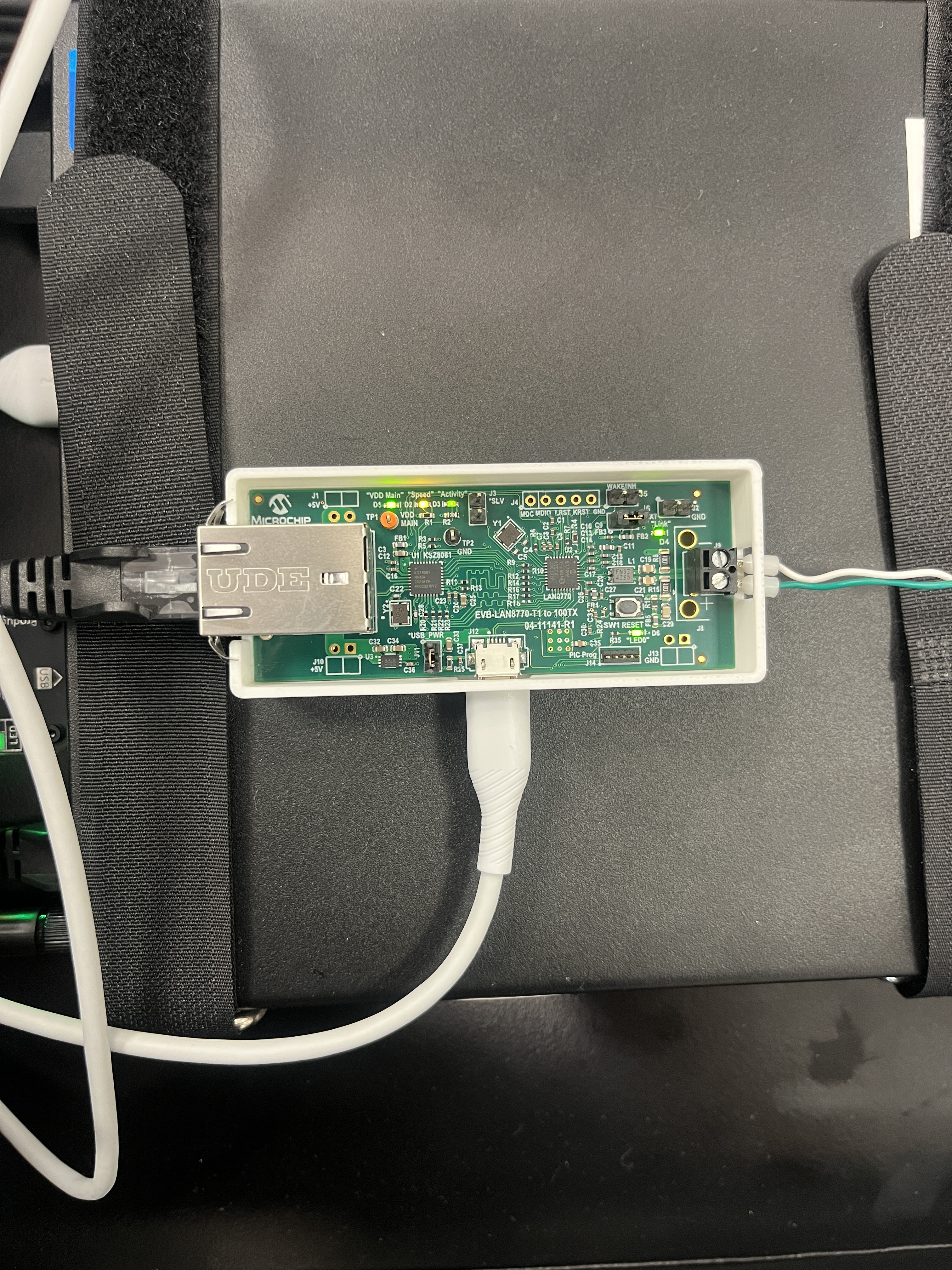
Innomaker T1 Converter Box
Section titled “Innomaker T1 Converter Box”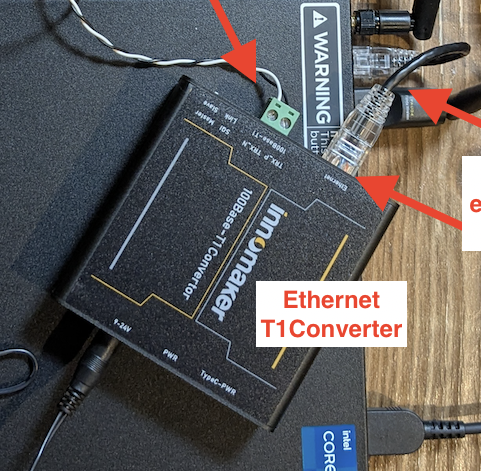
graph TD
    does-the-ping-devices-command-return-an{"<small><b>Step 1</b></small><br/>Question: Does the ping_devices command return ..."}
    something-is-likely-wrong-with-the-depl{{"<small><b>Step 2</b></small><br/>Escalation: Something is likely wrong with the de..."}}
    is-the-communication-cable-connected-to{"<small><b>Step 3</b></small><br/>Question: Is the communication cable connected ..."}
    swap-the-cables["<small><b>Step 4</b></small><br/>Action: Swap the cables."]
    try-to-ping-the-aircraft-droid-again["<small><b>Step 5</b></small><br/>Action: Try to ping the Aircraft/Droid again."]
    if-the-issue-is-not-resolved-continue-t["<small><b>Step 6</b></small><br/>Action: If the issue is not resolved, continu..."]
    follow-the-troubleshooting-steps-below-f{"<small><b>Step 7</b></small><br/>Question: Follow the troubleshooting steps belo..."}
    is-the-link-light-green-activity-light{"<small><b>Step 8</b></small><br/>Question: Is the link light green? green activi..."}
    is-the-green-activity-light-blinking-or{"<small><b>Step 9</b></small><br/>Question: Is the green activity light blinking ..."}
    the-ethernet-is-connected["<small><b>Step 10</b></small><br/>Action: The Ethernet is connected."]
    t1-board-blinking-can-the-ping-devices-s{"<small><b>Step 11</b></small><br/>Question: Can the ping_devices see the Aircraft..."}
    t1-board-blinking-the-issue-is-resolved["<small><b>Step 12</b></small><br/>Action: The issue is resolved."]
    t1-board-blinking-escalate-to-p2-smart-c{{"<small><b>Step 13</b></small><br/>Escalation: Escalate to P2 Smart Carts."}}
    t1-board-confirm-the-following-and-corre["<small><b>Step 14</b></small><br/>Action: Confirm the following and correct as ..."]
    t1-board-solid-can-the-ping-devices-see{"<small><b>Step 15</b></small><br/>Question: Can the ping_devices see the Aircraft..."}
    t1-board-solid-the-issue-is-resolved["<small><b>Step 16</b></small><br/>Action: The issue is resolved."]
    t1-board-solid-escalate-to-p2-smart-cart{{"<small><b>Step 17</b></small><br/>Escalation: Escalate to P2 Smart Carts."}}
    innomaker-confirm-the-following-and-corr["<small><b>Step 18</b></small><br/>Action: Confirm the following and correct as ..."]
    innomaker-can-the-ping-devices-see-the-a{"<small><b>Step 19</b></small><br/>Question: Can the ping_devices see the Aircraft..."}
    innomaker-the-issue-is-resolved["<small><b>Step 20</b></small><br/>Action: The issue is resolved."]
    innomaker-escalate-to-p2-smart-carts{{"<small><b>Step 21</b></small><br/>Escalation: Escalate to P2 Smart Carts."}}
    does-the-ping-devices-command-return-an -->|Yes| is-the-communication-cable-connected-to
    does-the-ping-devices-command-return-an -->|No| something-is-likely-wrong-with-the-depl
    is-the-communication-cable-connected-to -->|Yes| follow-the-troubleshooting-steps-below-f
    is-the-communication-cable-connected-to -->|No| swap-the-cables
    swap-the-cables --> try-to-ping-the-aircraft-droid-again
    try-to-ping-the-aircraft-droid-again --> if-the-issue-is-not-resolved-continue-t
    if-the-issue-is-not-resolved-continue-t --> follow-the-troubleshooting-steps-below-f
    follow-the-troubleshooting-steps-below-f -->|3d printed box and - T1 Ada...| is-the-link-light-green-activity-light
    follow-the-troubleshooting-steps-below-f -->|Innomaker T1 Converter Box| innomaker-confirm-the-following-and-corr
    is-the-link-light-green-activity-light -->|Blinking| the-ethernet-is-connected
    is-the-link-light-green-activity-light -->|Solid| t1-board-confirm-the-following-and-corre
    is-the-green-activity-light-blinking-or -->|Blinking| the-ethernet-is-connected
    is-the-green-activity-light-blinking-or -->|Solid| t1-board-confirm-the-following-and-corre
    the-ethernet-is-connected --> t1-board-blinking-can-the-ping-devices-s
    t1-board-blinking-can-the-ping-devices-s -->|Yes| t1-board-blinking-the-issue-is-resolved
    t1-board-blinking-can-the-ping-devices-s -->|No| t1-board-blinking-escalate-to-p2-smart-c
    t1-board-confirm-the-following-and-corre --> t1-board-solid-can-the-ping-devices-see
    t1-board-solid-can-the-ping-devices-see -->|Yes| t1-board-solid-the-issue-is-resolved
    t1-board-solid-can-the-ping-devices-see -->|No| t1-board-solid-escalate-to-p2-smart-cart
    innomaker-confirm-the-following-and-corr --> innomaker-can-the-ping-devices-see-the-a
    innomaker-can-the-ping-devices-see-the-a -->|Yes| innomaker-the-issue-is-resolved
    innomaker-can-the-ping-devices-see-the-a -->|No| innomaker-escalate-to-p2-smart-carts
    style does-the-ping-devices-command-return-an fill:#dbeafe,stroke:#3b82f6,color:#1e3a5f
    style something-is-likely-wrong-with-the-depl fill:#fef3c7,stroke:#f59e0b,color:#78350f
    style is-the-communication-cable-connected-to fill:#dbeafe,stroke:#3b82f6,color:#1e3a5f
    style swap-the-cables fill:#dcfce7,stroke:#22c55e,color:#14532d
    style try-to-ping-the-aircraft-droid-again fill:#dcfce7,stroke:#22c55e,color:#14532d
    style if-the-issue-is-not-resolved-continue-t fill:#dcfce7,stroke:#22c55e,color:#14532d
    style follow-the-troubleshooting-steps-below-f fill:#dbeafe,stroke:#3b82f6,color:#1e3a5f
    style is-the-link-light-green-activity-light fill:#dbeafe,stroke:#3b82f6,color:#1e3a5f
    style is-the-green-activity-light-blinking-or fill:#dbeafe,stroke:#3b82f6,color:#1e3a5f
    style the-ethernet-is-connected fill:#dcfce7,stroke:#22c55e,color:#14532d
    style t1-board-blinking-can-the-ping-devices-s fill:#dbeafe,stroke:#3b82f6,color:#1e3a5f
    style t1-board-blinking-the-issue-is-resolved fill:#dcfce7,stroke:#22c55e,color:#14532d
    style t1-board-blinking-escalate-to-p2-smart-c fill:#fef3c7,stroke:#f59e0b,color:#78350f
    style t1-board-confirm-the-following-and-corre fill:#dcfce7,stroke:#22c55e,color:#14532d
    style t1-board-solid-can-the-ping-devices-see fill:#dbeafe,stroke:#3b82f6,color:#1e3a5f
    style t1-board-solid-the-issue-is-resolved fill:#dcfce7,stroke:#22c55e,color:#14532d
    style t1-board-solid-escalate-to-p2-smart-cart fill:#fef3c7,stroke:#f59e0b,color:#78350f
    style innomaker-confirm-the-following-and-corr fill:#dcfce7,stroke:#22c55e,color:#14532d
    style innomaker-can-the-ping-devices-see-the-a fill:#dbeafe,stroke:#3b82f6,color:#1e3a5f
    style innomaker-the-issue-is-resolved fill:#dcfce7,stroke:#22c55e,color:#14532d
    style innomaker-escalate-to-p2-smart-carts fill:#fef3c7,stroke:#f59e0b,color:#78350f
Hover or focus a block to preview it. Select the block to keep the preview open.
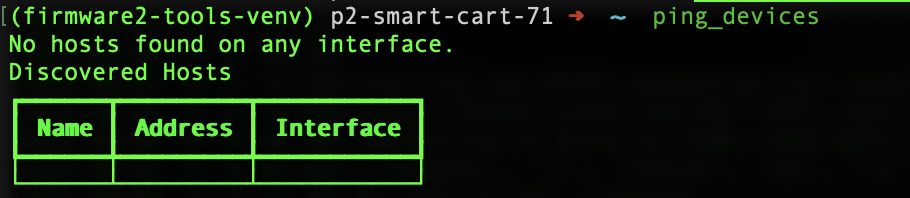
Escalate to P2 Smart Carts and include the smart cart ID and a screenshot of the response.
NOTE: The connector is on the top shelf of the smart cart, and is labeled with “ZIP” heat shrink or “DROID” heat shrink.
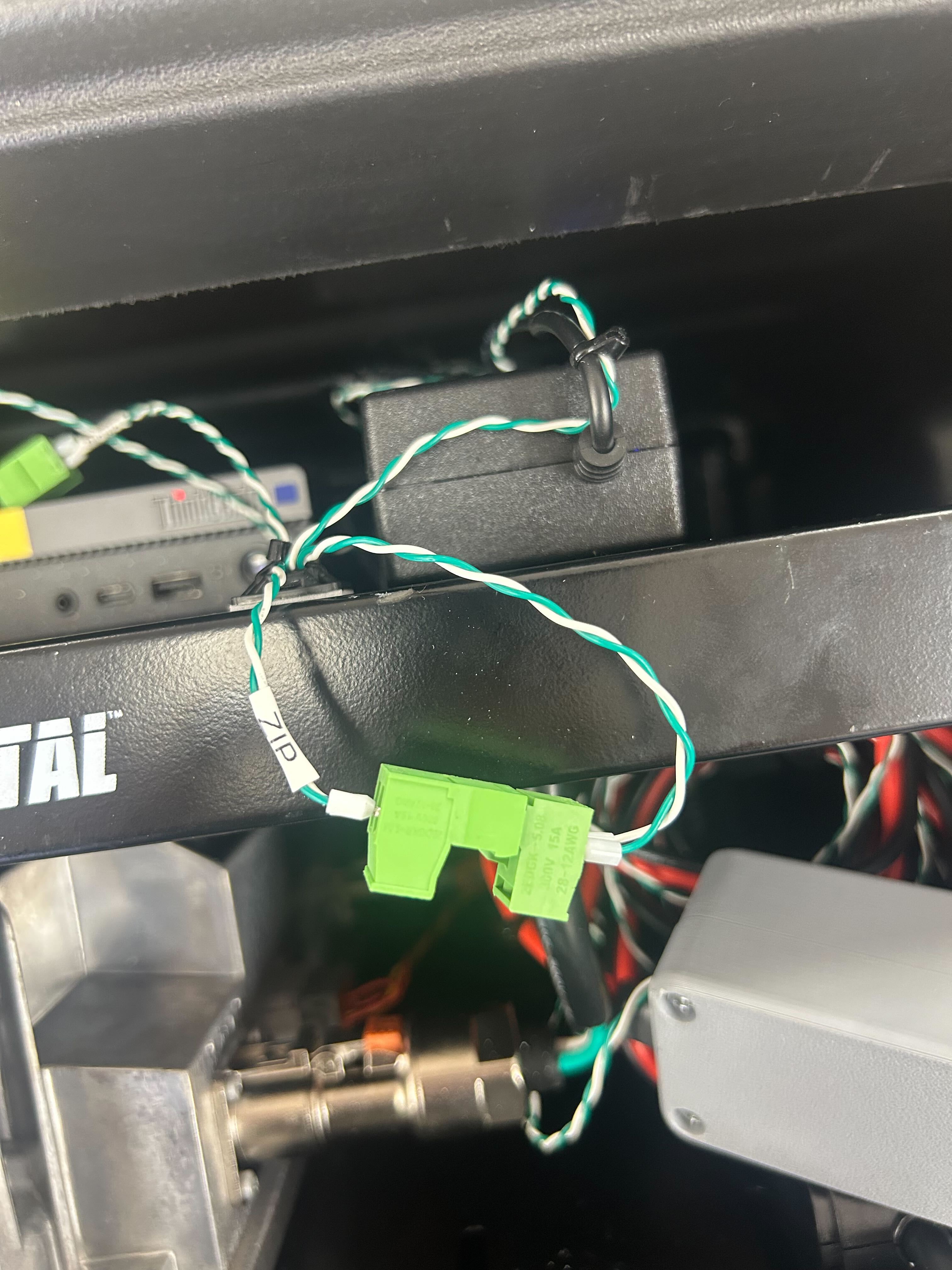
green activity light blinking or solid?
1. The board is powered.
2. The Ethernet cable is connected between the NEO and the T1 adapter board.
3. The SLV jumper has been removed. The image below shows the correct jumper setup with the SLV jumper removed.
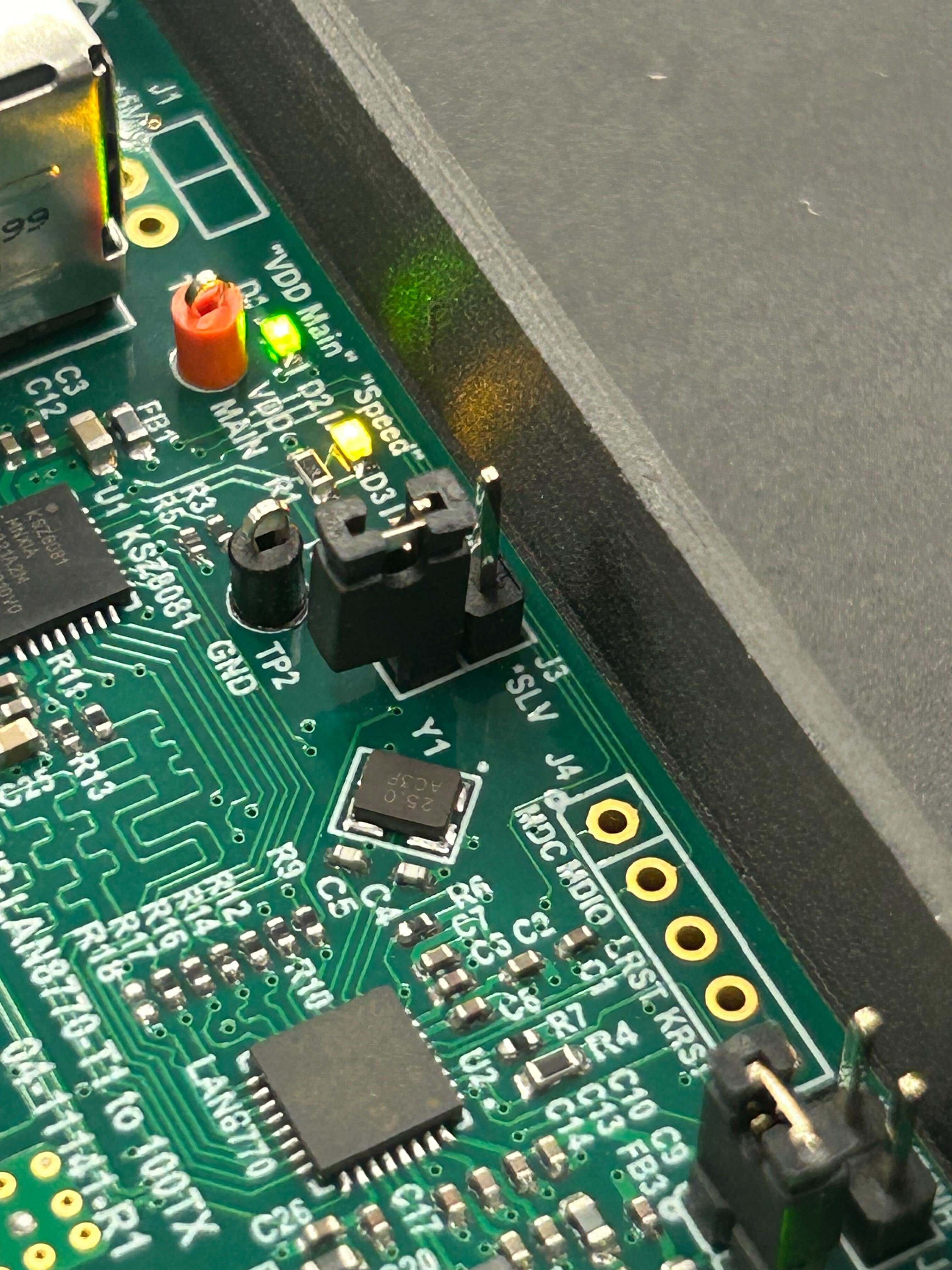
4. The twisted pair is connected to the vehicle and the T1 board.
5. The twisted pair polarity is correct. If in doubt, try swapping the wires if it has been moved.
6. The twisted pair is twisted.
- If the twisted pair looks more like two loose wires, there might be too much noise on the line (https://en.wikipedia.org/wiki/Twisted_pair).
1. The box is powered. You should see a red PWR light in the front.
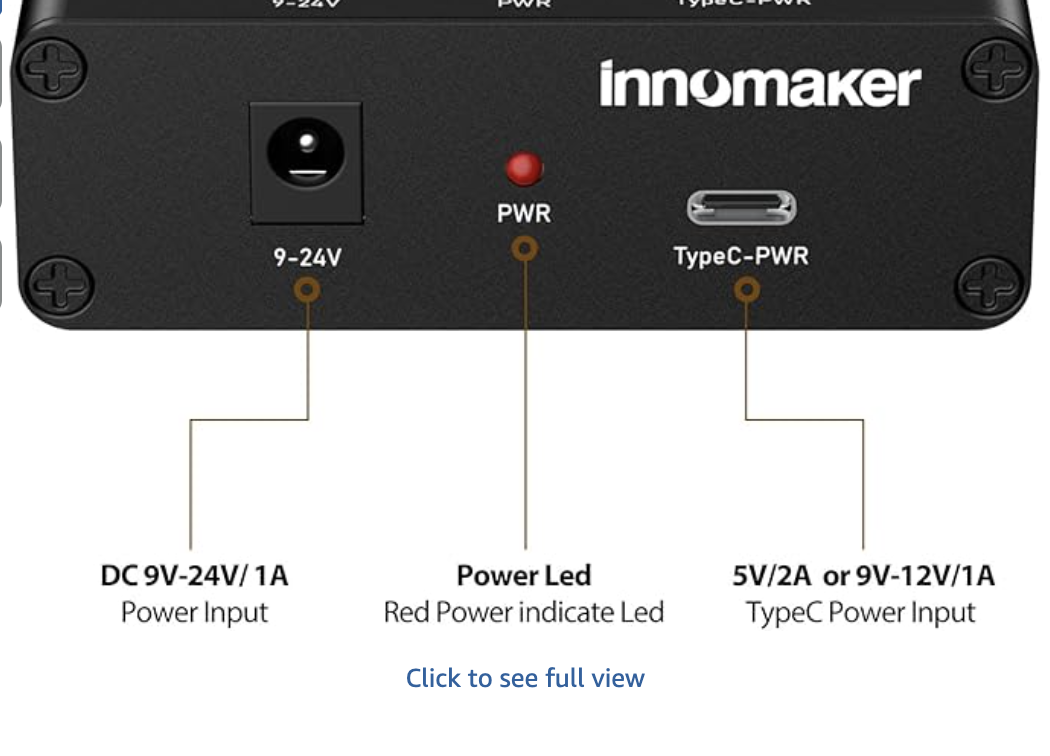
2. The Ethernet cable is connected between the NEO and the T1 Converter.
3. The master/slave switch is set to master.
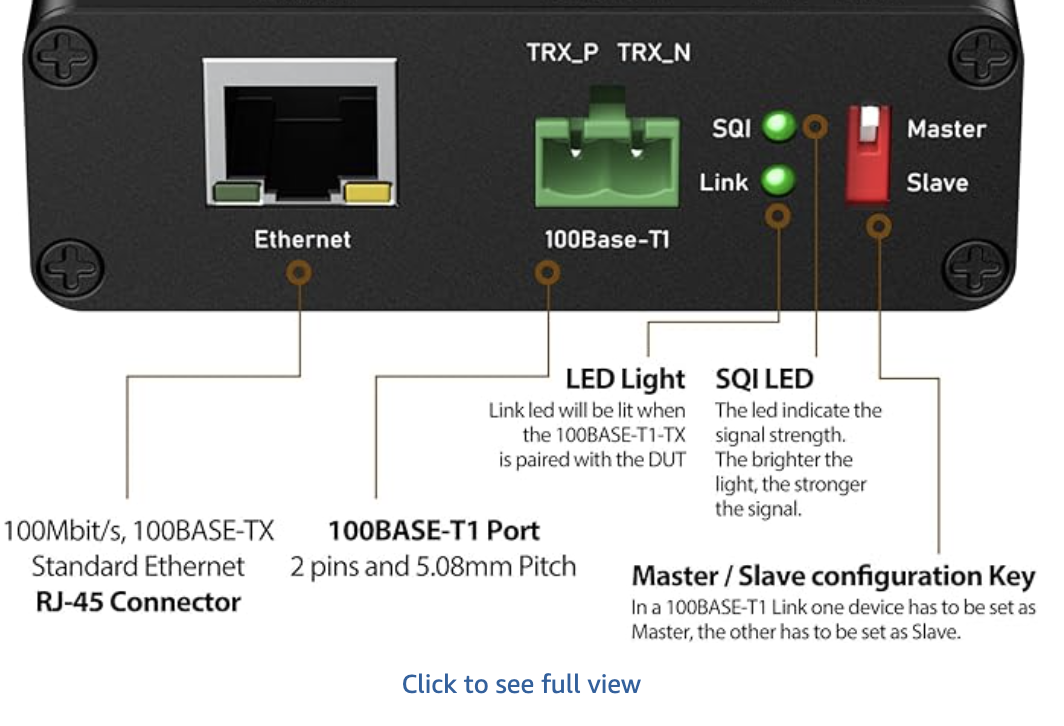
4. The twisted pair is connected to the asset and the T1 board.
5. The twisted pair is twisted.
- If the twisted pair looks more like two loose wires, there might be too much noise on the line (https://en.wikipedia.org/wiki/Twisted_pair).
Resolution note
This plaintext block is ready to paste into the Resolution Note field on the ZERP issue you're working. The permalink below gives engineering review access to the full step-by-step timeline including any back-navigation; share it if the case needs a deeper look.
Permalink:
Session is too large to fit in a URL. Use Download session JSON to share the timeline out-of-band.
Did this guide help you get unblocked?
Open suggestions
There are no open suggestions.
Open pull requests
There are no open pull requests.