

SIM Registration Denied Failures
Background
Section titled “Background”Use this guide when the Aircraft cell modem reports REGISTRATION_DENIED, or when the cell_registration/registration_denied_duration_seconds validator fails after a mission.
Each Aircraft Compute Board has two SIM cards, one for Compute A and one for Compute B. Each compute has an independent cell modem, so check both Compute A and Compute B to identify the affected SIM.
Troubleshooting Steps
Section titled “Troubleshooting Steps”graph TD
note-the-compute-that-set-the-alarm["<small><b>Step 1</b></small><br/>Action: Note which compute set the alarm. If ..."]
fetch-the-affected-sim-imsi-from-baraza["<small><b>Step 2</b></small><br/>Action: Fetch the affected SIM card's IMSI I..."]
escalate-to-cell-sim-support{{"<small><b>Step 3</b></small><br/>Escalation: Escalate to Cell SIM Support On Call ..."}}
return-the-asset-to-service-after-reactivation["<small><b>Step 4</b></small><br/>Action: Once the SIM card has been re-activat..."]
note-the-compute-that-set-the-alarm --> fetch-the-affected-sim-imsi-from-baraza
fetch-the-affected-sim-imsi-from-baraza --> escalate-to-cell-sim-support
escalate-to-cell-sim-support --> return-the-asset-to-service-after-reactivation
style note-the-compute-that-set-the-alarm fill:#dcfce7,stroke:#22c55e,color:#14532d
style fetch-the-affected-sim-imsi-from-baraza fill:#dcfce7,stroke:#22c55e,color:#14532d
style escalate-to-cell-sim-support fill:#fef3c7,stroke:#f59e0b,color:#78350f
style return-the-asset-to-service-after-reactivation fill:#dcfce7,stroke:#22c55e,color:#14532d Hover or focus a block to preview it. Select the block to keep the preview open.
If you got here from the
CRITICAL_WORKFLOW_ERROR check reference, use the critical workflow failure alarm to determine whether Compute A or Compute B raised the failure. You will need to inspect that compute's log data in the next step.In Baraza, search for
imsi in the data column selector, open the affected compute's cell_modem_status topic, and select View data table.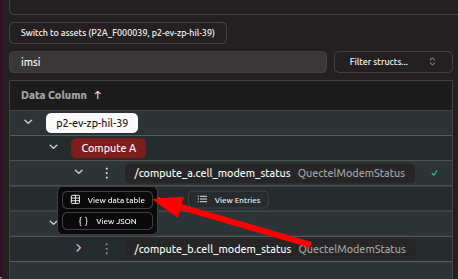
Then right-click a row with a populated
imsi value and copy it.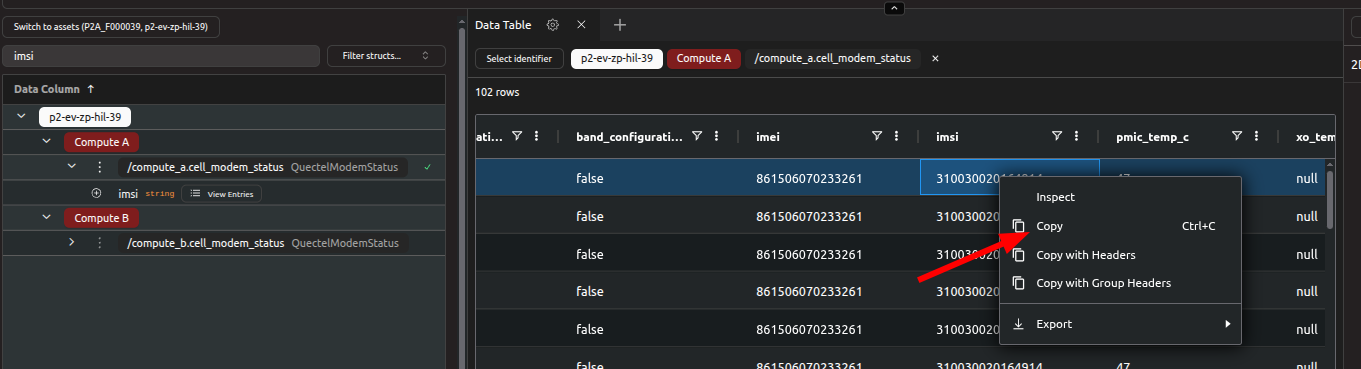
You can also open the validator topics, search for
registration_denied, and check the details column for the affected modem.Resolution note
This plaintext block is ready to paste into the Resolution Note field on the ZERP issue you're working. The permalink below gives engineering review access to the full step-by-step timeline including any back-navigation; share it if the case needs a deeper look.
Permalink:
Session is too large to fit in a URL. Use Download session JSON to share the timeline out-of-band.
Did this guide help you get unblocked?
Open suggestions
There are no open suggestions.
Open pull requests
There are no open pull requests.