

Dock Offline
Applicable alarms (3)
Likely outcomes — click to expand
Based on 0 missions where this alarm fired in the last
90 days
(for DOCK_OFFLINE) as of 2026-10-13
Aggregated from fleet operations and refreshed daily. Individual outcomes may vary by site and configuration.
Background
Section titled “Background”This guide fits into the larger Asset Offline Flow described here: Asset Offline Troubleshooting Landing Page. Before making edits to this page, please review the Landing Page and ensure that the steps here fit into the overall flow.
This guide covers dock specific troubleshooting steps to determine why a dock is showing offline on Fleetwrangler.
Troubleshooting Steps
Section titled “Troubleshooting Steps”graph TD
choose-remote-or-onsite-troubleshooting{"<small><b>Step 1</b></small><br/>Question: Do you want to perform Remote or Onsi..."}
remote-troubleshooting-reference("<small><b>Step 2</b></small><br/>Reference: The Dock may be offline for several r...")
attempt-to-ssh-into-the-dock["<small><b>Step 3</b></small><br/>Action: Attempt to SSH into the Dock SSH in..."]
what-is-the-state-of-your-ssh-connectio{"<small><b>Step 4</b></small><br/>Question: What is the state of your SSH connect..."}
confirm-stacks-installed-and-started["<small><b>Step 5</b></small><br/>Action: Continue troubleshooting in the Conf..."]
cannot-ssh-go-to-tailscale-console{"<small><b>Step 6</b></small><br/>Question: Go to the Tailscale Consolehttps:/..."}
cannot-ssh-tailscale-yes-site-power["<small><b>Step 7</b></small><br/>Action: This indicates a site power issue."]
cannot-ssh-initial-install{"<small><b>Step 8</b></small><br/>Question: Is this part of the initial install o..."}
cannot-ssh-dock-provisioned-correctly{"<small><b>Step 9</b></small><br/>Question: Check if the Dock is provisioned corr..."}
cannot-ssh-reprovision-dock["<small><b>Step 10</b></small><br/>Action: Reprovision the Dock."]
cannot-ssh-return-to-asset-offline-landing["<small><b>Step 11</b></small><br/>Action: Return to Asset Offline Troubleshooti..."]
cannot-ssh-tailscale-no-post-ask-tailsc["<small><b>Step 12</b></small><br/>Action: Post on ask-tailscale-users, tag ..."]
onsite-use-a-non-contact-voltage-tester{"<small><b>Step 13</b></small><br/>Question: Before testing the Dock for power, us..."}
onsite-power-cycle-dock-breaker["<small><b>Step 14</b></small><br/>Action: If the Dock is receiving power but is..."]
onsite-did-breaker-power-cycle-resolve{"<small><b>Step 15</b></small><br/>Question: Did the breaker power cycle resolve t..."}
onsite-dock-may-return-to-service("<small><b>Step 16</b></small><br/>Reference: The Dock may return to service.")
onsite-confirm-voltage-to-dock["<small><b>Step 17</b></small><br/>Action: Confirm voltage is getting to the Doc..."]
onsite-is-voltage-in-correct-range{"<small><b>Step 18</b></small><br/>Question: Is the AC voltage at the Dock power p..."}
onsite-request-breaker-inspection["<small><b>Step 19</b></small><br/>Action: This could be a faulty breaker. Conta..."]
onsite-did-breaker-inspection-resolve{"<small><b>Step 20</b></small><br/>Question: After breaker inspection or repair is..."}
onsite-dock-may-return-to-service-after-breaker-inspection("<small><b>Step 21</b></small><br/>Reference: The Dock may return to service.")
onsite-reconnect-dock-power-cable["<small><b>Step 22</b></small><br/>Action: Turn off the breaker. **Do not hot pl..."]
onsite-did-reconnect-resolve{"<small><b>Step 23</b></small><br/>Question: Did reconnecting the Dock power cable..."}
onsite-dock-may-return-to-service-after-reconnect("<small><b>Step 24</b></small><br/>Reference: The Dock may return to service.")
onsite-yes-power-replace-dock["<small><b>Step 25</b></small><br/>Action: At this point the issue could be inte..."]
onsite-no-power-return-to-asset-offline["<small><b>Step 26</b></small><br/>Action: Follow Site Power Outage/topics/as..."]
choose-remote-or-onsite-troubleshooting -->|Remote troubleshooting| remote-troubleshooting-reference
choose-remote-or-onsite-troubleshooting -->|Onsite troubleshooting| onsite-use-a-non-contact-voltage-tester
remote-troubleshooting-reference --> attempt-to-ssh-into-the-dock
attempt-to-ssh-into-the-dock --> what-is-the-state-of-your-ssh-connectio
what-is-the-state-of-your-ssh-connectio -->|Can SSH into the Dock| confirm-stacks-installed-and-started
what-is-the-state-of-your-ssh-connectio -->|Cannot SSH into the Dock| cannot-ssh-go-to-tailscale-console
cannot-ssh-go-to-tailscale-console -->|Yes| cannot-ssh-tailscale-yes-site-power
cannot-ssh-go-to-tailscale-console -->|No| cannot-ssh-tailscale-no-post-ask-tailsc
cannot-ssh-tailscale-yes-site-power --> cannot-ssh-initial-install
cannot-ssh-initial-install -->|Yes| cannot-ssh-dock-provisioned-correctly
cannot-ssh-initial-install -->|No| cannot-ssh-return-to-asset-offline-landing
cannot-ssh-dock-provisioned-correctly -->|Yes| cannot-ssh-reprovision-dock
cannot-ssh-dock-provisioned-correctly -->|No| cannot-ssh-return-to-asset-offline-landing
onsite-use-a-non-contact-voltage-tester -->|Yes| onsite-power-cycle-dock-breaker
onsite-use-a-non-contact-voltage-tester -->|No| onsite-no-power-return-to-asset-offline
onsite-power-cycle-dock-breaker --> onsite-did-breaker-power-cycle-resolve
onsite-did-breaker-power-cycle-resolve -->|Yes| onsite-dock-may-return-to-service
onsite-did-breaker-power-cycle-resolve -->|No| onsite-confirm-voltage-to-dock
onsite-confirm-voltage-to-dock --> onsite-is-voltage-in-correct-range
onsite-is-voltage-in-correct-range -->|Yes| onsite-reconnect-dock-power-cable
onsite-is-voltage-in-correct-range -->|No| onsite-request-breaker-inspection
onsite-request-breaker-inspection --> onsite-did-breaker-inspection-resolve
onsite-did-breaker-inspection-resolve -->|Yes| onsite-dock-may-return-to-service-after-breaker-inspection
onsite-did-breaker-inspection-resolve -->|No| onsite-yes-power-replace-dock
onsite-reconnect-dock-power-cable --> onsite-did-reconnect-resolve
onsite-did-reconnect-resolve -->|Yes| onsite-dock-may-return-to-service-after-reconnect
onsite-did-reconnect-resolve -->|No| onsite-yes-power-replace-dock
style choose-remote-or-onsite-troubleshooting fill:#dbeafe,stroke:#3b82f6,color:#1e3a5f
style remote-troubleshooting-reference fill:#f3e8ff,stroke:#a855f7,color:#581c87
style attempt-to-ssh-into-the-dock fill:#dcfce7,stroke:#22c55e,color:#14532d
style what-is-the-state-of-your-ssh-connectio fill:#dbeafe,stroke:#3b82f6,color:#1e3a5f
style confirm-stacks-installed-and-started fill:#dcfce7,stroke:#22c55e,color:#14532d
style cannot-ssh-go-to-tailscale-console fill:#dbeafe,stroke:#3b82f6,color:#1e3a5f
style cannot-ssh-tailscale-yes-site-power fill:#dcfce7,stroke:#22c55e,color:#14532d
style cannot-ssh-initial-install fill:#dbeafe,stroke:#3b82f6,color:#1e3a5f
style cannot-ssh-dock-provisioned-correctly fill:#dbeafe,stroke:#3b82f6,color:#1e3a5f
style cannot-ssh-reprovision-dock fill:#dcfce7,stroke:#22c55e,color:#14532d
style cannot-ssh-return-to-asset-offline-landing fill:#dcfce7,stroke:#22c55e,color:#14532d
style cannot-ssh-tailscale-no-post-ask-tailsc fill:#dcfce7,stroke:#22c55e,color:#14532d
style onsite-use-a-non-contact-voltage-tester fill:#dbeafe,stroke:#3b82f6,color:#1e3a5f
style onsite-power-cycle-dock-breaker fill:#dcfce7,stroke:#22c55e,color:#14532d
style onsite-did-breaker-power-cycle-resolve fill:#dbeafe,stroke:#3b82f6,color:#1e3a5f
style onsite-dock-may-return-to-service fill:#f3e8ff,stroke:#a855f7,color:#581c87
style onsite-confirm-voltage-to-dock fill:#dcfce7,stroke:#22c55e,color:#14532d
style onsite-is-voltage-in-correct-range fill:#dbeafe,stroke:#3b82f6,color:#1e3a5f
style onsite-request-breaker-inspection fill:#dcfce7,stroke:#22c55e,color:#14532d
style onsite-did-breaker-inspection-resolve fill:#dbeafe,stroke:#3b82f6,color:#1e3a5f
style onsite-dock-may-return-to-service-after-breaker-inspection fill:#f3e8ff,stroke:#a855f7,color:#581c87
style onsite-reconnect-dock-power-cable fill:#dcfce7,stroke:#22c55e,color:#14532d
style onsite-did-reconnect-resolve fill:#dbeafe,stroke:#3b82f6,color:#1e3a5f
style onsite-dock-may-return-to-service-after-reconnect fill:#f3e8ff,stroke:#a855f7,color:#581c87
style onsite-yes-power-replace-dock fill:#dcfce7,stroke:#22c55e,color:#14532d
style onsite-no-power-return-to-asset-offline fill:#dcfce7,stroke:#22c55e,color:#14532d Hover or focus a block to preview it. Select the block to keep the preview open.
- If the Dock is offline in Fleetdeck but it is possible to SSH into it, this indicates that there is either 1) a problem on the cloud side or 2) the Dock's cloud comms agent needs to be reestablished.
- If the Dock is offline in Fleetdeck and it is NOT possible to SSH into it, this indicates that there is a problem with Dock's network hardware (ethernet cabling, for example) or site network/power.
For an intermittent SSH connection (can SSH but lose SSH connection at any point), follow "Can SSH into the Dock" and then "Cannot SSH into the Dock."
Does the dock have the right tags for the metro it is located in? For example,
dfw-dock for Dallas, hou-docks for Houston, etc.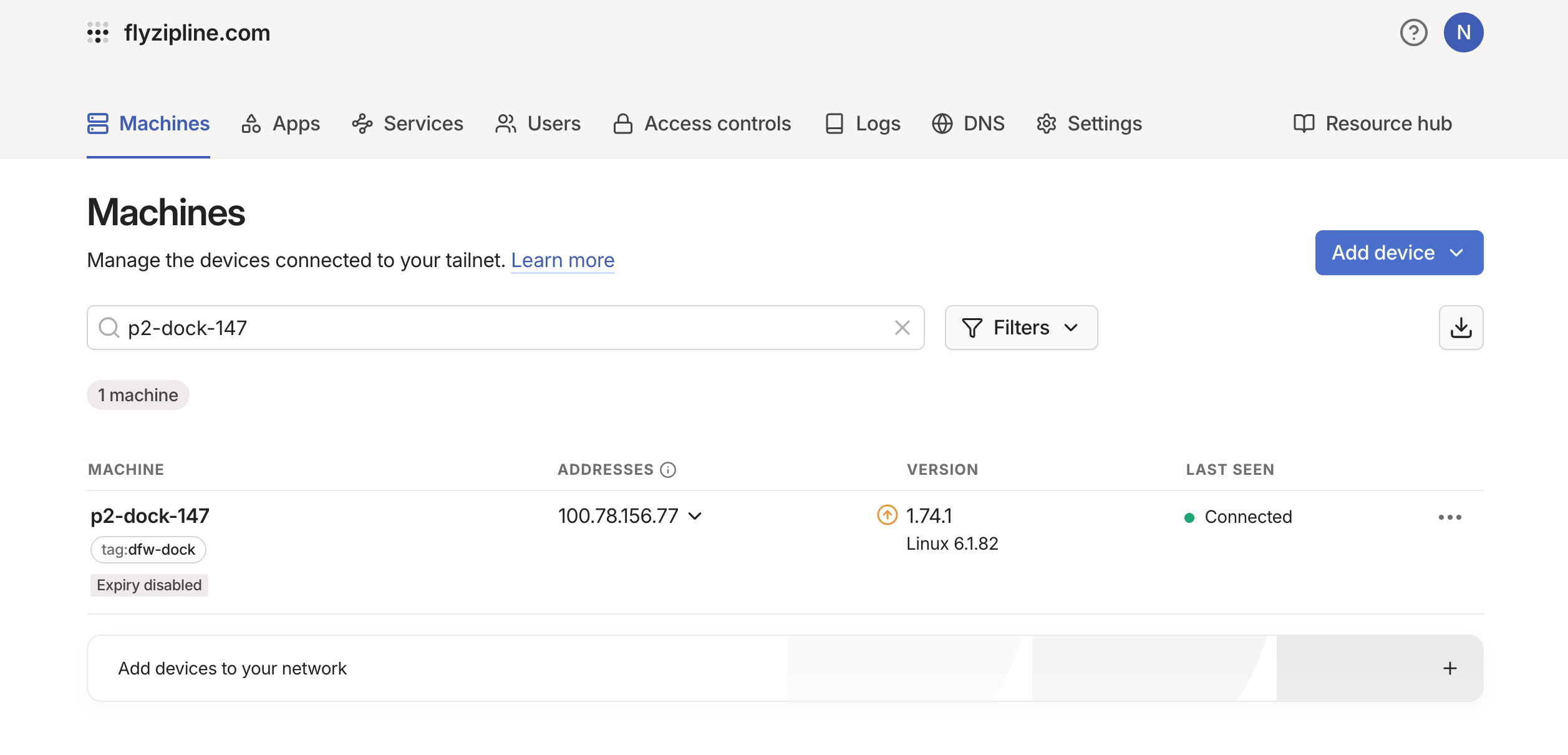
#ask-tailscale-users, tag @tailscale-admins, and ask for the Dock to be tagged. Once tagged, start again at step 1.Use a non-contact voltage tester to check if the Dock is receiving power.
Is the Dock receiving power?
1. Turn the breaker off.
2. Unplug the Dock power cable and leave it unplugged.
3. Turn the breaker back on.
4. Wearing HV gloves, use a multimeter to measure the AC voltage at the plug that goes to the Dock.
Before reconnecting the Dock, turn off the breaker. Do not hot plug the connector. Plug the cable back into the Dock only after the breaker is off.
- Remove the Dock from the tower per Section 10.4.6.b of the Site Infrastructure Maintenance Manual.
- Return the defective Dock to the hub.
- Run an EOL test and swap the defective hardware.
Resolution note
This plaintext block is ready to paste into the Resolution Note field on the ZERP issue you're working. The permalink below gives engineering review access to the full step-by-step timeline including any back-navigation; share it if the case needs a deeper look.
Permalink:
Session is too large to fit in a URL. Use Download session JSON to share the timeline out-of-band.
Confirm the stacks are installed and started
Section titled “Confirm the stacks are installed and started”Once the Dock is reachable, we need to confirm:
- the stack installer file is available
- the stack was automatically installed and started at reboot
>30 MB).# command for Dock
# install_dock_target.run -> over 30 MB
$ ls -ahluL /application/download_cache/
total 42M
-rwxrwxrwx 1 zipline zipline 42M Mar 3 2023 install_dock_target.runRun:
sudo systemctl list-dependencies dock.target.If the stack was installed and started, the tree should show some green/running services.
Run:
sudo boot-mode --check.production?Run:
boot-mode --enable-production.Run:
sudo reboot.Run:
sudo systemctl list-dependencies dock.target.If the stack was installed and started, the tree should show some green/running services.
Return to Asset Offline Troubleshooting and continue with the next steps.
Did this guide help you get unblocked?
Open suggestions
Open pull requests
There are no open pull requests.