

Dock Not Cooling Aircraft Battery
Applicable alarms (1)
Likely outcomes — click to expand
Based on 0 missions where this alarm fired in the last 90 days as of 2026-10-13
Aggregated from fleet operations and refreshed daily. Individual outcomes may vary by site and configuration.
Related Search Phrases
Section titled “Related Search Phrases”This issue may also be described as battery not cooling, Zip battery, or battery too hot.
Background
Section titled “Background”The Aircraft battery may not be cooling for a number of reasons associated with the Dock’s Thermal System. These reasons include:
- Latch may not be retracted.
- Compressor may be faulting.
- Evaporator Fan (Blower) may not be spinning.
- Condenser Fan may not be spinning.
- Heater may be unintentionally ON.
- Refrigerant may have leaked.
- Compressor vane may be stuck open.
We will walk through telemetry for each component to identify a likely cause.
Troubleshooting Steps (Fleet Wrangler)
Section titled “Troubleshooting Steps (Fleet Wrangler)”graph TD
in-fleet-wrangler-is-the-latch-service{"<small><b>Step 1</b></small><br/>Question: In Fleet Wrangler, is the latch servi..."}
latch-no-follow-guide("<small><b>Step 2</b></small><br/>Reference: Follow the guide associated with the ...")
latch-run-health-checks["<small><b>Step 3</b></small><br/>Action: Run a Health Checks mission."]
latch-health-checks-passed{"<small><b>Step 4</b></small><br/>Question: Did the Run Health Checks mission pass?"}
check-thermal-service-state-faulted{"<small><b>Step 5</b></small><br/>Question: In Fleet Wrangler, check the Dock’s ..."}
thermal-faulted-restart-service["<small><b>Step 6</b></small><br/>Action: Restart the thermal service: 1. SSH i..."]
thermal-restart-run-health-checks["<small><b>Step 7</b></small><br/>Action: Run a Health Checks mission."]
thermal-restart-health-checks-passed{"<small><b>Step 8</b></small><br/>Question: Did the Run Health Checks mission pass?"}
dock-may-return-to-service("<small><b>Step 9</b></small><br/>Reference: The Dock may return to service.")
check-compressor-no-comms{"<small><b>Step 10</b></small><br/>Question: In Fleet Wrangler, check the Dock’s ..."}
compressor-no-comms-power-cycle["<small><b>Step 11</b></small><br/>Action: Power cycle the Dock with the breaker..."]
compressor-no-comms-run-health-checks["<small><b>Step 12</b></small><br/>Action: Run a Health Checks mission."]
compressor-no-comms-health-checks-passed{"<small><b>Step 13</b></small><br/>Question: Did the Run Health Checks mission pass?"}
compressor-no-comms-return-to-service("<small><b>Step 14</b></small><br/>Reference: The Aircraft may return to service.")
compressor-no-comms-powercycled-more-than-3{"<small><b>Step 15</b></small><br/>Question: Have you power cycled more than 3 times?"}
compressor-no-comms-escalate-hardware-oncall("<small><b>Step 16</b></small><br/>Reference: Escalate to P2 Dock Hardware On Call.")
compressor-no-comms-begin-again("<small><b>Step 17</b></small><br/>Reference: Begin this troubleshooting process ag...")
check-compressor-fault{"<small><b>Step 18</b></small><br/>Question: In Fleet Wrangler, is the **COMPRESS..."}
compressor-fault-follow-guide["<small><b>Step 19</b></small><br/>Action: Continue troubleshooting by following..."]
continue-to-baraza-logs["<small><b>Step 20</b></small><br/>Action: Continue troubleshooting below using ..."]
in-fleet-wrangler-is-the-latch-service -->|Yes| check-thermal-service-state-faulted
in-fleet-wrangler-is-the-latch-service -->|No| latch-no-follow-guide
latch-no-follow-guide --> latch-run-health-checks
latch-run-health-checks --> latch-health-checks-passed
latch-health-checks-passed -->|Yes| dock-may-return-to-service
latch-health-checks-passed -->|No| check-thermal-service-state-faulted
check-thermal-service-state-faulted -->|Yes| thermal-faulted-restart-service
check-thermal-service-state-faulted -->|No| check-compressor-no-comms
thermal-faulted-restart-service --> thermal-restart-run-health-checks
thermal-restart-run-health-checks --> thermal-restart-health-checks-passed
thermal-restart-health-checks-passed -->|Yes| dock-may-return-to-service
thermal-restart-health-checks-passed -->|No| check-compressor-no-comms
check-compressor-no-comms -->|Yes| compressor-no-comms-power-cycle
check-compressor-no-comms -->|No| check-compressor-fault
compressor-no-comms-power-cycle --> compressor-no-comms-run-health-checks
compressor-no-comms-run-health-checks --> compressor-no-comms-health-checks-passed
compressor-no-comms-health-checks-passed -->|Yes| compressor-no-comms-return-to-service
compressor-no-comms-health-checks-passed -->|No| compressor-no-comms-powercycled-more-than-3
compressor-no-comms-powercycled-more-than-3 -->|Yes| compressor-no-comms-escalate-hardware-oncall
compressor-no-comms-powercycled-more-than-3 -->|No| compressor-no-comms-begin-again
check-compressor-fault -->|Yes| compressor-fault-follow-guide
check-compressor-fault -->|No| continue-to-baraza-logs
style in-fleet-wrangler-is-the-latch-service fill:#dbeafe,stroke:#3b82f6,color:#1e3a5f
style latch-no-follow-guide fill:#f3e8ff,stroke:#a855f7,color:#581c87
style latch-run-health-checks fill:#dcfce7,stroke:#22c55e,color:#14532d
style latch-health-checks-passed fill:#dbeafe,stroke:#3b82f6,color:#1e3a5f
style check-thermal-service-state-faulted fill:#dbeafe,stroke:#3b82f6,color:#1e3a5f
style thermal-faulted-restart-service fill:#dcfce7,stroke:#22c55e,color:#14532d
style thermal-restart-run-health-checks fill:#dcfce7,stroke:#22c55e,color:#14532d
style thermal-restart-health-checks-passed fill:#dbeafe,stroke:#3b82f6,color:#1e3a5f
style dock-may-return-to-service fill:#f3e8ff,stroke:#a855f7,color:#581c87
style check-compressor-no-comms fill:#dbeafe,stroke:#3b82f6,color:#1e3a5f
style compressor-no-comms-power-cycle fill:#dcfce7,stroke:#22c55e,color:#14532d
style compressor-no-comms-run-health-checks fill:#dcfce7,stroke:#22c55e,color:#14532d
style compressor-no-comms-health-checks-passed fill:#dbeafe,stroke:#3b82f6,color:#1e3a5f
style compressor-no-comms-return-to-service fill:#f3e8ff,stroke:#a855f7,color:#581c87
style compressor-no-comms-powercycled-more-than-3 fill:#dbeafe,stroke:#3b82f6,color:#1e3a5f
style compressor-no-comms-escalate-hardware-oncall fill:#f3e8ff,stroke:#a855f7,color:#581c87
style compressor-no-comms-begin-again fill:#f3e8ff,stroke:#a855f7,color:#581c87
style check-compressor-fault fill:#dbeafe,stroke:#3b82f6,color:#1e3a5f
style compressor-fault-follow-guide fill:#dcfce7,stroke:#22c55e,color:#14532d
style continue-to-baraza-logs fill:#dcfce7,stroke:#22c55e,color:#14532d Hover or focus a block to preview it. Select the block to keep the preview open.
- LATCH_SERVICE_STATE_RETAINED
- LATCH_SERVICE_STATE_EMPTY
- LATCH_SERVICE_STATE_FAULTED
Detailed Dock Status. Is the thermal service state set to THERMAL_SERVICE_STATE_FAULTED ?1. SSH into the Dock (SSH into Dock).
2. Run
sudo systemctl restart thermal.service.Detailed Dock Status. Is the COMPRESSOR_NO_COMMS alarm set?Troubleshooting Steps (Baraza Logs)
Section titled “Troubleshooting Steps (Baraza Logs)”Check the logs in Baraza with the template “Thermal System Health” applied. Make sure the log time period spans the time period where the dock is trying to cool the vehicle battery but is unsuccessful.
graph TD
    baraza-check-conditions{"<small><b>Step 1</b></small><br/>Question: Is one of the following conditions tr..."}
    conditions-no-escalate-embedded{{"<small><b>Step 2</b></small><br/>Escalation: Escalate to P2 Dock Embedded On Call."}}
    check-supply-temp{"<small><b>Step 3</b></small><br/>Question: Does thermal_diagnostics.component_f..."}
    supply-temp-yes-redock["<small><b>Step 4</b></small><br/>Action: Latch is not retracted and the therma..."]
    wait-after-redocking["<small><b>Step 5</b></small><br/>Action: Wait 10 minutes."]
    check-pack-temperature-after-redocking{"<small><b>Step 6</b></small><br/>Question: Is avg_pack_temperature within +/-1..."}
    baraza-dock-may-return-to-service("<small><b>Step 7</b></small><br/>Reference: The Dock may return to service.")
    evaluate-compressor{"<small><b>Step 8</b></small><br/>Question: Evaluate the compressor. !image-2025..."}
    compressor-fault-code-replace["<small><b>Step 9</b></small><br/>Action: **Fault Codes**: 1: DC Input Undervol..."]
    compressor-freq-check{"<small><b>Step 10</b></small><br/>Question: The compressor is not faulted. Is th..."}
    compressor-jammed-replace["<small><b>Step 11</b></small><br/>Action: The compressor may be jammed or stuck..."]
    check-blower-freq{"<small><b>Step 12</b></small><br/>Question: The compressor is operating nominally..."}
    blower-not-spinning-replace["<small><b>Step 13</b></small><br/>Action: The blower is not spinning as expecte..."]
    check-condenser-fan-freq{"<small><b>Step 14</b></small><br/>Question: The blower is operating nominally. Is..."}
    condenser-not-spinning-replace["<small><b>Step 15</b></small><br/>Action: The condenser fan is not spinning as ..."]
    check-heater-power{"<small><b>Step 16</b></small><br/>Question: The condenser fan is operating nomina..."}
    heater-on-escalate["<small><b>Step 17</b></small><br/>Action: The Aircraft battery heater is on. Th..."]
    dock-model-check{"<small><b>Step 18</b></small><br/>Question: Is the Dock an EV3 Dock or an EV4 Dock?"}
    thermal-degraded-replace-ev4-escalate{{"<small><b>Step 19</b></small><br/>Escalation: Escalate to P2 Dock Hardware On Call ..."}}
    thermal-degraded-replace["<small><b>Step 20</b></small><br/>Action: Thermal system performance has degrad..."]
    thermal-degraded-replace-older["<small><b>Step 21</b></small><br/>Action: Thermal system performance has degrad..."]
    baraza-check-conditions -->|Yes| check-supply-temp
    baraza-check-conditions -->|No| conditions-no-escalate-embedded
    check-supply-temp -->|Yes| supply-temp-yes-redock
    check-supply-temp -->|No| evaluate-compressor
    supply-temp-yes-redock --> wait-after-redocking
    wait-after-redocking --> check-pack-temperature-after-redocking
    check-pack-temperature-after-redocking -->|Yes| baraza-dock-may-return-to-service
    check-pack-temperature-after-redocking -->|No| evaluate-compressor
    evaluate-compressor -->|Yes| compressor-fault-code-replace
    evaluate-compressor -->|No| compressor-freq-check
    compressor-freq-check -->|Yes| check-blower-freq
    compressor-freq-check -->|No| compressor-jammed-replace
    check-blower-freq -->|Yes| check-condenser-fan-freq
    check-blower-freq -->|No| blower-not-spinning-replace
    check-condenser-fan-freq -->|Yes| check-heater-power
    check-condenser-fan-freq -->|No| condenser-not-spinning-replace
    check-heater-power -->|Yes| heater-on-escalate
    check-heater-power -->|No| dock-model-check
    dock-model-check -->|EV3 Dock| thermal-degraded-replace
    dock-model-check -->|EV4 Dock| thermal-degraded-replace-ev4-escalate
    style baraza-check-conditions fill:#dbeafe,stroke:#3b82f6,color:#1e3a5f
    style conditions-no-escalate-embedded fill:#fef3c7,stroke:#f59e0b,color:#78350f
    style check-supply-temp fill:#dbeafe,stroke:#3b82f6,color:#1e3a5f
    style supply-temp-yes-redock fill:#dcfce7,stroke:#22c55e,color:#14532d
    style wait-after-redocking fill:#dcfce7,stroke:#22c55e,color:#14532d
    style check-pack-temperature-after-redocking fill:#dbeafe,stroke:#3b82f6,color:#1e3a5f
    style baraza-dock-may-return-to-service fill:#f3e8ff,stroke:#a855f7,color:#581c87
    style evaluate-compressor fill:#dbeafe,stroke:#3b82f6,color:#1e3a5f
    style compressor-fault-code-replace fill:#dcfce7,stroke:#22c55e,color:#14532d
    style compressor-freq-check fill:#dbeafe,stroke:#3b82f6,color:#1e3a5f
    style compressor-jammed-replace fill:#dcfce7,stroke:#22c55e,color:#14532d
    style check-blower-freq fill:#dbeafe,stroke:#3b82f6,color:#1e3a5f
    style blower-not-spinning-replace fill:#dcfce7,stroke:#22c55e,color:#14532d
    style check-condenser-fan-freq fill:#dbeafe,stroke:#3b82f6,color:#1e3a5f
    style condenser-not-spinning-replace fill:#dcfce7,stroke:#22c55e,color:#14532d
    style check-heater-power fill:#dbeafe,stroke:#3b82f6,color:#1e3a5f
    style heater-on-escalate fill:#dcfce7,stroke:#22c55e,color:#14532d
    style dock-model-check fill:#dbeafe,stroke:#3b82f6,color:#1e3a5f
    style thermal-degraded-replace-ev4-escalate fill:#fef3c7,stroke:#f59e0b,color:#78350f
    style thermal-degraded-replace fill:#dcfce7,stroke:#22c55e,color:#14532d
    style thermal-degraded-replace-older fill:#dcfce7,stroke:#22c55e,color:#14532d
Hover or focus a block to preview it. Select the block to keep the preview open.
-
thermal_status.control_mode= MAX_COOL AND thermal_diagnostics.component_feedback.compressor_freq_hz > 0-
thermal_status.control_mode= PID_COMPRESSOR_COOL AND thermal_diagnostics.component_feedback.compressor_freq_hz > 0-
thermal_status.control_mode= HEAT AND thermal_diagnostics.component_control.heater_enabled is true-
thermal_status.control_mode= HEAT_EXCHANGE_ONLY AND thermal_diagnostics.component_feedback.hx_fan_freq_hz > 0thermal_diagnostics.component_feedback.supply_temp_degc drop below chager_command.battery_temperature_target?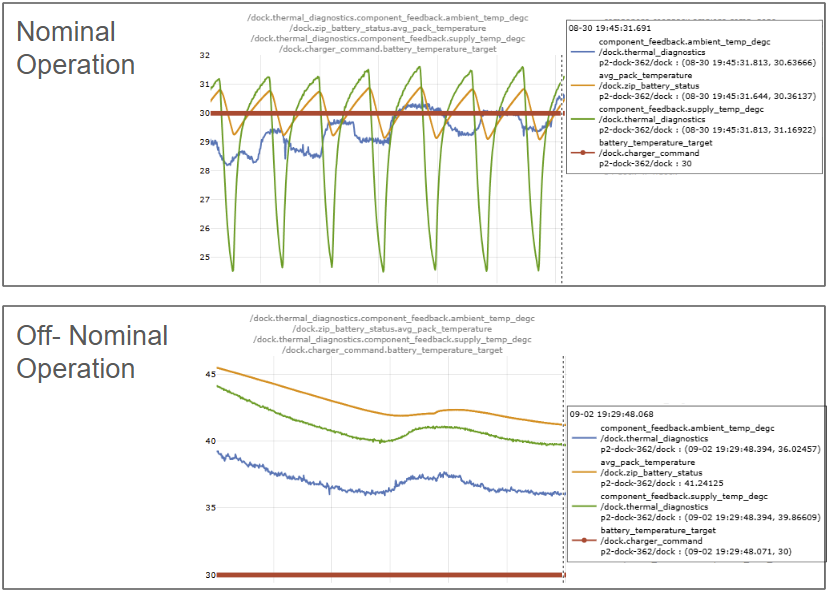
Send a redocking mission. If a redocking mission cannot be sent, the Aircraft must be manually removed from the Dock, reinserted, and manually retracted.
avg_pack_temperature within +/-10% of battery_temperature_target?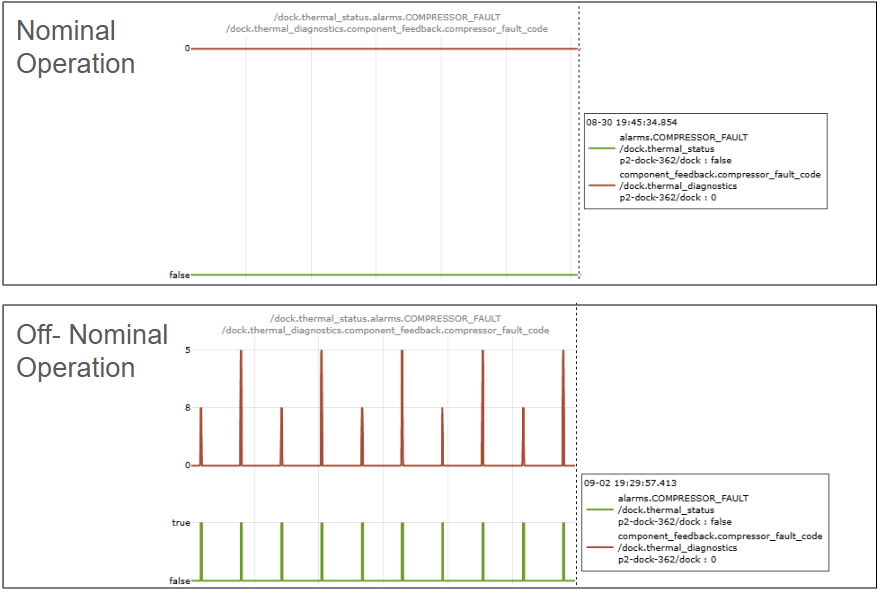
Is
thermal_diagnostics.component_feedback.compressor_fault_code temporarily any value other than 0?1: DC Input Undervoltage - Controller PCB may be damaged.
2: DC Input Overvoltage - Controller PCB may be damaged.
5: High Current (Hardware) - Compressor may be jammed or stuck.
8: Phase Loss or Imbalance - Compressor may be jammed or stuck.
1. Assign WO on Tower: Remove and Replace Dock on Tower
2. EV3 Assign WO on Dock: Replace Thermal Assembly on Dock
3. EV4 Assign WO on Dock: Replace Thermal System on EV4 Dock
- Note the fault code as the likely cause of failure in the Issue Ticket and ship the faulty thermal system to the coop atn: P2-Dock-Hardware-On-Call.
Is
thermal_diagnostics.component_feedback.compressor_freq_hz reaching the same value (+/-10%) as thermal_diagnostics.component_control.commanded_compressor_frequency_hz within 4 minutes of command?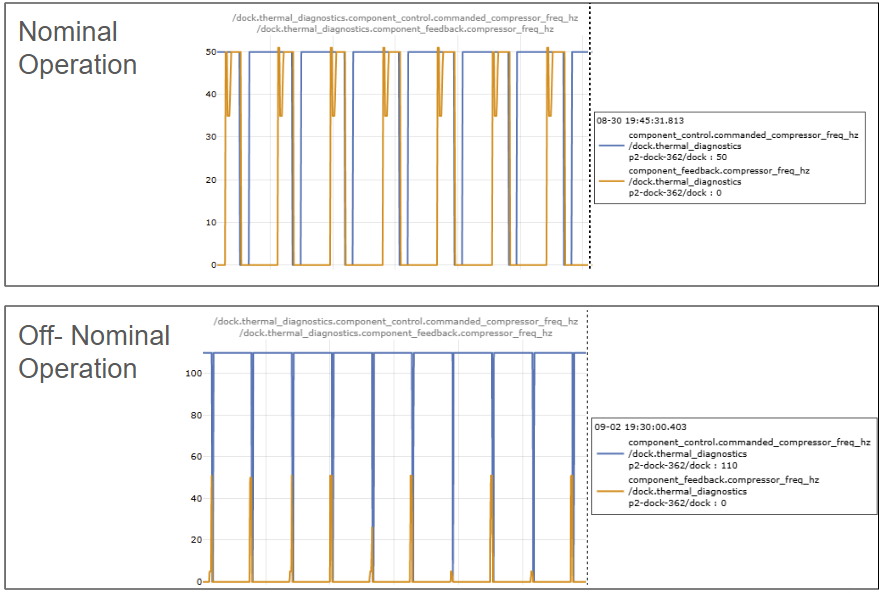
1. Remove and replace the Dock.
- Note this fault code as the likely cause of failure in the Issue Ticket and ship the faulty thermal system to the coop c/o Marty Cowell.
Is
thermal_diagnostics.component_feedback.zip_blower_freq_hz > 70 ?1. Remove and replace the Dock.
- Note this fault code as the likely cause of failure in the Issue Ticket and ship the faulty thermal system to the coop c/o Marty Cowell.
Is
thermals_diagnostics.compoenent_feedback.condenser_fan_freq_hz > 150 ?1. Remove and replace the Dock.
- Note this fault code as the likely cause of failure in the Issue Ticket and ship the faulty thermal system to the coop c/o Marty Cowell.
Is
thermal_system_power.zip_battery_air_heater.power_w > 5 ?1. Escalate to P2 Dock Embedded On Call.
1. Remove and replace the Dock.
WORK ORDER TEMPLATE: Use Work Order Template #265: Replace Thermal Assembly on Dock.
- Note this fault code as the likely cause of failure in the Issue Ticket and ship the faulty thermal system to the coop c/o Marty Cowell.
1. Remove and replace the Dock.
WORK ORDER TEMPLATE: Use Replace Thermal Assembly on Dock.
- Note this fault code as the likely cause of failure in the Issue Ticket and ship the faulty thermal system to the coop c/o Marty Cowell.
Resolution note
This plaintext block is ready to paste into the Resolution Note field on the ZERP issue you're working. The permalink below gives engineering review access to the full step-by-step timeline including any back-navigation; share it if the case needs a deeper look.
Permalink:
Session is too large to fit in a URL. Use Download session JSON to share the timeline out-of-band.
Did this guide help you get unblocked?
Open suggestions
There are no open suggestions.
Open pull requests
There are no open pull requests.