

Dock EOL Maintenance Health Check
Maintenance Health Check Procedure
Section titled “Maintenance Health Check Procedure”graph TD
bring-dock-to-eol-tester["<small><b>Step 1</b></small><br/>Action: Bring the Dock to the EOL tester."]
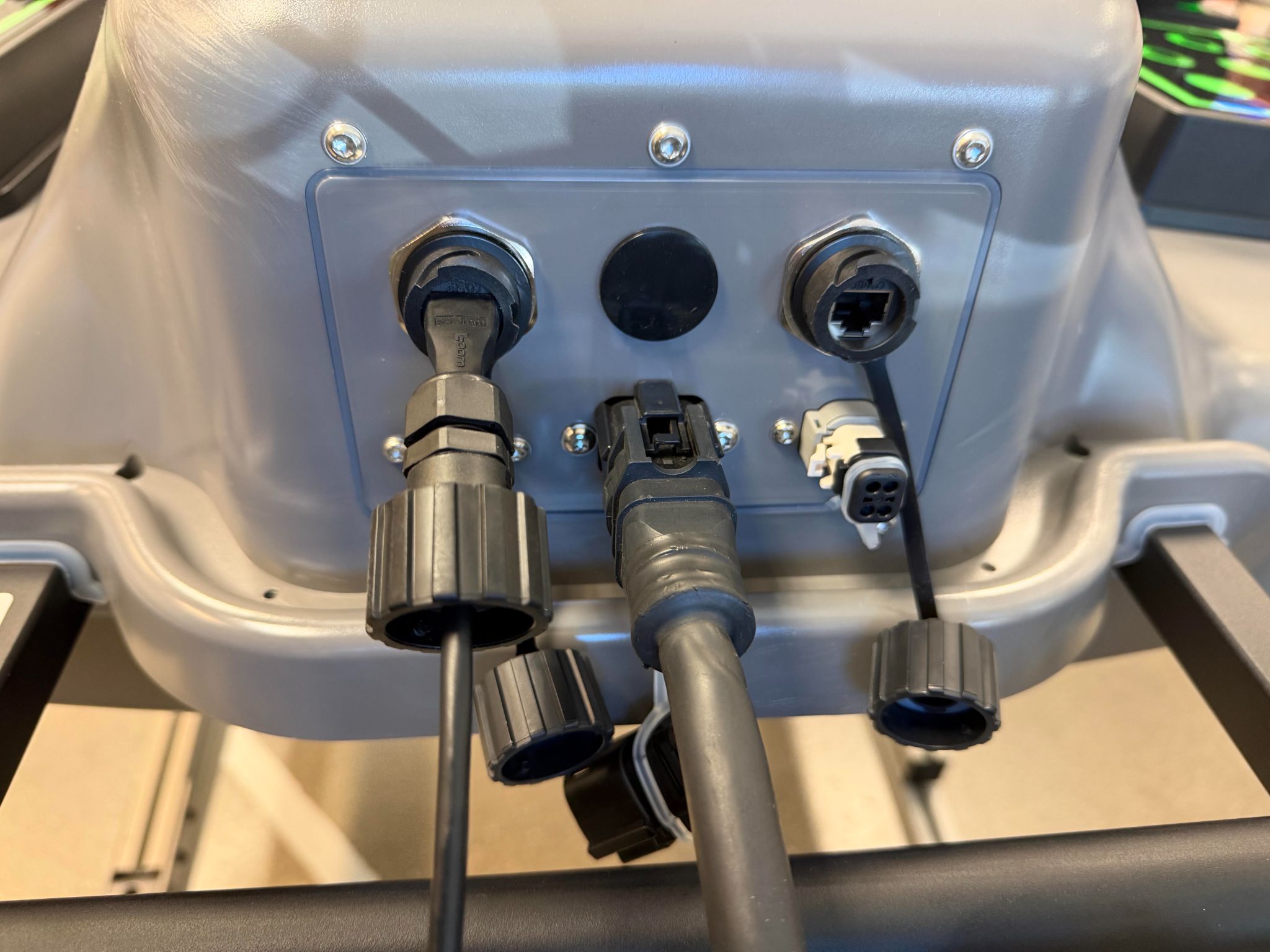
connect-power-and-ethernet["<small><b>Step 2</b></small><br/>Action: Connect the Dock power cable and Ethe..."]
enable-maintenance-mode["<small><b>Step 3</b></small><br/>Action: SSH into the Dock with ssh zipline@p..."]
is-ziplinux-older-than-22-1{"<small><b>Step 4</b></small><br/>Question: Is the ZipLinux version older than 22.1?"}
run-update-os["<small><b>Step 5</b></small><br/>Action: In your browser, go to the UI at loc..."]
reboot-after-update["<small><b>Step 6</b></small><br/>Action: Go back to the Dock you are SSH’d int..."]
run-provision-dock["<small><b>Step 7</b></small><br/>Action: Run provision_dock after update_os..."]
run-maintenance-health-check["<small><b>Step 8</b></small><br/>Action: Select maintenance_health_check fro..."]
follow-tester-prompts["<small><b>Step 9</b></small><br/>Action: Follow the prompts in order: 1. Swap ..."]
run-cooling-tests["<small><b>Step 10</b></small><br/>Action: There are no more prompts while the t..."]
did-dock-health-check-pass{"<small><b>Step 11</b></small><br/>Question: Did the Dock health check pass?"}
restore-production-mode["<small><b>Step 12</b></small><br/>Action: Before ending this procedure, SSH int..."]
troubleshoot-failed-health-check["<small><b>Step 13</b></small><br/>Action: Try the troubleshooting steps below, ..."]
bring-dock-to-eol-tester --> connect-power-and-ethernet
connect-power-and-ethernet --> enable-maintenance-mode
enable-maintenance-mode --> is-ziplinux-older-than-22-1
is-ziplinux-older-than-22-1 -->|Yes| run-update-os
is-ziplinux-older-than-22-1 -->|No| run-provision-dock
run-update-os --> reboot-after-update
reboot-after-update --> run-provision-dock
run-provision-dock --> run-maintenance-health-check
run-maintenance-health-check --> follow-tester-prompts
follow-tester-prompts --> run-cooling-tests
run-cooling-tests --> did-dock-health-check-pass
did-dock-health-check-pass -->|Yes| restore-production-mode
did-dock-health-check-pass -->|No| troubleshoot-failed-health-check
style bring-dock-to-eol-tester fill:#dcfce7,stroke:#22c55e,color:#14532d
style connect-power-and-ethernet fill:#dcfce7,stroke:#22c55e,color:#14532d
style enable-maintenance-mode fill:#dcfce7,stroke:#22c55e,color:#14532d
style is-ziplinux-older-than-22-1 fill:#dbeafe,stroke:#3b82f6,color:#1e3a5f
style run-update-os fill:#dcfce7,stroke:#22c55e,color:#14532d
style reboot-after-update fill:#dcfce7,stroke:#22c55e,color:#14532d
style run-provision-dock fill:#dcfce7,stroke:#22c55e,color:#14532d
style run-maintenance-health-check fill:#dcfce7,stroke:#22c55e,color:#14532d
style follow-tester-prompts fill:#dcfce7,stroke:#22c55e,color:#14532d
style run-cooling-tests fill:#dcfce7,stroke:#22c55e,color:#14532d
style did-dock-health-check-pass fill:#dbeafe,stroke:#3b82f6,color:#1e3a5f
style restore-production-mode fill:#dcfce7,stroke:#22c55e,color:#14532d
style troubleshoot-failed-health-check fill:#dcfce7,stroke:#22c55e,color:#14532d Hover or focus a block to preview it. Select the block to keep the preview open.
ssh zipline@p2-dock-###. Put the Dock in maintenance mode to disable the firewall with sudo boot-mode --enable-maintenance --forever. If a test fails, you stop this procedure, or troubleshooting is deferred after this point, restore production mode and re-enable the firewall before leaving the Dock: run boot-mode --enable-production, then sudo reboot. Run neofetch while SSH’d into the Dock to check the ZipLinux version. ZipLinux needs to be version 22.1.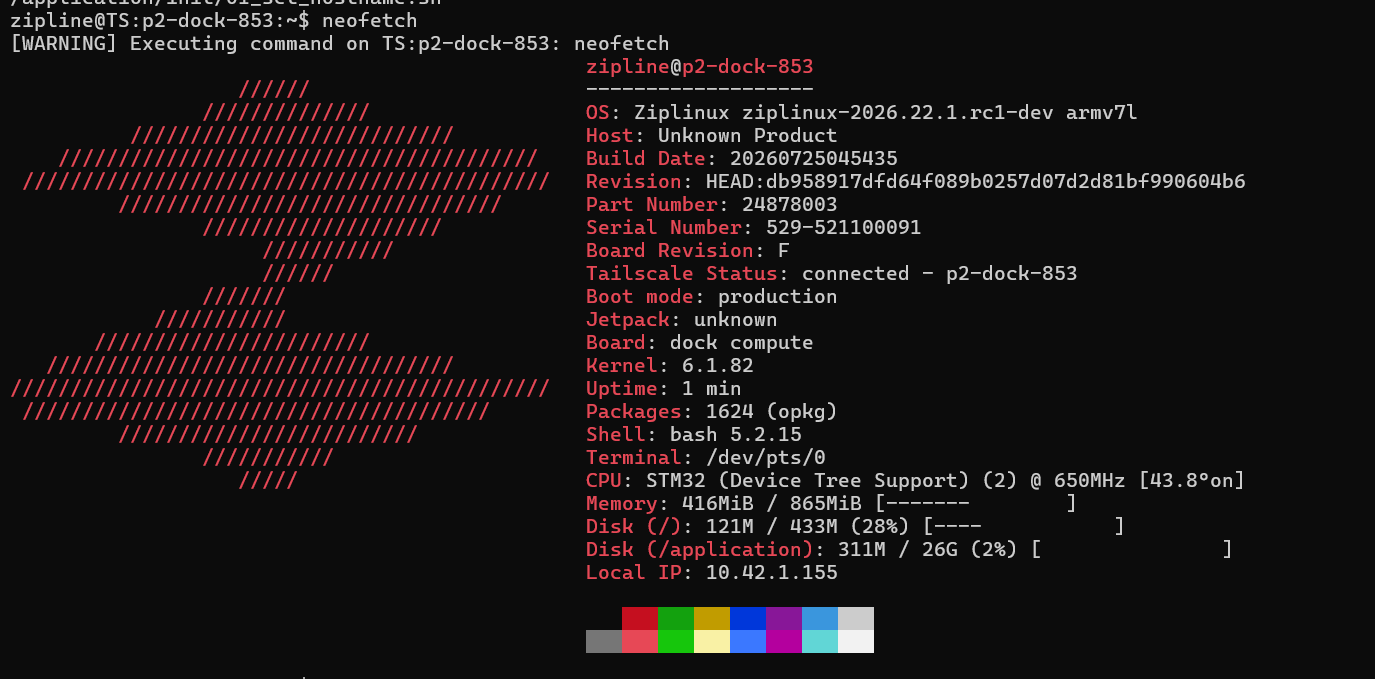
localhost:5000. Select update_os from the drop-down, scan the QR code into the barcode box, and enter the asset ID p2-dock-####. After the test is over, make sure the test has passed.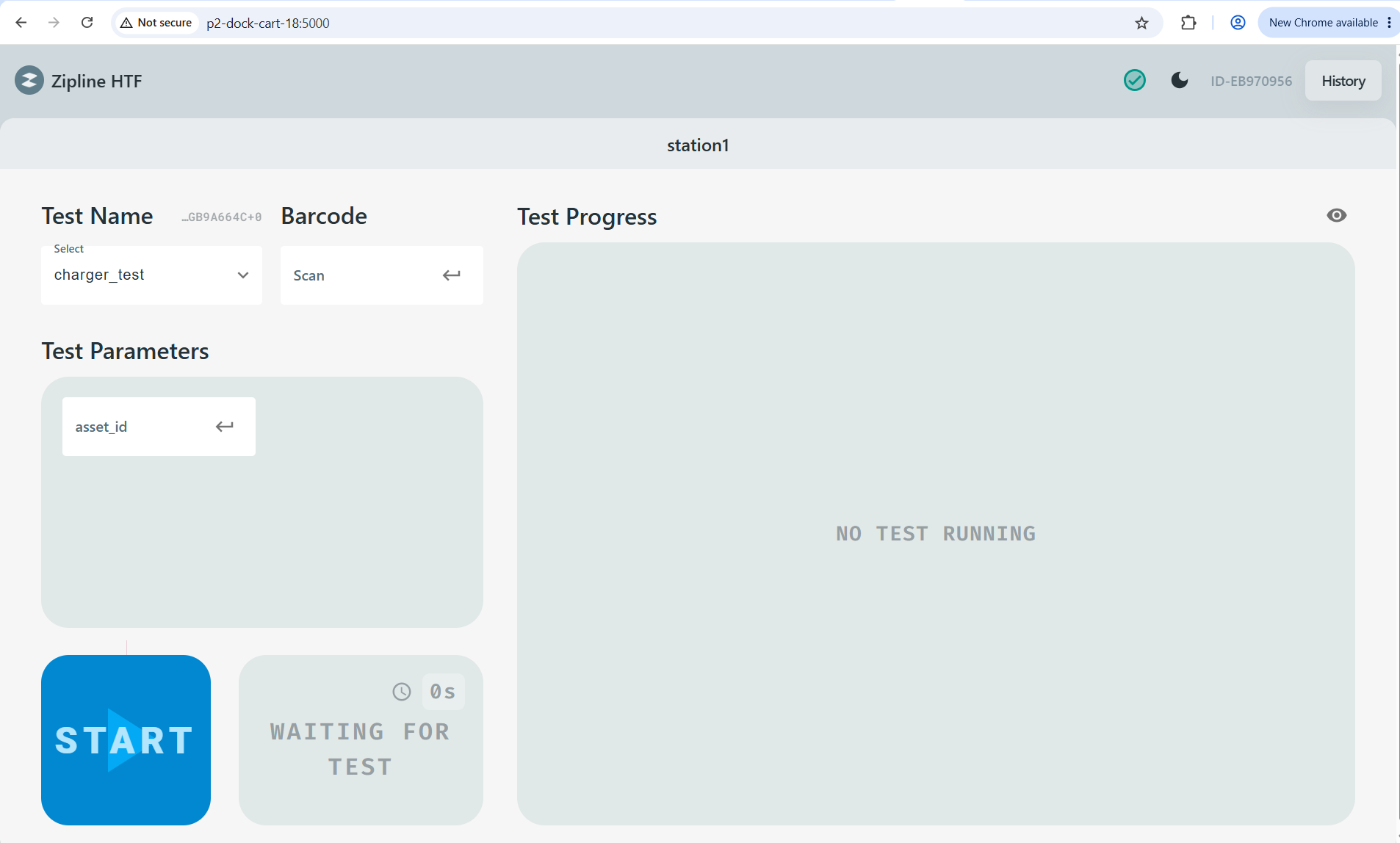
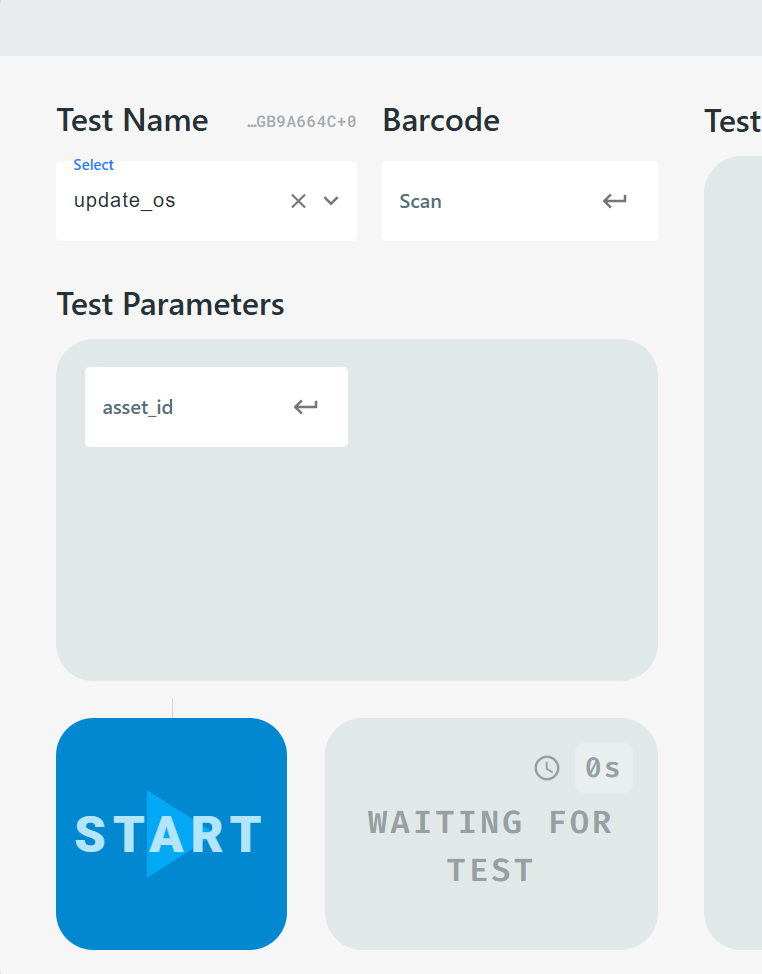
sudo reboot. This will kick you out of SSH. Wait for the Dock to reboot, SSH into it again, and run sudo boot-mode --enable-maintenance --forever.
provision_dock after update_os. Select provision_dock from the drop-down, scan the QR code into the barcode box, enter the asset ID p2-dock-####, type TEST in all caps for controller_enclosure_serial, and enter dock-apps-v2026.22.1 for manifest_revision.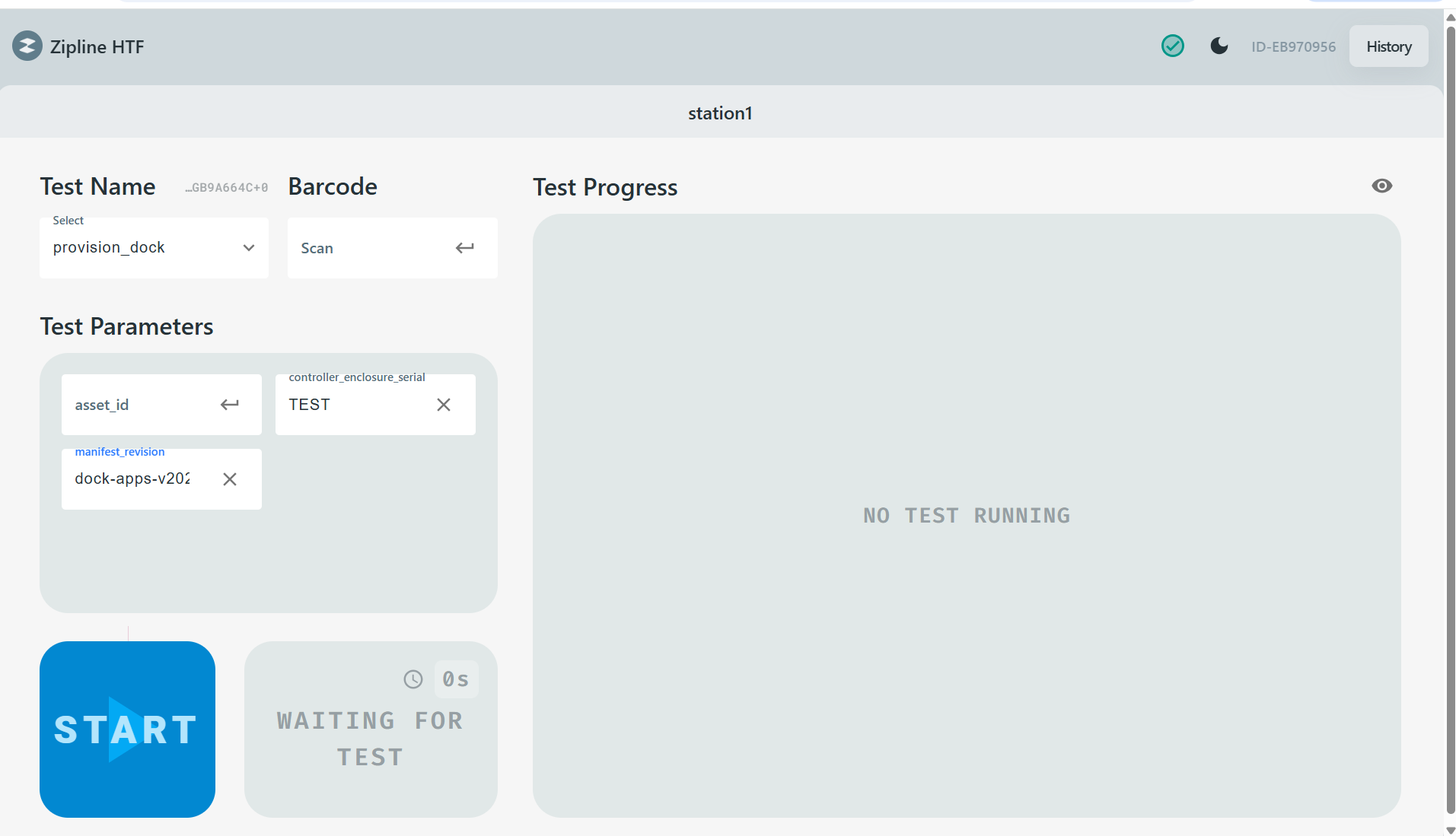
maintenance_health_check from the drop-down, scan the QR code into the barcode box, enter the asset ID p2-dock-####, and keep all other boxes as they are defaulted. Select Start.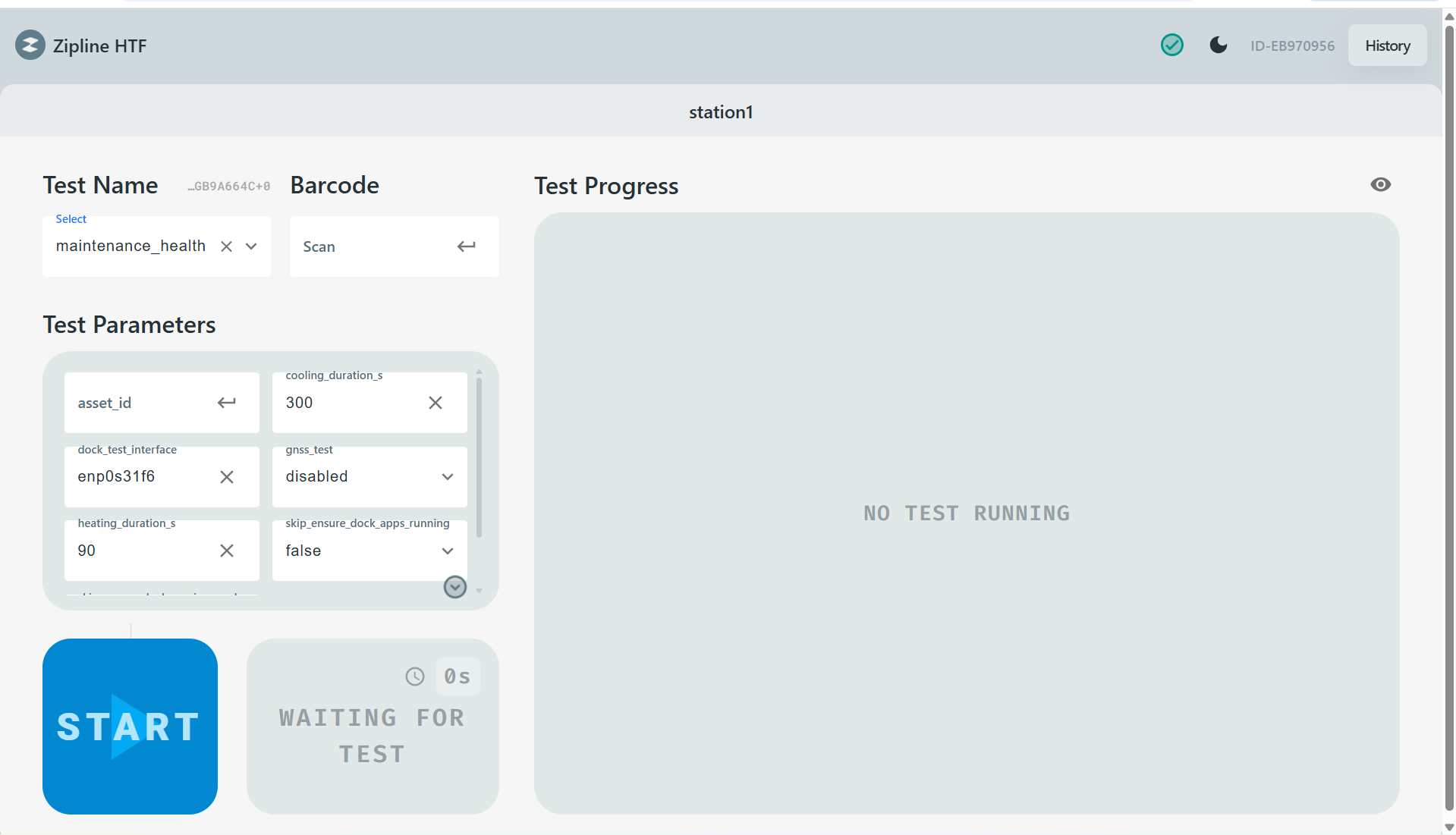
1. Swap the Ethernet cables.
2. Answer whether all of the fiducials are on and green.
3. Insert the fin-hat tool.
4. Remove the fin-hat tool. Prepare to catch it: a five-second timer starts after pressing OK.
boot-mode --enable-production, then reboot the Dock with sudo reboot.maintenance_health_check. If you stop or defer troubleshooting after any attempt, restore production mode and re-enable the firewall with boot-mode --enable-production, then reboot the Dock with sudo reboot. If the test fails three times, do not rerun it: restore production mode, reboot the Dock, then escalate to Dock EOL and Health Check On Call.Resolution note
This plaintext block is ready to paste into the Resolution Note field on the ZERP issue you're working. The permalink below gives engineering review access to the full step-by-step timeline including any back-navigation; share it if the case needs a deeper look.
Permalink:
Session is too large to fit in a URL. Use Download session JSON to share the timeline out-of-band.
If the Tester Gets Rebooted
Section titled “If the Tester Gets Rebooted”Go to the terminal of the Dock EOL tester. Copy the entire command block below, paste it into the terminal, and press Enter:
sudo bash -c 'modprobe usbtmcfor iface in /sys/bus/usb/devices/*:1.0; do    [ -f "$iface/../idVendor" ] || continue    [ "$(cat "$iface/../idVendor")" = f4ec ] || continue    case "$(cat "$iface/../idProduct")" in        1620|1621) ;;        *) continue ;;    esac
    name="${iface##*/}"    driver=""    [ -L "$iface/driver" ] && driver="$(basename "$(readlink -f "$iface/driver")")"
    [ "$driver" = usbfs ] && printf "%s\n" "$name" > /sys/bus/usb/drivers/usbfs/unbind    [ "$driver" = usbtmc ] || printf "%s\n" "$name" > /sys/bus/usb/drivers/usbtmc/binddone
udevadm trigger --subsystem-match=usbmisc --action=changeudevadm settle'
ls -l /dev/usbtmc_dock_eload
The output will look something like this:
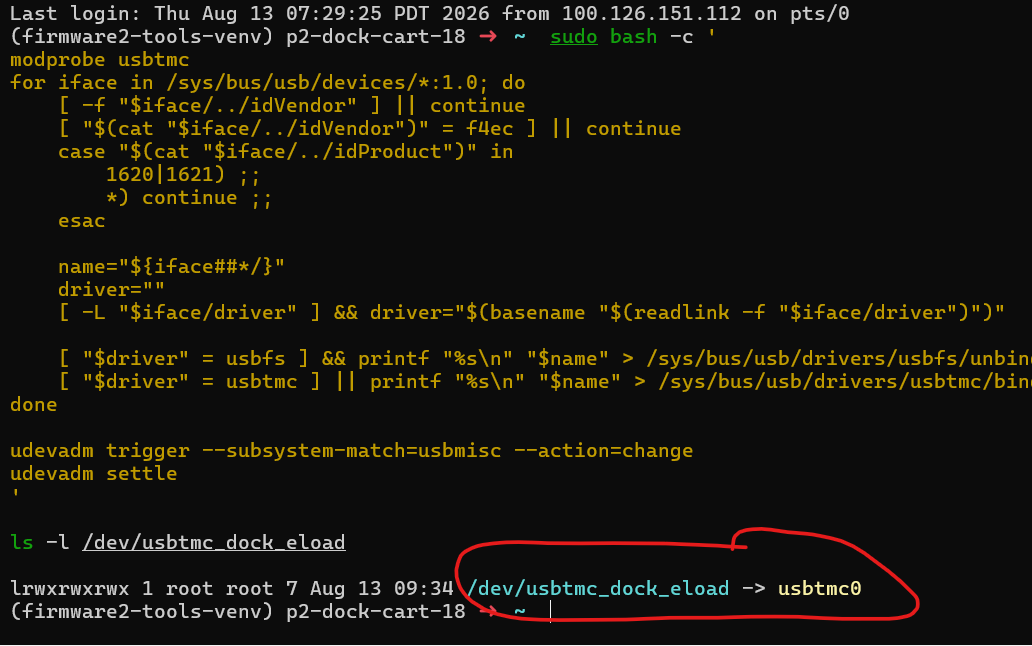
You want to see usbtmc0 or usbtmc1 appear. Both are OK. You should be able to run the tests after doing this.
If you do not run this before trying to run maintenance_health_check, you will see a traceback error related to the E-load during the test_initialization phase.
Troubleshooting Steps
Section titled “Troubleshooting Steps”What problem did the test encounter?
Tester failed to connect to the Dock
This error can occur at the very beginning of the test during the test_initialization phase.
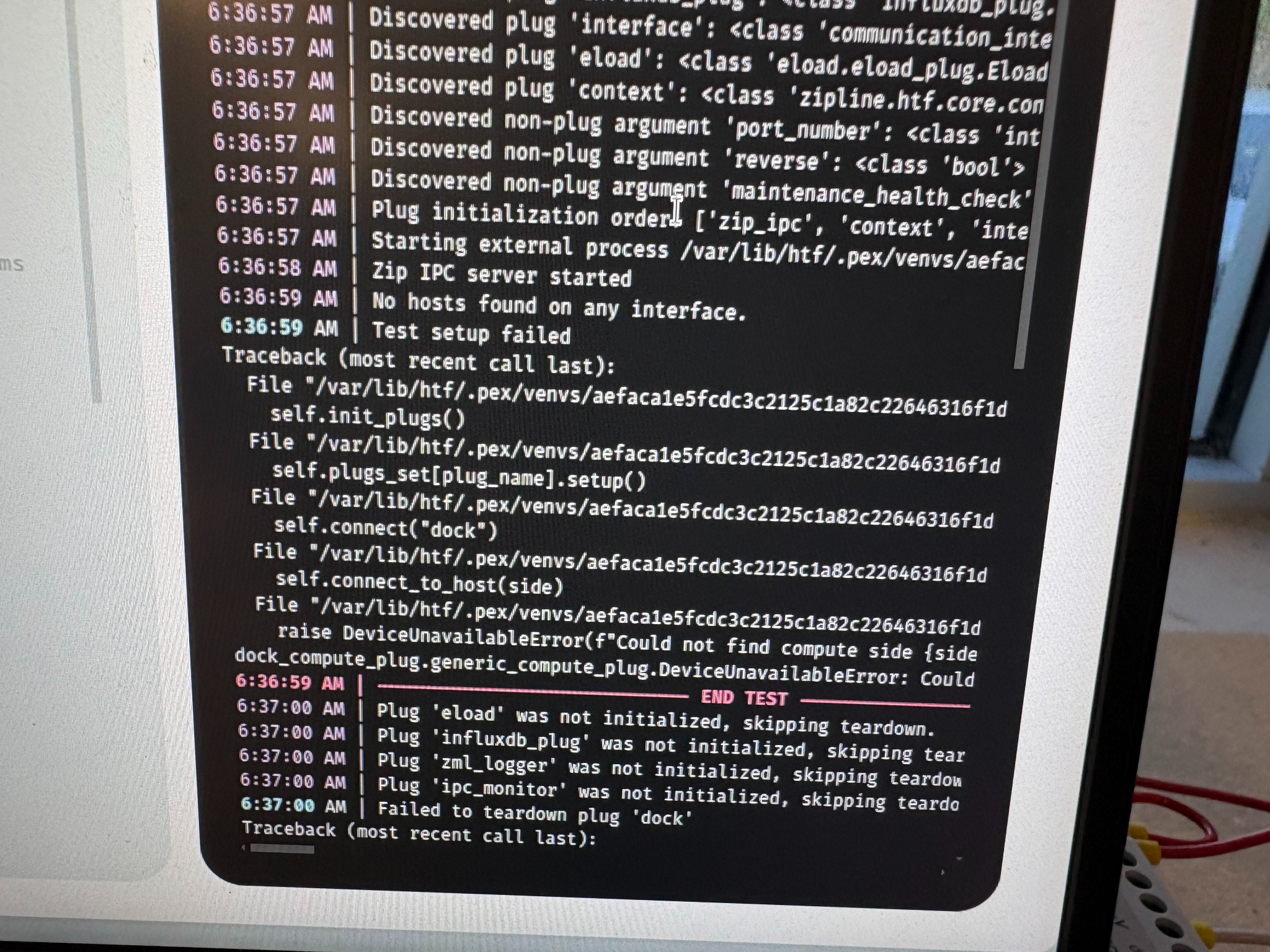
This is likely due to the Dock still being in production mode. Follow the instructions above to put the Dock into maintenance mode.
Run:
sudo boot-mode --checkIt should just say maintenance; make sure it does not say production.
Charger load phase error
This error can occur in the charger_load phase. This is an issue with the E-load.
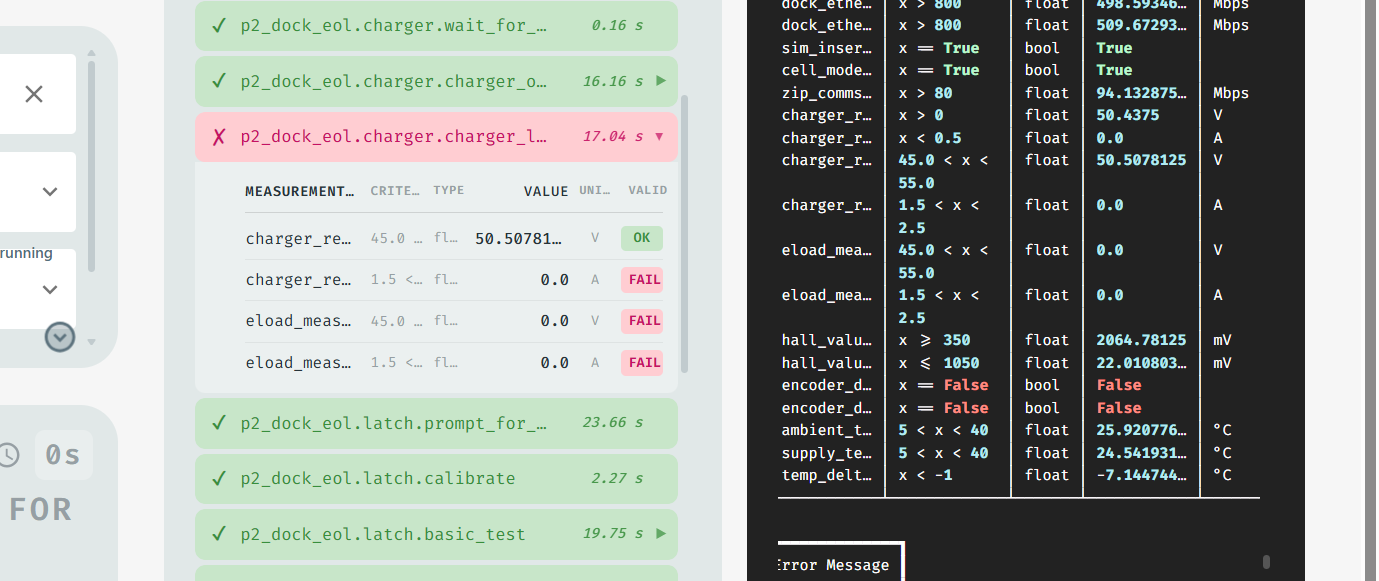
Reboot the E-load and run the test again.
Error code 3855
This failure occurs in either the wait_for_thermal_idle or nominal_thermistor_test phase. It has the specific error code 3855.
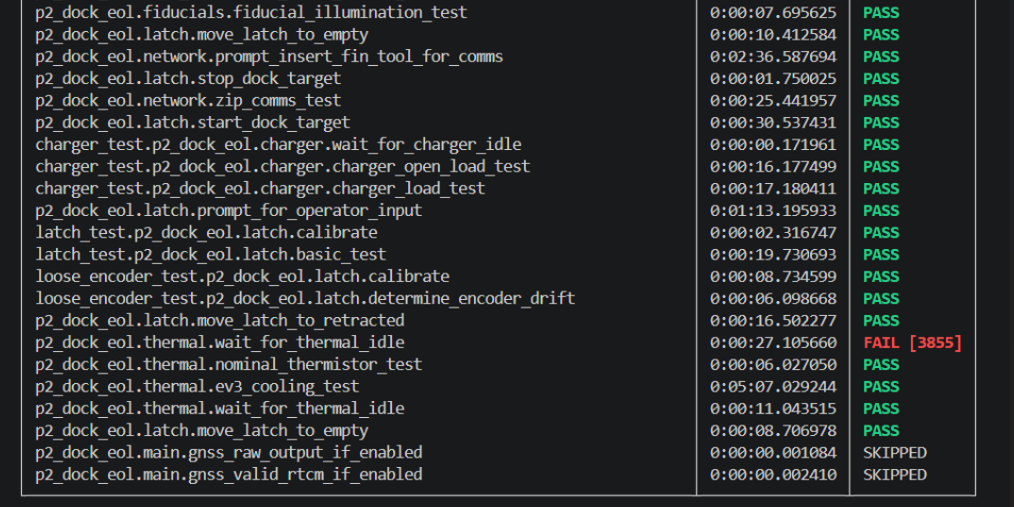
Run the test again.
ZERP certificate failure
This failure can occur in the provision_dock test. It is caused by the certificates being out of date on ZERP, so the test cannot get a response from ZERP.
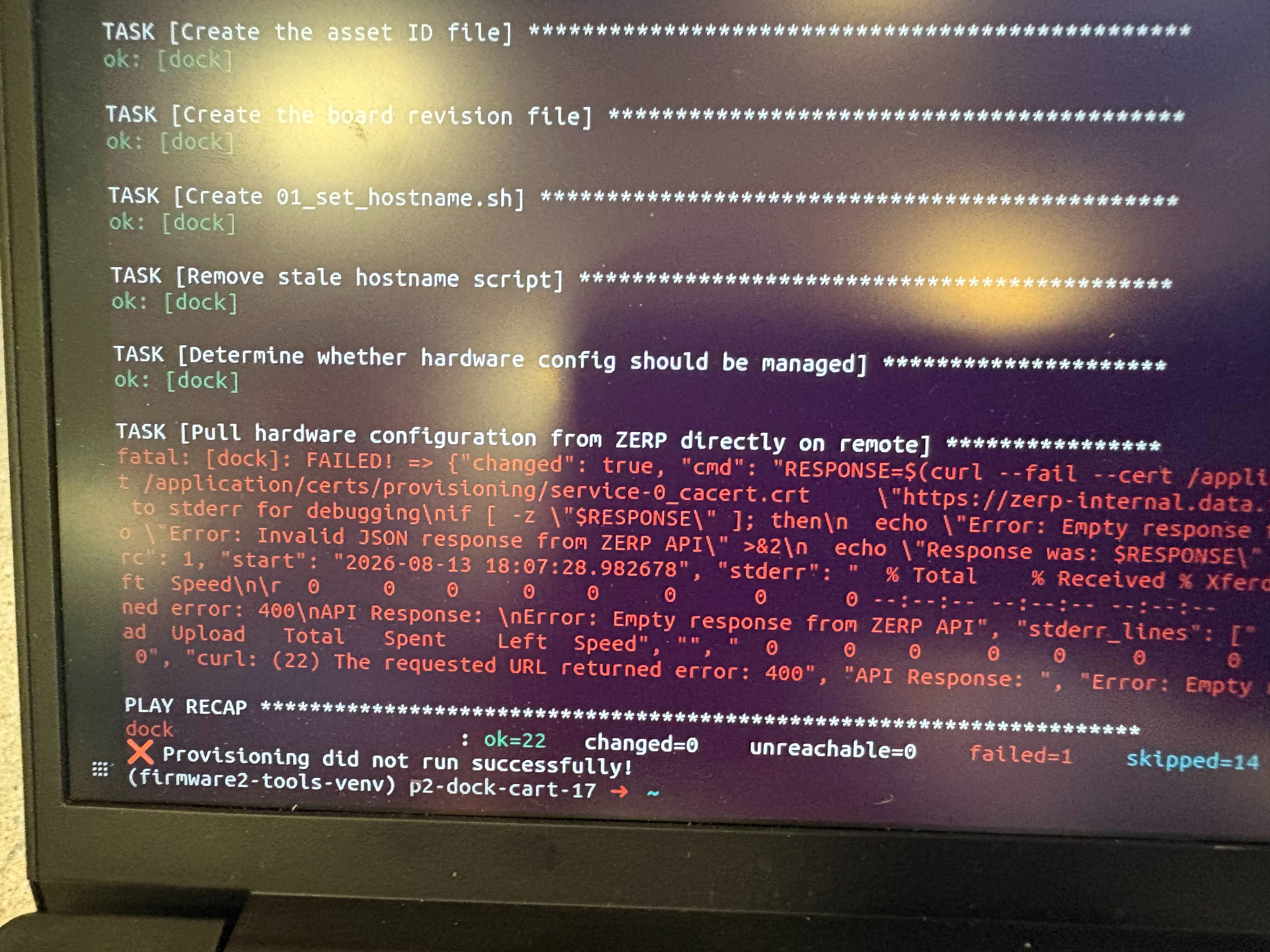
The certificates must be manually updated. This is separate from the test logic because it is now a ZERP problem. Escalate to Dock EOL and Health Check On Call.
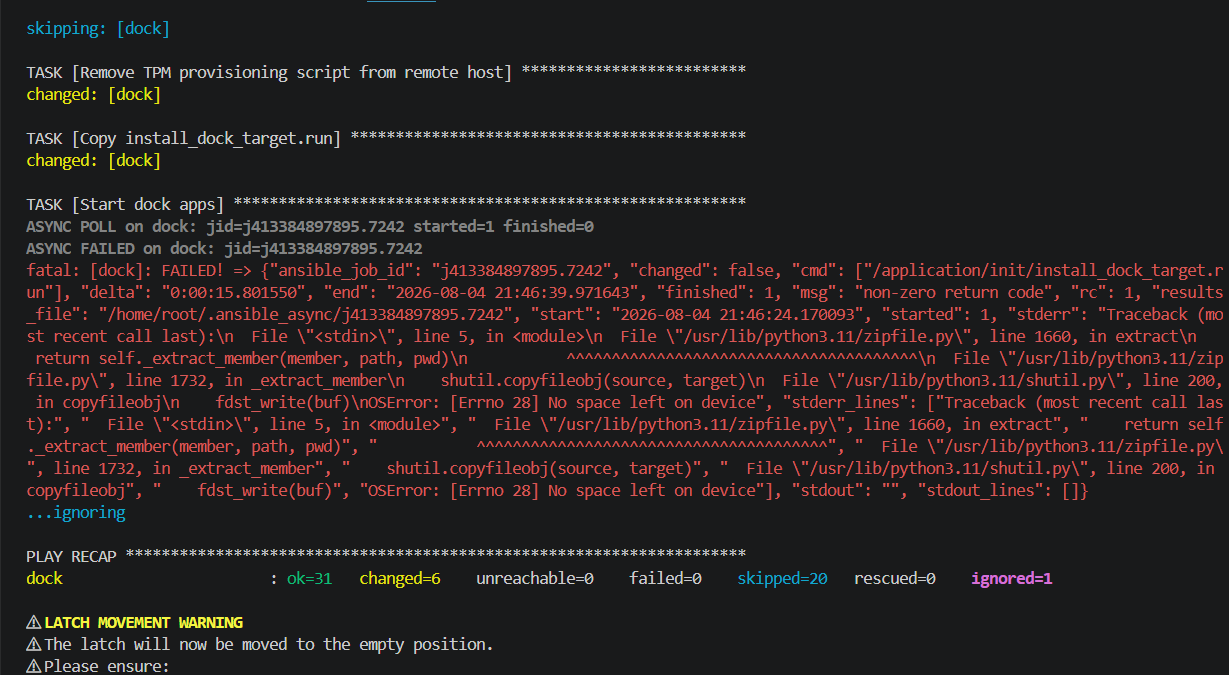
provision_dock OSError code 28
This error can occur in the provision_dock test. Reboot the Dock, put it into maintenance mode again, and rerun the provision_dock test.
Zipcomms test error
If the Zipcomms test fails, make sure the fin-hat tool is not the problem. Run this on the Dock cart terminal:
ip -br link | grep -E 't1_iface|enx'You want to see output like this. If you do, the fin-hat is likely not the issue:

You do not want to see output like this:

If you see an enx address instead of t1_iface:
- Copy the full
enxaddress. In the source example, it isenx9c69d33a4d8c. - Run the following commands on the Dock cart, replacing the example
enxaddress with the address you copied:
sudo ip link set enx9c69d33a4d8c downsudo ip link set enx9c69d33a4d8c name t1_iface_0sudo ip link set t1_iface_0 upRun the check again:
ip -br link | grep -E 't1_iface|enx'You should now see this:
Did this guide help you get unblocked?
Open suggestions
There are no open suggestions.
Open pull requests
There are no open pull requests.