

0x60003 ZIP_ONBOARD_PLANNING_ERROR_CODES_MOTION_CHECK_MAP_MANAGER_REJECTED
Applicable alarms (6)
Likely outcomes — click to expand
Based on 0 missions where this alarm fired in the last
90 days
(for 0x60003) as of 2026-10-13
Aggregated from fleet operations and refreshed daily. Individual outcomes may vary by site and configuration.
This guide is owned by Zip Motion Planning, whose on-call is P2 Aircraft Autonomy On Call.
Background
Section titled “Background”The maps provided by the cloud to the aircraft cannot be used to fly this mission. This guide also covers related map provider and map monitor errors:
ZIP_ONBOARD_PLANNING_ERROR_CODES_MAP_PROVIDER_FAILUREZIP_ONBOARD_PLANNING_ERROR_CODES_MAP_MONITOR_FAILUREZIP_ONBOARD_PLANNING_ERROR_CODES_MAP_MONITOR_TIMEOUTZIP_ONBOARD_PLANNING_ERROR_CODES_MAP_MONITOR_REQUEST_FAILURE
These errors are highly predictive of ZIP_ONBOARD_PLANNING_ERROR_CODES_MOTION_CHECK_MAP_MANAGER_REJECTED, but no single one appears in every map-manager rejected chain.
Use this guide when any of these related map provider or map monitor errors are present.
Detailed background
Section titled “Detailed background”Flow for getting maps onboard
- Onboard motion planner (MP) draws a polygon (with additional buffer) around expected mission waypoints provided by Exec from mission assignment
- MP asks Planning Layer Service (PLS) in the cloud to give it the s3 paths of all map tiles that need to be downloaded to cover that polygon
- MP makes individual download requests to the Blob Agent for each tile
- Fails if the total download times exceeds 120s
- Blob Agent performs downloads serially, and tells MP each completed file’s location on disk
- Fails if any one file download time exceeds 60s
- Once all downloads are complete, MP loads the map into memory
Troubleshooting Steps
Section titled “Troubleshooting Steps”graph TD
resend-the-mission-again-one-1-time["<small><b>Step 1</b></small><br/>Action: Resend the mission again one 1 time."]
does-this-resolve-the-failure{"<small><b>Step 2</b></small><br/>Question: Does this resolve the failure?"}
the-aircraft-may-return-to-service("<small><b>Step 3</b></small><br/>Reference: The Aircraft may return to service")
check-on-the-blob-agent["<small><b>Step 4</b></small><br/>Action: Check on the Blob Agent The Blob Agen..."]
has-the-blob-agent-crashed{"<small><b>Step 5</b></small><br/>Question: Has the Blob Agent crashed?"}
power-cycle-zip-blob-agent-crashed["<small><b>Step 6</b></small><br/>Action: Power cycle the zip; restarting it wi..."]
is-the-issue-resolved-after-blob-agent{"<small><b>Step 7</b></small><br/>Question: Is the issue resolved?"}
aircraft-may-return-to-service-blob("<small><b>Step 8</b></small><br/>Reference: The Aircraft may return to service.")
blob-agent-crashed-again-or-new-error["<small><b>Step 9</b></small><br/>Action: If the Blob Agent shows as having cra..."]
triage-network-related-failures["<small><b>Step 10</b></small><br/>Action: Triage network related failures Almos..."]
does-failure-message-look-similar{"<small><b>Step 11</b></small><br/>Question: Does your failure message look simila..."}
network-connection-issue-details["<small><b>Step 12</b></small><br/>Action: If you see either of these error mess..."]
does-network-config-contain-no-internet{"<small><b>Step 13</b></small><br/>Question: Does the network_config_status or ..."}
no-internet-via-ethernet-in-status["<small><b>Step 14</b></small><br/>Action: Continuing troubleshooting using NO_..."]
no-internet-via-ethernet-in-service-sta["<small><b>Step 15</b></small><br/>Action: When you see the alarm in network_co..."]
is-the-issue-resolved-no-internet-servi{"<small><b>Step 16</b></small><br/>Question: Is the issue resolved?"}
aircraft-may-return-no-internet-service("<small><b>Step 17</b></small><br/>Reference: The Aircraft may return to service.")
follow-no-internet-via-ethernet-status["<small><b>Step 18</b></small><br/>Action: Continuing troubleshooting using NO_..."]
does-network-config-contain-no-zipline{"<small><b>Step 19</b></small><br/>Question: Does the network_config_status or ..."}
no-zipline-endpoint-in-status["<small><b>Step 20</b></small><br/>Action: Continue troubleshooting using: NO_Z..."]
no-zipline-endpoint-in-service-status["<small><b>Step 21</b></small><br/>Action: When you see the alarm in network_co..."]
is-the-issue-resolved-no-zipline-servic{"<small><b>Step 22</b></small><br/>Question: Is the issue resolved?"}
aircraft-may-return-no-zipline-service("<small><b>Step 23</b></small><br/>Reference: The Aircraft may return to service.")
follow-no-internet-via-ethernet-prior["<small><b>Step 24</b></small><br/>Action: Continuing troubleshooting using NO_..."]
confirm-dock-can-route-internet["<small><b>Step 25</b></small><br/>Action: Confirm the Dock can route internet t..."]
new-mode-of-failure["<small><b>Step 26</b></small><br/>Action: This is a new mode of failure. Planne..."]
escalate-to-p2-aircraft-autonomy["<small><b>Step 27</b></small><br/>Action: It is unexpected that we will ever hi..."]
resend-the-mission-again-one-1-time --> does-this-resolve-the-failure
does-this-resolve-the-failure -->|Yes, the issue is resolved| the-aircraft-may-return-to-service
does-this-resolve-the-failure -->|No, the issue persists| check-on-the-blob-agent
check-on-the-blob-agent --> has-the-blob-agent-crashed
has-the-blob-agent-crashed -->|Yes, Blob Agent has crashed| power-cycle-zip-blob-agent-crashed
has-the-blob-agent-crashed -->|No, the Blob Agent is healthy| triage-network-related-failures
power-cycle-zip-blob-agent-crashed --> is-the-issue-resolved-after-blob-agent
is-the-issue-resolved-after-blob-agent -->|YES| aircraft-may-return-to-service-blob
is-the-issue-resolved-after-blob-agent -->|NO| blob-agent-crashed-again-or-new-error
blob-agent-crashed-again-or-new-error --> triage-network-related-failures
triage-network-related-failures --> does-failure-message-look-similar
does-failure-message-look-similar -->|Yes, therefore this is a ne...| network-connection-issue-details
does-failure-message-look-similar -->|No, therefore this is likel...| new-mode-of-failure
network-connection-issue-details --> does-network-config-contain-no-internet
does-network-config-contain-no-internet -->|Yes: NO_INTERNET_VIA_ETHERN...| no-internet-via-ethernet-in-status
does-network-config-contain-no-internet -->|Yes: NO_INTERNET_VIA_ETHERN...| no-internet-via-ethernet-in-service-sta
does-network-config-contain-no-internet -->|No: NO_INTERNET_VIA_ETHERNE...| does-network-config-contain-no-zipline
no-internet-via-ethernet-in-service-sta --> is-the-issue-resolved-no-internet-servi
is-the-issue-resolved-no-internet-servi -->|YES| aircraft-may-return-no-internet-service
is-the-issue-resolved-no-internet-servi -->|NO| follow-no-internet-via-ethernet-status
does-network-config-contain-no-zipline -->|Yes: NO_ZIPLINE_ENDPOINT_VI...| no-zipline-endpoint-in-status
does-network-config-contain-no-zipline -->|Yes: NO_ZIPLINE_ENDPOINT_VI...| no-zipline-endpoint-in-service-status
does-network-config-contain-no-zipline -->|No: NO_ZIPLINE_ENDPOINT_VIA...| confirm-dock-can-route-internet
no-zipline-endpoint-in-service-status --> is-the-issue-resolved-no-zipline-servic
is-the-issue-resolved-no-zipline-servic -->|YES| aircraft-may-return-no-zipline-service
is-the-issue-resolved-no-zipline-servic -->|NO| follow-no-internet-via-ethernet-prior
new-mode-of-failure --> escalate-to-p2-aircraft-autonomy
style resend-the-mission-again-one-1-time fill:#dcfce7,stroke:#22c55e,color:#14532d
style does-this-resolve-the-failure fill:#dbeafe,stroke:#3b82f6,color:#1e3a5f
style the-aircraft-may-return-to-service fill:#f3e8ff,stroke:#a855f7,color:#581c87
style check-on-the-blob-agent fill:#dcfce7,stroke:#22c55e,color:#14532d
style has-the-blob-agent-crashed fill:#dbeafe,stroke:#3b82f6,color:#1e3a5f
style power-cycle-zip-blob-agent-crashed fill:#dcfce7,stroke:#22c55e,color:#14532d
style is-the-issue-resolved-after-blob-agent fill:#dbeafe,stroke:#3b82f6,color:#1e3a5f
style aircraft-may-return-to-service-blob fill:#f3e8ff,stroke:#a855f7,color:#581c87
style blob-agent-crashed-again-or-new-error fill:#dcfce7,stroke:#22c55e,color:#14532d
style triage-network-related-failures fill:#dcfce7,stroke:#22c55e,color:#14532d
style does-failure-message-look-similar fill:#dbeafe,stroke:#3b82f6,color:#1e3a5f
style network-connection-issue-details fill:#dcfce7,stroke:#22c55e,color:#14532d
style does-network-config-contain-no-internet fill:#dbeafe,stroke:#3b82f6,color:#1e3a5f
style no-internet-via-ethernet-in-status fill:#dcfce7,stroke:#22c55e,color:#14532d
style no-internet-via-ethernet-in-service-sta fill:#dcfce7,stroke:#22c55e,color:#14532d
style is-the-issue-resolved-no-internet-servi fill:#dbeafe,stroke:#3b82f6,color:#1e3a5f
style aircraft-may-return-no-internet-service fill:#f3e8ff,stroke:#a855f7,color:#581c87
style follow-no-internet-via-ethernet-status fill:#dcfce7,stroke:#22c55e,color:#14532d
style does-network-config-contain-no-zipline fill:#dbeafe,stroke:#3b82f6,color:#1e3a5f
style no-zipline-endpoint-in-status fill:#dcfce7,stroke:#22c55e,color:#14532d
style no-zipline-endpoint-in-service-status fill:#dcfce7,stroke:#22c55e,color:#14532d
style is-the-issue-resolved-no-zipline-servic fill:#dbeafe,stroke:#3b82f6,color:#1e3a5f
style aircraft-may-return-no-zipline-service fill:#f3e8ff,stroke:#a855f7,color:#581c87
style follow-no-internet-via-ethernet-prior fill:#dcfce7,stroke:#22c55e,color:#14532d
style confirm-dock-can-route-internet fill:#dcfce7,stroke:#22c55e,color:#14532d
style new-mode-of-failure fill:#dcfce7,stroke:#22c55e,color:#14532d
style escalate-to-p2-aircraft-autonomy fill:#dcfce7,stroke:#22c55e,color:#14532d Hover or focus a block to preview it. Select the block to keep the preview open.
The Blob Agent, which is the service in charge of performing downloads, can crash silently and prevent any future downloads from occurring. Check the zip alarms and/or journal log.
sudo journalctl -fu blob_agentAssign the mission one (1) more time.
Almost every failure with this error code happens because map tiles were slow to download. Both of these error messages effectively represent the same failure:
-
Timed out map request: ExecutiveId(mission: MISSION_ID, sequence_id=NUMBER)-
Received MapInfo from MapProvider with failure status: "DownloadResponse has failure status"Example:
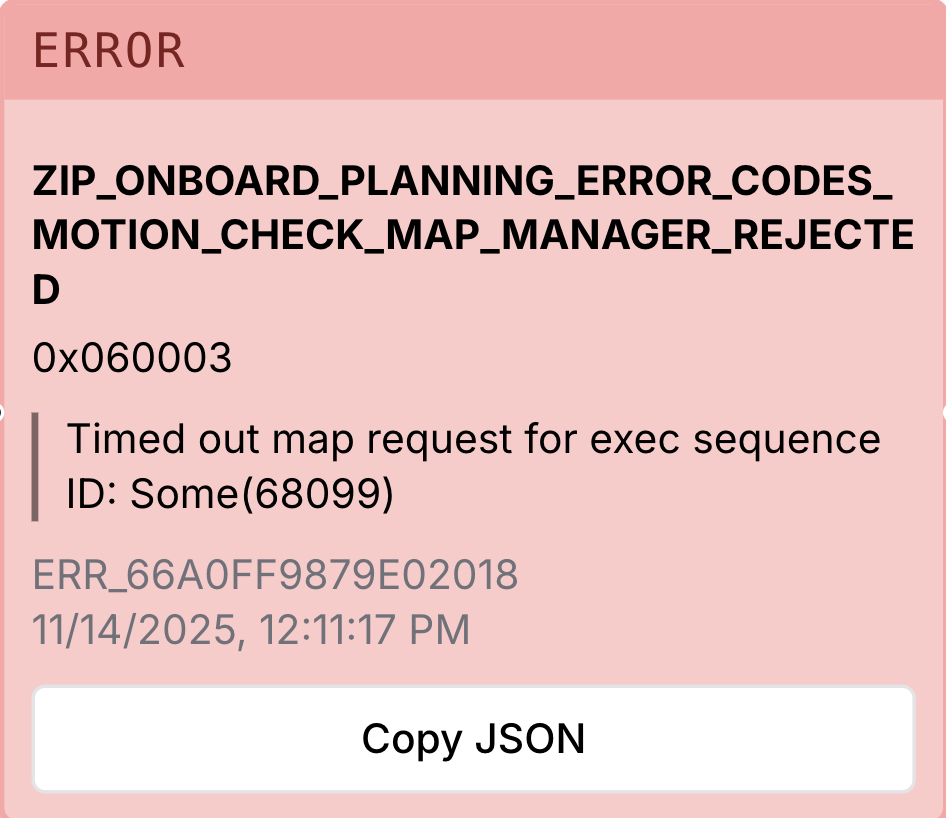
>1MB, so it is one of the places we are most sensitive to the many possible modes of failure in our network connection. Some of these modes of failure include:- Zip downloading through its cellular connection rather than ethernet through the dock
- Dock is missing ethernet connection
- Full site network issue
- Onsite wiring issue
- ISP outage
- Cellular outage
NOTE: There will be a more complete guide in the near future for all network-related failures, but in the meantime there are two main failures that can be identified on the Dock by checking its status on Fleet Wrangler:
Example:
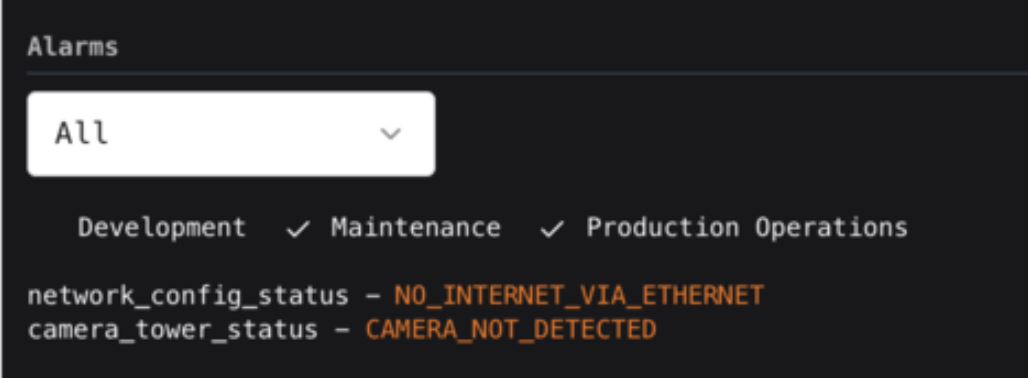
network_config_status or network_config_service_status contain NO_INTERNET_VIA_ETHERNET?This issue is likely to persist with this Dock-Aircraft pair for a while, but can clear at any time or can clear if the Aircraft is moved to a different Dock. If it does clear, the Aircraft is safe to return to service.
network_config_service_status but not in network_config_status, it likely means that this issue has already resolved.Assign the mission one (1) more time.
This issue is likely to persist with this Dock-Aircraft pair for a while, but can clear at any time or can clear if the Aircraft is moved to a different Dock. If it does clear, the Aircraft is safe to return to service.
network_config_status or network_config_service_status contain NO_ZIPLINE_ENDPOINT_VIA_ETHERNET?This issue is likely to persist with this Dock-Aircraft pair for a while, but can clear at any time or can clear if the Aircraft is moved to a different Dock. If it does clear, the Aircraft is safe to return to service.
network_config_service_status but not in network_config_status, it likely means that this issue has already resolved.Assign the mission one (1) more time.
This issue is likely to persist with this Dock-Aircraft pair for a while, but can clear at any time or can clear if the Aircraft is moved to a different Dock. If it does clear, the Aircraft is safe to return to service.
Follow the steps in this troubleshooting guide: Blob Agent/Dock Network Connection Issues.
Escalate to P2 Aircraft Autonomy On Call for further triage.
After logs have offloaded from the Aircraft, ask the on-call team if you can power cycle the Aircraft (Power Cycle Aircraft) as this will likely clear up any persisting error. If it resolves the error, the Aircraft can be returned to service unless other guidance is given from the on-call team.
Resolution note
This plaintext block is ready to paste into the Resolution Note field on the ZERP issue you're working. The permalink below gives engineering review access to the full step-by-step timeline including any back-navigation; share it if the case needs a deeper look.
Permalink:
Session is too large to fit in a URL. Use Download session JSON to share the timeline out-of-band.
Troubleshooting Step
Section titled “Troubleshooting Step”Did this guide help you get unblocked?
Open suggestions
Open pull requests
There are no open pull requests.